Kiosk Solutions
Configure single-app kiosk, multi-app kiosk, or digital signage modes to restrict access, improve customer experiences, and remotely manage Android tablets, TVs, and commercial displays.

Turn Android tablets, TVs, and handhelds into secure dedicated devices for check-in, point-of-sale, digital signage, field workflows, and shared workstations. Quantem helps teams lock devices to approved apps, push updates remotely, reduce manual setup, and keep fleets visible from one intuitive console—without premium add-ons or complex scripting.
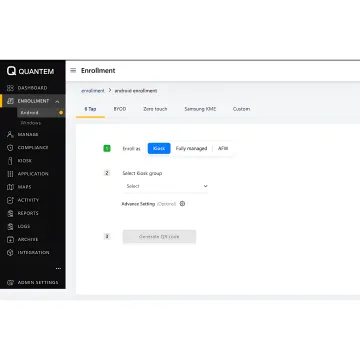
Lock, manage, monitor, and update Android dedicated devices with simple controls built for teams of every size.
Configure single-app kiosk, multi-app kiosk, or digital signage modes to restrict access, improve customer experiences, and remotely manage Android tablets, TVs, and commercial displays.
Provision devices quickly with QR code enrollment, Samsung Knox Mobile Enrollment, or Android zero-touch enrollment, reducing manual setup and eliminating scripting for bulk rollouts.
Apply group and device-level controls from one console, push policies across locations in minutes, and standardize secure settings for dedicated Android devices.
Push approved apps, block unauthorized installations, manage private apps, and control app versions so kiosk devices run only the software your workflows require.
Control uninstall permissions, roaming settings, device restrictions, and fleet visibility with granular tools designed to simplify Android endpoint administration at scale.
Protect kiosk tablets with standard or custom web filters that focus on device-level security, privacy, and reliable browser access for business use.
Quantem makes Android kiosk mode practical for shared, public-facing, and task-specific devices. Lock tablets to one app, allow a controlled set of apps, or turn displays into digital signage while IT manages enrollment, policies, apps, browsing, reports, and alerts from anywhere. Built-in kiosk features across all plans help teams deploy securely without paying extra for core controls.
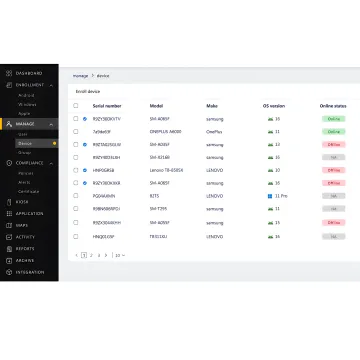
Organizations use Quantem to simplify device control, automation, reporting, and secure dedicated Android workflows.
"The software scales perfectly with our business needs, delivers strong performance, and provides reliable support whenever our team needs help."

"Setup was quick and required no technical background. Our team saw immediate improvements in productivity within the first few weeks."

"Simple to use, powerful under the hood. We saw immediate improvements in productivity and data visibility after switching."

"This platform completely transformed how our team worksthe automation and analytics saved us hours every week andhelped us make smarter decisions faster."

"The software scales perfectly with our business needs, delivers strong performance, and provides reliable support whenever our team needs help."
"Setup was quick and required no technical background. Our team saw immediate improvements in productivity within the first few weeks."
"Simple to use, powerful under the hood. We saw immediate improvements in productivity and data visibility after switching."
"This platform completely transformed how our team worksthe automation and analytics saved us hours every week andhelped us make smarter decisions faster."
"The software scales perfectly with our business needs, delivers strong performance, and provides reliable support whenever our team needs help."
"Setup was quick and required no technical background. Our team saw immediate improvements in productivity within the first few weeks."
"Simple to use, powerful under the hood. We saw immediate improvements in productivity and data visibility after switching."
"This platform completely transformed how our team worksthe automation and analytics saved us hours every week andhelped us make smarter decisions faster."
Quantem combines affordable pricing, intuitive controls, and enterprise-grade security for modern Android kiosk management.
Plans are positioned 50-70% lower than typical MDM tools, with no hidden fees.
Deploy devices faster using QR code, Knox, and Android zero-touch enrollment options.
SOC-2, GDPR, and CCPA compliance support secure fleet management and data governance.
Email and 24/7 chat support are included, with dedicated account management for Enterprise.
A product team focused on simpler device management.
Quantem is built by people who are obsessed with finding better ways to manage technology. The team focuses on making modern device management simple, affordable, and useful for organizations that need real control without heavy configuration work. Its platform helps businesses automate workflows, gain actionable insights, and scale smarter across Android and Windows fleets. From kiosk mode and BYOD to reporting, location tracking, and API integrations, Quantem is designed to reduce repetitive IT tasks and help teams move faster. The company’s vision is reflected in its tagline: Modern Device Management Made Simple - Control Your Fleet Anywhere.
Yes. Android supports kiosk-style dedicated device configurations, often managed through Android Enterprise and an MDM platform. With Quantem, teams can lock Android tablets into single-app kiosk mode, multi-app kiosk mode, or digital signage mode. Admins can also manage enrollment, app access, device policies, browsing controls, reporting, and remote updates from a centralized console.
Talk with Quantem for guidance, pricing, or a live demo.

Supports secure operational controls and trust.
Supports privacy requirements for personal data.
Supports responsible consumer data handling.
Request a demo, start your 21-day trial, or contact Quantem to discuss kiosk mode, enrollment, pricing, and deployment support.
You can also send us a quick email at sales@quantem.io.
You can also send us a quick email at sales@quantem.io.