That's the tension Mobile Application Management (MAM) was built to resolve.
Rather than managing the whole device, MAM shifts the security boundary to the application layer. Corporate data is isolated inside managed apps; personal photos, messages, and apps stay completely off-limits to IT. This guide covers what MAM is, how it works technically, its core features, how it compares to MDM, and how to implement it in your organization.
Key Takeaways
- MAM protects corporate data at the app level without full device enrollment or MDM
- BYOD environments, contractor devices, and privacy-sensitive scenarios are where MAM shines
- Core capabilities include app configuration, selective wipe, DLP controls, and access enforcement
- MAM and MDM work best together; most enterprises deploy both for complete coverage
- Policy definition must come before tool selection; skipping it creates compliance gaps
What Is Mobile Application Management (MAM)?
MAM refers to the software, policies, and services used to provision, configure, and secure mobile applications in enterprise settings—on both company-owned and personal devices—without necessarily enrolling the device itself. Put simply: IT controls the app, not the phone.
NIST defines MAM as technologies that enable enterprise control over mobile apps that access enterprise services or data. NIST also notes that MAM addresses BYOD privacy concerns because controls operate at the app layer, not the whole device.
The Core Concept
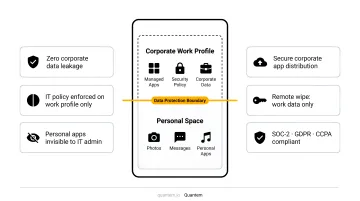
Instead of wrapping a security boundary around a device, MAM wraps it around the app and the signed-in work identity. Corporate data lives inside a protected, encrypted container within the managed app. The rest of the device — personal messages, photos, social apps — is untouched and invisible to IT.
This matters because the alternative, full device enrollment via MDM, requires employees to hand over significant device-level control. Many won't accept that trade-off on a personal phone — and when adoption fails, sensitive work data ends up in unmanaged apps anyway.
Why MAM Emerged
MAM grew alongside the BYOD trend and the rapid expansion of enterprise app usage. According to Okta's Businesses at Work 2024 report, the average number of apps deployed per company grew 4% year over year to 93 apps.
Managing that volume across mixed device ownership — without an application management layer — creates concrete risks:
- Data leakage when employees copy work files into personal apps
- Unauthorized access if a device is lost and apps aren't remotely wipeable
- Shadow IT as employees install unapproved apps to get work done
- Compliance gaps when sensitive data flows through unmanaged channels
How Does Mobile Application Management Work?
App-Level Enforcement: The SDK and App Wrapping
Two primary technical mechanisms make MAM enforcement possible:
App SDK — A set of libraries built directly into the application. Once a user signs in with a work identity, the SDK initializes an encrypted container inside the app for corporate data. All interactions—copying, sharing, file saves—are governed by the assigned app protection policy, not the operating system.
App Wrapping — An external tool that adds policy controls to an existing app without rewriting its source code. According to Microsoft's developer documentation, app wrapping is primarily suited for internal line-of-business apps and cannot be used for apps distributed through the Apple App Store or Google Play Store.
The SDK approach is more capable for modern app protection scenarios. It supports multi-identity, conditional access, granular DLP controls, and identity-based selective wipe—capabilities that app wrapping can't fully replicate.
What happens at sign-in:
- User authenticates with a work identity
- SDK verifies the identity against the MAM service
- Encrypted app container is initialized for corporate data
- App protection policy is applied to all data interactions within that container
- Personal data on the same device is never touched
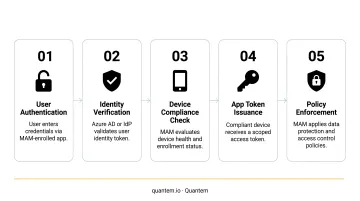
Policy Enforcement and the Selective Wipe
The SDK continuously validates identity state and policy integrity during runtime. If a token fails to refresh, identity verification breaks down, or policy can no longer be enforced, the SDK performs a selective wipe, removing only corporate data, encryption keys, and tokens from within the app.
The personal device stays completely intact — no photos deleted, no personal apps removed.
That wipe is scoped entirely to the corporate container. How the identity gets verified in the first place depends on the platform.
Platform-level broker differences:
- iOS: Authentication is brokered through Microsoft Authenticator
- Android: Intune Company Portal handles broker functions
In both cases, the broker handles identity verification only. Policy enforcement happens entirely within the SDK.
Key Features of Mobile Application Management
App Configuration and Deployment
MAM allows IT admins to configure app behavior before it ever reaches a user's device—pre-populating email server settings, restricting startup behavior, or defining app-specific configurations. Apps can be deployed over-the-air to individuals or groups from a managed enterprise app catalog.
Quantem's centralized private app catalog covers Play Store, App Store, and internal business apps, letting IT push, update, or remove apps across hundreds of devices in a few clicks with no scripting involved.
Data Loss Prevention (DLP) Controls
MAM's DLP capabilities are granular. Common controls include:
- Blocking copy-paste between managed work apps and personal apps
- Preventing screenshots within managed applications
- Restricting file saves to personal or unmanaged storage locations
- Enforcing encryption on all data stored within the app container
- Blocking data transfer to unmanaged third-party applications
Microsoft's Intune app protection policy documentation notes that app protection policies control how data is accessed and shared, restricting corporate data to approved apps and preventing save-as to personal storage.
Access Control and Authentication
MAM enforces identity-based access at the application layer:
- App-specific PINs or biometric prompts to unlock the encrypted container
- Multi-factor authentication requirements before accessing managed apps
- Role-based app access tied to user identity, not device ownership
- Conditional access policies that evaluate context before granting entry
These controls operate independently of device-level security settings—a critical distinction for BYOD, where IT cannot and should not modify the device's own passcode or biometrics.
App Lifecycle Management
Beyond initial deployment, MAM provides ongoing control over the app's entire lifespan:
- Force updates across all users to keep every device on a compliant app version
- Stage rollouts to test updates with a pilot group before pushing fleet-wide
- Remove managed apps from any device remotely without touching personal content
- Clear app data on a schedule or on demand without interrupting the user
Quantem's app lifecycle tools, for example, let admins pause updates for apps where new versions might cause performance issues, or stage releases to test groups before broader deployment.
Reporting and Usage Analytics
IT teams need visibility, not just control. MAM reporting typically covers:
- App installation status and version compliance across users
- Policy compliance dashboards showing which devices meet requirements
- App usage data to identify underused or risky applications
- Audit trails of administrative actions for compliance reviews
Quantem provides granular activity logs, scheduled custom reports, and app usage reports that let teams schedule actions based on actual usage patterns—giving IT the data to make faster, evidence-based decisions.
MAM vs. MDM: Understanding the Key Differences
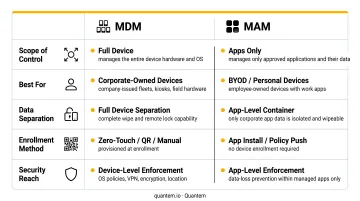
The foundational distinction: MDM manages the device, MAM manages the apps.
MDM controls OS settings, hardware functions, device encryption, remote lock, and full wipe. It requires device enrollment. MAM controls only the applications and the corporate data within them—and typically requires no device enrollment at all.
| Dimension | MDM | MAM |
|---|---|---|
| Scope | Entire device | Apps and corporate data only |
| Controls | OS settings, camera, passcodes, Wi-Fi | App behavior, data sharing, access |
| Secures | Device hardware and OS | Corporate data within managed apps |
| App deployment | Via device enrollment profile | Via app catalog, no enrollment needed |
| Privacy impact | High — IT can see device inventory, settings | Low — personal data is off-limits |
When to Choose MAM Over MDM
MAM is the right tool when:
- Employees use personal devices for work (BYOD)
- Contractor or partner devices need access to specific apps, not full device control
- Employees in regulated industries resist enrolling personal phones in corporate management
- Only a handful of apps need securing, not the whole device
The Combined MDM + MAM Model
MAM winning in BYOD scenarios doesn't mean MDM gets retired. Many enterprises run both in parallel. MDM handles device-level compliance and configuration for company-owned hardware. MAM adds a per-app security layer on top: protecting corporate data on enrolled devices that need extra controls and covering personal devices where full enrollment isn't appropriate.
According to NIST SP 800-124 Rev. 2, applying controls at both the device and application layers provides complementary protection — organizations don't have to choose one or the other.
Common Use Cases for Mobile Application Management
Healthcare and Regulated Industries
Clinicians access patient records, lab results, and clinical apps on personal smartphones every day. Enrolling those devices in full MDM is often a non-starter—staff won't accept it, and HR won't mandate it.
MAM solves this by enforcing HIPAA-aligned controls at the app level: no copy-paste of protected health information, mandatory app encryption, forced authentication before accessing clinical data. The device stays personal; the patient data stays protected.
Quantem manages hundreds of Android devices across ATHMA Hospitals from a single console, pushing policies, locking apps, and running compliance reports without IT touching each device individually. For organizations under strict data protection requirements, Quantem holds SOC-2, GDPR, and CCPA certifications.
Field Service, Retail, and Logistics
Distributed workforces—field technicians, retail associates, warehouse operators—often use a mix of company-issued and personal devices. MAM lets IT:
- Deploy purpose-built apps to specific user groups over the air
- Control access to inventory, dispatch, or point-of-sale systems
- Revoke app access immediately when an employee leaves
SOTI's 2025 State of Mobility report found that transportation and logistics employees lose an estimated 13 hours per person per month to device downtime—a figure that reliable app lifecycle management directly addresses.
Remote and Hybrid Work (BYOD)
The same challenge scales up for remote and hybrid teams. Employees need access to corporate email, collaboration tools, and documents on personal devices—and MAM enables this without IT enrolling or monitoring those devices.
If the device is lost or an employee departs, IT can execute a selective wipe—removing corporate data from managed apps without touching personal files, messages, or photos. That boundary—corporate data protected, personal content untouched—is what makes BYOD programs employees actually accept. When staff can verify exactly what IT controls, adoption stops being a negotiation.
How to Implement MAM in Your Organization
Step 1: Define Scope and Policy Requirements
Before selecting a tool, map out:
- Which apps need managing (email, CRM, clinical apps, collaboration tools)
- Which user groups and device types are in scope (company-owned vs. BYOD)
- What data-sharing restrictions are required (copy-paste, screenshots, file saves)
- What compliance requirements apply (HIPAA, GDPR, SOC-2)
NIST SP 1800-22 specifically recommends notifying users of corporate application policies and disallowing user configuration of work applications where possible to prevent commingling of work and personal data.
Step 2: Select and Configure Your MAM Solution
Key evaluation criteria:
- Platform support — Android Enterprise, iOS, Windows coverage
- Identity provider integration — compatibility with Azure AD, Okta, Google Workspace
- App protection policy depth — granularity of DLP, authentication, and wipe controls
- Compliance certifications — SOC-2, GDPR, CCPA for regulated sectors
- Total cost — most MDM/MAM platforms charge $3–$10+ per device/month; pricing tiers vary significantly, so verify what's included at each level (DLP, wipe controls, compliance reporting) before committing
Quantem's BYOD support uses Android Enterprise Work Profile to create a clean separation between personal and work data—IT manages the work profile only, personal data is architecturally off-limits, and corporate data is automatically wiped when an employee leaves or is deprovisioned from the IDP. Plans start at $1/device/month with compliance certifications (SOC-2, GDPR, CCPA) included across all tiers.
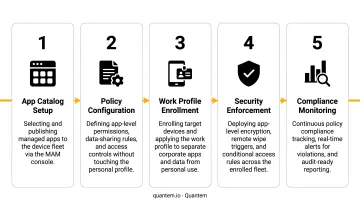
Step 3: Enroll Apps, Communicate, and Monitor
With your platform configured, roll out in this order:
- Add apps to the managed catalog — public store apps, private apps, and internal line-of-business (LOB) apps
- Assign app protection policies to user groups based on role and device type
- Communicate clearly with end users — for BYOD deployments specifically, document what IT can access, what remains private, and how a remote wipe works
- Monitor adoption and compliance using reporting dashboards, app installation status, and policy compliance views
- Refine over time — review compliance reports quarterly, identify apps with low adoption or policy violations, and tighten or loosen controls accordingly
Frequently Asked Questions
What is mobile application management?
MAM is a set of software tools and policies used to provision, configure, and secure mobile apps in enterprise environments—on both company-owned and personal devices—without requiring full device enrollment or control. Security is applied at the app and identity layer.
What is MDM vs MAM?
MDM (Mobile Device Management) controls the entire device including OS settings, passcodes, and hardware functions. MAM (Mobile Application Management) controls only the apps and corporate data within them. MDM requires device enrollment; MAM typically does not, making MAM the preferred choice for BYOD scenarios.
How is MAM used in technology?
MAM deploys, configures, and secures business apps on mobile devices by enforcing policies like data encryption, access controls, and copy-paste restrictions at the application level. These policies are applied through SDK integration or app wrapping technologies that operate independently of the device OS.
Does MAM require device enrollment?
No. Policies are enforced at the app level, so IT teams can secure corporate data on personal devices without touching the device itself. This makes MAM the practical choice when employees are unwilling or unable to enroll in full device management.
What are the core features of mobile application management?
Core MAM features include:
- App deployment, configuration, and lifecycle management
- Data loss prevention controls (copy-paste restrictions, screenshot blocking, file-save limits)
- Access management and authentication enforcement
- Selective wipe of corporate data only
- Usage reporting and audit trails
When should a company use MAM instead of MDM?
Choose MAM when employees use personal devices for work or when only specific apps need securing rather than the entire device. It's also the right fit when employee privacy concerns make full device enrollment a non-starter. For organizations managing both corporate-owned and personal devices, combining MAM with MDM gives IT teams granular control where they need it without overreaching on personal hardware.