Introduction
Most hospitals already have digital screens somewhere on-site. Far fewer have a working digital signage system - one where content is current, devices are managed, and the right message actually reaches the right person at the right screen.
The gap is costly. A 2024 peer-reviewed study of a 960-bed hospital found that 91% of patients could not navigate using signage alone, with 84% continuing to ask for directions even after they'd already started moving toward their destination. That's not a screen problem - it's a strategy problem.
The scale of investment makes that gap harder to ignore. According to MarketsandMarkets, the healthcare digital signage market is valued at $750 million in 2025 and is projected to reach $1.1 billion by 2030 at an 8.0% CAGR. Hospitals that deploy without a plan are investing in infrastructure that underperforms from day one.
This guide walks through what a functional hospital signage system actually looks like - from content zoning and screen placement to managing a device fleet across multiple facilities.
Key Takeaways
- Patients, visitors, and staff are three distinct audiences - each needing different content and screen placement
- Effective deployment begins with a content-location map, not hardware selection
- Device management infrastructure is as critical as the signage software
- Emergency alert override must be configured at the network level before go-live
- Signage networks require scheduled content audits - not set-and-forget operation
When Should Hospitals Invest in Digital Signage?
Digital signage earns its budget when it solves a specific, recurring problem. The clearest triggers:
- Wayfinding volume - front-desk staff fielding the same directional questions dozens of times per shift
- Waiting room anxiety - patients with no visible context for delays, contributing to negative HCAHPS scores
- Staff communication gaps - policy updates and shift changes that don't reach clinical teams effectively through email
- Inconsistent patient education - providers repeating the same verbal explanations across every appointment
Knowing when to invest is only half the equation. Equally important is knowing where deployments go wrong.
When Signage Gets Misdeployed
The most common mistakes aren't technical - they're strategic:
- Installing screens in low-traffic back corridors while high-anxiety zones like pre-procedure waiting areas go unaddressed
- Running generic content (stock health tips, brand imagery) that has no relationship to the facility's actual departments or patient demographics
- Treating installation as a one-time project rather than an ongoing communication channel that needs governance
Readiness Factors to Assess First
Before purchasing a single screen, confirm:
- Match deployment scope to facility size - a single clinic and a multi-wing campus have entirely different infrastructure needs
- Confirm IT staffing can handle enrolling, monitoring, and maintaining devices across the fleet
- Assign content owners by department before launch, not after
Skipping that last step is the single fastest way to undermine an otherwise solid rollout.
What You Need Before Deploying Healthcare Digital Signage
Four prerequisites determine whether a deployment will succeed or stall:
1. A Content-Location Map
Before selecting hardware, define which screen zones serve which audiences and what content each zone needs. A basic map covers:
- Public/patient zones: wayfinding, wait times, health education, ambient content
- Staff-only zones: shift schedules, policy updates, KPI dashboards, recognition
- Emergency zones: override-capable displays near exits and high-occupancy corridors
2. Network and Hardware Infrastructure
Every display location needs verified wired or Wi-Fi connectivity, mounting provisions, and stable power access. Walk each planned install location before procurement - dead zones and insufficient power drops are the most common causes of delayed go-lives. Without resolving these upfront, remote content management and uptime reliability suffer from day one.
3. A Device Management Platform
Hospitals deploying more than a handful of screens need centralized MDM to enroll, configure, lock down, and remotely monitor every display. Platforms like Quantem support zero-touch provisioning and kiosk mode, allowing IT teams to deploy signage-ready devices across large facilities without requiring on-site manual configuration for each unit - cutting deployment time from days to hours across multi-wing or multi-campus rollouts.
4. Defined Content Ownership
Each zone - lobby, ER waiting area, nurses' station - needs a named owner responsible for keeping content accurate. Without naming a responsible person per zone, content goes stale fast - and patients navigating a lobby with outdated information are worse off than no signage at all.
How to Deploy Healthcare Digital Signage Step-by-Step
Skipping infrastructure and content planning in favor of quick hardware installation is the most consistent reason signage networks underperform. The sequence below keeps deployments on track.
Planning and Location Zoning
Divide the facility into content zones by audience type and average dwell time:
| Zone Type | Examples | Primary Audience |
|---|---|---|
| High-traffic public | Main lobby, elevator banks, entrances | Patients, visitors |
| Patient dwell | Waiting rooms, pre-procedure corridors | Patients |
| Staff-only | Nurses' stations, break rooms | Clinical staff |
| Emergency-critical | Exit corridors, stairwells | All occupants |
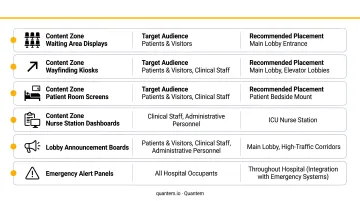
A common planning error: too many screens in back-of-house areas, too few in the highest-priority patient zones - check-in and pre-procedure waiting.
Content Architecture by Zone
Content playlists should be structured to match the zone's purpose:
- Patient-facing zones: wayfinding, wait time displays, health education, calming ambient visuals. Loop every 3–5 minutes to match average dwell times
- Staff zones: shift updates, compliance reminders, KPI metrics, recognition messaging. Use shorter loops, updated more frequently
- Lobby directories: near real-time updates for accuracy
Enrolling and Configuring Displays
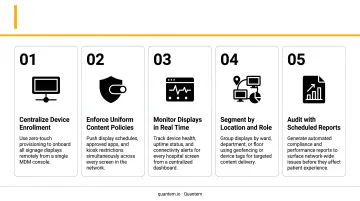
Every screen must be enrolled into a management platform, locked to a dedicated signage application via kiosk mode, and restricted from unauthorized browsing or app access, particularly in patient-facing areas.
For facilities deploying 10 or more screens, zero-touch enrollment eliminates the need for IT staff to manually configure each unit on-site. At scale, manual configuration becomes a serious bottleneck.
Quantem's Professional and Enterprise plans include zero-touch enrollment alongside tiered kiosk mode controls, from essential lockdown configurations through advanced kiosk pro settings.
Connecting to Hospital Systems
The integrations that deliver the most operational value:
- Room scheduling systems → digital door signs with live availability status
- EHR or queue management software → real-time wait time displays in waiting rooms
- CAP or mass notification systems → facility-wide emergency alert override
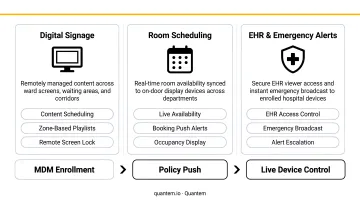
After setup, verify that live data appears on screens, content switches on schedule, and emergency overrides trigger without manual intervention.
Monitoring and Content Maintenance
Ongoing management requires both IT oversight and content governance:
IT teams should monitor:
- Device uptime and connectivity - Quantem's Enterprise plan provides 2-minute sync intervals and 30-day offline history
- Alerts for offline or unresponsive displays
- Remote content push confirmations
Content owners should review:
- Department information, staff listings, and service hours for accuracy
- Expired promotional content that needs to come down
- Seasonal or event-driven content updates
The clearest signs of a neglected signage network: blank or frozen screens, outdated promotional content still running months after campaigns ended, and department information pointing to locations or staff that no longer exist.
Where Digital Signage Makes the Biggest Difference in a Hospital
Impact varies significantly by location. Prioritizing high-anxiety, high-traffic zones delivers the fastest measurable improvement in patient experience.
Main Lobby and Entrances
The lobby is the first communication touchpoint for every patient and visitor. Effective lobby signage handles:
- Facility directories and department maps
- Interactive wayfinding kiosks with QR code handoff for mobile navigation
- Visitor policy updates and check-in instructions
When lobby signage works well, it measurably reduces front-desk inquiry volume - the staff time recaptured from repetitive directional questions is one of the clearest operational wins.
Waiting Rooms and Pre-Procedure Areas
Waiting room signage serves two functions simultaneously: managing perceived wait time through live queue displays, and occupying patients with relevant content.
A 2025 randomized controlled trial found that 81.4% of ED patients preferred having estimated wait times displayed, even though the study found no statistically significant satisfaction difference between groups - suggesting that patients value the transparency regardless of outcome. Content strategy matters here too: research on waiting-room media shows that positive and calming content (nature visuals, wellness messaging) can reduce stress, while news content can increase it.
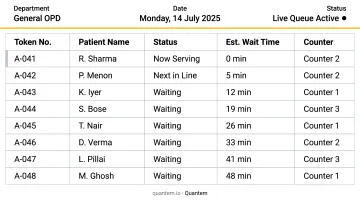
Content should reflect the specific department. Oncology waiting areas carry different emotional weight than a general check-in lobby, and the content strategy should match that context.
Exam Rooms and Patient Rooms
In-room displays reduce cognitive load on providers and improve patient recall:
- Condition-specific education tailored to the patient's care context
- Care plan summaries and discharge instructions
- Medication explanations that patients can reference without needing to ask again
When patients leave with a clearer understanding of their care plan, readmission risk drops - a measurable clinical result, not just a satisfaction metric.
Nurses' Stations and Staff Break Rooms
Clinical staff rarely sit at desks for extended periods. Staff-facing displays function as persistent communication boards for a workforce in constant motion:
- Shift schedules and handoff reminders
- Policy changes and compliance deadlines
- Quality metrics and team recognition
This reduces email dependence for time-sensitive internal communications and keeps messaging visible in the spaces where staff actually spend time.
Emergency and Exit Zones
Emergency-capable displays near exits and high-occupancy corridors serve a critical function: when a centralized alert triggers, every screen overrides current content simultaneously. That instant override capability delivers:
- Evacuation routes and shelter-in-place instructions
- Staff code broadcasts to clinical teams across the facility
- Real-time updates as an emergency situation develops
CMS regulations under 42 CFR 482.15 require hospitals to maintain emergency preparedness communication plans with primary and alternate channels for reaching staff. Digital signage, when integrated with mass notification systems, serves as a visible endpoint for those broadcasts, reaching patients and visitors who may not hear audible alerts clearly.
Best Practices for Managing Healthcare Digital Signage at Scale
Scaling digital signage across a hospital network introduces content drift, hardware blind spots, and compliance risk. These five practices address each directly.
- Distribute content ownership - assign a content owner per zone or department, not a single central administrator. Distributed ownership is the only realistic way to keep content accurate across a large, complex facility
- Set a content review calendar - monthly audits for patient-facing zones, weekly for staff zones; content owners verify accuracy, remove expired promotions, and refresh seasonal messaging on a defined schedule
- Monitor hardware centrally - Quantem provides fleet-wide visibility with real-time offline alerts, activity logging, and remote content push capability. For multi-facility networks, toggle-based policy controls and SOC-2, GDPR, and CCPA compliance are non-negotiable when devices operate near patient data environments
- Test emergency override quarterly - don't wait for an actual incident to discover the override sequence isn't working. A scheduled drill that triggers the facility-wide alert confirms the system is operational and that IT staff know the correct procedure
- Design for 3–5 second comprehension - healthcare audiences are often anxious or distracted. Large fonts, minimal text per slide, and high-contrast visuals (WCAG 2.1 recommends at least a 4.5:1 contrast ratio for normal text) are the baseline standard
Frequently Asked Questions
What types of content work best on hospital digital signage displays?
Content should match the zone's audience and dwell time. Patient-facing areas perform best with wayfinding, health education, and wait time updates. Staff areas benefit from shift data, policy reminders, and recognition content. Every zone should prioritize short, high-contrast messages designed for 3–5 second comprehension - not dense paragraphs.
Can hospital digital signage integrate with EHR or queue management systems?
Modern signage software can connect to EHR platforms, scheduling systems, and queue management tools via APIs or data feeds, enabling live wait time displays, room availability indicators, and dynamic care information without manual content entry. Test integrations in a staging environment before launch.
How do hospitals secure patient-facing digital signage displays?
Displays should be enrolled through an MDM platform and locked into kiosk mode to prevent unauthorized access or browsing. The underlying device management solution should meet SOC-2 and GDPR standards, particularly when displays are positioned near patient data environments or connected to clinical networks.
How many screens does a hospital typically need?
Screen count should follow a location-audience audit, not a flat formula. As a reference point, one vendor case study describes a 500-bed U.S. hospital running approximately 120 screens with plans to add 100 more - but the right number for any facility depends on campus layout, wing count, zone types, and staff area coverage.
What is the ROI of digital signage in a hospital setting?
ROI spans several dimensions: reduced front-desk inquiry volume, lower printing costs, faster emergency communication, and improved patient experience scores. Because no universal benchmark exists, the strongest case comes from tracking facility-specific metrics before and after deployment.
How do you manage digital signage across multiple hospital locations?
Multi-facility management requires a cloud-based MDM platform with centralized content scheduling, device health monitoring, and policy enforcement across all sites. Quantem supports this with multi-user console access and fleet-wide reporting, so IT teams can manage distributed signage networks without on-site presence at each location.