What is Remote Device Management? RDM Guide for Business Owners
Managing devices is easy when every employee is sitting in the same office and IT can walk over whenever something goes wrong. But that is no longer how most businesses operate.
Employees may work from home, travel between offices, or use company devices in the field. At the same time, businesses may have smartphones, tablets, laptops, rugged devices, kiosks, and other connected devices spread across different locations. Keeping all of them configured, updated, secure, and working properly can quickly become difficult.
The bigger challenge comes when IT teams need to fix an issue but cannot physically reach the device. A user may be dealing with a software problem, a device may miss an important update, or a kiosk may stop working at a remote location. Waiting for someone to bring the device back or visiting the location every time is slow and expensive.
Remote device management solves this by allowing IT teams to manage and support devices without being physically present.
From configuring devices and deploying applications to monitoring device health, enforcing policies, and troubleshooting problems, remote device management gives IT teams a central way to manage distributed devices.
In this guide, we'll explain what remote device management is, how it works, its key features and benefits, common challenges, and how to choose the right remote device management software for your business.
What is Remote Device Management (RDM)?
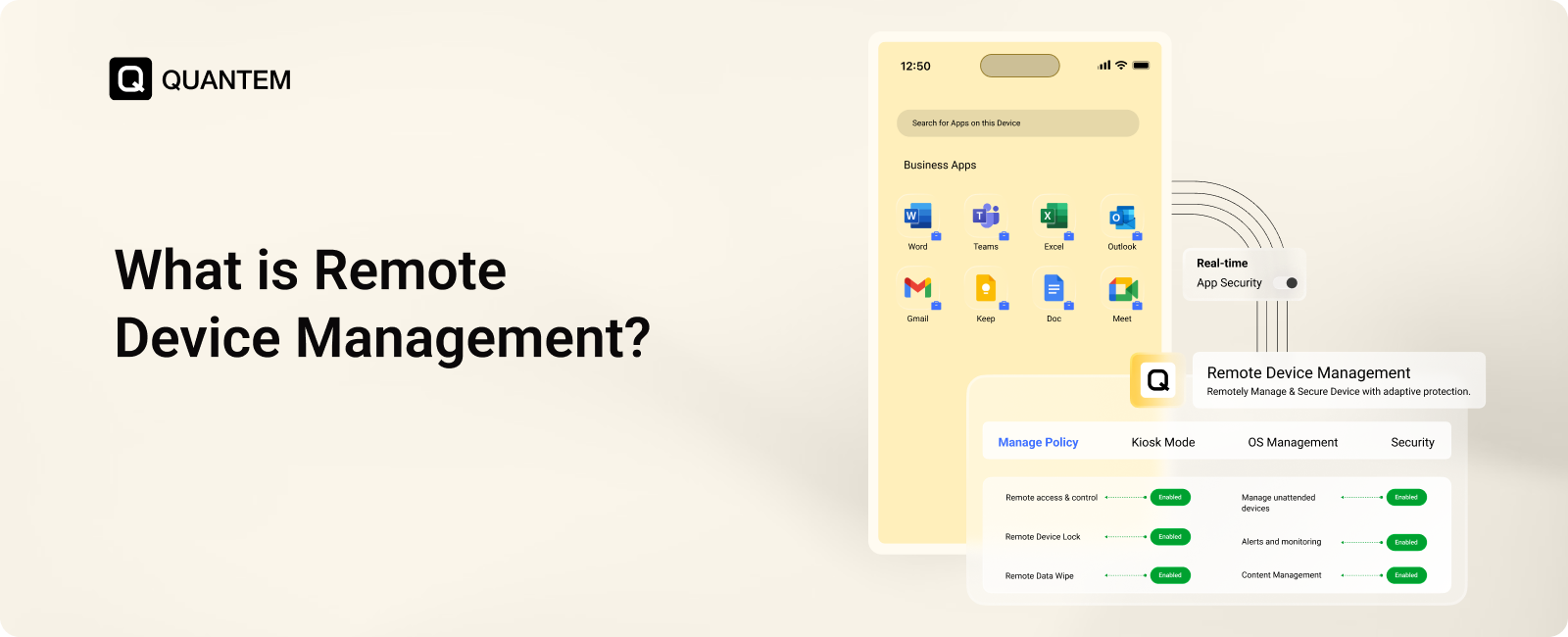
Remote Device Management (RDM) is the process of managing, monitoring, and securing devices remotely through a centralized system. It allows IT teams to configure devices, manage applications, apply policies, install updates, and troubleshoot issues without needing physical access to each device.
In simple terms, remote device management gives IT teams a way to manage devices from wherever they are. Instead of asking an employee to bring a laptop to the IT desk or sending a technician to a remote location, administrators can perform many management and support tasks remotely.
RDM can be used to manage different types of devices, including laptops, smartphones, tablets, rugged devices, kiosks, and other connected devices. It is particularly useful when these devices are distributed across offices, homes, stores, warehouses, or field locations.
Remote device management is also more than remote access. A complete RDM approach can help IT teams maintain device configurations, enforce security policies, monitor device health, deploy software and updates, and respond to problems remotely.
This gives organizations greater visibility and control over their device fleet, while reducing the need for manual, on-site management.
Why Do Businesses Need Remote Device Management?
Managing a few devices manually may work for a small team, but it becomes much harder when employees and devices are spread across different locations. IT teams need a way to maintain control without relying on physical access every time a device needs attention.
Here are some common reasons businesses use remote device management:
1. Devices Are Used Outside the Office
Employees may use company devices from home, while traveling, or at customer and field locations. Without remote management, IT teams have limited control over how these devices are configured, updated, and maintained.
2. Device Management Gets Fragmented
Businesses often use different types of devices and operating systems. Managing each device separately can create inconsistent configurations and make routine IT tasks more time-consuming.
3. IT Teams Need to Resolve Issues Faster
When a device stops working, waiting for the user to bring it in or arranging an on-site visit can delay work. Remote device management allows IT teams to troubleshoot supported issues without being physically present.
4. Policies Are Harder to Maintain
Security and usage policies need to remain consistent across managed devices. Without a centralized system, users may have different settings, applications, or configurations, creating gaps in device management.
5. Device Fleets Keep Growing
As businesses add employees, locations, and devices, manual management becomes increasingly difficult. Remote device management tools help IT teams manage larger device fleets from a central location instead of handling every device individually.
Who Needs Remote Device Management?
Remote device management can benefit any organization with devices spread across different locations, but it becomes especially useful when IT teams need to support a large or distributed device fleet.
Managed Service Providers (MSPs)
MSPs can use remote device management to support devices belonging to multiple clients without needing physical access. It helps technicians handle routine management, updates, monitoring, and troubleshooting from a central system.
Remote and Hybrid Workforces
Employees working from home or other locations still need access to properly configured and managed devices. RDM allows IT teams to support these devices remotely and maintain consistent settings and policies.
Healthcare and Financial Services
Organizations handling sensitive information need stronger control over the devices used to access business systems and data. Remote device management can help IT teams apply security policies, manage updates, and respond to device issues remotely.
Retail and Logistics
Retail stores, warehouses, and logistics operations often use POS devices, tablets, kiosks, and other connected devices across multiple locations. RDM makes it easier to monitor and manage these devices without sending technicians to every site.
Education and Mid-Market Businesses
Schools and growing businesses may manage devices across classrooms, offices, or multiple locations. Remote device management helps IT teams maintain consistent configurations, deploy applications, and provide support without handling every device individually.
Key Features of Remote Device Management
A remote device management platform gives IT teams the tools they need to manage devices without being physically present. Beyond simply accessing a device, it can help administrators monitor device status, apply policies, manage software, and respond to issues remotely.
Here are some of the key features to look for:
- Remote Access and Control: IT teams can access and control supported devices remotely to investigate problems and provide assistance. This helps resolve issues without waiting for the device to reach an IT desk or sending a technician on-site.
- Remote Device Lock: If a device is lost, stolen, or being misused, administrators can lock it remotely to prevent unauthorized access. This gives IT teams a quick way to protect the device while deciding on the next action.
- Remote Data Wipe: Administrators can remotely remove sensitive business data from lost or compromised devices. For BYOD deployments, appropriate controls can help remove business data without affecting the user's personal information.
- Remote Management: Devices such as kiosks, POS systems, digital signage, and shared tablets can be managed remotely even when no IT employee is nearby. Teams can monitor and support these devices without visiting their physical location.
- Device Monitoring and Alerts: Administrators can monitor device health, status, and compliance from a central dashboard. Alerts can help identify issues such as devices going offline or falling out of compliance before they cause larger problems.
- Application Management: IT teams can remotely install, update, configure, and remove applications on managed devices. This helps keep required business apps available and up to date without requiring manual changes on every device.
- Content Management: IT teams can remotely distribute and update files across managed devices, ensuring employees and unattended devices have access to the right content. This reduces the need for manual content updates on individual devices.
Benefits of Remote Device Management
Remote device management gives IT teams more control over distributed devices while reducing the amount of manual work required to keep them running. It can improve day-to-day operations, support faster issue resolution, and make device management easier as the fleet grows.
- Manage Devices at Scale: IT teams can manage large numbers of devices from a central platform, regardless of where those devices are located. This makes it easier to maintain consistent configurations across a growing device fleet.
- Reduce Device Downtime: Issues can be investigated and resolved remotely without waiting for physical access to the device. Faster troubleshooting helps reduce interruptions and keeps employees and business operations productive.
- Centralize Device Management: A centralized dashboard gives administrators one place to view and manage their devices. Instead of switching between different systems or handling devices individually, teams can manage routine tasks from a single platform.
- Strengthen Device Security: Administrators can enforce security policies, push updates, and take actions such as remotely locking or wiping devices. This helps protect business information when devices are lost, stolen, or no longer meet security requirements.
- Lower IT Costs: Remote management reduces the need for on-site support and manual device maintenance. IT teams can handle more tasks remotely, which can reduce travel, support effort, and the operational costs associated with managing distributed devices.
- Speed Up Device Onboarding: New devices can be configured and prepared remotely before they reach employees or their intended locations. This helps IT teams reduce manual setup and provide users with properly configured devices faster.
- Improve Device Visibility: IT teams can view device status, health, and compliance information from a central system. Better visibility helps administrators identify issues earlier and take action before they affect users or business operations.
- Enforce Policies Consistently: Security and usage policies can be applied across managed devices instead of relying on individual users to configure their devices correctly. This helps reduce configuration differences and maintain consistent standards across the device fleet.
What's the Difference Between RDM and RMM?
Remote Device Management (RDM) and Remote Monitoring and Management (RMM) both help IT teams manage systems remotely, but they focus on different areas. RDM centers on managing devices, while RMM focuses more on monitoring and maintaining IT systems and infrastructure.
Remote Device Management is primarily concerned with the devices employees and businesses use every day. IT teams can configure devices, manage applications, enforce policies, monitor status, and troubleshoot supported issues remotely.
Remote Monitoring and Management is generally focused on keeping computers, servers, networks, and other IT systems healthy and operational. RMM tools commonly provide system monitoring, alerts, patching, remote access, and maintenance capabilities.
In simple terms, RDM helps manage the devices people use, while RMM helps monitor and maintain the IT systems that keep business operations running. Depending on their needs, organizations may use both as part of their broader IT management strategy.
Challenges in Remote Device Management
Remote device management gives IT teams greater control, but managing devices from a distance also comes with practical challenges. Different devices, network conditions, user expectations, and configurations can make consistent management harder.
1. Differences Across Operating Systems
Android, iOS, Windows, and macOS don't offer the same management capabilities. A policy or restriction available on one platform may work differently or may not be supported on another, making consistent device management more difficult.
2. Devices Can Go Offline
Remote actions depend on the device being able to communicate with the management platform. If a device is switched off, has no network connection, or is outside coverage, updates and policy changes may have to wait until it reconnects.
3. User Privacy Concerns
Privacy can become a concern when employees use managed devices, particularly with BYOD. Users may worry about IT accessing personal information. Clear boundaries between business and personal data are important for building trust and avoiding unnecessary concerns.
4. Too Many Alerts
Remote device management platforms can generate a large number of alerts as they monitor device status and compliance. If alerts aren't prioritized properly, IT teams may struggle to identify which issues require immediate attention.
5. Configuration Changes Over Time
Device settings can change because of software updates, user actions, or other changes. Over time, devices may no longer match the original configuration or policy. Regular monitoring helps identify these differences and bring devices back in line with the required standards.
Best Practices for Implementing Remote Device Management
A successful remote device management strategy requires more than choosing a management platform. IT teams also need clear policies, a consistent enrollment process, and regular monitoring to keep devices managed throughout their lifecycle.
1. Choose the Right Remote Device Management Tool
Start with a platform that supports the devices and operating systems your organization uses. Look for capabilities such as centralized management, remote access, application management, policy enforcement, monitoring, and security controls.
2. Connect Your Existing Systems
Your RDM platform may need to work alongside identity providers, directories, security tools, and other IT systems. Integrating these systems can help keep device access and security policies consistent while reducing separate administrative tasks.
3. Define a Device Enrollment Strategy
Decide how devices will be enrolled before deployment begins. Automated enrollment can help apply the required settings, applications, and restrictions as soon as a device is registered, reducing manual setup and configuration errors.
4. Establish Compliance Standards
Define the basic requirements every managed device should meet, such as supported OS versions, password requirements, encryption, and approved applications. Regular checks can help identify devices that no longer meet these standards.
5. Automate Monitoring
Manually checking every device isn't practical as your fleet grows. Automated monitoring can track device status, health, and compliance while alerting IT teams when a device requires attention. This allows teams to address issues before they become larger problems.
Which Remote Device Management Software Should You Choose?
The right remote device management software depends on the types of devices you manage and how much control your IT team needs. RDM can be delivered through different types of tools, including Mobile Device Management (MDM), Unified Endpoint Management (UEM), Remote Monitoring and Management (RMM), and Remote Desktop Protocol (RDP).
Mobile Device Management (MDM)
MDM is designed to manage and secure mobile and other supported devices from a central platform. A multi-OS MDM solution can manage smartphones, tablets, laptops, desktops, digital signage, interactive flat-panel displays (IFPDs), and Android TVs across Android, iOS, Windows, macOS, and Linux.
MDM platforms can provide capabilities such as device enrollment, application management, policy enforcement, remote troubleshooting, device lock and wipe, and device monitoring. This makes MDM a practical choice when the primary requirement is managing a distributed fleet of business devices.
Unified Endpoint Management (UEM)
UEM expands device management beyond mobile devices by bringing different endpoint types into one platform. It can manage smartphones, tablets, laptops, desktops, kiosks, and other supported devices across multiple operating systems.
With UEM, IT teams can manage applications, enforce policies, deploy updates, monitor device status, and provide remote support from a centralized console. It is a good fit for organizations that want to manage a diverse device fleet without maintaining separate management systems.
Remote Monitoring and Management (RMM)
RMM tools focus on monitoring and maintaining IT systems such as computers, servers, and network infrastructure. They can track system health, generate alerts, manage patches, and automate routine maintenance tasks.
RMM is commonly used by IT teams and MSPs that need continuous visibility into system performance and want to identify and resolve issues before they affect users.
Remote Desktop Protocol (RDP)
RDP allows an administrator to connect to a supported computer remotely and interact with it as though they were sitting in front of the device. It can be useful for troubleshooting, accessing applications, and performing administrative tasks without being physically present.
However, RDP is primarily a remote access method, rather than a complete device management platform. Organizations may therefore use it alongside an RDM, MDM, UEM, or RMM solution depending on their requirements.
Why is UEM a Good Choice for Remote Device Management?
RDM gives IT teams the ability to manage devices remotely, but organizations with a wide mix of endpoints may need broader capabilities. This is where Unified Endpoint Management (UEM) becomes useful.
UEM brings device management for different operating systems and device types into one platform. Instead of using separate tools for smartphones, tablets, laptops, and other endpoints, IT teams can manage them through a centralized console.
With UEM, administrators can:
- Manage different device types: Manage smartphones, tablets, laptops, desktops, kiosks, and other supported endpoints from one platform.
- Apply consistent policies: Create and enforce device, security, and usage policies across supported operating systems.
- Manage applications: Deploy, update, configure, and remove applications remotely.
- Monitor device status: View device health, compliance, and other important information from a central dashboard.
- Provide remote support: Troubleshoot supported devices without requiring physical access.
- Secure lost devices: Remotely lock or wipe devices when necessary to help protect business data.
For businesses managing a diverse device fleet across multiple locations, UEM can provide a more centralized and scalable approach to remote device management.
Simplify Remote Device Management with Quantem UEM
Managing devices remotely becomes much easier when IT teams have one place to monitor devices, apply policies, manage applications, and resolve issues. Quantem UEM brings these capabilities together so teams don't have to manage different device types through separate tools.
With Quantem UEM, IT teams can manage supported devices across Android, iOS, Windows, macOS, and Linux from a centralized platform.
Key capabilities include:
- Remote Cast and Control: View and control supported device screens remotely to diagnose issues and provide faster assistance.
- Remote Troubleshooting: Resolve supported device issues without requiring users or technicians to be physically present.
- Multi-OS Management: Manage devices across Android, iOS, Windows, macOS, and Linux from a single console.
- Application Management: Install, update, configure, and remove applications remotely to keep required business apps available and up to date.
- Content Management: Distribute and update business content remotely so users and managed devices always have access to the required files.
- Kiosk Mode: Lock supported Android devices into single-app or multi-app Kiosk Mode for dedicated workflows such as kiosks, POS devices, and shared tablets.
- BYOD Support: Manage employee-owned devices while helping keep business data and personal data separate.
- Remote Updates: Push operating system and application updates remotely to help keep devices current.
- Remote Lock and Wipe: Lock or wipe lost or stolen devices remotely to help prevent unauthorized access to business data.
By bringing device management, application management, content management, remote support, Kiosk Mode, and security controls together, Quantem UEM helps IT teams reduce manual work and maintain consistent control across their device fleet.
See how Quantem UEM can simplify remote device management.
FAQs
1. What is the difference between RDM and MDM?
Remote Device Management (RDM) is a broader approach to managing devices remotely, while Mobile Device Management (MDM) is a specific type of management solution focused primarily on mobile and supported business devices. MDM can provide capabilities such as device configuration, application management, policy enforcement, monitoring, and remote security actions.
2. What are the most common remote device management use cases?
Common use cases include remotely configuring devices, deploying applications and updates, troubleshooting issues, managing remote and hybrid employee devices, and supporting unattended devices such as kiosks, POS systems, and digital signage.
3. What features should you look for in remote device management software?
Look for remote access, remote control, device monitoring, application management, policy enforcement, remote updates, device lock and wipe, content management, and multi-OS support. The right RDM tool should provide the features your IT team needs to manage and secure its device fleet remotely.
4. Who needs a remote device management platform?
Remote device management is useful for organizations with distributed employees, multiple device types, or devices deployed across different locations. It is particularly valuable for MSPs, remote workforces, retail and logistics businesses, healthcare organizations, and enterprises managing large device fleets.
5. Does a remote device management solution support the device lifecycle?
Yes. Remote device management can support different stages of the device lifecycle, including enrollment, configuration, application deployment, policy management, monitoring, updates, troubleshooting, and device retirement. This allows IT teams to manage devices from initial setup through decommissioning.



Get the latest blogs directly delivered to your mail fly arrow

.png)