Introduction
IT teams managing distributed workforces face a problem that only gets worse at scale: employees spread across home offices, co-working spaces, and branch locations need immediate, secure access to the right apps — but most organizations still rely on manual app distribution, email-attached installers, or consumer app stores with zero IT oversight.
The consequences are measurable. According to BetterCloud's 2025 State of SaaS report, companies use an average of 106 SaaS apps, nearly 60% of IT teams worry about shadow IT, and the average IT-to-employee ratio sits at 1:108. At that ratio, manual app distribution isn't a workflow — it's a liability.
Enterprise app catalogs address this directly. They've become a core layer of MDM strategy for hybrid environments — controlling which apps reach which devices, enforcing version consistency, and cutting the support burden that comes with unmanaged installs.
Choosing the right platform matters. This guide compares the leading enterprise app catalog solutions for remote and hybrid deployments — with honest pricing, platform coverage, and real trade-offs.
TL;DR
- An enterprise app catalog is a private, IT-managed app store for distributing approved applications to employee devices — securely and without manual intervention.
- Remote and hybrid workforces need catalogs with zero-touch deployment, BYOD support, and multi-OS coverage.
- Top platforms evaluated: Microsoft Intune, Jamf Self Service, Omnissa Workspace ONE, Hexnode UEM, and Quantem.
- Key selection criteria: OS platform coverage, BYOD support, pricing transparency, compliance certifications.
- Quantem offers multi-platform app catalog management starting at $1–$3 per device per month — with no hidden fees and a 21-day free trial.
What Is an Enterprise App Catalog and Why Does It Matter for Remote Teams?
An enterprise app catalog is a private, curated app store managed by IT. Employees use it to discover, request, and install company-approved applications — separate from public marketplaces like Google Play or the Apple App Store. That distinction matters when your workforce is spread across uncontrolled home networks and personal devices.
Without one, remote environments compound four problems at once:
- Employees install whatever tools they need, outside IT's visibility — classic shadow IT
- Unmanaged devices run stale software with known vulnerabilities; the 2025 Verizon DBIR found that 20% of breaches started with vulnerability exploitation, up 34% year over year
- Workers on different device types lose access to the same tools, creating inconsistent experiences
- IT spends hours manually provisioning apps via tickets instead of managing infrastructure
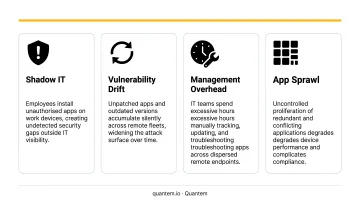
The platforms compared below were evaluated on criteria that matter most to distributed teams: self-service access, cross-platform support, and IT overhead reduction.
Best Enterprise App Catalogs for Remote & Hybrid Workers
Platforms below are evaluated on app distribution capabilities, platform coverage, security controls, BYOD compatibility, pricing, and remote IT management suitability.
Microsoft Intune Enterprise App Catalog
Microsoft Intune is Microsoft's cloud-based endpoint management platform. Its Enterprise App Catalog — part of the Intune Suite add-on — provides a library of approximately 500 pre-packaged Win32 applications that IT admins can deploy directly from the Intune console, without custom packaging.
For remote teams, the standout capabilities are Windows Autopilot (which handles zero-touch device setup when a remote employee first powers on a new machine) and the Enrollment Status Page, which blocks device use until required apps and policies are fully installed. Automated app update detection means IT doesn't need to track version changes manually.
| Feature | Detail |
|---|---|
| Key Features | Pre-packaged Win32 app library (~500 titles), Windows Autopilot, Enrollment Status Page, automated update detection, Graph API |
| Platform Support | Windows only (64-bit); not suitable for Android or macOS app catalog use |
| Pricing | Intune Plan 1: $8.00/user/month; Intune Suite add-on: $10.00/user/month (annual, billed on top of Plan 1); Enterprise App Management requires the Suite add-on |
Best for: Windows-centric enterprises already in the Microsoft 365 ecosystem.
Limitation: Enterprise App Management is Windows-only and requires the Intune Suite add-on — not included in standard Microsoft 365 plans.
Jamf Self Service
Jamf is the dominant Apple device management provider. Jamf Self Service functions as an enterprise app catalog for macOS and iOS/iPadOS, letting employees self-install IT-approved apps, configurations, and software without filing a help desk ticket.
The differentiator for hybrid Apple fleets is Smart Groups — Jamf's dynamic grouping system lets IT scope catalog content by department, role, or device type, so employees only see apps relevant to their function. App Installers automate third-party macOS app updates across managed devices, cutting the packaging burden considerably. The consumer App Store-like UX drives adoption without requiring user training.
| Feature | Detail |
|---|---|
| Key Features | Self-service app installation, Smart Group-based catalog personalization, App Installers for automated third-party updates, custom categories and branding |
| Platform Support | macOS, iOS, iPadOS only — not suitable for Android or Windows fleets |
| Pricing | Jamf for Mac: $12.50/device/month (billed annually, 25-device minimum); Jamf for Mobile: $5.75/device/month; Self Service is included within Jamf Pro |
Best for: Organizations running primarily Apple device fleets where self-service adoption and automated updates are priorities.
Limitation: Apple ecosystem only. Mixed-OS or Android-heavy environments need a different solution.
Omnissa Workspace ONE (formerly VMware)
Workspace ONE, now operating under Omnissa after Broadcom's 2023 divestiture of VMware's End-User Computing business, is one of the broadest cross-platform UEM options available. Its built-in enterprise app catalog spans iOS, Android, Windows, and macOS from a single console.
For distributed teams, Workspace ONE Tunnel provides per-app VPN: remote employees get secure access to corporate resources app-by-app, without requiring a full device VPN connection. App wrapping adds security policies to third-party apps without modifying code. Workspace ONE Intelligent Hub serves as the unified employee portal, combining app catalog, notifications, HR integrations, and self-service in one interface.
| Feature | Detail |
|---|---|
| Key Features | Cross-platform UEM, per-app VPN (Tunnel), app wrapping, Intelligent Hub employee portal, conditional access, app analytics |
| Platform Support | iOS, Android, Windows, macOS, ChromeOS, Linux |
| Pricing | Mobile Essentials $3.00/device/month; UEM Essentials $5.25/device/month; Enterprise Edition $10.00/device/month; Platinum $15.63/device/month (12-month prepaid) |
Best for: Large enterprises with mixed-OS fleets requiring per-app VPN and a unified employee experience portal.
Limitation: Premium pricing; platform complexity can require dedicated IT resources to manage effectively.
Hexnode UEM
Hexnode is a unified endpoint management platform with competitive per-device pricing and strong Android and Windows coverage. Its built-in app catalog supports public store apps, in-house private apps, and web app distribution, making it practical for frontline and field workforce deployments.
Silent app installation is available for Android Enterprise, supervised iOS, Windows, and macOS, so IT can push apps without any end-user interaction. App allowlisting and blocklisting gives IT control over what employees can and cannot install on BYOD devices. Hexnode also supports APK, IPA, MSI, and DMG distribution directly, without routing through a public store.
| Feature | Detail |
|---|---|
| Key Features | Silent install/uninstall, public and private app distribution, app allowlist/blocklist, BYOD work profile, kiosk mode, app usage analytics |
| Platform Support | Android, iOS, iPadOS, macOS, Windows, tvOS, FireOS, visionOS |
| Pricing | Pro: $2.20/device/month; Enterprise: $3.20/device/month; Ultimate (adds Windows/Mac app management): $4.70/device/month; all billed annually |
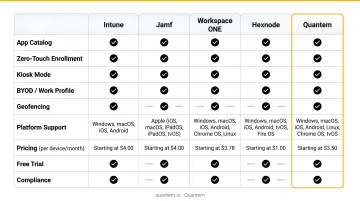
Best for: Mid-market organizations with mixed OS environments needing frontline-friendly app controls at a predictable per-device cost.
Note: Windows and macOS app management requires the Ultimate tier ($4.70/device/month).
Quantem
Quantem is an enterprise MDM platform built around simplicity and cost efficiency. Its private app management with version control is a core feature, not a premium add-on, enabling IT teams to build and maintain a curated app catalog for Android and Windows device fleets supporting remote and hybrid workers across healthcare, retail, logistics, and field service.
For cost-conscious IT teams, Quantem delivers these capabilities across all plans:
- Zero-touch enrollment included across all plans, not locked behind an enterprise tier
- Private app catalog with version control for controlled rollouts without manual version tracking
- BYOD work profile separation to isolate corporate apps from personal content on employee-owned devices
- Toggle-based policy management with 250+ pre-built controls configurable through the UI, no scripting required
- No-code console accessible from any browser, designed for IT ops teams without developer resources
- SOC-2, GDPR, and CCPA compliant, covering healthcare and other regulated-industry requirements
| Feature | Detail |
|---|---|
| Key Features | Private app catalog with version control, zero-touch enrollment, BYOD work profile separation, toggle-based policies, geofencing, real-time device analytics, API access, SOC-2/GDPR/CCPA compliant |
| Platform Support | Android, Windows |
| Pricing | Essential: $1/device/month; Professional: $2/device/month; Enterprise: $3/device/month (annual billing); Enterprise includes free migration support; 21-day full-access free trial, no credit card required, no cancellation fees |
Best for: Android and Windows fleets in cost-sensitive organizations — healthcare, retail, logistics, field service — where simplicity and affordability matter as much as feature depth.
Key Features to Look for in an Enterprise App Catalog
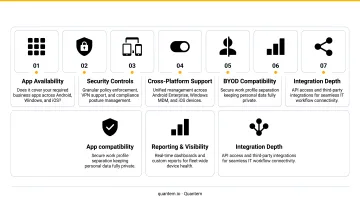
Not all enterprise app catalogs handle remote and hybrid deployments equally. These three capabilities separate platforms that work for distributed teams from those that create more problems than they solve.
Zero-Touch and Silent App Installation
For remote workers who never visit a physical IT desk, zero-touch app deployment is what makes onboarding scalable. IT pushes approved apps to new devices automatically — the employee powers on, connects to a network, and the device configures itself.
Silent installation handles the ongoing work. When an update or new tool needs to reach a distributed fleet, waiting on employees to manually install it creates version drift and security gaps. Platforms like Hexnode, Intune, and Quantem support silent push deployment, though OS coverage varies — so verify Android, iOS, and Windows support before committing.
BYOD Compatibility and Work Profile Separation
According to the Verizon 2025 Mobile Security Index, 70% of mobile devices impacted by a cyberattack are personal/BYOD devices — and 63% of organizations that rejected MDM experienced data loss.
Work profile separation addresses this directly. Android Enterprise Work Profile creates a managed container on the employee's personal device, keeping corporate apps and data completely isolated from personal content. For hybrid environments where employees regularly use personal devices for work tasks, this isn't optional — it's what makes BYOD manageable without creating compliance exposure.
Compliance Certifications and Access Controls
For regulated industries — healthcare, finance, legal — an enterprise app catalog needs to hold up under audit, not just under daily use.
Key compliance considerations:
- SOC-2 — confirms the platform's internal controls for security, availability, and data processing
- GDPR Article 32 — requires appropriate technical measures to secure personal data in processing systems
- HIPAA technical safeguards — mandate audit controls for systems containing electronic protected health information
- Role-based catalog visibility — employees should only see apps they're authorized to access, reducing attack surface and simplifying compliance reporting
How We Chose the Best Enterprise App Catalogs
These platforms were evaluated specifically for remote and hybrid workforce deployments — not general MDM feature richness. A common mistake is selecting an app catalog based on brand recognition or an existing vendor relationship without verifying it covers your actual device OS mix.
An IT team managing 500 Android field devices and 200 Windows laptops gets little value from an Apple-only solution, regardless of its reputation or feature set.
Evaluation factors applied:
| Factor | Operational Outcome |
|---|---|
| Platform OS breadth | Determines whether the catalog covers your actual device fleet |
| Pricing transparency | Affects total cost of ownership as device count scales |
| BYOD and work profile support | Reduces security risk from personal devices accessing corporate apps |
| Zero-touch deployment | Speeds up onboarding for remote workers without IT desk access |
| Compliance certifications | Required for regulated industries; affects audit readiness |
| No-code manageability | Reduces dependency on scripting skills for routine app management |
| Scalability | Ensures the platform grows with distributed team expansion |
Conclusion
The right enterprise app catalog for remote and hybrid workers isn't just an app distribution mechanism. A new remote employee should be productive on day one — not waiting three days for app access. Without the right platform, shadow IT fills the gap, and IT loses visibility into what's running on which devices.
Choose based on your actual OS mix, not feature marketing. A Windows-heavy environment gets most of its value from Intune. Apple fleets belong in Jamf. Mixed-OS enterprises with scale requirements are well-served by Workspace ONE or Hexnode. And for Android and Windows fleets where budget and simplicity are genuine constraints, Quantem delivers full-featured app management at $1–$3 per device — with zero-touch enrollment included in every plan.
Quantem offers a 21-day free trial with no credit card required. Start exploring at quantem.io.
Frequently Asked Questions
What is an enterprise app catalog?
An enterprise app catalog is a private, IT-managed app store that gives employees access to organizationally approved applications. Unlike public app stores, it integrates with an MDM platform to enable secure app distribution, version control, and compliance enforcement across all managed devices.
What are the top platforms for hybrid workforce app management?
Leading platforms include Microsoft Intune, Jamf Self Service, Omnissa Workspace ONE, Hexnode UEM, and Quantem. The best choice depends on your device OS mix — particularly whether you're managing primarily Apple, Android, Windows, or a mixed fleet — as well as team size and budget.
How is an enterprise app catalog different from a public app store?
Unlike Google Play or the Apple App Store, an enterprise app catalog only contains IT-vetted apps, can include proprietary in-house applications not available publicly, and gives IT full control over installation, updates, and access permissions. This prevents shadow IT and maintains security compliance.
Can enterprise app catalogs support BYOD devices?
Most modern platforms support BYOD through work profile separation, which creates a managed container on the employee's personal device that isolates corporate apps and data from personal content. Quantem includes work profile support across all plans, making it practical for hybrid workplaces where personal devices regularly access corporate resources.
What is the best app to work from home?
There's no single answer — it depends on the role. For IT teams, the more useful goal is ensuring every remote worker has secure, managed access to the right apps from day one. An MDM-backed enterprise app catalog handles exactly that, without the security risk of unmanaged self-installs.
Which devices offer the best enterprise app support?
Android devices with Samsung Knox or Google Pixel enterprise editions, and iPhones with Apple Business Manager, both offer strong enterprise support. The more decisive factor is whether your MDM platform and app catalog support the device OS — that determines what level of control IT can actually enforce in practice.