The platforms covered here span public consumer stores, pre-release beta tools, and enterprise-grade deployment channels. Understanding which one fits your use case - and where each falls short - is the actual decision worth making carefully.
TL;DR
- Mobile app distribution moves builds from development into users' hands through public stores, beta tools, or private enterprise channels
- Google Play and the Apple App Store are the primary public channels, each tied to their respective OS ecosystems
- Firebase App Distribution and TestFlight handle pre-release builds and QA testing before launch
- Amazon Appstore and Samsung Galaxy Store extend reach to specific device audiences
- Enterprise teams distributing internal apps need MDM-integrated distribution; public stores and beta tools don't support private, policy-controlled deployments
What Is Mobile App Distribution?
Mobile app distribution is the process of making an application available to its intended audience - whether that's a QA tester on day one of a sprint, an employee using a proprietary internal tool, or a consumer downloading from a public store.
Three distinct contexts define how distribution works in practice:
- Public distribution - submitting a finished app to consumer stores like Google Play or the Apple App Store for general availability
- Pre-release/beta distribution - sending development or QA builds to trusted testers before launch, using tools like TestFlight or Firebase App Distribution
- Enterprise/internal distribution - deploying proprietary apps to company-managed devices through MDM platforms, without publishing them to a public marketplace
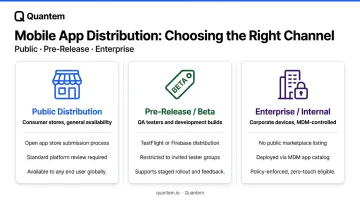
Each context calls for a different platform, different access controls, and different review timelines. Routing an internal employee app through the public App Store, for example, adds weeks to every release cycle and exposes proprietary functionality to review processes designed for consumer software - not enterprise deployments.
Top Mobile App Distribution Platforms
These five platforms represent the primary channels through which apps reach end users - selected based on OS coverage, audience reach, developer tooling, and enterprise readiness.
Google Play Console
Google Play Console is the primary distribution channel for Android apps, giving developers access to more than 2.5 billion monthly users across 190+ markets. As of mid-2026, the store hosts over 2.36 million apps.
What sets it apart from other public stores is the tiered testing structure built directly into the console:
- Internal testing track - builds available to up to 100 invited testers in seconds, with no app review required
- Closed/open testing tracks - for structured beta programs before production launch
- Staged rollouts - release updates to a percentage of users first, then expand incrementally
- Crash and ANR (Application Not Responding) reporting - integrated diagnostic data alongside Play Analytics
The internal testing path is the fastest verified no-review distribution option among all the major stores. The tradeoff: tester enrollment and UI configuration can confuse non-technical stakeholders, and the full production release still goes through Google's standard policy review.
| Attribute | Detail |
|---|---|
| Supported Platforms | Android only |
| Key Features | Internal/closed/open testing tracks, staged rollouts, crash and ANR reporting, Play Analytics, in-app review API |
| Pricing | One-time $25 developer registration fee; distribution is free |
Apple App Store & TestFlight
The Apple App Store is the sole official public distribution channel for iOS apps. TestFlight - accessed through the same App Store Connect interface - handles pre-release distribution, supporting up to 10,000 external testers and 100 internal testers per app.
The integration between TestFlight and App Store Connect is a genuine workflow advantage: a build tested in TestFlight moves to production submission without re-uploading or reconfiguring.
Automatic tester notifications and Xcode integration keep the process smooth. Apple's review standards are fast too - 90% of submissions are reviewed in under 24 hours.
One constraint worth noting: external TestFlight builds require Apple's TestFlight App Review before distribution. The first build of a new version goes through full review; subsequent builds for the same version may not. Most teams won't find this disruptive, but it's a meaningful difference from Google Play's instant internal testing track.
The platform is also iOS/iPadOS/macOS/tvOS exclusive - no Android support.
| Attribute | Detail |
|---|---|
| Supported Platforms | iOS, iPadOS, macOS, tvOS only |
| Key Features | Up to 10,000 external testers, automatic build notifications, App Store Connect integration, in-app feedback, no separate SDK required |
| Pricing | $99/year Apple Developer Program membership; TestFlight is free |
Firebase App Distribution
Firebase App Distribution is Google's cross-platform pre-release tool - purpose-built for getting development and beta builds to trusted testers before any public store submission. It supports both Android and iOS.
Setup is lightweight: teams can distribute builds through the Firebase console, CLI, Gradle plugin, or Fastlane. The native integration with Crashlytics means crash data from pre-release builds feeds directly into the same dashboard teams use for production monitoring.
Key limitations to plan around:
- 500 testers per Firebase project maximum
- 200 testers per distribution group maximum
- No role-based permissions within the tester management interface
- Distribution ends when the build hits a device - no device testing infrastructure included
Those tester caps work fine for controlled pre-release programs with a defined list. Broad public betas or enterprise-scale internal distribution will hit them quickly.
| Attribute | Detail |
|---|---|
| Supported Platforms | Android and iOS |
| Key Features | Tester group management, email-based invitations, CLI/Gradle/Fastlane integration, Crashlytics integration, release notes per build |
| Pricing | Free (available on both Spark and Blaze Firebase plans) |
Amazon Appstore
The Amazon Appstore serves as the primary distribution channel for Amazon's Fire device ecosystem - Fire tablets and Fire TV - and is also available for sideload on standard Android devices and Windows 11. Amazon cites over 250 million Fire TV devices worldwide.
The Amazon Appstore is a supplementary channel for most developers. Its value is audience-specific:
- Reaches Amazon device users who don't use Google Play
- Supports Amazon Coins for in-app purchases and Alexa skill integration
- Provides promotional placement opportunities through Amazon's merchandising programs
- Baseline revenue share is 70/30 (Amazon's Small Business Accelerator program offers an improved 80/20 split for qualifying developers)
Submitting to the Amazon Appstore requires a separate APK and review process independent of Google Play Console. Global reach is narrower than Play, but for apps targeting Fire TV or Fire tablet users specifically, it's the relevant channel.
| Attribute | Detail |
|---|---|
| Supported Platforms | Android (Amazon Fire OS and standard Android via sideload) |
| Key Features | Amazon device user reach, Amazon Coins monetization, Alexa integration, promotional placement programs |
| Pricing | Free developer registration; 70/30 revenue share baseline |
Samsung Galaxy Store
The Samsung Galaxy Store comes pre-loaded on 1.2 billion devices across 188 countries, making it one of the largest OEM-specific distribution channels available. Samsung held 18.8% global smartphone market share in Q3 2025, according to IDC - the largest share of any single Android manufacturer.
Developers already targeting Android gain direct visibility to Samsung's installed base without competing in Google Play's broader discovery environment. The store also supports Samsung-specific integrations:
- Galaxy Watch and wearable ecosystem apps
- Galaxy Fold and foldable device optimizations
- Samsung Pay integration
- Editorial placement programs through the Galaxy Store storefront
Revenue share is developer-friendly: 80/20 for paid apps and in-app purchases, and 85/15 for subscriptions, effective May 2025. The audience is Samsung-device exclusive, and the submission process requires a separate Samsung Developer account with its own review workflow.
| Attribute | Detail |
|---|---|
| Supported Platforms | Android (Samsung devices) |
| Key Features | Pre-loaded on Samsung devices, Samsung-specific feature support, promotional placements, Galaxy wearable ecosystem integration |
| Pricing | 80/20 revenue share (paid apps); 85/15 for subscriptions |
How to Choose the Right Distribution Platform
The Evaluation Framework
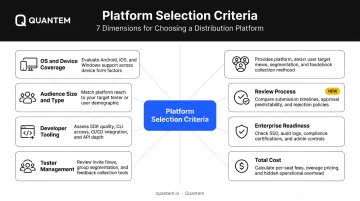
Matching a distribution platform to a use case requires looking at more than just OS support. The relevant dimensions:
- OS and device coverage - does the platform reach your target hardware?
- Audience size and type - public consumers, QA testers, or managed corporate devices?
- Developer tooling - CLI support, CI/CD integration, API access?
- Tester management - how many testers, with what level of access control?
- Review process - how long, and how predictable?
- Enterprise readiness - private deployment, access policies, compliance logging?
- Total cost - registration fees, revenue share, or per-device pricing?
The Most Common Selection Mistake
Teams default to a familiar channel rather than the right one. The most common example: routing an internal employee app through the public App Store or Google Play because "that's where apps go."
Public consumer stores are built for general availability. Beta tools like TestFlight and Firebase are built for pre-release feedback cycles. Neither is designed for the requirements that enterprise internal distribution actually involves - policy-based access, compliance logging, version enforcement across a managed fleet, and keeping proprietary apps out of consumer marketplaces.
When Public Stores and Beta Tools Aren't Enough
For organizations distributing proprietary or internal apps to corporate-owned or BYOD device fleets, MDM-integrated private app distribution is a separate layer that public stores can't replicate.
Platforms like Quantem handle this layer directly. Private apps are uploaded and pushed to enrolled device groups with no public store submission required. Key capabilities include:
- Supports up to 5 app versions per plan on the Enterprise tier
- Distributes to specific device groups with fleet-wide access controls
- Automatically pushes new builds across hundreds of devices on schedule
- SOC-2, GDPR, and CCPA compliant - a baseline requirement for organizations with formal app governance policies
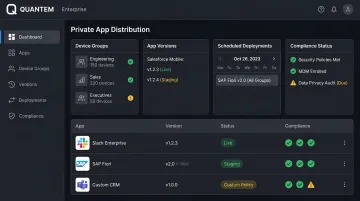
This is a governance decision as much as a delivery one. The right question isn't which store to use - it's whether a store is the right model at all, or whether the use case calls for a private distribution channel with device-level controls.
Conclusion
No single platform handles every distribution scenario. The practical breakdown:
- Public consumer reach → Google Play Console (Android), Apple App Store (iOS)
- Pre-release testing → TestFlight (iOS), Firebase App Distribution (Android + iOS)
- Device-specific audiences → Amazon Appstore (Fire ecosystem), Samsung Galaxy Store (Samsung devices)
- Internal/enterprise apps → MDM-integrated private distribution
Most teams need more than one of these running simultaneously. A mobile team shipping a consumer app might use Google Play for Android production, TestFlight for iOS beta, and Firebase for cross-platform QA. The IT team managing internal tools for the same company often runs an entirely separate MDM-based distribution channel alongside all of that.
For organizations managing corporate devices or BYOD fleets, Quantem handles what public app stores aren't designed for: private app deployment with version control, policy-based access, and device-level compliance controls. Pricing starts at $1 per device per month, with a 21-day free trial and no credit card required.
To see how MDM-integrated private app distribution fits alongside your existing public and beta channels, contact the Quantem team.
Frequently Asked Questions
What is app distribution used for?
App distribution moves a mobile application from development to its intended users. This covers publishing to consumer stores, sending pre-release builds to QA testers, or deploying internal apps to corporate devices through enterprise channels.
What is replacing APK?
The Android App Bundle (AAB) format replaced APK as the standard submission format for Google Play - required for all new apps since August 2021. AAB lets Google generate optimized APKs per device configuration, reducing install size by an average of 15%. Direct distribution and MDM-based enterprise deployments may still use APK files.
What is the difference between public and enterprise app distribution?
Public distribution means submitting an app to consumer stores like Google Play or the Apple App Store for anyone to download. Enterprise distribution means deploying a private or internal app directly to company-managed devices - typically through an MDM platform - without making it publicly available or subject to app store review.
Which app distribution platform is best for Android apps?
Google Play Console is the primary channel for public Android distribution, offering the broadest reach and most developer tooling. Firebase App Distribution handles pre-release builds well, while large Samsung or Fire TV fleets may warrant supplementing with Galaxy Store or Amazon Appstore.
Can I distribute an app without the App Store or Google Play?
Yes. Android supports APK sideloading and enterprise distribution via MDM. iOS supports enterprise in-house distribution through Apple's Developer Enterprise Program ($299/year) and MDM-based deployment for corporate-enrolled devices - both allow distribution outside the public App Store.
How much can an app with 1,000 downloads make?
Revenue depends on the monetization model. RevenueCat's 2026 benchmarks show D60 median revenue of $0.31 per install overall and $3.09 for hard paywalls - roughly $310–$3,090 per 1,000 installs for subscription apps. Ad-monetized gaming apps typically land between $220–$550 per 1,000 installs (AppsFlyer, Day 90 ad ARPU).