What Is Enterprise Mobility Management?
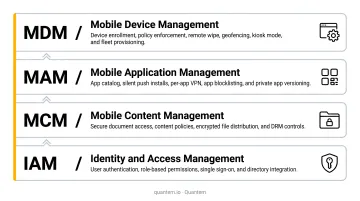
Enterprise Mobility Management (EMM) is an IT framework that combines mobile device management, application management, content management, and identity management into a single platform. The goal: give organizations complete control over how employees access corporate data from mobile devices — whether those devices are company-issued or personal.
The need is real. According to Gallup, 52% of remote-capable employees now work hybrid schedules, and just under 10% prefer being fully on-site. That shift means employees are accessing sensitive systems from airports, home offices, and job sites — on a mix of devices IT doesn't always control.
Traditional MDM tools, built during the BlackBerry era of the 2000s, handled that world fine. They couldn't anticipate smartphones, BYOD programs, or cloud-based apps. EMM emerged to cover what MDM couldn't: application controls, content security, and user identity management under one framework.
By 2015, when Windows 10 introduced native MDM APIs, vendors were already pushing toward what's now called Unified Endpoint Management (UEM).
Understanding where EMM sits in that evolution matters before choosing a platform. This guide covers EMM's core components, key benefits, how it compares to MDM and UEM, which industries need it most, and how to choose the right solution.
Key Takeaways
- EMM combines four layers: MDM (device), MAM (apps), MCM (content), and IAM (identity)
- Core benefits include stronger mobile security, productivity gains, IT efficiency, and compliance support
- EMM sits between MDM (device-only) and UEM (all endpoints, including desktops)
- Healthcare, retail, logistics, and field service organizations gain the most from EMM
- Evaluate solutions on BYOD support, zero-touch enrollment, compliance certifications, and total cost
Core Components of Enterprise Mobility Management
EMM platforms bundle four integrated capability areas into one management console. Each layer closes a different security gap — together, they give IT teams unified control over devices, apps, content, and identity without managing each in isolation.
Mobile Device Management (MDM)
MDM is the device-level foundation. IT admins can enroll, configure, and enforce security policies across every managed device from a central console — no physical access required.
Key MDM capabilities:
- Remote lock and wipe for lost or stolen devices
- OS patch management and update enforcement
- Jailbreak and root detection to flag compromised devices
- Hardware inventory tracking across the entire fleet
- Encryption and passcode policy enforcement
For corporate-owned devices, MDM provides full control. For BYOD devices, MDM applies a limited management profile that governs only the work container — personal apps and data stay completely separate.
Mobile Application Management (MAM)
MAM operates at the app level rather than the device level. It controls which corporate apps employees can install, enforces app-specific security policies, and enables selective wipe of corporate app data without touching personal content.
Common MAM controls include:
- Copy/paste restrictions between work and personal apps
- Screenshot blocking within corporate applications
- Mandatory app updates before access is granted
- Selective wipe that removes only work app data
MAM is especially critical for BYOD. Rather than managing the whole device, IT creates a secure app container — maintaining control over corporate tools without visibility into what employees do personally. Android Enterprise Work Profile is the standard mechanism for this separation, isolating corporate apps and data from personal content on employee-owned devices.
Mobile Content Management (MCM)
MCM secures the documents and files that employees access from mobile devices. Without it, a single forwarded email or downloaded PDF can expose sensitive data outside the organization's control.
MCM typically includes:
- Encrypted document repositories with role-based access
- Data loss prevention (DLP) rules on downloads, sharing, and printing
- Audit trails for file access and distribution
- Controls that prevent unauthorized cloud storage uploads
Employees can collaborate on corporate files from any device, while IT retains visibility into where sensitive content goes — closing the gap between productivity and data security.
Identity and Access Management (IAM)
Securing content means little if anyone with a stolen password can access it. IAM is the authentication layer that verifies the right person, on a compliant device, is accessing the right system — so a compromised credential alone can't bypass your other controls.
Core IAM capabilities in EMM:
- Multi-factor authentication (MFA)
- Single sign-on (SSO) across corporate apps
- Certificate-based authentication
- Conditional access policies (non-compliant devices are blocked automatically)
IAM integrates with corporate identity providers and feeds device-trust signals into Zero Trust security architectures — ensuring access decisions account for both who is asking and whether their device meets policy requirements.
Key Benefits of Implementing EMM
Enhanced Security Across the Mobile Perimeter
Mobile threats are accelerating. The 2025 Verizon Mobile Security Index found that 85% of organizations reported rising mobile attacks, and 63% of those that experienced downtime reported major business repercussions.
EMM addresses the full attack surface:
- Enforces encryption at rest and in transit
- Triggers remote wipe immediately when a device is reported lost
- Blocks access from non-compliant or jailbroken devices
- Monitors continuously for anomalous device behavior
The 2024 IBM Cost of a Data Breach report puts the global average breach cost at $4.88 million — with healthcare breaches averaging $9.77 million. Proactive device security isn't optional at those stakes.
EMM Removes Friction for Employees
EMM removes the friction between employees and the tools they need. Zero-touch provisioning means a new hire's device arrives pre-configured — apps installed, policies applied, ready to work from the moment it's powered on. No manual IT setup, no waiting.
For hybrid and remote workers, EMM provides secure access to corporate apps and data from any location or device — without requiring VPN workarounds or IT tickets for every access request.
Streamlined IT Operations
A centralized EMM console eliminates the need for separate management tools per device type or OS. IT teams can configure, monitor, and troubleshoot the entire device fleet from one interface.
Remote support capabilities mean IT can resolve most issues without ever seeing the physical device — cutting support costs and response times. Quantem takes this further by eliminating scripting requirements entirely — IT teams manage policies through toggle-based controls rather than writing custom code.
Regulatory Compliance Support
EMM automates the enforcement of controls that regulators require:
- HIPAA: Encryption, access controls, and audit logs for patient data
- GDPR: Data minimization, access restrictions, and breach notification readiness
- CCPA: Enforced access controls and data handling restrictions
The compliance cost of getting this wrong is substantial. In 2024, GDPR enforcement across Europe included fines of €310M against LinkedIn and €290M against Uber. HIPAA penalties range from $100 to $50,000 per violation depending on intent and negligence level.
EMM doesn't guarantee compliance, but it enforces the technical controls that regulators look for — and generates the audit trails that prove it.
Measurable Cost Savings
A Forrester TEI study commissioned by Microsoft found that Microsoft Intune delivered 181% ROI for a composite enterprise organization. A separate Forrester study on Workspace ONE reported 170% ROI. Both figures come from vendor-commissioned research, but the underlying savings categories are consistent across platforms.
Those categories — reduced IT labor through automation, lower breach costs through proactive security, and eliminated overhead from disparate device tools — are what a well-implemented EMM platform is designed to deliver, regardless of vendor.
EMM vs. MDM vs. UEM: What's the Difference?
These three terms overlap — but each represents a meaningfully different scope of control.
| Category | Scope | Best For |
|---|---|---|
| MDM | Device hardware and OS only | Simple mobile-only fleets, corporate-owned devices |
| EMM | MDM + apps, content, and identity | Organizations with BYOD programs, app-heavy environments |
| UEM | EMM + laptops, desktops, IoT, wearables | Large enterprises managing mixed endpoint environments |
Think of it as a progression in scope:
- MDM asks: Is the device secure?
- EMM asks: Are the device, apps, data, and users all secure?
- UEM asks: Are ALL endpoints — mobile and traditional — secure from one console?
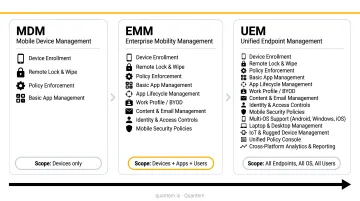
According to IDC, UEM evolved from the EMM market around 2018 to unify PC and mobile management — and more than 70% of enterprises that deploy UEM still use at least two endpoint management products, a sign of how fragmented mixed-fleet environments remain.
Practical guidance:
- Small businesses or mobile-only operations can often start with MDM
- Organizations running active BYOD programs need EMM's MAM and content controls
- Large enterprises managing Windows, macOS, and mobile fleets should evaluate UEM
Many modern EMM platforms — including Quantem — support Windows MDM in addition to Android, blurring the line between EMM and UEM for many organizations.
Who Needs EMM? Common Use Cases by Industry
Any organization where employees access corporate data from mobile devices can benefit from EMM. Four areas see the sharpest returns:
Healthcare
Clinical staff depend on mobile devices for patient data access, clinical workflows, and communication. An international survey of 400 clinical and IT leaders found 92% consider mobile devices essential, and 81% said clinicians use personal devices as workarounds when shared devices aren't available.
EMM with HIPAA-aligned policy enforcement closes that gap. Quantem's healthcare customers, including ATHMA Hospitals, use centralized fleet management to enforce compliance policies across every clinical device from one console.
Retail and Hospitality
POS devices, inventory scanners, and customer-facing tablets need locked-down, purpose-built configurations. Kiosk mode keeps devices on a single app or approved set of apps, preventing misuse. According to Zebra's 2024 research, nearly 90% of retail associates said mobile tools simplify real-time communication — but only when those tools are properly managed.
Logistics and Field Services
Device fleets spread across warehouses, delivery routes, and job sites require centralized tracking and remote management. Geofencing triggers automated actions based on location, locking devices that leave a permitted zone. Zero-touch enrollment means replacement devices ship pre-configured, cutting downtime.
BYOD Environments
Education, professional services, and fast-growing companies often can't issue corporate devices at scale. EMM's work profile separation, such as Android Work Profile, creates a secure container on personal devices without giving IT access to employees' personal content.
How to Choose the Right EMM Solution
Key Evaluation Criteria
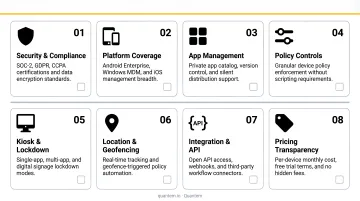
Before comparing vendors, clarify what your environment actually needs:
- Manages Android, iOS, and Windows devices from a single console
- Scales deployments without adding IT headcount through zero-touch enrollment
- Separates work and personal data cleanly for BYOD programs
- Holds SOC-2, GDPR, and CCPA certifications at minimum; HIPAA alignment for healthcare
- Supports single-app and multi-app kiosk configurations for purpose-built devices
- Includes geofencing and location tracking for field-based or multi-site operations
- Exposes API access for integration with HRMS, identity providers, and business systems
- Runs policy management without requiring specialized scripting skills
Pricing and Total Cost of Ownership
EMM pricing typically falls between $2 and $9 per device per month for mainstream platforms, based on vendor-published rates from Hexnode ($2.20–$4.70/device/month) and Miradore ($2.75–$3.95/device/month). Microsoft Intune is priced per user at $8–$10/user/month.
Watch for:
- Per-device pricing that scales unexpectedly at volume
- Enterprise features locked behind premium tiers
- Hidden fees for support, migration, or API access
For comparison, Quantem prices its full-featured plans at $1–$3 per device per month, with zero-touch provisioning, kiosk mode, and geofencing available across tiers. A 21-day free trial requires no credit card, and free migration support is included in Professional and Enterprise plans.
Final Selection Advice
Test before you commit. Most reputable EMM platforms offer free trials — use them to test real-world usability beyond feature checklists. When evaluating vendors, prioritize:
- Responsive support with clear SLAs
- A defined upgrade path as your fleet grows
- No cancellation fees if the platform underdelivers
Frequently Asked Questions
What is an enterprise mobility management solution?
An EMM solution is a software platform that combines MDM, MAM, MCM, and IAM into a single console. It helps organizations manage and secure mobile devices, apps, and data (both company-owned and BYOD) from one centralized interface.
What are enterprise mobility management solutions used for?
EMM solutions secure corporate data on mobile devices, enforce security policies, manage app distribution, enable safe BYOD programs, and support regulatory compliance. They give IT teams centralized visibility and control over distributed device fleets without requiring physical access to each device.
What is the difference between EMM and MDM?
MDM focuses solely on device hardware and OS settings: encryption, passcodes, and remote wipe. EMM is a broader framework that adds application management, content security, and identity controls — making it the right fit when you need to secure data across both corporate and personal devices.
How does EMM support BYOD policies?
EMM supports BYOD through work profile separation (for example, Android Work Profile), which creates a secure container for corporate apps and data on personal devices. IT retains control over business content without accessing employees' personal activity.
What industries benefit most from EMM?
Healthcare (shared clinical devices, HIPAA compliance), retail and hospitality (kiosk mode, POS management), logistics and field services (device tracking, rugged device support), and education (BYOD management, app control) see the strongest operational and security returns from EMM implementation.
What are the biggest challenges in implementing EMM?
The main challenges are device and OS fragmentation, which makes consistent policy enforcement difficult, and employee resistance driven by privacy concerns — resolved through clear work/personal profile separation. Managing granular per-role policies across large, diverse device fleets adds further complexity at scale.