Samsung Knox addresses this directly. Built into Galaxy hardware from the chip up, Knox gives enterprises a security layer that enforces corporate policies on personal devices without turning those devices into company property. This article covers how Knox works, what specific risks it neutralizes, and how pairing Knox with an MDM platform turns a personal Samsung phone into a compliant, manageable enterprise endpoint.
Key Takeaways
- Samsung Knox is a hardware-backed security platform embedded in Galaxy devices - active before Android even finishes booting
- The Android Work Profile Knox creates is a cryptographically isolated container, keeping corporate data completely separate from personal apps
- IT can push apps, enforce policies, and selectively wipe work data without ever touching personal content
- Pairing Knox with an MDM platform is what makes BYOD enrollment and policy management scalable across a device fleet
- Regulated industries - healthcare, finance, logistics, and field services - benefit most from Knox's compliance-grade controls
What Is Samsung Knox?
Samsung Knox is a hardware-level security platform built directly into Samsung Galaxy hardware and software. Built in at the factory, it activates the moment a device powers on and operates across multiple layers simultaneously:
- Hardware: Knox Vault (a physically isolated security processor) and TrustZone
- Firmware: Secure Boot and Trusted Boot chain verification
- Software: Containerization, policy enforcement, and remote attestation
Knox vs. Standard Android Security
Standard Android Enterprise provides the framework for enterprise device management. Knox extends that framework with hardware-level protections that generic Android devices cannot replicate: a tamper-resistant security chip, deeper policy controls, and a persistent tamper record (the Knox Warranty Bit) that survives factory resets.
Knox Is a Platform, Not a Single Product
Those hardware protections are delivered through a family of products - Knox Suite, Knox Manage, Knox Platform for Enterprise (KPE), and Knox Mobile Enrollment (KME). For BYOD deployments specifically, three components do most of the work:
- Android Work Profile integration - personal/work separation on personally owned devices
- Knox Platform for Enterprise - deeper policy controls layered on top of the standard Work Profile
- Knox Mobile Enrollment - streamlined device onboarding
BYOD Security Risks That Knox Addresses
When employees use personal phones for work, IT loses visibility into device configuration, installed apps, and data handling behavior. The exposure this creates is well-documented.
Verizon's 2025 Mobile Security Index found that 85% of organizations reported mobile device attacks were on the rise. Their 2024 report showed 53% of organizations had already suffered a mobile-related compromise - up from under 30% in 2018.
The Four Core BYOD Risks Knox Is Built to Counter
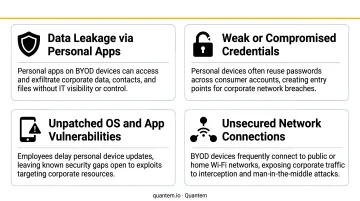
- Malware from personal app installs - employees download apps from unvetted sources; malicious apps can attempt to reach data in adjacent containers
- Lost or stolen devices - an unlocked personal phone with work email access is an open door to corporate data
- Credential sprawl - many employees store work passwords on personal devices, often in unencrypted notes apps
- Unpatched OS vulnerabilities - personal devices frequently run outdated Android versions that IT cannot force-update
The Compliance Dimension
Healthcare organizations under HIPAA and financial firms subject to SOC 2 or PCI-DSS cannot simply hope employees follow security hygiene. Regulators expect documented proof that corporate data on any device - personal or company-issued - is encrypted, access-controlled, and auditable.
Without hardware-backed controls, BYOD programs typically fail to meet these requirements across three key areas:
- Encryption: Data at rest and in transit must meet regulatory standards, not just OS defaults
- Access control: Work data must be isolated and revocable without touching personal data
- Audit trails: IT must demonstrate who accessed what, and when - on any device
Knox addresses all three directly through its hardware-backed security architecture.
Samsung Knox Security Features for BYOD
Hardware Root of Trust and Knox Vault
Knox starts at the chip, not the operating system. Knox Vault is a physically isolated, tamper-resistant subsystem with its own processor and memory, operating independently from the main application processor. Encryption keys, biometric data, and sensitive credentials are stored here - meaning even if the Android OS is compromised, the vault stays intact.
For BYOD, this matters enormously. IT cannot control what apps an employee installs on the personal side. Knox Vault ensures that even a compromised personal environment cannot extract the cryptographic keys protecting work data.
That vault-level protection only holds if the kernel itself stays clean. Knox's Real-Time Kernel Protection (RKP) continuously monitors the Android kernel for unauthorized modifications. It blocks exploits that attempt to escalate privileges from user level to kernel level - the type of attack that could allow a malicious personal-side app to break out of its sandbox and reach work container data.
Secure Boot and the Knox Warranty Bit
At every startup, Knox runs cryptographic checks on each bootloader and OS component through Trusted Boot verification. If tampering is detected, Knox sets the Knox Warranty Bit - a hardware e-fuse record of a non-approved device state that cannot be reset, even after a factory reset. MDM platforms can query this bit and automatically block compromised devices from accessing corporate resources.
Encryption on Work Profile Data
Samsung Galaxy devices running Android 9.0 or higher with Knox 3.3 use file-based encryption, with each file independently encrypted using AES-256-XTS. For deployments using Knox Platform for Enterprise's DualDAR feature, work profile data receives a second encryption layer through a FIPS 140-2 certified cryptographic module. That dual-layer approach helps organizations meet strict compliance requirements like HIPAA and FedRAMP.
Remote Attestation
Knox can report a device's integrity status to an MDM platform in real time. IT can configure automatic quarantine rules that block work profile access the moment a device fails a check. Devices are blocked before they touch corporate resources if they are:
- Rooted or jailbroken
- Running an outdated or unapproved OS version
- Missing a required screen lock
Android Work Profile and Knox: Separating Personal and Work Data
What the Work Profile Does
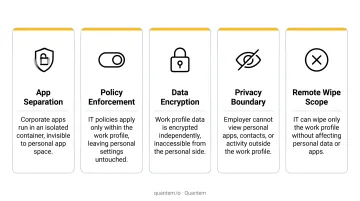
The Android Work Profile creates a cryptographically isolated partition on a personally owned device. Apps, contacts, notifications, and storage in the work profile are invisible to personal apps - and vice versa. Employees see work apps marked with a briefcase badge, two separate contact lists, and two distinct storage areas.
This separation is the foundational BYOD privacy mechanism. Neither the employee's personal data nor the organization's corporate data bleeds across the boundary.
How Knox Enhances the Standard Work Profile
Standard Android Work Profile is available on all Android Enterprise-certified devices. Knox adds a layer of controls that standard Android cannot provide:
- Block screenshots within work apps
- Require a separate work profile password independent of the device PIN
- Disable copy-paste between personal and work sides
- Apply per-app VPN tunnels exclusively to work apps
- Control cross-profile app communication
Employee Privacy Guarantees
IT administrators have zero visibility into the personal side of a Knox BYOD device. Personal photos, browsing history, app activity, and location remain completely private. The MDM can only see and manage what is inside the work container.
TechRepublic's research found that 89% of security professionals express legal concerns about accessing private employee data. Knox addresses this structurally - the architecture enforces the boundary, not just policy.
Selective Wipe
When an employee leaves or a device is lost, IT triggers a selective wipe: the work profile - all corporate apps, data, and credentials - is deleted entirely. Personal photos, messages, and apps are untouched. For IT teams managing personal phones, this means faster offboarding with no legal exposure over personal data - something full device wipes cannot guarantee.
Deploying and Managing Knox BYOD Devices
Enrollment Process
BYOD enrollment with Knox follows a clear, repeatable flow:
- Employee downloads the MDM agent from the Play Store or a provisioning link
- Work Profile is automatically provisioned on the device
- IT pushes required apps and policies to the work container
- Device becomes compliant and ready for corporate use
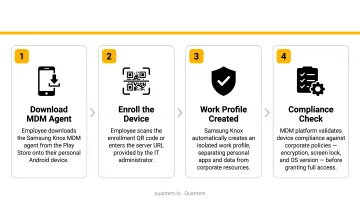
Knox Manage supports multiple enrollment methods for personally owned devices: manual enrollment, token-based enrollment, QR code scanning, and zero-touch enrollment. Employees can self-enroll without IT physically handling the device.
The MDM's Role
Knox provides the security hardware and software layer. Day-to-day fleet management - app deployment, policy updates, compliance reporting, remote wipe - requires an MDM platform that integrates with Knox capabilities.
Quantem's MDM platform supports Samsung Knox Mobile Enrollment and Android Enterprise Work Profile management, giving IT teams a centralized console to manage enrolled BYOD devices. Work Profile management is available across all Quantem plans, starting at $1 per device per month. Knox Mobile Enrollment is available on Professional and Enterprise tiers. A 21-day free trial (no credit card required) lets IT teams evaluate Knox BYOD management before purchasing.
Baseline Policies IT Should Configure
Every Knox BYOD deployment should enforce these baseline controls:
- Block enrollment for devices below your minimum OS version threshold
- Require a screen lock - PIN, pattern, or biometric - before granting work profile access
- Verify AES encryption is active on the device before provisioning
- Automatically flag and block rooted devices using Knox Warranty Bit and remote attestation
- Control which apps can run inside the work profile with an allowlist or blocklist
- Revoke work profile access automatically when a device falls out of compliance
Frequently Asked Questions
What is a Samsung BYOD Android phone?
A Samsung BYOD Android phone is a personal Samsung Galaxy device that an employee uses for both work and personal purposes. Knox enables a secure work profile that separates corporate data from personal content, making the device enterprise-ready without requiring a company-issued device.
What is Samsung Android?
Samsung Android refers to Samsung's version of the Android operating system, built on Google's core Android OS with the One UI interface and Knox security platform layered on top. This combination gives Galaxy devices enterprise security capabilities that standard Android phones from other manufacturers don't offer.
Does Samsung Knox work on non-Samsung Android devices?
Knox's hardware security features (Knox Vault, Real-Time Kernel Protection, Trusted Boot, and the Knox Warranty Bit) are exclusive to Samsung Galaxy devices. The Android Work Profile is available on all Android Enterprise-certified devices, but without Knox's hardware-level protections underneath.
How does Samsung Knox protect employee privacy in a BYOD setup?
Knox's Work Profile ensures IT administrators can only see and manage content inside the work container. Personal photos, messages, browsing history, and app activity are completely private and inaccessible to the employer. This separation is enforced at the platform level, not simply a matter of IT policy.
Can IT admins remotely wipe personal data from a Knox BYOD device?
No. Under standard Knox BYOD configurations, IT can only perform a selective wipe - removing the work container and all its data. Personal content is untouched. A full factory reset of a personal BYOD device is not within IT's control.
Is Samsung Knox free to use for BYOD?
Basic Knox security is built into Galaxy devices at no cost. Enterprise capabilities - Knox Platform for Enterprise policies, Knox Mobile Enrollment, and Knox Manage - require licensing. An MDM platform is also required to centrally manage BYOD devices at scale. Samsung's Knox Suite Essentials pricing starts at $30 for a one-year license; verify current pricing at Samsung's Knox Manage page.