Introduction
Deploying hundreds of Samsung devices across an enterprise is straightforward - until someone has to set them up. Manual enrollment means each device goes through a setup wizard, credential entry, app installs, and MDM configuration. For a fleet of 500 devices, that's hundreds of hours of IT labor before a single employee can be productive.
Samsung Knox Mobile Enrollment (KME) solves this. It's a free, cloud-based enrollment tool that automatically registers corporate Samsung devices into your MDM the moment they power on, with no IT hands required.
This guide covers everything you need to get KME working: what it is, how the enrollment process works, setup requirements, and the common mistakes that derail deployments before they start.
Key Takeaways
- KME is a free, cloud-based Samsung service that auto-enrolls corporate devices into an MDM on first boot
- A Samsung-approved reseller uploads device IMEIs to the Knox Reseller Portal before devices ship
- KME-enrolled devices automatically re-enroll after a factory reset, so MDM control persists
- Supported enrollment modes include dedicated, fully managed, and corporate-owned work profile devices
- The core service is free; advanced features require a Knox Suite Enterprise Plan license
What Is Samsung Knox Mobile Enrollment?
KME is a cloud-based, automated bulk enrollment tool that allows IT admins to pre-configure and enroll large fleets of Samsung Android devices into an EMM/MDM solution before end users ever take the device out of the box.
The outcome it's designed to achieve is simple: eliminate per-device manual setup entirely. When a device powers on and connects to the internet, it contacts Samsung's Knox servers, confirms it's registered to your organization, and self-enrolls into your MDM - no user action beyond turning it on.
How KME Differs from Related Tools
KME is often confused with other Knox products. The distinctions matter:
| Tool | Purpose |
|---|---|
| Knox Mobile Enrollment | Enrollment gateway - gets devices registered to your MDM |
| Knox Configure | Deep device customization (firmware, UI, settings) after enrollment |
| Knox Manage | Samsung's own EMM/MDM platform for ongoing device management |
| KME Direct | On-premises variant of KME for air-gapped or intranet-only environments |
KME handles enrollment only. Once devices are registered, the MDM takes over: policy enforcement, app distribution, and compliance monitoring.
Why Enterprises Use Knox Mobile Enrollment
The Core Problem KME Solves
Without KME, every device in a bulk deployment requires someone to physically touch it: advance through setup wizards, enter credentials, install MDM agents, and apply configurations. Multiply that by 500 or 1,000 devices, and you've created a bottleneck that delays entire rollouts.
Samsung's own documentation states that KME cuts more than half the steps in the standard Android Setup Wizard. That reduction compounds at scale.
KME enables direct drop-shipping: devices go from the reseller to the end user's desk, and IT never physically touches them. Field technicians, retail associates, warehouse staff, and clinical employees get a device that's configured and ready on first boot.
Security Continuity
Without KME, a determined user can factory reset a device and break MDM enrollment - the device is now unmanaged, unmonitored, and potentially out of policy.
With KME, a factory reset triggers automatic re-enrollment. The device reboots, contacts Samsung's Knox server, confirms it's still registered, and re-enrolls in the assigned MDM without IT intervention. No factory reset can permanently bypass policy enforcement.
This is especially critical in:
- Healthcare - where clinical tablets must maintain HIPAA-compliant configurations
- Logistics and warehousing - where seasonal device onboarding happens at scale
- Financial services - where data access controls cannot have gaps
- Retail - where POS and associate devices need consistent, locked-down configurations
Compliance Positioning
KME ensures every device starts with a secured, policy-compliant configuration from first boot. There's no window between unboxing and MDM enrollment where a device is exposed.
For organizations under HIPAA - which requires administrative, physical, and technical safeguards for protected health information - or GDPR Article 32, which mandates technical measures proportionate to risk, starting every device in a managed state is a defensible security posture.
How Knox Mobile Enrollment Works: Step-by-Step
KME relies on two mechanisms working together: the IT admin's account in the Knox Admin Portal linked to a trusted reseller, and a built-in Samsung behavior where every Knox-enabled device checks Samsung's servers on first boot to see if it's registered to a company.
Step 1: IT Admin Sets Up a Knox Account
The IT admin creates a company account in the Knox Admin Portal. This requires Samsung approval, which Samsung's documentation notes can take up to several business days. Knox accounts themselves are free.
Once approved, the admin exchanges their Knox Customer ID with a Samsung-approved reseller participating in the Knox Deployment Program. This reseller relationship is what makes automatic device registration possible.
Step 2: Reseller Uploads Device IMEIs
When the reseller ships devices, they prepare a CSV file containing the device IMEIs, MEIDs, or serial numbers and upload it to the Knox Reseller Portal, associating those devices with the customer's KME account.
The IT admin receives a notification and approves the upload in their console. Trusted resellers can be configured for auto-approval on future uploads, removing this manual step from recurring procurement.
Step 3: IT Admin Creates an Enrollment Profile
This is where the device's intended configuration is locked in. The IT admin builds an enrollment profile in the KME portal that specifies:
- The target MDM/EMM platform - KME supports over 20 platforms including Microsoft Intune, VMware Workspace ONE, IBM MaaS360, BlackBerry UEM, and others (see the Knox partner solutions list for current supported vendors)
- The enrollment method used to authenticate the device with the MDM
- Whether the standard Android setup wizard is skipped or shown to the end user
One critical note for Intune deployments: Microsoft's documentation confirms that while the Custom JSON Data field appears optional in the Knox Admin Portal, Intune requires it for successful enrollment. The required format is:
{"com.google.android.apps.work.clouddpc.EXTRA_ENROLLMENT_TOKEN": "enter Intune enrollment token string"}
Missing this before devices ship means manual re-enrollment on every affected device - a costly mistake at scale.
Step 4: Device Boots and Enrolls Automatically
With the profile configured, the enrollment itself requires nothing from the end user. They power on the device, connect to Wi-Fi or mobile data, and the device configures itself. Behind the scenes:
- The device contacts Samsung's Knox server to check its registration status
- Knox matches the device IMEI against the reseller-uploaded list
- If matched, the device automatically initiates enrollment into the assigned MDM
- Standard Android setup wizard is skipped
- Device arrives at the home screen, already managed
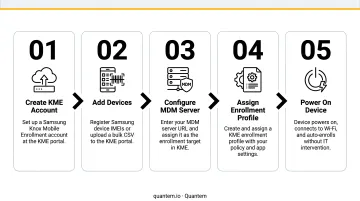
KME supports this zero-touch flow for the full range of Android Enterprise deployment modes - dedicated devices, fully managed devices, and corporate-owned devices with work profiles, covering every major corporate deployment scenario.
KME Setup Requirements and Key Considerations
Prerequisites Checklist
Before purchasing a single device, confirm you have:
- Knox Admin Portal account - requires Samsung approval (up to several business days); the account itself is free
- Samsung-approved reseller - must be part of the Knox Deployment Program; not all resellers qualify
- Knox-enabled Samsung devices - KME does not support non-Samsung Android devices; check the official KME device compatibility list for current supported models
- Firewall exceptions configured - KME requires specific URLs and ports to reach Samsung Knox servers
Advanced Settings and Licensing
KME's core enrollment service is free. However, Samsung's advanced settings documentation confirms that certain features require a Knox Suite Enterprise Plan license:
- Time-based enrollment lock - enforces a 1–30 day window (default: 7 days) before unprovisioned devices are locked out of the EMM
- Offline PIN unlock - generates a one-time PIN in KME so admins can unlock a device without network access
If you're deploying shared devices or kiosks, the enrollment lock is the feature most likely to justify the Knox Suite license cost.
KME Direct for Air-Gapped Environments
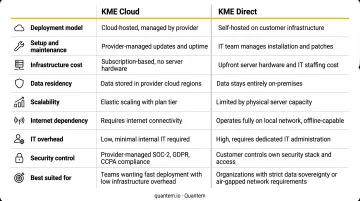
Organizations that cannot allow devices to connect to Samsung's cloud servers (government agencies, secure facilities, and certain healthcare environments) have an alternative. KME Direct is an on-premises PC application where an admin generates a QR code that devices scan to enroll locally, without ever reaching Samsung's cloud.
| KME (Cloud) | KME Direct (On-Premises) | |
|---|---|---|
| Network required | Internet connection | Local intranet only |
| Setup complexity | Lower | Higher (local server required) |
| Best for | Standard enterprise deployments | Air-gapped or restricted networks |
| Reseller dependency | Required for OOBE enrollment | Not required |
Common Issues and Misconceptions About KME
KME Is Not a Device Management Tool
This is the most frequent misunderstanding. KME handles enrollment only - it gets devices registered to an MDM. Everything that happens after enrollment is the MDM's responsibility:
- App distribution and version management
- Policy enforcement and compliance monitoring
- Remote wipe and lock
- Geofencing and location tracking
- Secure browsing controls
An MDM platform like Quantem handles these post-enrollment functions, providing IT teams with centralized visibility and control over the entire device fleet after KME does its job.
The Reseller Dependency Will Catch You Off Guard
KME's automatic zero-touch flow only works if devices are purchased through a Samsung-approved reseller in the Knox Deployment Program. Organizations that buy devices through unauthorized channels, consumer retail, or grey-market suppliers will not have IMEI numbers pre-loaded in the Knox system.
For devices already in the field or purchased outside approved channels, QR code enrollment works as a documented alternative - Samsung confirms it supports both reseller-uploaded and non-reseller-uploaded devices, though it's restricted to EMM-only enrollment.
Map your procurement channel to approved resellers before locking in your deployment timeline - surprises here create delays, not just paperwork.
The Android 15 FRP Limitation
Factory Reset Protection behavior changed with Android 15. Samsung's KME 25.11 release notes confirm that KME no longer supports bypassing Factory Reset Protection on devices running Android 15 or higher, aligning with Google's updated policies.
For organizations deploying newer Samsung hardware running Android 15+, this affects how re-enrollment after factory reset behaves. Before rolling out at scale, verify your device OS versions and test re-enrollment scenarios - this matters most for shared-device or kiosk deployments where factory resets are routine.
Frequently Asked Questions
What is Knox Mobile Enrollment?
Knox Mobile Enrollment is a free, cloud-based Samsung tool that automatically enrolls corporate Samsung devices into an enterprise MDM or EMM solution on first boot. End users simply power on the device; no manual setup is required.
How much does Knox Mobile Enrollment cost?
The core KME enrollment service is free. Advanced features - including time-based enrollment locks and offline PIN unlock - require a paid Knox Suite Enterprise Plan license from Samsung.
Which Samsung devices support Knox Mobile Enrollment?
KME supports Knox-enabled Samsung smartphones and tablets. Because the compatibility list is updated regularly, check Samsung's official KME device compatibility page for current supported models rather than relying on a static list.
What is the difference between KME and KME Direct?
KME is cloud-based and requires devices to reach Samsung's servers on first boot. KME Direct is an on-premises alternative for air-gapped or intranet-only environments, using a locally generated QR code to enroll devices.
Can KME work with MDM solutions other than Samsung Knox Manage?
Yes. KME supports approximately two dozen MDM/EMM platforms including Microsoft Intune, VMware Workspace ONE, IBM MaaS360, and BlackBerry UEM. Check Samsung's Knox partner solutions list for the current list of supported vendors.
What happens if a KME-enrolled device is factory reset?
The device automatically re-enrolls: on reboot, it contacts Samsung's Knox server, confirms registration, and re-joins the assigned MDM without IT intervention. Note that devices running Android 15 or higher have updated FRP behavior, so test this scenario before deploying at scale.