Zero Touch Provisioning (ZTP) cuts through that entirely. A device ships directly to its destination, someone plugs it in, and it configures itself. No technician required.
This guide covers what ZTP is, exactly how it works step-by-step, its core business benefits, where it's applied across industries, and how it compares to similar approaches like One Touch Provisioning and Cisco's Plug and Play.
Key Takeaways
- Unconfigured devices self-configure on first power-on - no on-site IT staff required
- DHCP servers or cloud provisioning services push OS images, configs, and security policies automatically
- Endpoint setup drops from 2–3 hours to under 30 minutes, per a 2024 Forrester study on zero-touch methods
- Applies across network switches, routers, SD-WAN edge devices, smartphones, tablets, and IoT sensors
- Unlike One Touch Provisioning (OTP) or Cisco Plug and Play (PnP), ZTP requires zero manual intervention and works across vendors
What Is Zero Touch Provisioning (ZTP)?
ZTP is a provisioning mechanism that allows unconfigured devices to automatically download and apply their OS software, configuration files, and security policies when they first power on - with no IT staff present at the deployment site. In mobile and endpoint contexts, the same concept is called zero-touch enrollment.
"Provisioning" simply means the process of configuring a device and making it ready to operate within a network or organization. ZTP automates that entire process from the moment a device boots for the first time.
Which Devices Support ZTP?
ZTP works across a wide range of hardware, provided the device firmware supports the protocol:
- Network switches, routers, and firewalls
- SD-WAN edge devices
- Wireless access points
- Smartphones and tablets
- Laptops and desktop computers
- Servers
- IoT sensors and connected devices
The Problem ZTP Solves
Traditional provisioning requires a skilled IT person at every deployment location. For a company opening 50 new retail locations or expanding a hospital network across 20 sites, that means separate trips to each site, compounding risks of configuration errors and delays waiting on technician availability. The logistics simply don't scale.
ZTP makes physical presence irrelevant. A device ships directly from the manufacturer to any location - a clinic, warehouse, or retail store - and local staff just plug it in.
That shift is happening at scale. The global ZTP market was valued at $2.73 billion in 2022 and is projected to reach $5.98 billion by 2030, growing at 10.3% CAGR. The IETF formalized secure ZTP practices in RFC 8572 (published April 2019), establishing standards for authenticated device bootstrapping.
How Does Zero Touch Provisioning Work? Step-by-Step
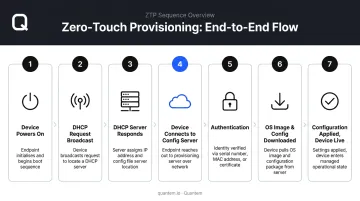
ZTP initiates only when a device is in its factory default state - either shipped new from the manufacturer or reset to factory defaults. From that point, the device handles its own setup without any IT involvement.
Steps 1–3: DHCP Handshake
When the device powers on, its preinstalled firmware runs a DHCP client and broadcasts a request for network access. The DHCP server responds with:
- An assigned IP address
- The file server location (via TFTP, FTP, HTTP, or HTTPS)
- Gateway address and domain details
- Bootfile name and path (carried in DHCP Options 43, 66, 67, or 150)
DHCP is the most widely used ZTP method for network devices because it centralizes configuration management without requiring pre-installed credentials on each device.
Steps 4–5: File Retrieval and Authentication
Using the server location from DHCP, the device connects to the configuration or cloud server and authenticates - typically via serial number, MAC address, or a pre-loaded certificate. It then downloads the OS image and configuration file assigned specifically to that device.
Steps 6–7: Configuration Applied, Device Goes Live
The downloaded configuration installs and commits, making the device fully operational for its intended role with no technician involvement and no manual steps.
Not every deployment goes perfectly. If something fails - a corrupted file or network interruption - ZTP retries automatically. Juniper's implementation, for example, attempts file retrieval up to six times, with 10–15 seconds between each attempt, before restarting the ZTP state machine.
Alternative ZTP Methods
DHCP-based ZTP covers most network infrastructure scenarios, but two other approaches handle different environments:
- Cloud phone-home ZTP - Used for smartphones, tablets, and laptops. The device connects to a cloud provisioning server over HTTPS on first boot using pre-assigned credentials (Google Android Zero-Touch, Microsoft Windows Autopilot, and Apple Automated Device Enrollment all use this model)
- USB-based ZTP - Available for air-gapped or offline environments where no internet or DHCP access exists; a USB drive carries the bootstrap configuration
Key Benefits of Zero Touch Provisioning for Enterprises
Dramatically Faster Deployment
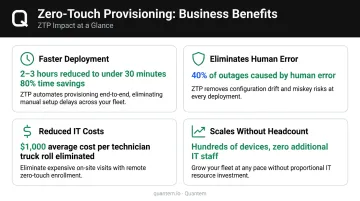
Manual device setup is slow. A 2024 Forrester TEI study commissioned by Microsoft found that PC setup for new devices dropped from 2–3 hours to under 30 minutes using zero-touch enrollment - an 80% reduction in onboarding time. For a 30,000-device fleet, that difference is measured in thousands of labor hours per deployment cycle.
Eliminates Human Error and Configuration Drift
Every device gets an identical configuration pulled from a centralized template. No skipped steps, no mistyped IP addresses, no credential mismatches.
The risk from manual processes is real. Uptime Institute's 2025 outage analysis found that nearly 40% of organizations suffered a major outage caused by human error in the prior three years. Of those, 85% were traced to staff failing to follow procedures - or to flawed procedures themselves. Automated provisioning removes that failure mode entirely.
Reduced IT Labor and On-Site Costs
With ZTP, devices ship directly from the manufacturer to any location. Non-technical staff - a nurse, a store associate, a warehouse worker - unbox and power on. That's it.
Every eliminated on-site IT visit has a cost attached. A Forrester field service analysis pegged the average cost of dispatching a technician at $1,000 per truck roll. At scale, ZTP makes that cost disappear for initial device deployment.
Stronger, More Consistent Security Posture
Automated provisioning enforces standardized security policies from the moment a device first connects:
- Applies encryption and MFA requirements before a user can log in
- Enforces password policies and role-based access controls automatically
- Restricts unauthorized apps and flags non-compliant devices in real time
This is especially critical in regulated industries. Healthcare organizations under HIPAA and financial institutions can't afford per-device configuration inconsistencies - ZTP makes compliance automatic from day one.
Scalability Without Proportional IT Headcount Growth
Organizations can add hundreds of devices across new locations without hiring additional IT staff. The IT team manages everything remotely from a central dashboard, while ZTP handles provisioning across scenarios like:
- New retail store or branch office openings
- Hospital or clinic expansions with fresh device fleets
- Seasonal warehouse staffing surges requiring rapid deployment
ZTP Use Cases: Where Is It Applied?
Networking Infrastructure
This is where ZTP originated and where it's still most mature. Routers, switches, firewalls, and SD-WAN edge devices are pre-registered in a central system, shipped to branch locations, and configured automatically on power-on.
SD-WAN deployments benefit particularly here. Major vendors have built ZTP directly into their edge device workflows:
- Cisco uses ZTP for vEdge devices and PnP for IOS XE SD-WAN devices
- Palo Alto Prisma SD-WAN uses a ZTP bootstrap service for ION device registration
- Fortinet supports ZTP and Low Touch Provisioning (LTP) through device blueprints in its SD-WAN architecture
Remote branch edges come online without a technician making the trip.
Enterprise Mobile Device Management (MDM) and Endpoints
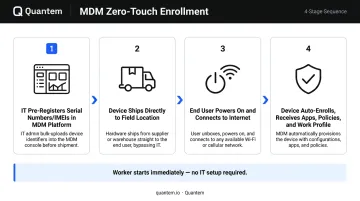
For smartphones, tablets, rugged handhelds, and laptops, zero-touch enrollment works through cloud-based provisioning:
- IT pre-registers device serial numbers or IMEIs in the MDM platform
- Devices ship directly to the field - clinic, store, warehouse, or field office
- On first power-on and internet connection, the device auto-enrolls, receives assigned apps and security policies, and configures the work profile
- The worker can start immediately
A regional hospital network deploying Windows devices across dozens of wards and departments, for example, can ship hardware directly to each location and have devices enrolled, locked down, and ready for clinical staff - without dispatching a single IT technician on-site.
IoT Deployments at Scale
IoT ZTP is a different challenge - device counts are enormous and manual configuration is never an option. Azure IoT Hub Device Provisioning Service enables zero-touch, just-in-time provisioning designed to scale to millions of devices. AWS IoT supports fleet provisioning templates and just-in-time registration for similar scale.
Smart buildings, industrial automation systems, agricultural sensor networks, and connected infrastructure all rely on ZTP to make mass IoT deployment logistically viable.
ZTP vs. One Touch Provisioning vs. Plug and Play (PnP)
ZTP vs. One Touch Provisioning (OTP)
Both automate device configuration, but OTP requires exactly one manual step - typically IT scanning a QR code, entering enrollment credentials, or confirming a device identity on-screen. ZTP requires zero interaction beyond plugging the device in.
OTP is used when full automation isn't possible - for example, when a device needs a one-time identity confirmation before joining a managed fleet, or when enrollment policies require a credential not stored in the provisioning template.
ZTP vs. OEM-Specific Enrollment Programs
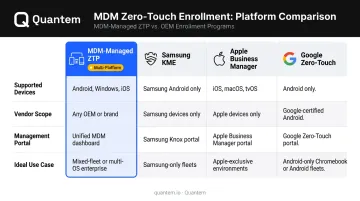
OEM enrollment programs - such as Samsung Knox Mobile Enrollment (KME), Apple Business Manager (ABM/DEP), and Google Zero-Touch Enrollment - are conceptually similar to ZTP: devices self-configure on first boot without IT handling them. The key difference is portability.
ZTP through an MDM platform is vendor-agnostic - the same provisioning workflow applies across Android, Windows, and iOS devices regardless of manufacturer. OEM programs are device-specific, meaning a Samsung KME workflow won't apply to a Zebra rugged device or a Windows tablet. In mixed-device environments, managing ZTP through a central MDM platform is the more scalable approach; in single-OEM fleets, the manufacturer's native program may offer tighter integration.
Key distinctions at a glance:
- MDM-managed ZTP: Works across device brands and operating systems from one console
- Samsung KME: Deep Samsung integration, limited to Samsung Android hardware
- Apple Business Manager: Required for Apple devices, does not extend to Android or Windows
- Google Zero-Touch: Android Enterprise-native, Google-managed portal separate from your MDM
Comparison Table
| ZTP (MDM-managed) | OTP | OEM Enrollment (KME/ABM/GZT) | |
|---|---|---|---|
| User Interaction Required | None | One step (e.g., credential entry) | None (device-manufacturer managed) |
| Primary Method | MDM platform + enrollment token | MDM platform + manual confirmation | OEM portal + manufacturer binding |
| Device Compatibility | Multi-platform (Android, Windows, iOS) | Multi-platform | OEM-specific hardware only |
| Best Suited For | Mixed-device fleets, large-scale rollouts | Environments needing partial automation | Single-brand device fleets |
ZTP and Mobile Device Management: Deploying Devices at Scale
How Zero-Touch Enrollment Works in MDM
The MDM version of ZTP - zero-touch enrollment - follows a specific sequence:
- IT pre-registers devices in the MDM platform using serial numbers or IMEIs before devices ship
- Devices ship directly from manufacturer or distributor to any end-user location
- End user powers on the device and connects to the internet
- Device auto-enrolls in the MDM system, downloads assigned policies, apps, and work profile configuration
- Device is ready to use - the worker never interacts with any setup wizard or IT process
The entire sequence runs without any manual setup steps. A warehouse associate or field technician simply turns the device on.
Why It Matters for Distributed Industries
For organizations managing device fleets across multiple facilities, zero-touch enrollment changes the logistics entirely:
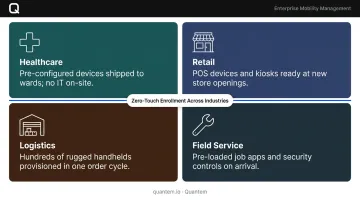
- Healthcare networks can deploy pre-configured devices for patient check-in, clinical documentation, or diagnostic imaging without IT visiting each ward
- Retail chains get fully configured POS devices, inventory scanners, and kiosks ready at new store openings from day one
- Logistics operations can provision hundreds of rugged handhelds during seasonal staffing expansions in a single order cycle
- Field service teams receive pre-loaded devices with job management apps and security controls already applied
IT maintains full visibility and policy control from a central dashboard. Local staff never touch a settings menu.
Quantem: Zero-Touch Enrollment Built Into Every Plan
Quantem is a cloud-based MDM platform built for exactly this kind of distributed deployment. Zero-touch enrollment is available across all pricing plans for Android and Windows devices, including the entry-level Essential plan. IT teams can configure policies, push app catalogs, enforce security controls, and manage the entire device fleet remotely from a single dashboard, with no scripting required.
The platform's toggle-based policy interface means IT administrators without deep scripting backgrounds can set up and manage complex provisioning workflows. Teams typically see productivity gains within the first few weeks of deployment.
For organizations evaluating MDM with zero-touch capabilities, Quantem offers a 21-day full-access free trial with no credit card required - a practical way to test zero-touch enrollment against a real device fleet.
Frequently Asked Questions
What is zero touch provisioning?
ZTP is a mechanism that allows unconfigured devices to automatically download and apply OS software, configuration files, and security policies when they first power on. No IT staff are needed at the deployment location - devices configure themselves using DHCP or cloud-based provisioning servers.
What is zero touch provisioning in SD-WAN?
In SD-WAN, ZTP automates configuration of remote WAN edge devices at branch offices. A device is shipped to the site, powered on, and automatically retrieves its network configuration from the central SD-WAN controller. No technician is required at the branch location.
What is the difference between ZTP and PnP?
ZTP is a vendor-agnostic open standard using DHCP and cloud protocols, applicable across hardware from multiple manufacturers. Cisco Plug and Play (PnP) is Cisco-specific, requiring Cisco Catalyst Center infrastructure. ZTP suits mixed-vendor environments; PnP integrates more deeply within Cisco-only networks.
What devices support zero touch provisioning?
ZTP supports network switches, routers, firewalls, wireless access points, smartphones, tablets, laptops, servers, and IoT sensors - any device whose firmware supports ZTP protocols and can reach a provisioning server at startup.
Is zero touch provisioning secure?
Yes. ZTP uses encrypted HTTPS communication and device authentication via certificates, serial numbers, or hardware identifiers. RFC 8572 (SZTP) adds mutual authentication between device and bootstrap server. MDM platforms extend this further with remote wipe, compliance enforcement, and policy-based access controls.
How does zero touch provisioning work in mobile device management (MDM)?
In MDM, devices are pre-registered by serial number or IMEI before shipping. On first power-on, the device auto-enrolls in the MDM platform, receives assigned apps and policies, and fully configures its work profile. The end user doesn't need to do anything beyond turning it on. Platforms like Quantem include zero-touch enrollment across all plans, supporting Android, Windows, and iOS fleets at scale.