This guide is written for IT administrators, operations leads, and decision-makers in healthcare, retail, logistics, and field services who need to understand how enterprise device provisioning actually works - and why getting it right matters at scale.
Key Takeaways
- Enterprise device provisioning covers registering, authenticating, configuring, and deploying devices before they reach corporate networks
- Unmanaged or improperly provisioned devices are measurably riskier - users on unmanaged devices are 71% more likely to be infected
- Zero-touch provisioning eliminates manual IT setup, making large-scale rollouts faster and more consistent
- Provisioning and MDM are related but distinct: provisioning is the onboarding step; MDM is the ongoing management layer
- HIPAA, PCI DSS, and the FTC Safeguards Rule each have direct requirements tied to provisioning controls
What Is Enterprise Device Provisioning?
Enterprise device provisioning is the end-to-end process of preparing a device - laptop, mobile, tablet, or dedicated kiosk - so it is registered, authenticated, configured with corporate policies, and ready for authorized use.
The word "enterprise" carries weight here. Provisioning at organizational scale means applying that same preparation consistently - across every device that will ever connect to your network, regardless of location, device type, or the team receiving it.
What Provisioning Is Designed to Achieve
Every provisioned device should arrive in the hands of an end user with:
- A verified identity registered in the management system
- Required security settings applied (encryption, screen lock, access restrictions)
- Approved applications installed
- Appropriate access permissions tied to the user's role or the device's function
Provisioning vs. Device Management
These two terms are frequently used interchangeably, but they serve different purposes:
| Dimension | Device Provisioning | Mobile Device Management (MDM) |
|---|---|---|
| When | Initial onboarding | Ongoing, post-deployment |
| Purpose | Prepare device for authorized use | Monitor, update, enforce policies |
| Trigger | First enrollment | Continuous |
| Outcome | Compliant baseline configuration | Sustained compliance over time |
Provisioning sets the foundation; MDM maintains it. An effective enterprise device program depends on both working in sequence.
Why Enterprise Device Provisioning Matters
Manual device setup doesn't scale. A 2022 endpoint survey reported by Help Net Security found that the average enterprise manages around 135,000 endpoint devices - with 48% of those endpoints at risk because they were undetected or outdated.
The Security Case
Unprovisioned devices bypass the controls your security team spent months designing. Microsoft's security research found users are 71% more likely to be infected on unmanaged devices because IT cannot set the right configurations, patch vulnerabilities, or prevent shadow apps. A device that skips formal provisioning also enters your network without:
- Certificate-based identity verification
- Enforced encryption settings
- Network access controls tied to role
- Visibility from your monitoring tools
The Compliance Argument
Regulated industries don't get to treat provisioning as optional:
- HIPAA requires technical safeguards including access controls, audit logging, and transmission security for devices handling patient data
- PCI DSS v4.0.1 mandates secure device configurations (Requirement 2), role-based access (Requirement 7), and access logging (Requirement 10)
- FTC Safeguards Rule requires financial institutions to implement technical and organizational controls - device configuration and access management are directly implicated
Provisioning creates the audit trail that proves devices were configured correctly from day one. Without it, demonstrating compliance is nearly impossible to prove.
The Operational Cost
A Forrester Consulting study commissioned by Microsoft found that PC setup time dropped from 2-3 hours to under 30 minutes with automated provisioning. The same study reported 25% fewer endpoint-management help desk tickets after automation was implemented.
Across a 500-device fleet, that time reduction alone translates to roughly 1,000+ hours of IT labor saved per deployment cycle - before factoring in reduced help desk load.
How Enterprise Device Provisioning Works
A device moves from unboxed hardware to fully managed endpoint through a defined sequence: registration, authentication, configuration, assignment, and verification. In modern environments, most of this can be automated through an MDM platform - devices can be pre-configured before they ship, reducing IT intervention to near zero even for large-scale rollouts.
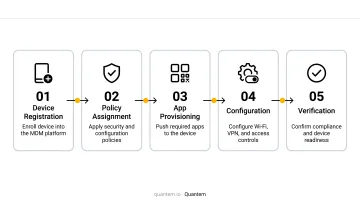
Here's how each step works:
Step 1: Device Registration and Identity Verification
The process begins when the device is registered in the management system. IT captures unique identifiers - serial numbers, IMEI, or hardware IDs - before any access is granted. This step establishes that the device is known and approved.
For zero-touch deployments, this registration happens before the device ever leaves the warehouse. Android Zero-touch, Apple Business Manager, and Windows Autopilot all support pre-registration through authorized reseller channels. With the device identity confirmed, the next step is proving it belongs to the organization.
Step 2: Authentication and Enrollment
The device proves it belongs to the organization. Depending on the platform, this happens via:
- Enrollment token or QR code - scanned during initial setup
- Zero-touch configuration - pulled automatically on first boot
- NFC bump - for supported Android devices in close-proximity setups
This step links the physical device to a specific enterprise, policy set, and user or role within the MDM platform. Quantem supports all three methods, including zero-touch enrollment on every plan - not just enterprise tiers.
Step 3: Policy and Configuration Application
Once authenticated, the MDM platform pushes a pre-defined policy profile to the device. This typically includes:
- Wi-Fi credentials and VPN configurations
- Screen lock and encryption enforcement
- Approved application installs
- Access restrictions and content filters
- Geofencing rules (where applicable)
This is where consistency is enforced at scale. One policy profile, applied identically to every device in a group - no configuration drift. Once policies are confirmed, the device is ready to be assigned to its intended user or use case.
Step 4: User Assignment and Access Provisioning
The device is assigned to a specific user, team, or use case. This determines what corporate resources the device can reach:
- Kiosk device - locked to a single app or defined set of apps
- Field worker device - GPS-enabled with relevant work tools
- BYOD device - work profile active, personal data untouched
- Office employee device - full access to collaboration and productivity tools
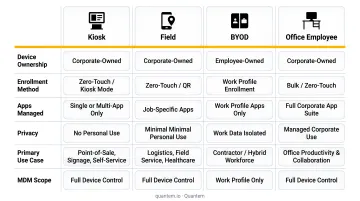
The assigned role controls exactly what each user can do and what data they can reach - nothing more, nothing less.
Types of Enterprise Device Provisioning
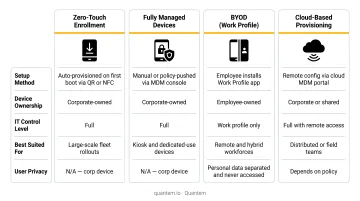
Different environments require different approaches. The right method depends on device ownership model, deployment scale, and the level of IT control the organization needs.
Zero-Touch Provisioning
Zero-touch provisioning allows devices to self-configure automatically when powered on and connected to the internet. IT staff never need to physically handle each unit.
Best for: Large-scale corporate rollouts, remote or distributed teams, organizations onboarding dozens of new devices per month.
Requirements: Devices must be purchased through authorized channels and pre-enrolled with a provisioning service. Google's Android zero-touch, Apple's Automated Device Enrollment, and Windows Autopilot all support this model with different trigger mechanisms.
Fully Managed Device Provisioning
For company-owned devices intended exclusively for work use, IT controls all apps, settings, and usage. Users have no ability to install unauthorized software or change device settings.
Typical scenarios: Retail point-of-sale kiosks, warehouse barcode scanners, hospital tablets locked to patient-facing apps, delivery driver handhelds.
Quantem's platform supports kiosk configurations across multiple plan levels, allowing IT teams to lock devices to specific applications without scripting.
BYOD and Work Profile Provisioning
BYOD provisioning creates a secure, containerized work environment on an employee's personal device. Corporate data lives inside the work profile; personal apps, photos, and data stay completely separate.
82% of organizations actively enable BYOD to some extent, so most enterprises need a reliable strategy for it. Android's Work Profile and Apple's User Enrollment both provide native separation mechanisms - the MDM manages only the work container, not the personal side of the device.
Quantem supports Android Enterprise Work Profile across all pricing tiers, making this capability accessible regardless of fleet size or budget.
Cloud-Based and Remote Provisioning
Cloud-based provisioning lets IT configure and deploy devices remotely through a central management console. Administrators can push policies, assign profiles, and verify enrollment status from anywhere - no physical access required.
Best for: Distributed workforces and operations that span multiple sites or geographies:
- Remote employees onboarding across different regions
- Multi-location retail and healthcare deployments
- Logistics and field service teams where devices ship directly to end users
Best Practices for Enterprise Device Provisioning
Automate Wherever Possible
Manual provisioning is slow and inconsistent. Zero-touch or QR-based enrollment eliminates both problems, and frees IT staff from repetitive setup tasks so they can focus on higher-value work.
Platforms like Quantem offer zero-touch enrollment capabilities that let devices arrive at end-user locations preconfigured - no IT presence required at the point of deployment.
Define Policy Templates Before Deployment
The biggest provisioning mistake is starting the enrollment process before policies are defined. Role-based templates should be ready before the first device ships:
- Field workers: GPS enabled, approved field apps, restricted personal app installs
- Office employees: productivity tools, collaboration apps, standard security settings
- Kiosk devices: single or multi-app lockdown, no user access to device settings
Every device should receive its configuration automatically based on its assigned role - no manual customization per device.
Role-based templates also make it easier to enforce least-privilege access by default. Each device gets only the permissions its function requires - an inventory scanner doesn't need email access, and a customer-facing kiosk has no business touching internal HR systems.
Verify Compliance Certification in Your Provisioning Platform
The provisioning platform itself is part of your compliance posture. When evaluating an MDM or provisioning service, look for:
- SOC 2 - evidence of the provider's internal control environment
- GDPR compliance - required if provisioning data involves EU device or user data
- CCPA compliance - relevant for California-based operations or users
Quantem holds SOC-2, GDPR, and CCPA certifications. The provisioning infrastructure itself doesn't introduce a compliance gap, and end-to-end audit trails support the reporting requirements common in healthcare and retail environments.
Establish a Regular Audit Cycle
Provisioning isn't a one-time event. Devices fall out of intended configuration states over time - through OS updates, user behavior, or policy changes that weren't pushed retroactively.
Schedule regular audits to verify that provisioned devices remain in the configuration state they were deployed in. Your MDM platform should surface any device that has drifted from baseline.
Frequently Asked Questions
What is a device provisioning service?
A device provisioning service is a managed process or platform that automates the registration, authentication, configuration, and deployment of enterprise devices. It ensures each device meets security and policy requirements before connecting to organizational systems - typically through an MDM platform that handles enrollment, policy application, and access assignment.
What is the difference between device provisioning and MDM?
Provisioning is the initial setup phase - it prepares the device for authorized use. MDM is the ongoing management layer that monitors, updates, and enforces policies after deployment. Both are necessary, but they serve different stages of the device lifecycle and require different planning.
What is zero-touch provisioning and how does it work?
Zero-touch provisioning allows devices to self-configure automatically on first boot when connected to the internet. The device checks for a pre-assigned enterprise configuration, downloads the appropriate policy controller, and applies all settings without IT intervention - provided devices are pre-registered through an authorized provisioning channel before shipping.
Can enterprise device provisioning support both company-owned and employee-owned devices?
Yes. Company-owned devices can be fully managed or configured for dedicated use cases like kiosks or field tools. Employee-owned BYOD devices use a work profile model - a containerized work environment sits alongside personal apps, with corporate data kept separate and personal data left untouched.
What security risks are involved in enterprise device provisioning?
Key risks include device spoofing during enrollment, weak authentication methods, manual configuration errors, and lack of visibility into devices that bypass the provisioning process entirely. Automated provisioning with strong enrollment authentication significantly reduces each of these risks.
How long does it typically take to provision enterprise devices at scale?
Manual provisioning has been documented at 2-3 hours per device in enterprise PC setups. Automated provisioning drops that to under 30 minutes, while zero-touch provisioning goes further - devices become fully configured and policy-compliant within minutes of first boot, with near-zero end-user involvement.