Introduction
Setting up a single device manually can take anywhere from one to several hours - imaging, patching, configuring network settings, installing apps, assigning permissions. Multiply that across 50, 200, or 500 devices, and the math becomes painful fast. According to Forrester's analysis of endpoint environments, provisioning "often takes hours per machine" in complex imaging scenarios, and research from FleetDM shows that 25% of IT teams manage 250,000+ endpoints. Manual processes simply don't hold up at that scale.
Device provisioning software solves this by automating enrollment, applying security policies, and getting devices deployment-ready without a technician touching each one. The result: faster rollouts, fewer configuration errors, and employees who can actually start working on day one.
Here's what this guide covers:
- What device provisioning software is and how it works
- The main provisioning methods and when to use each
- Features worth evaluating before you buy
- Real-world use cases across industries
- How to pick the right platform for your environment
Key Takeaways
- Device provisioning software automates registration, configuration, and policy enforcement across every device in your fleet
- Zero-touch provisioning removes manual IT setup - devices configure themselves on first boot
- Essential features include policy management, BYOD work profiles, kiosk mode, and compliance controls
- The right platform depends on fleet size, supported platforms (Android, Windows), and security requirements
- Pricing typically ranges from $1–$3 per device for platforms covering healthcare, retail, logistics, and education use cases
What Is Device Provisioning Software?
Device provisioning software automates how devices get registered, configured, secured, and deployed - whether they're corporate-owned or employee-owned. The goal: get every device ready for productive use without IT staff touching each one manually.
It goes well beyond "setting up" a device. As NIST SP 800-124r2 defines it, this category of technology ties device identity to users and organizational roles, enforces security policies, and maintains compliance throughout the device lifecycle.
Provisioning vs. Device Management
These terms are often used interchangeably, but they describe different stages:
| Stage | What It Covers |
|---|---|
| Provisioning | Initial enrollment, identity setup, configuration, policy assignment |
| Device Management (MDM/UEM) | Ongoing monitoring, compliance enforcement, app updates, remote wipe |
Most modern platforms handle both under one roof. Provisioning gets a device into a known, trusted state - management keeps it there.
Supported Device Types
Enterprise provisioning software typically covers:
- Smartphones and tablets (Android, Windows, iOS)
- Laptops and desktop computers
- Kiosks and digital signage displays
- POS terminals and handheld scanners
- IoT endpoints
For organizations running mixed device fleets, single-platform tools create gaps in coverage and add admin overhead. Quantem supports Android and Windows devices across all plan tiers, with kiosk provisioning available from the entry-level plan upward - no premium upgrade required.
How Device Provisioning Software Works
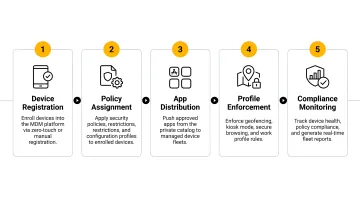
Step 1 - Device Registration
Before any access is granted, the software captures unique hardware identifiers - serial numbers, IMEI numbers, device IDs - to create a verified inventory. Common registration methods include QR code scanning, CSV import for bulk registration, and manufacturer-linked zero-touch programs.
Step 2 - Authentication and Identity Establishment
Once registered, the software verifies the device is legitimate using certificates, tokens, or hardware-backed identity mechanisms. It then associates the device with a specific user, role, or organizational unit. Without this step, unauthorized or spoofed devices could slip into the environment undetected.
Quantem enforces AES 256-bit encryption for data at rest and HTTPS with TLS 1.2 for data in transit as part of this security layer.
Step 3 - Configuration and Policy Assignment
Predefined policy templates are automatically pushed to the device, covering:
- Wi-Fi and network settings
- App installations and restrictions
- Password policies and encryption requirements
- Screen timeout, camera access, USB controls
- Device-specific configurations (kiosk lockdown, work profile mode)
Quantem's dashboard uses a toggle-based interface with 250+ pre-built policy controls, so admins configure policies without writing a single line of script. Push policies to individual devices, groups, or the entire fleet in one action.
Step 4 - Enrollment and Activation
The device is formally enrolled into the MDM or provisioning platform, activating remote management capabilities. For BYOD scenarios, this step creates an Android Enterprise work profile: a containerized environment that keeps corporate apps and data completely isolated from personal content on the same device.
The employee keeps full control of their personal side. IT manages only the work profile.
Step 5 - Ongoing Compliance Monitoring
After enrollment, the software continuously monitors enrolled devices for:
- Policy violations or unauthorized configuration changes
- Outdated software or missing security patches
- Device status (online/offline, battery, location)
- Geofence boundary breaches
Quantem's Enterprise plan includes event-based alerts, 30-day device history logs, and geofencing with automated responses - such as device lock or alarm triggers when a device exits a defined boundary.
Types of Device Provisioning Methods
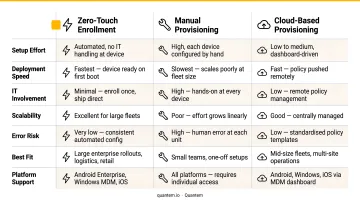
Zero-Touch Provisioning
Zero-touch provisioning removes IT from the equation entirely. A device powers on, connects to the internet, and configures itself automatically - no IT technician required. Devices are pre-registered with the provisioning platform by serial number, so the correct profile and policies apply the moment the device boots.
Google's Android zero-touch enrollment follows exactly this model: on first boot, the device checks for an assigned enterprise configuration and downloads the device policy controller. Microsoft's Windows Autopilot works similarly, using device hardware hash to match the device to a pre-configured deployment profile.
Zero-touch works best for:
- Large fleet rollouts across multiple locations
- Remote workers receiving devices by mail
- Retail or healthcare deployments where IT staff can't be on-site
Manual and Image-Based Provisioning
Traditional provisioning means IT manually installs an OS image, configures settings, and installs applications on each device before deployment. It works - but it doesn't scale. Microsoft's own documentation limits manual Autopilot CSV registration to 500 devices, and that's for testing scenarios, not production rollouts.
The practical downsides are hard to ignore:
- Time-intensive - each device requires hands-on setup
- Prone to human error with no automated validation
- Nearly impossible to standardize across distributed teams
Cloud-Based and Remote Provisioning
Cloud-based provisioning lets IT configure and deploy devices remotely through a central platform, with no physical access or on-site network required. This model fits hybrid workforces, multi-site businesses, and BYOD environments where IT can't handle each device directly.
Quantem, for example, is built entirely around this model - an admin in one city can provision devices shipping to 10 different locations simultaneously, without touching a single physical unit.
Key Features to Look for in Device Provisioning Software
Zero-Touch Enrollment
Zero-touch enrollment should be a standard feature, not a premium add-on. Platforms that gate it behind higher tiers force smaller organizations to pay more for basic automation. Quantem includes zero-touch enrollment across all plans - Essential, Professional, and Enterprise - currently supporting Android devices, with no additional fee.
Policy and Configuration Management
Look for a toggle-based or template-driven interface that doesn't require scripting. Admins should be able to:
- Define app restrictions and network rules from a central dashboard
- Push policy changes to any number of devices instantly
- Apply different policy sets to different device groups
250+ pre-built controls with no scripting required is the standard to hold any platform to.
BYOD and Work Profile Support
Enterprise provisioning software must handle BYOD properly. That means creating a secure, containerized work profile on personal devices that keeps corporate data, apps, and communications completely separate from personal content. SOTI's enterprise mobility research found that 35% of organizations use BYOD policies - so this isn't a niche requirement. Quantem's Android Enterprise work profile support is available across all pricing tiers.
Kiosk Mode and Dedicated Device Configuration
Kiosk mode locks a device to a single app or defined set of apps - essential for:
- Retail POS terminals
- Hospital patient check-in stations
- Warehouse barcode scanners
- Field service tablets
Some platforms charge extra for kiosk mode. Kiosk functionality should be available across all plan tiers, with advanced configuration options reserved for higher tiers - not the feature itself.
Security, Compliance, and Audit Controls
Device provisioning software should enforce security baselines and support compliance with relevant standards. Key controls to verify:
- Encryption: AES 256-bit at rest, TLS 1.2 in transit
- Remote wipe: Full or selective, for lost or decommissioned devices
- Jailbreak/root detection: Block enterprise access on compromised devices
- Audit logs: Activity history for compliance review
- Geofencing: Location-based policy enforcement
- Standards compliance: SOC-2, GDPR, CCPA certifications
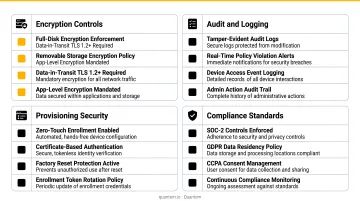
Quantem holds SOC-2, GDPR, and CCPA certifications. For healthcare or finance deployments, these certifications determine whether a platform can legally operate in your environment - treat them as hard requirements during evaluation.
Common Use Cases for Device Provisioning Software
Healthcare
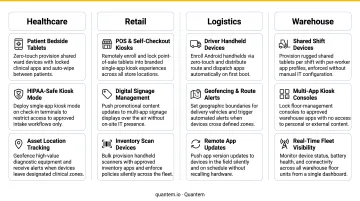
Hospitals, diagnostic labs, and home healthcare agencies manage some of the most security-sensitive device fleets in any industry. Sentara Health, for example, is equipping clinicians across 12 hospitals with nearly 6,000 specialized smartphones to streamline care workflows.
Zero-touch deployment means devices arrive pre-configured with the right apps and restrictions in place. Strict security controls - remote wipe, encrypted profiles, role-based access - align with HIPAA's requirements for protecting ePHI. Quantem manages this end-to-end for healthcare organizations like ATHMA Hospitals, from initial enrollment through ongoing compliance.
Retail, Hospitality, and Field Service
Provisioning hundreds of POS terminals, handheld scanners, or technician tablets across multiple locations is a coordination challenge - especially when IT can't be on-site. Retail chains and field service organizations handle this through centralized policy management: devices are locked to intended workflows, and updates roll out remotely without dispatching support staff.
Quantem's geofencing capabilities provide location-based control for field service scenarios, triggering alerts or automated actions when devices move outside expected zones.
Logistics and Warehouse Operations
Zebra's Warehousing Vision Study, which surveyed 1,403 IT and operations decision-makers, found that 86% of warehouse associates agree that implementing connected devices and warehouse technologies helps attract and retain workers. Managing ruggedized Android devices across warehouse floors and delivery fleets requires zero-touch deployment for fast onboarding and geofencing to track mobile workers across large geographic areas. Quantem's integration with Exhilar connects device management APIs to delivery route planning and HRMS systems, giving operations teams a unified view of devices and the workers using them - without manual data syncing between platforms.
How to Choose the Right Device Provisioning Software
Start by matching the platform to your fleet size and device mix. A 20-device team has different needs than a hospital network managing 500+ mixed Android and Windows endpoints. Confirm the platform supports every OS in your environment before evaluating anything else.
Calculate total cost of ownership, not just list price. Hidden costs compound quickly: feature paywalls for kiosk mode, premium support tiers, migration fees, and per-device rates that scale poorly as the fleet grows.
As a reference point, Quantem runs $1–$3 per device per month (billed yearly) across three tiers - Essential, Professional, and Enterprise - with zero-touch enrollment, kiosk mode, and BYOD support available on all plans. The 21-day free trial requires no credit card and carries no cancellation fees.
For healthcare, finance, or any regulated environment, verify compliance credentials before signing anything. SOC-2, GDPR, and CCPA certifications should be built into the platform - not bolted on as third-party add-ons.
Once you've evaluated these criteria, take them directly into vendor conversations. These questions will surface the gaps most sales decks won't mention:
Questions to ask every vendor:
- Is zero-touch enrollment included in base plans or gated?
- Are kiosk mode and BYOD support available at all tiers?
- What does migration support actually cover?
- How are compliance certifications maintained and documented?
- What are the per-device fees as the fleet grows?
Frequently Asked Questions
What is device provisioning?
Device provisioning is the process of registering, configuring, and securing a device - assigning policies, apps, and access permissions - so it's ready for organizational use before it reaches the end user.
What are common provisioning tools?
The most common options include cloud-based MDM platforms (such as Quantem, Microsoft Intune, VMware Workspace ONE), endpoint management solutions, and OS-native tools like Windows Configuration Designer. Cloud-based MDM platforms are now the most widely adopted because they support remote management without physical access.
What is the difference between device provisioning and device enrollment?
Enrollment is the specific step where a device gets registered and added to the management system. Provisioning is the broader process that includes enrollment plus configuration, policy application, and access assignment - everything required to make the device work-ready.
What is zero-touch provisioning?
Zero-touch provisioning is an automated method where a device configures itself on first boot and internet connection, applying the correct policies and settings without any manual IT involvement. It's ideal for large-scale rollouts and remote deployments where IT can't physically handle each device.
What devices can be provisioned using MDM software?
Modern MDM platforms can provision smartphones, tablets, laptops, desktops, kiosks, POS terminals, and IoT endpoints. Platform coverage varies - Quantem, for example, covers Android and Windows across all plan tiers, while some platforms also extend to iOS and macOS.