Introduction
Most Android devices used in business settings are flying blind - no policies, no remote wipe capability, no enforcement. According to IDC data cited by BizTech, 85% of Android devices sold to businesses are not managed by any EMM tool. That's a massive security gap, and for many small and mid-sized organizations, the traditional answer - deploying a full MDM platform - feels out of reach due to cost, complexity, or a lack of dedicated IT staff.
Android Enterprise Essentials (AEE) is Google's response: a lightweight, automatic mobile security service that applies a pre-configured baseline of protections to business Android devices without requiring IT configuration or policy management expertise.
Key Takeaways:
- AEE automatically enforces six security controls: screen lock, encryption, Play Protect, Play-only installs, remote wipe, and tamper-proof policies
- Devices arrive policy-ready through Google-certified resellers using Zero-Touch Enrollment
- AEE is ideal for SMBs with 5–200 devices and no dedicated IT infrastructure
- It does not support BYOD, custom policies, analytics, or geofencing
- Growing businesses that need those capabilities should consider a full MDM platform like Quantem
What Is Android Enterprise Essentials?
Google describes AEE as a "simple, secure management service" built by the Android team to protect business devices and data - designed specifically for organizations with simpler needs and limited IT resources.
The Problem It Solves
Many SMBs know mobile security matters. They also know their employees are using unmanaged devices to access company email, customer data, and internal systems. The barrier is rarely awareness. Traditional MDM solutions require IT expertise to configure, maintain, and troubleshoot - and most SMBs simply don't have that capacity. AEE removes that obstacle by making security automatic.
Rather than giving IT admins a blank canvas of configurable policies, AEE ships with a fixed, pre-determined set of critical controls already applied. There's nothing to configure. Devices arrive protected.
How AEE Differs From Full EMM Platforms
AEE is intentionally limited - and that's the point. It doesn't offer:
- Granular policy customization or role-based access controls
- BYOD work profile separation
- App allow/blocklists or application catalog management
- Device analytics, location tracking, or geofencing
- Compliance reporting
AEE guarantees every enrolled device meets a minimum security standard - nothing more. For businesses that need more than that baseline, Google itself acknowledges that organizations can "upgrade to more complete management" when they're ready.
How It's Distributed
That distribution model reflects how AEE reaches businesses in the first place. AEE is available exclusively through Google-certified resellers, not retail channels. It is compatible only with devices that support Zero-Touch Enrollment, meaning devices must be purchased through authorized distribution partners. The reseller handles enrollment configuration; by the time a device reaches an employee, policies are already attached.
Larger enterprises can also use AEE to extend baseline protections to secondary device pools - seasonal workers or contractor devices - without pulling them into a full MDM deployment.
The Core Security Features of Android Enterprise Essentials
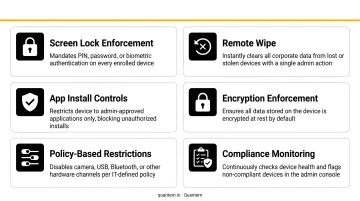
AEE enforces six controls on every enrolled device. These are not optional - they're applied automatically and employees cannot disable them.
1. Mandatory Screen Lock and Encryption
Every AEE-enrolled device requires a screen lock. If a device is lost or left unattended, unauthorized users cannot access company data. Device-level encryption is also enforced, protecting data at rest.
2. Google Play Protect - Always On
AEE mandates that Google Play Protect remains active at all times. Employees cannot turn it off. Play Protect performs continuous malware scanning and app verification - in 2024, Google reported it was scanning more than 200 billion Android apps daily, protecting over 3 billion users.
For businesses, the key benefit isn't just the scanning - it's the enforcement. End users can't disable it, even accidentally.
3. App Installation Restriction - Play Store Only
Sideloading apps from unknown sources is blocked by default. Employees can only install applications through the Google Play Store. Apps installed from browsers or messaging links bypass Google's vetting process - blocking this channel significantly reduces the risk of malware entering the corporate environment.
4. Remote Device Wipe
Administrators can remotely wipe company data from a device through the AEE management portal. This covers lost devices, theft, and employee departures - three scenarios where unmanaged devices most commonly become security liabilities.
5. Tamper-Proof Policy Enforcement
This is the feature that makes everything else reliable. AEE policies cannot be removed or overridden by end users. No workarounds, no accidental disabling, no employees turning off Play Protect because it flagged an app they wanted.
That consistent enforcement matters most in environments where devices are shared or operated by non-technical staff - exactly where policy gaps tend to appear.
How Automatic Device Enrollment Works
Zero-Touch Enrollment Explained
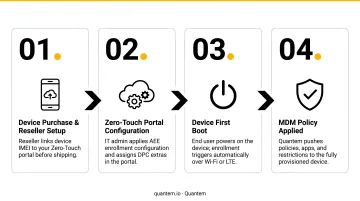
AEE relies on Zero-Touch Enrollment to provision devices before they ever reach an employee. Here's how it works:
- The IT administrator provides a corporate Google Account to the reseller
- The reseller creates a Zero-Touch enrollment account and associates devices with corporate policies
- On first boot, each device checks for its enterprise configuration and initiates provisioning automatically
- The employee opens the box, signs in, and the device is already secured
The AEE Management Portal
Once devices are deployed, administrators access a lightweight web portal for ongoing oversight. From there, they can:
- View enrolled device status
- Add or remove users
- Trigger remote actions (screen unlock, device wipe)
- Manage the device roster as the team grows or changes
The portal is built for speed, not complexity - covering the actions IT teams need most without requiring training or onboarding to use effectively.
Why the Automatic Model Matters for Lean IT Teams
A 2023 Small Business Majority survey found that only 31% of businesses with 1–5 employees have dedicated IT support. For those teams, the appeal of AEE is straightforward: new devices go out policy-ready, without IT intervention at the device level.
Onboarding a new employee means ordering a device through a certified reseller and adding a user to the portal - no imaging, no configuration, no risk that a device ships unprotected because IT was stretched thin that week.
Who Should Use Android Enterprise Essentials?
Ideal Use Cases by Business Type
SMBs and growing teams (5–200 devices) fit AEE's profile best. These organizations often lack dedicated IT infrastructure but still need a security baseline quickly. Automatic setup and accessible pricing mean there's no mobile management experience required.
Industry-specific scenarios where AEE fits well:
- Delivery and logistics teams (Google's own AEE case study features S. Morris Ltd.) can deploy field devices that are secured from day one, no IT handholding needed.
- Retail associates sharing point-of-sale tablets get consistent security without anyone managing policy settings manually.
- Healthcare front desks issuing patient-facing devices benefit from enforced screen locks and Play Protect without putting security decisions on staff.
Enterprises with mixed device pools have a different use case. Larger organizations running a full EMM deployment can use AEE to extend basic protections to secondary device groups - seasonal staff, contractors, or temporary workers - without adding them to the full MDM stack.
Limitations of Android Enterprise Essentials - and When to Go Beyond It
AEE is honest about what it is. But understanding where it stops matters before you commit to it as your long-term solution.
No BYOD Support
AEE requires company-owned devices enrolled through Zero-Touch Enrollment. It cannot be applied to employee-owned devices. Organizations that want work/personal data separation on personal phones need a full MDM solution with Android work profile support.
Fixed Policies With No Customization
AEE's controls are predetermined. IT admins cannot:
- Create custom policy groups for different roles or departments
- Configure app allow/blocklists
- Apply role-based access controls
- Access device analytics or reporting dashboards
- Use location tracking or geofencing
For businesses where device use varies across teams, or where compliance reporting is required, these gaps become operational blockers - not just inconveniences.
When to Consider Upgrading to a Full MDM Platform
Google's own guidance acknowledges this: as your needs grow beyond AEE's default protections, upgrading to more sophisticated management is the natural next step. Common triggers include:
- Scaling beyond 200+ devices or expanding to multiple locations
- Needing BYOD support for personal device users
- Requiring compliance reporting for HIPAA, GDPR, or other frameworks
- Wanting kiosk-mode deployments for dedicated-use devices
- Needing geofencing, location tracking, or real-time analytics
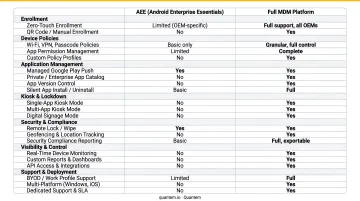
When those triggers apply, a full MDM platform like Quantem covers the gaps: BYOD work profiles, kiosk mode, geofencing, compliance reporting, and real-time analytics, starting at $1 per device per month. SOC-2, GDPR, and CCPA certifications make it a viable option for regulated industries where AEE alone falls short. A 21-day free trial requires no credit card.
Frequently Asked Questions
What devices are compatible with Android Enterprise Essentials?
AEE is compatible with Android devices that support Zero-Touch Enrollment. These devices must be purchased through Google-certified resellers rather than standard retail channels - you can't enroll a device purchased at a consumer electronics store.
Is Android Enterprise Essentials free?
AEE is a paid service distributed through authorized resellers. No public pricing list is available from Google - costs are arranged through reseller agreements. Check with a certified reseller partner for current pricing in your region.
Can employees remove or disable Android Enterprise Essentials policies?
No. AEE policies are persistent and cannot be removed or bypassed by end users. This tamper-proof enforcement is a core design principle of the service - not an optional configuration.
What is the difference between Android Enterprise Essentials and a full MDM solution?
AEE delivers a fixed baseline: screen lock enforcement, Play Protect, and remote wipe - nothing more. A full MDM platform goes further, adding granular policy customization, BYOD work profiles, app management, geofencing, and compliance reporting. For organizations that need those capabilities, a dedicated MDM solution is the right fit.
Does Android Enterprise Essentials support BYOD devices?
No. AEE is designed exclusively for company-owned devices provisioned through Zero-Touch Enrollment. BYOD deployments require a full MDM platform that supports Android work profiles, which keep work and personal data cleanly separated on employee-owned devices.
How do I get started with Android Enterprise Essentials?
Start by purchasing compatible devices through a Google-certified reseller, who configures Zero-Touch Enrollment before the devices ship. Once deployed, the AEE management portal gives IT administrators access to device status and remote actions. If your team needs broader policy control or BYOD support, a full MDM platform like Quantem can be set up in the same workflow.