Introduction
If your organization deployed Android devices five or more years ago, there's a good chance those devices were managed using Device Administrator (DA). That approach no longer holds up. Google deprecated DA APIs starting with Android 9.0, and Microsoft Intune ended support for DA on GMS-enabled devices at the end of 2024.
Organizations still running DA face real security gaps, growing management blind spots, and an increasingly narrow set of controls as each Android version advances. Android Enterprise (AE) is now the only supported management framework for GMS-capable Android devices.
This article covers what you need to know to make the transition:
- What Device Administrator and Android Enterprise actually are
- How they differ across security, enrollment, and app management
- Privacy implications for BYOD and corporate-owned deployments
- What IT teams should do next
TL;DR
- Device Administrator is a legacy API from Android 2.2 (2010) that granted elevated permissions to apps - it has since been deprecated
- Android Enterprise is the structured management framework from Android 5.0, with a single-owner model and consistent behavior across OEMs
- Microsoft Intune ended DA support on GMS devices as of December 31, 2024
- Android Enterprise supports four deployment modes (work profile, fully managed, dedicated/kiosk, COPE) - DA supports none of them
- For organizations still on DA, migration to Android Enterprise is now a deadline issue, not a strategy debate
Android Enterprise vs Device Administrator: Quick Comparison
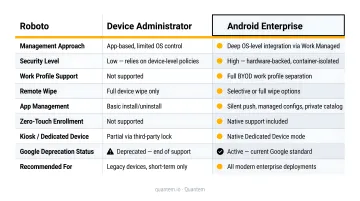
| Dimension | Device Administrator | Android Enterprise |
|---|---|---|
| Management API | Legacy Device Admin API (deprecated) | Android Management API (AMAPI) / Google Play EMM API |
| Management Scope | Device-level, inconsistent | Scoped by deployment mode (profile, device, or dedicated) |
| Enrollment Methods | Single method, manual | NFC, QR code, EMM token, zero-touch |
| App Distribution | Manual install or sideloading | Silent push via Managed Google Play |
| Data Separation | None | Cryptographic work profile boundary |
| Cross-OEM Consistency | Fragmented (OEM extensions vary) | Standardized across GMS-certified devices |
| Deprecation Status | Deprecated; Intune support ended Dec 2024 | Active standard; mandatory for modern Android management |
Note: DA may still technically operate on non-GMS devices, certain hardware sold in markets without Google Mobile Services. For any GMS-enabled device running Android 10 or later, DA capabilities are heavily restricted, and Microsoft Intune has removed DA support for GMS devices entirely.
What Is Android Device Administrator?
The Original Enterprise Android Framework
Introduced with Android 2.2 in 2010, Device Administrator was Google's first attempt at enterprise Android management. It worked by granting elevated administrative permissions to apps - and critically, multiple apps could hold those permissions simultaneously on a single device.
That permissive model created three problems at scale:
- Inconsistent behavior across OEMs - manufacturers built custom extensions to fill DA's gaps, so a policy applied on a Samsung device behaved differently on a Motorola
- No data separation - DA had no mechanism to separate corporate from personal data, making BYOD unmanageable from a compliance perspective
- Security abuse - A 2019 ACM MobiCom study of over 39,000 apps identified 578 confirmed "Deathless Device Administrator" apps that subverted deactivation or uninstall flows, exploiting DA's permissive model for ransomware and lockouts
The Deprecation Timeline
Google's phased removal of DA was deliberate:
- Android 9.0 (2018) - Key DA policies deprecated, including camera disable, keyguard features, and password expiration
- Android 10 (2019) - Deprecated policies removed entirely; calling them throws a
SecurityException - December 31, 2024 - Microsoft Intune ended support for Android DA management on GMS devices
When DA Still Applies
One narrow edge case remains: non-GMS environments where Google Mobile Services are unavailable. Certain device fleets - specific ruggedized hardware or devices sold without GMS certification - still rely on DA during migration.
In those cases, organizations should pair DA with OEM-specific management extensions (Samsung Knox, for example) to fill the gaps in DA's limited native controls. The goal is migration to Android Enterprise - not long-term dependence on a deprecated framework.
What Is Android Enterprise?
A Fundamentally Different Architecture
Android Enterprise (originally called Android for Work) was built into Android 5.0 in 2014. Unlike DA's fragmented multi-admin model, AE enforces a single-owner model. Only one Device Owner or Profile Owner can be active on a device at a time, with scoped delegations to other apps defined by the EMM. That constraint shrinks the attack surface and makes every admin action auditable.
That architecture runs through two management APIs:
- Android Management API (AMAPI) - Google's preferred modern path, using Google's standard Android Device Policy app as the DPC. Google is no longer accepting new registrations for custom Device Policy Controllers and directs new implementations to AMAPI.
- Google Play EMM API - used by EMMs with existing custom DPCs, still supported but not the recommended path for new solutions
What AE Unlocks That DA Never Could
- Silent app installation through Managed Google Play - no user action required
- Managed configurations - IT can remotely configure supported app settings centrally
- Private enterprise app deployment - apps distributed to your organization without a public Play Store listing
- Zero-touch enrollment - devices enroll automatically on first boot, no IT hands required
- Managed system updates - IT controls when and how OS updates roll out
- Cross-OEM policy consistency - the same policy set works reliably across any GMS-certified device
The BYOD Privacy Advantage
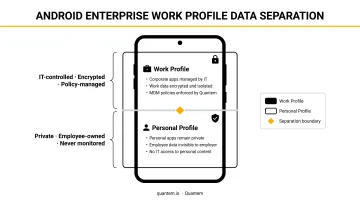
AE's work profile creates a cryptographically separated container for corporate apps and data. IT management reach stops at the work profile boundary - personal apps, photos, messages, and data remain completely outside admin visibility. Under DA, enrolling a personal device gave the admin access to the entire device - AE eliminates that problem entirely.
Android Enterprise Deployment Modes
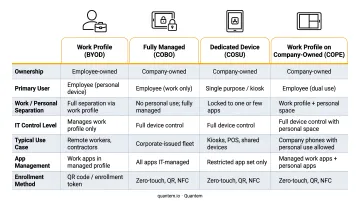
AE supports four distinct scenarios, each matched to a different ownership and use case model:
| Mode | Ownership | Use Case |
|---|---|---|
| Work Profile (BYOD) | Personal device | Employee uses personal device; work apps isolated in profile |
| Fully Managed (COBO) | Corporate-owned | Company device used exclusively for work |
| Dedicated/Kiosk (COSU) | Corporate-owned | Single-purpose device - POS terminal, warehouse scanner, hospital bedside tablet |
| COPE | Corporate-owned | Company device with preserved user privacy via work profile |
The numbers back it up. According to Android Enterprise's industry case studies, Leroy Merlin deployed 15,000 AE-managed devices across 140 locations in Spain, and National Australia Bank saved more than 500 IT hours during device deployment using zero-touch enrollment.
Android Enterprise vs Device Administrator: Key Differences Explained
Security Architecture and Ownership Model
DA allowed any number of apps to hold admin privileges simultaneously - creating overlapping, difficult-to-audit control that malware actively exploited. AE's single Device Owner or Profile Owner model means one entity controls the device, delegations are explicit, and every action is traceable.
Enrollment and Provisioning
DA had one enrollment method: manual configuration that granted full device-level access every time - even on personal devices. AE supports four:
- NFC bump - tap a provisioner device to configure
- QR code scan - scan during device setup
- EMM token - enter during enrollment flow
- Zero-touch - device arrives pre-configured, enrolls automatically on first boot
Zero-touch enrollment is where AE creates a meaningful operational advantage for large fleets. Devices ship directly to remote employees or field locations and provision themselves on first boot - no IT team member needs to physically handle each unit.
App Management and Distribution
Under DA, app deployment meant manual installation or sideloading - unreliable, unscalable, and impossible to enforce. Under AE, Managed Google Play handles everything:
- Silent push installation (required or available)
- Centrally managed app permissions
- Managed configurations for supported apps
- Private enterprise app distribution without public Play Store exposure
- Version control for internal apps
Data Separation and Privacy
DA provides zero separation between corporate and personal data. Wiping a DA-managed device means wiping everything. Enrolling a personal device means the admin sees everything.
AE's work profile changes both of those realities. Corporate data lives in the work profile - cryptographically separated from personal data. When an employee leaves, IT removes the work profile without touching personal photos, apps, or messages. BYOD becomes manageable without becoming invasive.
Cross-OEM Policy Consistency
DA's minimal APIs pushed OEMs to build proprietary extensions, meaning the same policy could behave entirely differently on a Samsung versus a Motorola versus a Zebra device. IT teams managing mixed fleets had no reliable baseline.
AE's APIs are standardized across all GMS-certified Android devices. One policy set delivers consistent behavior regardless of hardware vendor - which means IT can build and test policies once, then deploy across the entire fleet with confidence.
Which Should You Choose?
For any organization managing GMS-enabled Android devices, this isn't a close call: Android Enterprise is the only supported path. DA is deprecated, Intune support has ended, and management capabilities will continue eroding as Android versions advance.
Match your AE deployment mode to your scenario:
- Work Profile - BYOD or COPE; employees want privacy, IT needs security
- Fully Managed - corporate-owned single-user devices used exclusively for work
- Dedicated/Kiosk - single-purpose deployments like POS terminals, hospital bedside tablets, or warehouse scanners
Those three modes cover the vast majority of real-world deployments. The one remaining edge case: organizations with device models that lack GMS certification may still need DA temporarily, supplemented by OEM-specific tools. Treat this as a bridge, not a destination - migration planning should start immediately.
Quantem is built natively around Android Enterprise, with zero-touch enrollment, built-in kiosk mode for dedicated devices, and work profile separation for BYOD - no premium add-ons required. The 21-day free trial requires no credit card.
Conclusion
The framework for this decision is clear: GMS-capable devices belong on Android Enterprise. That's not a preference - it's the standard Google has enforced since Android 10. DA persists only in non-GMS edge cases, and even there, migration planning should already be underway.
Moving to AE delivers concrete operational outcomes:
- Reduced security exposure through the single-owner model
- Scalable zero-touch provisioning that eliminates manual device setup
- BYOD that works without compromising employee privacy
- Consistent policy enforcement across any Android device vendor
All of that translates to lower IT overhead and reduced compliance risk. For most IT teams, the question is no longer whether to migrate - it's how to do it without disrupting users or operations. Platforms like Quantem include zero-touch enrollment across all plans and free migration support on the Enterprise tier, which removes two of the biggest friction points in that transition.
Frequently Asked Questions
What is an Android Device Administrator?
Android Device Administrator is a legacy management API introduced in Android 2.2 that granted elevated administrative permissions to apps on a device. Multiple apps could hold these permissions simultaneously, creating notable security risks. Google has since deprecated the framework, and it is no longer supported for GMS-capable devices.
What is the difference between Android and Android Enterprise?
"Android" refers to the operating system itself. "Android Enterprise" is a structured management framework built on top of Android, offering standardized deployment modes, Managed Google Play, and consistent APIs for IT control across GMS-certified devices.
When was Android Device Administrator deprecated?
Google began deprecating DA APIs with Android 9.0 in 2018 and completed key removals in Android 10 in 2019. Microsoft Intune ended support for DA management on GMS devices on December 31, 2024, making AE the only viable path for modern enterprise Android management.
Why choose Android Enterprise over Android Device Administrator?
AE is the only supported standard for modern Android management on GMS devices. It offers better security through a single-owner model, enables BYOD without exposing personal data, supports silent app distribution via Managed Google Play, and unlocks zero-touch enrollment - none of which DA can provide.
Can Android Device Administrator still be used?
DA still functions in limited contexts, primarily on non-GMS devices or specific legacy hardware. For any GMS-capable device running Android 10 or later, DA capabilities are significantly reduced, and Microsoft Intune has ended DA support for GMS devices entirely. Any remaining DA deployments should have a migration timeline in place.
What deployment modes does Android Enterprise support?
Android Enterprise supports four modes: Personally-owned with Work Profile (BYOD), Corporate-owned Fully Managed (COBO), Corporate-owned Dedicated/Kiosk (COSU), and Corporate-owned with Work Profile (COPE). Each is designed for a distinct ownership model and use case.