Android TV OS management with MDM is the practice of enrolling, configuring, and remotely controlling Android TV devices — smart TVs, set-top boxes, and media sticks — through a centralized management platform. It's a distinct discipline from standard Android MDM, and treating it the same way leads to missed configurations, enrollment failures, and security gaps.
This guide is written for IT managers, operations leads, and business decision-makers in retail, hospitality, healthcare, digital signage, and education. If you're responsible for more than a handful of Android TV devices, here's what you need to know before deploying.
Key Takeaways
- Android TV OS runs on a controller-based, non-touch UI that requires MDM workflows tailored to its architecture, not standard Android Enterprise processes
- MDM lets IT teams enroll, configure, secure, and update Android TV devices at scale without physical access
- Google-certified Android TV OS and AOSP-based TVs have meaningfully different management capabilities
- Not all Android TV devices support MDM enrollment — OEM provisioning blocks are a real deployment risk
- Key MDM capabilities for TV fleets: kiosk lockdown, remote view, app management, digital signage mode, and location tracking
What Is Android TV OS Management with MDM?
Android TV OS management with MDM is the process of using a mobile device management platform to remotely enroll, configure policies, deploy apps, enforce restrictions, and monitor the health of Android TV OS devices from a central console. This applies to both Google-certified Android TV units and AOSP (Android Open Source Project)-based variants.
The goal is straightforward: consistent device behavior across a fleet of display devices, centralized control over content and applications, and the ability to respond to issues without sending someone on-site.
How It Differs from Standard Android MDM
Many IT teams discover mid-deployment that Android TV OS behaves differently than standard Android — and not just because the screen is larger. Three differences directly affect how you manage these devices:
- Non-touch, controller-based UI — Google confirms that TV devices do not have touchscreens; all interaction happens via D-pad remote. MDM features designed for touchscreen interaction may behave differently or require TV-specific configuration.
- Limited enrollment options — Standard Zero-Touch enrollment, Knox Mobile Enrollment, and Android Enterprise provisioning are designed for phones and tablets. Neither Google's Zero-Touch prerequisites nor KME documentation references Android TV. In practice, enrollment typically means installing an MDM agent directly on the device.
- Two technically distinct variants — Google-certified Android TV OS includes Google Mobile Services (GMS), enabling Managed Google Play and broader app compatibility. AOSP-based Android TVs lack GMS and require APK sideloading for MDM agent installation — meaning your policy options and app distribution methods will differ depending on which variant you're managing.
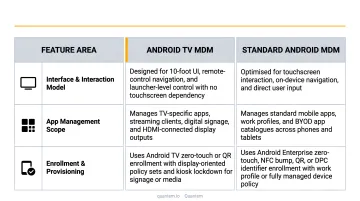
Platforms like Quantem support enrollment for both variants, allowing IT teams to manage mixed fleets from a single dashboard without custom scripting.
Why Enterprises Use MDM for Android TV Fleets
Android TV devices are appearing everywhere in commercial environments: digital menu boards in restaurants, patient-room TVs in hospitals, wayfinding displays in hotels, and promotional screens in retail. The global digital signage market is valued at $31.1 billion in 2025 and projected to reach $58.4 billion by 2033, growing at 8.2% CAGR — and Android-based players hold a dominant position in that market.
At small scale, manual management is feasible. At 20, 50, or 200 devices across multiple locations, it breaks down fast.
What Enterprise Environments Require
Default consumer Android TV settings aren't built for commercial deployment. Enterprise environments need:
- Consistent branding and approved content on every screen
- Restricted user access — no app stores, no personal accounts, no settings menus
- Enforced Wi-Fi configurations that connect automatically to corporate networks
- Prevention of unauthorized app installs
- Remote troubleshooting without dispatching technicians
None of this exists out of the box on a consumer Android TV device.
What Goes Wrong Without MDM
In practice, unmanaged Android TV fleets follow a predictable failure pattern:
- Devices drift from their intended configuration as users interact with settings
- Content becomes stale or incorrect when there's no remote update mechanism
- Users bypass security policies, or IT never applies them consistently across locations
- IT has no visibility into which devices are online, offline, or misbehaving
The Compliance Dimension
In regulated environments, this isn't just an operational problem. The HIPAA Security Rule requires that any system handling electronic protected health information meet administrative, physical, and technical safeguard requirements. A patient-room TV displaying appointment data or health content falls squarely within that scope. MDM provides a technical mechanism to enforce access controls, audit configurations, and execute remote lock or wipe when needed.
Whether the driver is HIPAA compliance or simply keeping 200 screens running correctly across 15 locations, the outcome is the same: MDM converts an unmanageable fleet into a controlled, auditable infrastructure.
How Android TV OS MDM Management Works
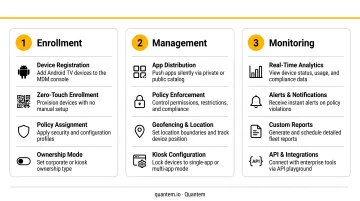
The end-to-end flow has three phases: enroll the device, push policies and apps, then monitor and act remotely. Each phase builds on the last — enrollment establishes control, policy configuration defines behavior, and remote monitoring keeps the fleet running without on-site visits.
Enrollment
Standard Zero-Touch, Knox, and Android Enterprise enrollment methods don't apply to most Android TV OS devices. Instead, enrollment works by installing an MDM agent app on the device — either from the Play Store on GMS-certified devices or via sideloaded APK on AOSP-based TVs. The admin enters server credentials, the device authenticates, and it registers with the management console.
Device Owner status is required for full MDM control. Some OEMs block the provisioning path needed to establish it, meaning certain devices cannot be enrolled through standard MDM processes. This is a hardware/firmware limitation — not a platform gap — and must be verified before any fleet purchase.
Policy Configuration and Push
After enrollment, the IT admin creates and assigns policies covering:
- Wi-Fi networks — auto-connect to corporate SSIDs
- Device restrictions — force Wi-Fi, disable settings access, block sideloading
- App deployment — mandatory apps, app catalog, version control
- Kiosk lockdown — single-app, multi-app, or digital signage mode
- Content distribution — media files and dynamic content for display devices
Policies push to devices instantly and apply without user intervention. Quantem's toggle-based console handles this without scripting — admins configure policies through the interface, and changes roll out across enrolled device groups in bulk.
Remote Monitoring and Actions
The ongoing management phase is where MDM delivers the most daily value. From the dashboard, admins can:
- View real-time device status and connectivity
- See location history and current device position
- Remotely view the live device screen to diagnose visual issues
- Execute one-time commands: install or uninstall apps, broadcast messages, lock device, enable or disable kiosk mode
- Set data usage limits and receive threshold alerts
- Schedule reports on fleet health
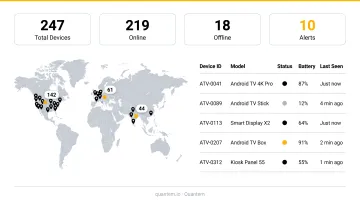
Quantem's digital signage solution enables converting any Android TV or commercial display unit into a managed device, with remote content updates — videos, images, text, and animations — pushed from the central dashboard without on-site visits.
Key MDM Capabilities for Android TV Devices
Kiosk Lockdown and Digital Signage Mode
The most critical capability for commercial Android TV deployments. MDM platforms can lock devices into:
- Single-app kiosk mode — restricts the device to one application only
- Multi-app kiosk mode — limits access to a defined set of approved apps
- Digital signage mode — loops media content (video, images, text, animations) continuously
This makes Android TV devices suitable for customer-facing displays, menu boards, wayfinding screens, and waiting room content. Quantem includes kiosk mode built-in across all plans — it's not gated behind a premium tier.
App Lifecycle Management
Fleet consistency requires more than installing apps once. MDM supports:
- Remote app push for both Play Store and enterprise (sideloaded) apps
- Over-the-air updates without user interaction
- Remote uninstallation
- App catalog management so devices access only approved applications
When hundreds of devices need to run the same application version, this is the most operationally viable approach at that scale.
Remote View and Troubleshooting
MDM platforms supporting Android TV typically offer a remote view feature — admins see the live device screen from the console, identify visual issues, and resolve issues directly. This eliminates the need for on-site IT visits in most cases — for a retail chain or hotel managing displays across dozens of properties, avoiding a single truck roll can offset months of MDM licensing costs.
Location Tracking and Geofencing
Admins can enable real-time or periodic location tracking on Android TV devices to:
- Monitor fleet distribution across locations
- Create virtual geofences that trigger policy changes when devices move in or out of defined zones
- Receive alerts on non-compliant location behavior
Quantem offers geofencing starting in mid-tier plans, accessible through the standard console interface.
Data Usage and Wi-Fi Control
Android TV devices in commercial settings stream significant volumes of content. MDM enables:
- Remote Wi-Fi configuration push (auto-connect to corporate networks)
- Data usage limits and per-app network consumption tracking
- Alerts when usage thresholds are exceeded
This is particularly relevant for hospitality and retail deployments where bandwidth management affects overall network performance.
Common Issues, Misconceptions, and When MDM Falls Short
Misconception: All Android TV Devices Are Manageable
Many IT teams assume any Android TV device can be enrolled. This is incorrect. Amazon Fire Sticks, for example, block the provisioning required for an MDM to become Device Owner, preventing standard dedicated-device management entirely. Fire OS is Android-based — that alone does not make it MDM-compatible.
Before committing to a large fleet purchase, verify that the specific device model and firmware support MDM agent installation and Device Owner mode. Lab testing with a small pilot batch is the right approach.
Misconception: Android TV MDM Works Like Phone/Tablet MDM
Teams often attempt to apply standard Android Enterprise or Zero-Touch workflows to Android TV devices and encounter failures. These enrollment methods don't apply in most cases. The controller-based, non-touch UI also means certain MDM features that rely on touchscreen interaction may require TV-specific configuration or simply behave differently on a TV form factor.
AOSP Devices and GMS Gaps
AOSP-based Android TVs lack Google Mobile Services. This means:
- Apps distributed through Managed Google Play will not install
- Premium streaming services depend on DRM implementation and provider certification — not all will function on AOSP devices
- Certain MDM features tied to GMS APIs may be unavailable
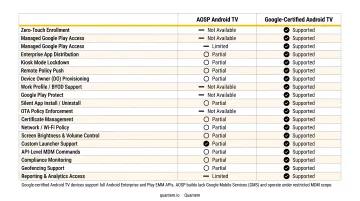
AOSP devices can still be managed for scoped use cases like digital signage, but test in a lab environment before large-scale deployment to confirm app compatibility and MDM feature availability.
When MDM Is Not the Right Fit
MDM is not always the answer. Skip it when:
- You're managing 1-3 devices in a single location where manual configuration is practical
- The use case requires a full consumer TV experience with unrestricted app access
- The device hardware or firmware doesn't support MDM enrollment at all
When the hardware simply won't support enrollment, the practical options are switching to a device model with confirmed MDM compatibility or, in specialized cases, exploring custom ROM approaches — though that path adds significant technical complexity.
Frequently Asked Questions
What is MDM on Android?
MDM (Mobile Device Management) on Android is a software-based approach to remotely managing, configuring, securing, and monitoring Android devices — including smartphones, tablets, and Android TV units — from a centralized console. IT teams use it to enforce policies, deploy apps, and troubleshoot without touching each device.
How do you set parental controls on Android TV?
On a consumer Android TV, parental controls live in Settings under Preferences or Parental Controls, allowing content rating restrictions and PIN-protected access. In enterprise deployments, MDM provides a stronger alternative: kiosk mode locks devices to approved apps and removes the need for per-device manual configuration.
Can all Android TV devices be enrolled and managed with MDM?
No. Some OEMs block the provisioning process required to establish Device Owner control, making MDM management impossible without hardware or firmware-level changes. Always verify MDM compatibility for a specific device model before committing to a large-scale fleet purchase. A small pilot test before a full rollout will save significant time and cost.
What is the difference between Android TV OS and AOSP-based Android TV for MDM purposes?
Google-certified Android TV OS includes Google Mobile Services (GMS), enabling Managed Google Play, broader app compatibility, and simpler MDM enrollment. AOSP-based devices lack GMS and require APK sideloading for agent installation, with more limited app distribution — they're best suited for focused deployments like digital signage.
Can you use kiosk mode on Android TV devices with MDM?
Yes. MDM platforms supporting Android TV can lock devices into single-app kiosk mode, multi-app kiosk mode, or digital signage mode for looping media content. This makes Android TV suitable for controlled commercial applications like customer-facing displays, menu boards, and wayfinding screens.