Introduction
Mobile device fleet management looks manageable on paper. In practice, your IT team is simultaneously chasing down a lost warehouse scanner, troubleshooting a field tech's broken app, and trying to figure out which of your 400 devices actually have encryption enabled. Without a structured system, that's exactly what happens.
According to Verizon's 2024 Mobile Security Index, 53% of organizations experienced a security incident involving a mobile or IoT device that resulted in data loss or downtime - and 47% of those incidents had major impacts on operations.
Those numbers reflect what happens when device management is reactive rather than systematic. This guide covers everything IT teams need to get ahead of it: core concepts, must-have platform features, lifecycle management from enrollment to retirement, security and compliance, and how to choose the right solution for your organization.
Key Takeaways
- Mobile device fleet management covers the full device lifecycle, from procurement to secure retirement, not just MDM policy enforcement
- Zero-touch enrollment eliminates manual device setup and significantly speeds up onboarding
- Security, compliance, and BYOD management each require purpose-built controls designed for enterprise environments
- Fleet analytics directly reduce costs by identifying unused devices and overspending on data plans
- Platforms like Quantem offer enterprise-grade fleet management at $1–$3 per device per month
What Is Mobile Device Fleet Management?
Mobile device fleet management is the practice of centrally overseeing, securing, and optimizing every mobile endpoint an organization owns or authorizes. That includes smartphones, tablets, rugged handhelds, and IoT devices, managed across their full operational life from procurement to retirement.
MDM vs. Fleet Management: What's the Difference?
These terms get used interchangeably, but they describe different scopes of work:
| Capability | MDM | Fleet Management |
|---|---|---|
| Policy enforcement | ✓ | ✓ |
| Remote wipe/lock | ✓ | ✓ |
| Procurement & lifecycle | ✗ | ✓ |
| Expense tracking | ✗ | ✓ |
| Compliance reporting | Limited | ✓ |
| Device retirement | ✗ | ✓ |
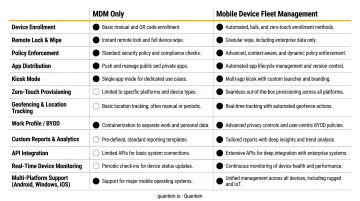
MDM is the software layer that enforces policies and secures individual devices. Fleet management is the broader operational discipline surrounding it: procurement decisions, lifecycle planning, cost optimization, and structured retirement procedures. MDM is one component within fleet management, not a synonym for it.
Why This Has Become a Priority
Three trends have made structured fleet management non-negotiable:
- Hybrid and remote work have scattered devices across home offices, field locations, and co-working spaces, well beyond the reach of traditional network-based controls
- IoT expansion continues accelerating; GSMA Intelligence forecasts 40.8 billion global IoT connections by 2030, with enterprise applications as the primary growth driver
- Mixed device environments - corporate-owned phones alongside BYOD laptops alongside shared warehouse scanners - introduce overlapping ownership models, security requirements, and compliance obligations that manual tracking cannot reliably address
Key Features of a Mobile Device Fleet Management Platform
Not all platforms offer the same depth. These are the core capabilities worth evaluating before committing to any solution.
Device Inventory and Real-Time Visibility
You can't secure what you can't see. A reliable, continuously updated device inventory is the foundation everything else is built on. That inventory should capture:
- Device model, OS version, and patch level
- Ownership status (corporate vs. BYOD)
- Assigned user and organizational group
- Current location and last check-in
- App installation status and compliance state
Inventory accuracy matters beyond security - it drives cost control decisions, supports compliance audits, and prevents the common scenario where IT is paying for data plans on devices that haven't been touched in six months.
Zero-Touch Enrollment and Provisioning
Zero-touch enrollment means devices arrive pre-configured and ready to use. The moment a device connects to the network, the MDM platform detects it, applies the assigned configuration profile, pushes required apps, and enforces restrictions - all without anyone in IT manually touching it.
Google's Android zero-touch enrollment, Apple's Automated Device Enrollment via Apple Business Manager, and Microsoft Windows Autopilot each implement this differently. The outcome is the same: new hires get a work-ready device without IT spending 45–90 minutes per unit on manual setup.
It's worth confirming with any vendor you evaluate whether zero-touch enrollment is included across all plans - some gate this capability behind higher-cost tiers.
Remote Policy Enforcement and Device Control
IT administrators need the ability to push configuration changes, enforce PIN and password requirements, lock a device remotely, or wipe it entirely - all from a central dashboard, without physical access or scripting expertise.
This capability matters in two distinct scenarios: routine compliance maintenance (pushing a security policy update across 500 devices at once) and emergency response (wiping a stolen device before sensitive data is accessed). Both depend on remote control that works regardless of where the device is located.
Application and Content Management
App lifecycle management covers:
- Deploys and updates apps silently across the fleet without user interaction
- Removes apps remotely when an employee leaves or a software license expires
- Hosts private app catalogs with version control for internally developed applications
- Locks devices to a single purpose via kiosk mode - a point-of-sale terminal, a patient intake tablet, or a warehouse scanning station shouldn't behave like a general-purpose smartphone
Geofencing, Location Tracking, and Usage Analytics
Geofencing lets IT teams define geographic boundaries and trigger automated actions when devices cross them - locking a device that leaves a facility, or sending an alert when a field asset appears in an unexpected location.
Usage analytics connect operational data to budget decisions. Identifying devices with no activity in 60+ days, benchmarking actual data consumption against plan tiers, and flagging overspending on unused lines all reduce costs without requiring manual audits.
The Mobile Device Lifecycle: From Enrollment to Retirement
Every device in your fleet moves through a predictable lifecycle - and the organizations that manage each phase deliberately spend less, respond faster, and carry fewer security risks than those that don't.
Planning and Procurement
Decisions made before a single device is ordered ripple through the entire lifecycle. The planning phase covers:
- Defining device standards (OS, form factor, minimum specs)
- Choosing between corporate-owned and BYOD models - or a hybrid of both
- Negotiating carrier contracts based on realistic usage patterns, not worst-case assumptions
- Establishing baseline configurations before procurement begins
Skip this phase and you'll likely face conflicting MDM profiles, carrier plan overages, or re-enrollment at scale - all of which cost more to fix than to prevent.
Enrollment and Deployment
Enrollment covers device staging, MDM platform onboarding (via zero-touch, QR code, or manual methods), policy assignment, and distribution to end users.
The time savings from automated enrollment compound quickly at scale. Forrester's 2024 Total Economic Impact study of Microsoft Intune found that the composite organization achieved 80% faster new-device onboarding and 25% fewer help desk tickets after implementing automated enrollment for 30,000 endpoints.
Active Management and Compliance Monitoring
Once devices are deployed, ongoing management consumes the most IT hours - and offers the most room for automation:
- Pushing OS and app updates on schedule
- Monitoring compliance status (encryption on? PIN set? Unauthorized apps detected?)
- Troubleshooting device issues remotely instead of requiring employees to ship hardware back
- Generating audit reports for internal reviews and regulatory requirements
Automated compliance checks are where MDM platforms return the clearest ROI - recurring policy verification that would otherwise generate help desk volume runs silently in the background, freeing IT for higher-priority work.
Device Refresh, Repair, and Retirement
Mid-lifecycle decisions - when to repair vs. replace, how to handle aging devices - should be data-driven, not based on arbitrary three-year schedules. Fleet analytics identify which devices are underperforming, which are security liabilities due to unsupported OS versions, and which can safely run another cycle.
Retirement is where many organizations cut corners - and where the risk is highest. Proper end-of-life procedures include:
- Remote data wipe before the device leaves the organization's control
- Unenrollment from the MDM platform
- Inventory update to reflect the device's retired status
- Responsible disposal or recertification depending on hardware condition
Employees who leave without their devices being properly wiped represent one of the most common and preventable sources of data exposure.
Security, Compliance, and BYOD Management
Security is the most cited reason organizations implement fleet management - and the most complex to execute correctly, particularly in mixed-ownership environments.
Endpoint Security and Remote Wipe
Core security controls for any fleet management platform:
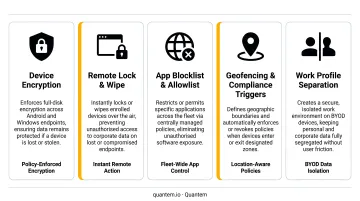
- Encryption enforcement for data at rest and in transit
- Strong authentication requirements (PIN, password, biometric)
- Remote lock and wipe for lost or stolen devices
- Detection of jailbroken or rooted devices that have bypassed security controls
- Firewall and network policy enforcement at the device level
The stakes are real. IBM's 2024 Cost of a Data Breach report put the global average breach cost at $4.88 million. Mobile endpoints, left unmanaged, are an accessible entry point.
Regulatory Compliance Across Industries
Fleet management platforms reduce the compliance burden by automating controls that regulations require:
- HIPAA (healthcare): encryption, access controls, audit logs, and device disposal procedures for any device handling electronic protected health information
- PCI-DSS (retail/payments): secure configuration, MFA for cardholder data environments, and logging for mobile payment-accepting devices
- GDPR/CCPA (data handling): device security appropriate to risk, privacy-preserving BYOD controls, and breach response capabilities
Quantem holds SOC-2, GDPR, and CCPA certifications - a useful baseline for organizations that need to demonstrate their MDM vendor meets minimum compliance standards during their own audits.
BYOD: Work Profile Separation and Privacy
BYOD creates a real tension: employees want to use personal devices, and organizations need to secure corporate data without intruding on personal information.
Containerization (or Android Work Profile) solves this by creating a separate, encrypted environment for corporate apps and data on a personal device. The result:
- IT can wipe the corporate container without touching personal photos, messages, or apps
- Employees maintain genuine privacy over personal data
- Organizations meet their data security obligations
Before deployment, confirm the platform enforces full container isolation - including separate encryption keys and independent wipe capabilities for corporate data only.
Access Control and Identity Management
Device-level security is only part of the picture. Admin access to the management console needs the same discipline.
Role-based access controls (RBAC) define what each IT administrator can see and do. Combined with directory integrations (Google Workspace, Okta, and similar identity providers), this enforces least-privilege access across the team:
- Field IT staff handle device enrollment
- Senior admins manage policy changes
- No one holds broader access than their role requires
This limits the blast radius if an admin account is ever compromised.
Best Practices for Managing Your Mobile Device Fleet
Keep Inventory Accurate and Automated
Manual inventory spreadsheets become stale within days. API integrations with HR and procurement systems keep your records current automatically:
- Add devices when employees onboard
- Update assignments when someone changes roles
- Flag devices for retirement when employees leave
The goal is an inventory that reflects reality in real time - not one that requires a quarterly audit to reconcile.
Define and Enforce a Clear Device Policy
Most fleet management failures trace back to policy gaps, not technology failures. Before rolling out any platform, document:
- Corporate-owned vs. BYOD rules and eligibility
- Acceptable use guidelines (personal app restrictions, data usage limits)
- Update compliance timelines (how long does a device have to install a security patch before it's flagged?)
- Offboarding procedures - what happens to devices when someone leaves
An unenforced policy protects nothing. Build enforcement checkpoints directly into your MDM platform so compliance happens automatically, not on the honor system.
Use Analytics to Drive Cost Optimization
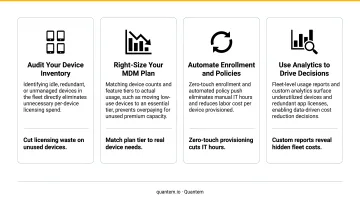
Fleet analytics turn operational data into budget decisions:
- Dormant device identification: flag devices with no usage in 30+ days for investigation or decommissioning
- Data plan benchmarking: compare actual consumption against service plan tiers and right-size accordingly
- Shadow device elimination: identify devices that appear in carrier billing but aren't enrolled in MDM
- Refresh cycle forecasting: use device age and health data to plan hardware budgets 12–18 months ahead
How to Choose the Right Mobile Fleet Management Solution
Evaluate Platform Support, Scalability, and Feature Completeness
Before shortlisting any vendor, verify:
- Which operating systems are supported (Android, iOS, Windows) and whether your specific device types are covered
- Whether zero-touch enrollment is included in base plans or gated behind premium tiers
- Whether kiosk mode, geofencing, and app management are included or sold as add-ons
- How the platform scales - does pricing or performance degrade as device count grows?
Assess Pricing Structure and Total Cost of Ownership
Per-device per-month pricing is the standard model. Based on publicly available vendor pricing, standard MDM/UEM tiers currently run $2.00–$6.00+ per device per month:
- Hexnode: $2.20–$4.70
- Scalefusion: $2.00–$6.00
- Jamf for Mobile: $5.75 per device
- Microsoft Intune Plan 1: $8.00 per user per month
Quantem prices below this range at $1–$3 per device per month (Essential, Professional, and Enterprise tiers), with a 21-day free trial and no cancellation fees. For a 500-device fleet, the difference between a $2 and $5 per-device plan adds up to $18,000 per year - worth quantifying before you sign.
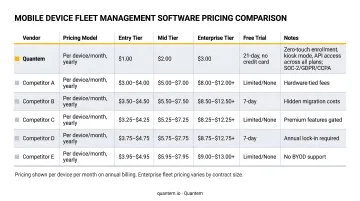
License cost is only part of the picture. Factor in setup complexity, support quality, and whether the features you need require a premium tier upgrade before comparing quotes.
Verify Security Certifications and Compliance Coverage
Once pricing checks out, compliance requirements often become the deciding factor - especially in regulated industries. For any vendor under consideration, confirm:
- SOC-2, GDPR, and CCPA certifications at minimum
- Availability of compliance documentation (attestation reports, data processing agreements) to support your own audits
- Industry-specific controls if you operate in healthcare, finance, or retail
Frequently Asked Questions
What is the difference between MDM and mobile device fleet management?
MDM (Mobile Device Management) is the software layer that enforces security policies and manages device configurations. Mobile device fleet management is the broader operational discipline, encompassing procurement, lifecycle planning, cost optimization, and structured retirement. MDM functions as one component within it.
How does zero-touch enrollment work?
When a device first connects to a network, the MDM platform detects it, matches it to an assigned configuration profile, and automatically applies apps, restrictions, and policies - no manual IT setup required. The process relies on Android Zero-Touch, Apple Automated Device Enrollment, or Windows Autopilot depending on the device OS.
What happens to company data on a personal device when an employee leaves?
MDM work profiles and containerization allow IT administrators to selectively wipe only the corporate data container on a BYOD device. Personal photos, messages, and apps on the same device remain completely untouched; the wipe targets only the encrypted corporate workspace.
Is mobile device fleet management suitable for small businesses?
Yes. Even teams managing fewer than 50 devices benefit from centralized enrollment, remote wipe capabilities, and automated policy enforcement. Modern cloud-based platforms like Quantem use per-device pricing with no large upfront investment, so full fleet management capability is available without enterprise-level spend.
How much does mobile device fleet management software typically cost?
Most platforms are priced per device per month, ranging from $2 to $6+ based on publicly listed vendor pricing, with some enterprise suites billed per user instead. Quantem's tiers run $1–$3 per device per month. When comparing options, factor in setup costs, ongoing support, and whether the features you need require a premium plan upgrade.
What types of devices can be managed through a fleet management platform?
Most platforms support smartphones, tablets, and Windows laptops. Broader support varies by vendor and may extend to rugged handhelds, warehouse scanners, point-of-sale terminals, and IoT endpoints. Organizations running mixed-OS or specialized hardware fleets should verify device compatibility directly with vendors before committing.