BYOD (Bring Your Own Device) policies offer a pragmatic answer: let students use personal devices for academic work, reduce hardware procurement costs, and keep learning connected beyond the classroom. But without proper guardrails, BYOD also introduces security gaps, compliance headaches, and equity problems that can undermine the entire program.
This guide covers what BYOD actually means in a school context, the real benefits and challenges backed by current data, actionable best practices for IT teams, and what a solid BYOD policy needs to include.
Key Takeaways
- BYOD lets students use personal devices for learning, shifting hardware costs away from the school budget
- Benefits include reduced procurement costs, stronger student engagement, and faster digital skill development
- Key challenges include security vulnerabilities, OS fragmentation, student distraction, and unequal device access
- A successful program needs a written policy, network segmentation, and MDM-enforced work profile separation
- Understanding the difference between BYOD, COPE, and COBO is essential before committing to a device ownership model
What Is BYOD in Schools?
BYOD in a school context is a formal policy that permits students and staff to bring personally owned devices (smartphones, tablets, laptops) onto school premises and use them for academic activities. That includes accessing the learning management system (LMS), submitting assignments, attending virtual sessions, and using approved educational apps.
BYOD vs. COPE vs. COBO
Schools typically choose from three device ownership models, and the distinction matters for how much control IT can actually enforce:
| Model | Who Owns the Device | Personal Use Allowed? | IT Control Level |
|---|---|---|---|
| BYOD | Student/staff | Yes (personal device) | Limited (work profile only) |
| COPE | School | Yes (limited) | High |
| COBO | School | No | Full |
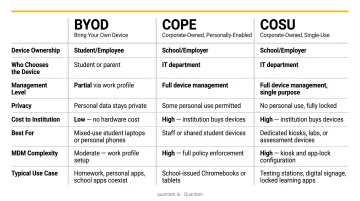
BYOD shifts hardware responsibility to families. COPE gives IT more control while offering some flexibility. COBO locks devices down entirely for school use - ideal for high-security or standardized testing environments.
Understanding these models sets the context for why BYOD adoption rates vary so widely across districts.
How Common Is BYOD in US Schools?
According to CoSN's 2024 State of EdTech District Leadership report, 11% of districts use a BYOD model, while 44% provide 1:1 devices for all K-12 students and 39% for some grades.
The pandemic accelerated device adoption broadly - by 2021-22, 96% of public schools were providing digital devices to students who needed them. Budget pressures since then have pushed more districts to reconsider BYOD to reduce hardware spending.
Benefits of BYOD in Schools
Reduces Hardware Costs
School device programs carry costs well beyond the purchase price. CoSN's total cost of ownership framework accounts for the full lifecycle: hardware, software, infrastructure, maintenance, and staff labor. Hidden costs include chargers, cases, repair parts, and professional development - reselling devices after three to four years only recoups 20–25% of original cost.
BYOD shifts the hardware burden to families, freeing school budgets for infrastructure, teacher training, or device lending pools for students who need them. Savings vary by district, but the math is straightforward: fewer devices to buy means more budget flexibility everywhere else.
Boosts Student Engagement and Familiarity
Students already know their own devices. There's no onboarding friction, no "how do I log in" delay eating into class time. That familiarity translates to faster participation in digital activities (polls, collaborative documents, real-time quizzes) and a stronger sense of ownership over their work.
A 2024 study of 8,265 upper-secondary students across 100 BYOD schools found higher self-reported 21st-century skills among students who brought their own devices. While this isn't a US-specific benchmark, it supports what classroom teachers often observe: students engage more when working on familiar tools.
Supports Learning Beyond School Hours
A school-issued device that stays at school doesn't help with homework. A personal device goes home with the student, supporting:
- Asynchronous learning and LMS access outside class hours
- Homework completion without a loaner checkout process
- Self-directed research on a device students already know how to use
The equity caveat: students who don't own a capable device or lack home internet are excluded. That access gap is one of the core challenges any BYOD policy needs to address.
Accelerates Digital Literacy
Regular academic use of personal devices builds skills that transfer directly to the workplace : researching, collaborating, creating content, managing digital files. When paired with structured digital citizenship instruction, BYOD also builds responsible technology habits.
ISTE/ASCD frames digital citizenship as students learning to engage across viewpoints and interact online with empathy and respect. Those habits require regular practice, not just a one-time policy acknowledgment.
Faster Rollout Than School-Issued Programs
Procuring school devices involves months of planning, bidding, purchasing, imaging, and distribution. A BYOD program, once policy and network infrastructure are in place, can go live in days. For lean IT teams managing competing priorities, that speed advantage matters.
Challenges of BYOD in Schools
Security Risks From Unmanaged Personal Devices
Personal devices vary widely in security posture. Some run outdated operating systems. Others lack encryption or have never had antivirus software installed. K12 SIX tracked 1,619 publicly disclosed K-12 cyber incidents between 2016 and 2022, and CISA identifies systemic cybersecurity risk across K-12 schools. When unmanaged personal devices connect to the school network or access student data systems, they expand the attack surface.
The core risks:
- Unpatched OS vulnerabilities on student-owned devices
- Malicious apps downloaded outside school app stores
- Lost or stolen devices with unencrypted school data
- Inconsistent security configurations across dozens of hardware and OS combinations
Device and OS Fragmentation Creates IT Complexity
One class might include Android phones, Windows laptops, iPads, and Chromebooks - all running different OS versions. Supporting this fragmented landscape without a unified management tool is time-intensive and error-prone. Most school IT teams simply can't enforce a consistent security baseline across that many device types manually.
Student Distraction and Misuse
Device fragmentation is an IT problem. Distraction is a classroom one - and personal devices create both. The same device used for class is also the one used for gaming, social media, and group chats.
A 2024 Pew Research survey found 38% of teens said they spend too much time on their smartphones. Without content filtering and usage restrictions actively enforced, maintaining focus is a persistent challenge - particularly at the K-12 level where self-regulation is still developing.
Digital Equity and the Access Gap
BYOD assumes every student owns a capable device and has reliable home internet. That assumption doesn't hold. CoSN's 2024 data shows only 24% of districts report that all students have device access at home. Schools that rely solely on BYOD without a device lending program risk locking lower-income students out of digital learning entirely - undermining the equity goals a technology program is supposed to advance.
Data Privacy and Compliance Obligations
Student data doesn't stop being regulated just because it's accessed on a personal device. Three federal frameworks apply regardless of who owns the hardware:
- FERPA governs personally identifiable information from education records and requires consent before disclosure, with limited exceptions
- CIPA requires schools receiving E-rate funding to certify an internet safety policy and filter obscene or harmful content
- COPPA applies to online services collecting data from children under 13 - the FTC allows schools to consent on behalf of parents, but only for educational purposes
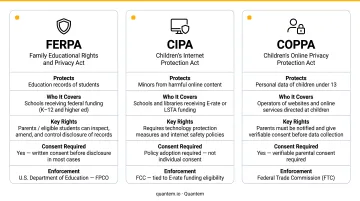
The FTC's 2022 education technology policy statement confirmed that edtech providers cannot use school adoption of their tools as a workaround for COPPA. Every app students access on a personal device - not just school-issued hardware - falls within a school's compliance obligation.
BYOD Best Practices for Schools
Segment the Network to Isolate BYOD Traffic
CoSN explicitly recommends network segmentation for insecure school-connected devices, including placing them on a separate VLAN. For BYOD, this means creating a dedicated Wi-Fi network for personal devices that keeps them isolated from administrative systems, financial records, and sensitive staff data.
If a student's compromised device does reach the school network, segmentation limits what it can access. This is one of the highest-impact, lowest-cost security controls available to school IT teams.
Deploy an MDM Solution With Work Profile Separation
An MDM platform is the operational backbone of a secure BYOD program. The key capability to look for: work profile separation, which creates a managed container on each enrolled device that keeps school apps and data completely separate from personal content.
With a proper work profile in place, IT can:
- Push approved educational apps to the managed profile
- Enforce security policies without touching personal photos or messages
- Remotely wipe school data from a lost device without affecting personal content
Android Enterprise Work Profile is the platform-level standard for this separation, and Microsoft Intune documents BYOD enrollment using this approach for Android devices.
Quantem supports this approach with work profile separation across Android and Windows devices, zero-touch enrollment, and toggle-based policy controls. Pricing starts at $1–$3 per device per month, with a 21-day free trial and no credit card required.
Establish Acceptable Use Policies and Content Filtering
A written acceptable use policy (AUP) defines what students can and cannot do on personal devices while on school networks or accessing school systems. Policy alone isn't enough - it needs technical enforcement:
- Web content filters blocking social media, gaming, and adult content during school hours
- App whitelists or blacklists restricting unapproved applications
- Clear consequences for violations, documented in the AUP
CIPA already requires content filtering for schools receiving E-rate support. Meeting that standard is the minimum - most schools benefit from going further with tighter app controls and usage monitoring.
Address Equity Gaps With a Device Lending Program
No BYOD program is complete without a plan for students who don't own a compatible device. Maintain a pool of school-owned loaner devices for these students, managed through the same MDM console used for BYOD devices. This ensures consistent policy enforcement regardless of device ownership - and keeps every student participating in digital learning.
Train Teachers and Communicate With Parents
Technology controls only go so far. BYOD success depends equally on human buy-in:
- Teachers need training on integrating BYOD into lesson plans and managing distraction when it surfaces
- Parents need clear communication about what the school can and cannot access on personal devices, what happens if a device is lost or damaged, and how the MDM work profile protects their child's personal data
Being specific about data access and MDM scope - in plain language, not policy jargon - is what builds parent trust and keeps your program aligned with FERPA requirements.
Building a BYOD Policy: What to Include
A written BYOD policy gives the program its legal and operational backbone - defining what's allowed, what's monitored, and what happens when rules are broken.
Every school BYOD policy should address:
- Eligible devices - which device types and OS versions are permitted
- Permitted uses - which school resources and apps students can access
- Prohibited uses - specific activities that are not allowed (social media during class, personal app stores, etc.)
- Content filtering and app restrictions - how these are technically enforced
- Data privacy disclosures - exactly what the school's MDM can and cannot see or control on a personal device
- Consequences for violations - graduated, clearly defined
- Device loss or damage - who bears responsibility
- Offboarding - how school data is removed from a personal device when a student leaves
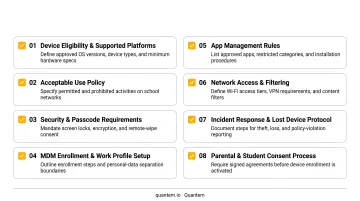
The MDM transparency section deserves particular attention. Parents and students need to understand that the work profile manages only school-side content - their personal photos, messages, and apps remain private. The privacy disclosure should spell out specifically what the MDM can access, what it cannot touch, and how data is handled if a student unenrolls - this is both a trust-building measure and a FERPA compliance requirement.
Review the policy at least once a year. Apps change, student device trends shift, and state or federal privacy regulations evolve. Triggers for an unscheduled review include new state privacy legislation, a significant shift in student device types, or any MDM feature changes that affect what the school can monitor.
Frequently Asked Questions
What does BYOD mean in a school setting?
BYOD in schools is a policy that permits students and staff to use personally owned devices - smartphones, tablets, laptops - for academic activities like accessing the LMS, submitting assignments, and using approved apps. It's an alternative to schools purchasing and issuing devices to every student.
Is BYOD allowed in schools?
BYOD is permitted in many US schools and districts, though policies vary widely. Schools receiving E-rate funding must comply with CIPA content filtering requirements. Individual districts set their own rules on which device types and activities are permitted - check your state department of education for guidance.
What is the difference between BYOD, COPE, and COBO?
BYOD means the student owns the device; COPE means the school owns it but allows limited personal use; COBO means the school owns it and restricts it entirely to school-approved activities. Schools with tighter IT budgets and lower support capacity tend to favor BYOD; those needing stricter control over device use typically choose COBO.
What are the main security risks of BYOD in schools?
The top risks include:
- Unpatched or unencrypted personal devices connecting to the school network
- Data exposure from lost or stolen devices
- Students installing malicious or unauthorized apps
- Inconsistent security configurations across different hardware and operating system combinations
How can schools address the digital equity problem in a BYOD program?
Pair the BYOD policy with a device lending program that provides loaner devices to students who don't own a compatible personal device. Some districts also offer subsidized purchase programs or partner with local nonprofits to close the access gap more permanently.
What should a school BYOD policy include?
A complete BYOD policy should cover:
- Eligible device types and minimum technical requirements
- Permitted and prohibited uses on school networks
- Content filtering rules and app restrictions
- Data privacy disclosures explaining what the school can access on personal devices
- Consequences for policy violations
- Procedures for lost or damaged devices
- A scheduled annual review process