Introduction
Implementing BYOD in a university setting goes far beyond Wi-Fi configuration. It's a cross-departmental initiative spanning policy governance, network architecture, identity management, endpoint security, and ongoing compliance.
Universities are doing it anyway, and for good reason. A 2025 UC Davis campus survey found 96.3% laptop ownership and 95.7% smartphone ownership among respondents. Students arrive with devices already in hand. The real question is whether your institution accommodates them deliberately or scrambles to catch up.
Done without a clear strategy, BYOD produces predictable outcomes: unmanaged device sprawl, FERPA compliance exposure, network congestion during peak class hours, and data on unsecured personal devices that nobody can account for. Faculty resistance compounds the problem when policies arrive without consultation.
IT leadership drives implementation, but success requires genuine input from legal and compliance, faculty governance, student affairs, and network operations. This guide walks university IT teams through the complete process - covering readiness assessment, phased rollout, and sustained monitoring.
Key Takeaways
- BYOD requires policy, infrastructure, security, and device management to be operational before any rollout begins
- Network segmentation and MDM enrollment are non-negotiable technical prerequisites - treat them as launch blockers, not afterthoughts
- A formal pilot (50–200 users, 8–12 weeks) must precede campus-wide deployment
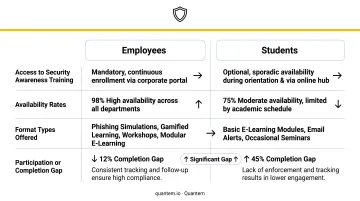
- Only 36% of institutions make security awareness training available to students - every BYOD program must fix this from day one
- Ongoing monitoring and annual policy reviews keep the program functional long after launch
What BYOD Implementation in Higher Education Actually Involves
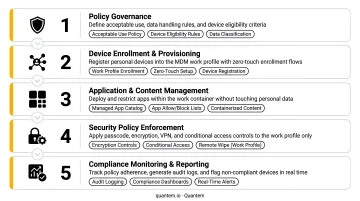
A university BYOD program is not a single decision - it's the combination of five interdependent layers operating together:
- Policy governance - acceptable use rules, data classification, enforcement mechanisms
- Network architecture - segmented VLANs separating personal devices from administrative systems
- Identity and access management - who can access what, and under what conditions
- Endpoint security enforcement - minimum device requirements, MDM enrollment, compliance checks
- Ongoing compliance monitoring - continuous visibility into enrollment status, OS versions, and anomalies
Why Higher Education BYOD Is More Complex Than Enterprise BYOD
Enterprise IT can mandate device models, push configuration profiles, and enforce policies on hardware the organization owns. Universities cannot. Students have legal autonomy over their personal devices, faculty expect academic freedom, and staff come with their own device preferences.
That dynamic creates hard constraints:
- Can't mandate device models or operating systems
- Can't force software installation without a clear consent and privacy framework
- Must balance institutional security obligations against student autonomy and faculty governance expectations
- Must manage a mixed-device environment - iOS, Android, Windows, macOS - across thousands of concurrent users
The scope includes access to genuinely sensitive systems: FERPA-protected student records, financial data, and research repositories. A single breach can expose thousands of student records and trigger federal compliance consequences under FERPA.
Coordination Timeline
Universities should plan for a minimum of 3–6 months from policy drafting to initial pilot launch. A full academic year is a realistic timeline before campus-wide rollout is stable.
Stakeholder groups whose buy-in is required before implementation begins:
- IT and network operations
- Legal and compliance
- Faculty senate or academic council
- Student government
- Department heads with specialized software needs (engineering, health sciences, nursing programs)
Prerequisites Before Launching a University BYOD Program
None of the technical implementation steps should begin until these foundations are confirmed. Retrofitting policy and infrastructure after deployment creates significant rework and security exposure.
Policy and Governance Readiness
A BYOD Acceptable Use Policy must be formally approved before any devices connect to institutional resources. It needs to cover:
- Which device types are permitted and minimum OS version requirements
- Passcode, encryption, and patch currency requirements
- Data classification rules - what can and cannot be stored on personal devices
- MFA requirements for accessing institutional systems
- The university's right to restrict access or remotely remove institutional data from personal devices
That policy must align with the institution's broader Information Security Policy, Data Protection and Privacy Policy, and FERPA obligations. FERPA requires institutions to use reasonable methods to ensure school officials access only education records in which they have a legitimate educational interest - BYOD controls need to be framed explicitly around this requirement.
Real-world examples worth reviewing: the University of Michigan's SPG 601.33 governs personally owned devices accessing sensitive institutional data, and the University of Reading's BYOD policy requires screen lock after no more than 10 minutes of inactivity.
Infrastructure and Network Readiness
Network segmentation is non-negotiable. Personal devices must connect to a dedicated BYOD VLAN that grants internet access and approved cloud services while remaining logically isolated from administrative systems, research networks, and sensitive data stores. Without this separation, a compromised personal device has a direct path to institutional systems.
Before rollout, assess carefully:
- Can your wireless infrastructure support peak simultaneous BYOD connections without degradation?
- Do high-traffic areas (lecture halls, libraries, student unions) have sufficient access point density?
- Is bandwidth provisioning adequate given that typical students connect two or more devices to campus Wi-Fi daily?
MDM Platform Selection
Select an MDM or Unified Endpoint Management (UEM) solution that supports:
- Work profile separation - institutional apps and data containerized without touching personal content
- The device platforms your student and faculty population actually uses
- Compliance requirements relevant to your institution (SOC-2, GDPR, FERPA-aligned data handling)
Pricing varies considerably across MDM platforms. Enterprise incumbents typically run $3–$10+ per device per month, while platforms built specifically for BYOD use cases - such as Quantem - offer work profile separation with SOC-2, GDPR, and CCPA compliance starting at $1–$3 per device per month. Quantem also offers a 21-day free trial with no credit card required, which is enough runway to run a realistic pilot enrollment test before committing.
How to Implement BYOD in Higher Education: A Step-by-Step Approach
Skipping phases - especially the pilot or policy approval - is where most university BYOD programs break down. Follow this sequence in order.
Phase 1: Policy Finalization and Stakeholder Alignment
Finalize the BYOD policy through formal governance channels before anything goes live:
- Communicate the policy to students, staff, and faculty before launch
- Establish a dedicated support channel for BYOD questions
- Document the sign-off process clearly - ambiguity about who approved what creates problems during audits and incidents
Phase 2: Infrastructure Configuration
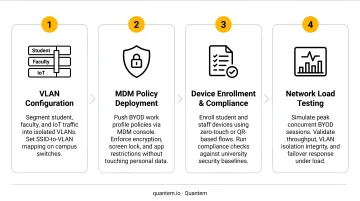
- Configure BYOD network segments - deploy the dedicated VLAN and test isolation boundaries
- **Deploy or configure your selected MDM platform** - verify work profile enrollment workflows end-to-end
- Integrate MDM with your identity provider - Active Directory, LDAP, or SSO for authentication
- Test everything before users touch it - enrollment flows, policy enforcement, and network performance under simulated load
Phase 3: Pilot Rollout
Launch with a defined, willing cohort - a single department or student residence hall of 50–200 users works well. Set a clear duration of 8–12 weeks and define measurable success criteria before it begins:
- Device enrollment completion rate
- Help desk ticket volume per 100 users
- Network performance during peak hours
- Policy edge cases identified
Phase 4: Validation and Iteration
Collect structured feedback from pilot participants, review help desk data for recurring patterns, and pull network performance logs. Use what you find to refine enrollment documentation, adjust network configuration, and close policy gaps before rollout scales.
Phase 5: Campus-Wide Rollout and Ongoing Monitoring
Roll out by college or department rather than all at once. Run user awareness sessions covering BYOD security responsibilities. Establish recurring review cycles:
- Quarterly - compliance audits via MDM dashboard
- Annual - full policy review
- Continuous - real-time monitoring for enrollment status, OS version compliance, and security anomalies
Common BYOD Implementation Challenges and How to Address Them
BYOD rollouts in higher education tend to run into the same friction points. Here's what typically goes wrong - and how to fix it.
Challenge 1: Low Enrollment Compliance
Problem: A significant portion of users access campus resources from personal devices without completing MDM enrollment or meeting minimum security requirements.
Likely cause: Enrollment process is too complex, or the value proposition isn't clearly communicated. Faculty in particular resist any perception that the institution can monitor or control their personal device.
Fix:
- Simplify enrollment to the fewest possible steps
- Create role-specific enrollment guides (student, faculty, staff versions)
- Communicate explicitly what the MDM does not access - work profile separation means the university cannot see personal content, photos, messages, or apps
Challenge 2: Network Congestion and Performance Degradation
Problem: Campus Wi-Fi degrades noticeably after BYOD devices are added at scale, particularly during peak class hours.
Likely cause: Insufficient access point density in high-traffic areas, inadequate bandwidth provisioning, or no QoS (Quality of Service) policies differentiating academic traffic from recreational device activity.
Fix:
- Conduct a pre-rollout wireless site survey - identify congestion zones before they become complaints
- Upgrade access points in identified areas before expanding rollout
- Implement QoS rules on the BYOD network segment to prioritize academic traffic
Challenge 3: Data Leakage from Non-Compliant Devices
Problem: Institutional data - student records, research data, financial information - is accessed from personal devices that don't meet minimum security requirements.
Likely cause: Systems grant access based on valid credentials alone, without checking device compliance status first.
Fix: Implement conditional access policies that verify device compliance (OS version, encryption status, MDM enrollment) as a prerequisite for accessing sensitive institutional systems. Integrate this with your identity provider and establish clear remediation workflows so non-compliant users receive guidance before access is restricted - before they're locked out with no path forward.
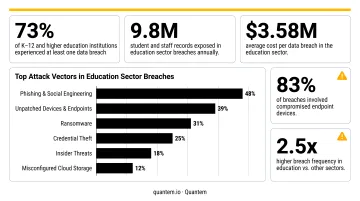
That remediation gap matters more than most IT teams realize. The Verizon 2025 DBIR reported 851 confirmed breaches in Educational Services, with System Intrusion, Miscellaneous Errors, and Social Engineering accounting for 80% of education-sector breaches. Unmanaged personal devices without conditional access controls are a direct path into that statistic.
Pro Tips for a Sustainable University BYOD Program
Three practices consistently separate BYOD programs that hold up over time from those that quietly erode.
Review Policy Annually - Not Just at Launch
Device ecosystems, OS versions, and threat landscapes change faster than most institutions update their policies. A policy written in year one will have meaningful gaps by year three without deliberate annual review. Build a standing calendar item; don't wait for an incident to trigger a refresh.
Close the Student Training Gap
An EDUCAUSE 2023 QuickPoll found that 94% of institutions had security awareness programs and 90% mandated employee training - but only 36% made training available to students. For a BYOD program, that gap is a direct security risk.
Run brief, targeted sessions at enrollment and at the start of each academic year. Cover:
- Safe Wi-Fi use on campus and public networks
- Phishing recognition and how to report suspicious messages
- Data handling obligations under institutional policy
Use MDM Analytics to Get Ahead of Incidents
Platforms like Quantem provide real-time dashboards showing enrollment status, OS version compliance, policy violations, and device health across the fleet. The goal is to catch trends - devices drifting out of compliance, enrollment drop-offs in specific departments - before they become incidents.
Automate compliance alerts and build a process where IT reaches out to non-compliant users with remediation guidance before access is restricted. Reactive enforcement frustrates users; proactive outreach keeps them onside.
Frequently Asked Questions
What does BYOD mean for a university?
University BYOD (Bring Your Own Device) is a formal program allowing students, faculty, and staff to use personally owned smartphones, tablets, and laptops to access institutional resources, subject to minimum security requirements and an acceptable use policy set by the institution. NIST defines BYOD as performing work-related activities on personally owned devices.
What are the main security risks of BYOD in higher education?
The four primary risks are: unencrypted personal devices accessing FERPA-protected records, institutional data stored locally where IT has no visibility, malware entering the campus network from unsecured devices, and unauthorized access when a device is lost or stolen without remote wipe capability.
What is the difference between BYOD and university-managed devices?
University-managed devices are owned and fully controlled by the institution - IT can install software, enforce settings, and wipe the device entirely. BYOD devices are personally owned and the university has limited control, typically enforced through work profile separation and conditional access rather than full device management.
What should a university BYOD policy include?
Essential elements include: acceptable use rules, minimum device security requirements (OS version, encryption, passcode), data classification and handling rules, MFA requirements for institutional system access, the university's right to remotely remove institutional data, and consequences for policy violations.
How does an MDM solution support BYOD in universities?
An MDM platform enforces security baselines, containerizes institutional apps in a work profile separate from personal content, and monitors device compliance across the fleet. If a device is lost or stolen, IT can remotely remove institutional data without affecting the user's personal files.
Is BYOD cost-effective for universities?
BYOD reduces hardware provisioning costs, but those savings are often offset by infrastructure upgrades, MDM licensing, and increased IT support demand. Net savings depend heavily on your institution's current infrastructure state and the MDM pricing model you choose.