Introduction
A device disappears from inventory. A policy gets changed overnight - no ticket, no approval. Then a compliance auditor asks you to prove who accessed sensitive device data six months ago. That's the core problem a device fleet audit log solves.
According to the 2024 Verizon Data Breach Investigations Report, internal actors were responsible for 35% of breaches, and human error was a factor in another 28%. Both categories are exactly what audit logs are built to catch - before they become incidents.
This guide covers what a device fleet audit log is, which events it tracks, how to access and use it effectively, and how it supports compliance across frameworks like HIPAA, SOC-2, GDPR, and CCPA.
Key Takeaways
- Audit logs create tamper-evident, time-stamped records of every administrative action across your device fleet
- Events span enrollment, policy changes, app management, and administrator activity
- Regular review cadences - not just post-incident reviews - are essential for proactive security
- Compliance frameworks like HIPAA and SOC-2 treat audit logs as core evidence artifacts
- Choosing an MDM platform certified under relevant frameworks reduces compliance burden and audit prep time
What Is a Device Fleet Audit Log?
A device fleet audit log is a chronological, tamper-evident record of all administrative actions, device-level events, and configuration changes made across a fleet of managed devices. It differs from a device usage log (which tracks end-user behavior like app open times) or an application-level log (which records in-app activity).
The audit log sits at the management layer. It tracks what administrators and automated systems did to devices - policy changes, remote actions, enrollments - not how end users interacted with them.
Core Components of an Audit Log Entry
NIST SP 800-53 Rev. 5 AU-3 defines the minimum fields an audit record must establish:
| Field | Description |
|---|---|
| Timestamp | When the event occurred |
| Actor | User, admin, or automated system that initiated the action |
| Action type | Create, update, delete, assign, remote action |
| Target entity | Device, user, policy, app, or profile |
| Outcome | Success or failure |
| Before/after values | What changed - original state and new state |
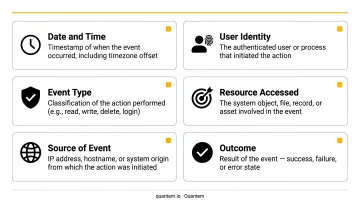
Before-and-after values are the most operationally critical field. Without them, you know that a policy changed - but not what it changed from, which makes rollbacks and incident investigations significantly harder.
Active vs. Inactive-Changed Entries
Most MDM platforms log two types of entries:
- Active entries - reflect the current state of a record after a change was applied
- Inactive-changed entries - preserve the original state before the edit was made
Together, these two entry types give administrators a complete before-and-after change history for any configuration, policy, or device record.
Why Device Fleet Audit Logs Matter for IT and Operations Teams
Accountability and Internal Governance
Every policy change, remote wipe, enrollment action, or role assignment gets attributed to a specific actor - whether that's a named administrator or an automated process. This creates an authoritative record that prevents disputes ("I didn't change that setting") and supports internal governance by making administrative activity visible and reviewable.
Security Monitoring
Audit logs are your early warning system. They surface patterns that wouldn't otherwise be visible:
- Unexpected configuration changes made outside business hours
- Repeated failed admin login attempts
- Bulk device removals not tied to a scheduled decommission
- MDM unenrollments initiated without a support ticket
- Privilege escalations or role changes not authorized through standard processes
Routine log review exists precisely to catch these signals before they become incidents.
Compliance Evidence
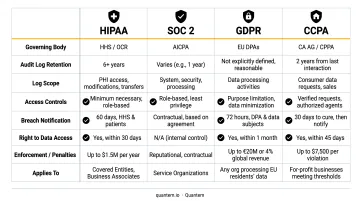
Multiple regulatory frameworks require auditable records of who accessed or modified systems containing sensitive data:
- HIPAA (45 CFR 164.312(b)) requires hardware, software, or procedural mechanisms that record and examine activity in systems containing ePHI
- SOC-2 (CC7) covers monitoring, detecting, evaluating, and responding to security events
- GDPR requires accountability and appropriate security controls for personal data
- CCPA regulations require cybersecurity audits that assess audit log management, including centralized storage and retention
Audit logs aren't just helpful during a compliance review - they're often a required artifact.
Operational Troubleshooting
When a device fleet starts behaving unexpectedly - policies not applying, apps not pushing, kiosk mode configurations reverting - audit logs let you reconstruct the sequence of events that led there. That's faster than manually comparing current and expected configurations with no change history to reference.
Incident Response
The IBM Cost of a Data Breach 2024 report puts the average breach cost at $4.88M, with a mean time to identify and contain of 258 days. When an incident occurs, audit logs provide the forensic timeline investigators need. They isolate the source, scope, and sequence of unauthorized activity - giving investigators a starting point instead of a blank slate.
What Events Are Captured in a Device Fleet Audit Log?
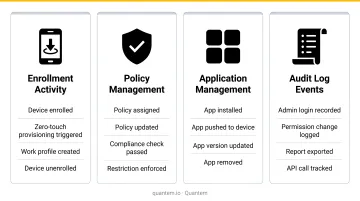
Device fleet audit logs capture events across four main categories. The specific events logged vary by MDM platform, but the patterns are consistent across major vendors including Microsoft Intune, Google Workspace, and Omnissa Workspace ONE.
The four categories are:
- Device Enrollment and Lifecycle - from zero-touch enrollment through retirement
- User and Administrator Activity - logins, role changes, and permission updates
- Policy, Profile, and Configuration Changes - before-and-after values for every setting
- Application Management - installs, updates, and deployment policy changes
Device Enrollment and Lifecycle Events
These events track every stage of a device's life in your fleet:
- Zero-touch and manual enrollment
- MDM unenrollment - flag when this happens outside standard offboarding workflows
- Device transfer between organizational units or groups
- Device archival and retirement
- Device deletion from the management console
Tracking the full lifecycle matters for asset accountability. If a device disappears from your fleet record, you need to know when it was removed, why, and who authorized it.
User and Administrator Activity
Admin activity logging is essential for detecting privilege abuse. Key events include:
- Administrator login and logout
- Failed login attempts
- User account creation and deletion
- Role or permission changes
- Password reset requests
The 2025 Verizon DBIR reports that the human element - including errors and privilege misuse - was involved in 68% of breaches. Logging every admin action is the most direct control against this category of risk.
Policy, Profile, and Configuration Changes
Human errors don't stop at admin accounts - misconfigured policies are one of the most common sources of fleet drift. Configuration changes are where before-and-after values matter most. Logged events include:
- Creation, editing, or deletion of device policies and configuration profiles for Android and Windows devices
- Kiosk mode setting changes
- Geofencing rule modifications
- App allowlist or blocklist updates
Without both the original and updated values in the log, you can't verify whether a change was intentional or identify exactly when a configuration deviated from your approved baseline.
Application Management Events
App-related events are particularly important in managed environments where unauthorized installations can introduce security risks:
- Software installations and uninstallations
- App updates and version changes
- Deployment policy changes
- App state changes (compliance state, application ID, SHA-256 hash where available)
Across all four categories, every log entry should capture at minimum: the device ID, the actor who triggered the event, and a precise timestamp. Without these three fields, the log can record what happened - but not who was responsible or when.
How to Access and Review Your Device Fleet Audit Log
Most MDM dashboards surface audit logs under an Administration, Security, or Compliance section. The default view typically displays the most recent events - though the number of visible entries varies by platform and plan tier.
For platforms like Quantem, activity log retention scales with the plan: the Essential tier retains logs for 1 month, Professional for 2 months, and Enterprise for 3 months. Organizations with stricter compliance requirements should factor retention periods into their platform selection.
Filtering for Targeted Investigation
When you're investigating a specific incident rather than doing a general review, filtering is essential. Most platforms support filtering by:
- Date range to narrow the window when a change occurred
- User or actor to isolate actions by a specific administrator or service account
- Device ID, to view all events tied to a single endpoint
- Action type - creates, deletes, or updates only
- Event category, such as enrollment events, policy changes, or app activity
Once you've isolated the relevant events, the next step is often pulling that data out for closer analysis.
Exporting Audit Logs for Deeper Analysis
On-screen views have limits - both in the number of entries displayed and the analytical tools available. Exporting to CSV or Excel lets you:
- Run custom queries and pivot tables across the full dataset
- Produce evidence packages for compliance audits
- Combine fleet audit data with logs from other systems
- Share findings with auditors without granting dashboard access
Some platforms also support log forwarding to external destinations: SIEM tools, cloud storage, or logging pipelines. This extends retention beyond native platform limits and enables automated alerting on specific event patterns.
Best Practices for Managing Device Fleet Audit Logs
Define a Retention Policy
Log retention requirements vary by framework, but some clear reference points exist:
- CIS Control 8 sets a minimum of 90 days of active log retention
- HIPAA (45 CFR 164.316) requires documentation retention for 6 years from creation or last effective date - which effectively applies to documented audit controls and policies
- CCPA requires consumer request records for at least 24 months
- GDPR and SOC-2 don't specify a fixed MDM audit log retention period - retention should align with your system commitments, risk profile, and auditor evidence needs
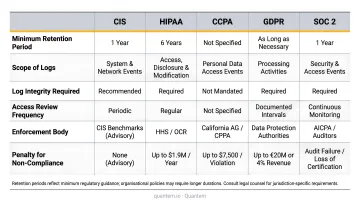
Match your MDM platform's retention settings to the most demanding framework applicable to your organization. For regulated industries, longer native retention tiers or log forwarding to external storage are both practical options worth budgeting for.
Establish Regular Review Cadences
CIS Control 8 recommends reviewing audit logs weekly or more frequently to detect anomalies. NIST SP 800-92 goes further, recommending daily review of log entries most likely to matter.
Practical spot-check focus areas:
- Bulk changes affecting many devices simultaneously
- Administrative activity outside normal business hours
- Repeated failed login attempts from any account
- MDM unenrollments not tied to an approved workflow
- Any role or permission change not matching an open ticket
Waiting until something breaks means many incidents go undetected until devices are already compromised or out of policy.
Restrict Access to the Audit Log Itself
Review cadences only work if the logs themselves are trustworthy. NIST SP 800-53 AU-9 requires protecting audit information from unauthorized access, modification, and deletion:
- Only authorized administrators should be able to view or export audit logs
- Administrators should not be able to edit or delete log entries - read and export only
- Access to the audit log should itself generate a logged event, creating a meta-trail of who reviewed the logs
- Verify log integrity through cryptographic checksums or hash-based validation
Device Fleet Audit Logs and Compliance
Audit logs serve a specific documentation function during compliance reviews: they demonstrate that your organization can answer "who did what, when, and on which device" for any point in the retention window.
What Auditors Look For
Across frameworks, compliance reviewers typically assess:
- Whether access was controlled and logged consistently
- Whether configuration changes were authorized and traceable to specific actors
- Whether incidents were detectable from log data - not just discovered after the fact
- Whether the audit log itself is protected from tampering or selective deletion
Organizations managing ePHI (healthcare), financial data, or student records face the highest scrutiny. The audit log isn't just evidence - it's often the primary artifact that determines whether a security control was actually operating as claimed.
Platform Certification Matters
Choosing an MDM platform already certified under relevant frameworks reduces the compliance burden on your organization. Quantem holds SOC-2, GDPR, and CCPA certifications, which means an independent assessor has verified the platform's own controls - a meaningful factor when your auditors want to understand the security posture of your device management infrastructure.
Tamper-Resistant Logs Are a Compliance Requirement
For audit logs to have compliance value, they must be tamper-resistant. Administrators should be able to read and export logs - nothing more. Any MDM platform where administrators can edit or delete log entries cannot provide reliable audit evidence, regardless of how comprehensive the logged events are. When evaluating MDM vendors, ask directly: can any admin role modify or delete log entries? If the answer is yes - or unclear - that platform introduces compliance risk your auditors will flag.
Frequently Asked Questions
What is the purpose of a device fleet audit log?
A device fleet audit log creates a time-stamped, tamper-evident record of all administrative actions, device events, and configuration changes across a managed fleet. It supports incident investigation and compliance documentation by answering who did what, on which device, and when.
Where can I view the device fleet audit log?
Audit logs are typically located under the Administration, Security, or Compliance section of your MDM platform's dashboard. From there, you can filter by date, device, actor, or event type, and export results for offline analysis or compliance reporting.
What are the two types of device fleet audit log entries?
Active entries show the current state of a record after a change was applied. Inactive-changed entries preserve the original state before the edit was made. Together, they provide a full before-and-after change history for any configuration or policy update.
How long should device fleet audit logs be retained?
CIS Control 8 sets a minimum of 90 days; HIPAA extends that to 6 years. GDPR and SOC-2 requirements vary by risk profile and auditor expectations. Regulated industries should plan for extended retention through native platform settings or external log forwarding.
What events are most important to monitor in a device fleet audit log?
High-priority events to monitor include:
- Failed administrator login attempts
- Bulk device removals
- Unexpected policy or profile changes
- MDM unenrollments outside standard procedures
- Administrative actions taken outside business hours
These patterns most often signal unauthorized activity or privilege misuse.
How do audit logs support regulatory compliance for managed device fleets?
Audit logs demonstrate to regulators that access was controlled, changes were authorized and traceable, and that unauthorized activity can be detected and investigated. Under SOC-2, GDPR, CCPA, and HIPAA, audit logs serve as a primary evidence artifact during compliance reviews.