According to IoT Analytics, connected IoT devices reached 18.5 billion in 2024 and are projected to hit 39 billion by 2030. At that scale, manual provisioning isn't just inefficient - it's untenable.
The concept of automated provisioning is straightforward. Execution is where most teams run into trouble. Results vary widely based on tools, environment, and how thoroughly workflows are defined before automation begins.
This article walks through the exact steps to automate provisioning workflows, what to prepare, the variables that affect outcomes, and the mistakes that derail even well-planned automation efforts.
Key Takeaways
- Automated provisioning replaces manual configuration with policy-driven workflows, cutting deployment time dramatically
- Zero-touch provisioning (ZTP) and Infrastructure as Code (IaC) are the two foundational approaches - most organizations use both
- A clean source of truth, a reliable orchestration or MDM platform, and version-controlled templates are all required before you start
- Nearly 30% of network problems stem from manual configuration errors, so pre-validation is essential before scaling any automated workflow
- Automation delivers the strongest ROI for distributed, high-volume deployments - small static networks rarely justify the setup overhead
How to Automate Network Device Provisioning Workflows
Step 1: Audit and Document Your Current Device Environment
Start with a complete inventory. Document every network device type, OS version, and vendor across your infrastructure. Identify which devices require manual configuration today and look for patterns - high-volume, rule-based provisioning tasks are your best candidates for automation first.
Then establish your source of truth: a version-controlled repository (Git is the standard) that stores all configuration templates, VLAN assignments, IP schemes, and access policies. As Cisco's network automation guidance notes, YAML files in a Git repo work well as the desired-state source for static data, while dynamic data like IP addresses belongs in a relational database or tool like NetBox. Automation is only as reliable as the data feeding it.
Step 2: Define Your Provisioning Workflow and Policies
Map the end-to-end provisioning flow for each device type - from power-on to fully operational. Break it into discrete stages:
- DHCP IP assignment - device gets an address and locates the provisioning server
- Config file retrieval - device pulls its configuration via TFTP, HTTP, or HTTPS
- Firmware verification - confirm the device meets minimum version requirements
- VLAN tagging and policy enforcement - apply network segmentation and access rules
- Compliance check - validate security baselines before marking the device provisioned
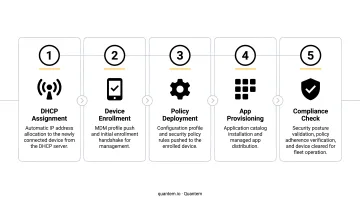
Convert those manual steps into declarative policy templates - Ansible playbooks, Jinja2 config templates, or equivalent. Standardization at this stage directly determines how consistent deployments will be at scale.
Also define approval gates. Before a device is considered provisioned, it should pass security baseline checks: unused ports disabled, authentication protocols enforced, config data encrypted in transit.
Step 3: Configure Your Provisioning Platform and Enable Zero-Touch Deployment
Set up the core infrastructure:
- DHCP server - assigns IP addresses and points devices to the provisioning server via options 67 (boot file/script path) and 150 (TFTP/HTTP server address)
- Config file server - TFTP or HTTP server hosting device configuration files
- Orchestration platform - Ansible, Cisco NSO, or an MDM platform to push policies and manage enrollment at scale
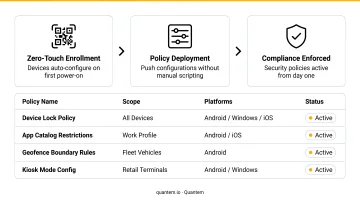
Enable zero-touch provisioning (ZTP) so new devices automatically retrieve their configuration upon connecting to the network - no console cable, no on-site engineer. This is especially valuable for remote branches, warehouses, and healthcare facilities where IT staff aren't physically present.
That same zero-touch logic applies to mobile and endpoint fleets. Quantem handles zero-touch enrollment, policy assignment, and app deployment across Android and Windows devices without manual scripting per device. The platform includes 250+ pre-built policy controls that IT teams toggle directly, so organizations without dedicated network automation engineers can still automate provisioning at scale. Zero-touch enrollment is available on Professional and Enterprise plans.
Step 4: Test, Validate, and Deploy Incrementally
Before any production rollout:
- Test automation scripts against a staging environment or digital twin that mirrors production
- Validate that templates produce the expected device state and don't conflict with existing infrastructure
- Use a tool like Batfish - an open-source network configuration analysis tool that models network behavior from config files without requiring hardware access - to catch errors before they propagate
Then deploy in phases. Start with one device type or one location, verify results against the expected configuration state, then expand. This limits the blast radius if a template contains an error and keeps troubleshooting manageable.
When Should You Automate Network Device Provisioning?
Automated provisioning isn't always the right fit. Small networks with fewer than 20 static devices and infrequent changes may not justify the setup investment. The overhead of maintaining templates, a source of truth, and an orchestration platform can outweigh the gains when change volume is low.
Automation delivers the highest return when:
- Deploying devices to remote sites without on-site IT staff
- Onboarding large batches simultaneously - retail rollouts, hospital expansions, warehouse deployments
- Managing fleets where configuration drift or firmware inconsistency is a recurring problem
- Operating in regulated environments (healthcare, finance) where consistent, auditable provisioning is a compliance requirement
That said, automation introduces its own risks if the groundwork isn't in place first. Proceed cautiously when:
- Your environment is highly heterogeneous with inconsistent firmware support across vendors
- No version-controlled source of truth exists yet
- The team lacks the engineering bandwidth to validate templates before production deployment
The deciding factor is usually change velocity. If devices are being added regularly across multiple locations, the setup investment pays off fast - often within the first major deployment cycle.
What You Need Before You Start
The quality of preparation directly determines whether automation accelerates deployments or amplifies errors at scale.
Infrastructure and Platform Requirements
At minimum, you need:
- A DHCP server to assign addresses and guide devices to the provisioning source
- A config file server (TFTP or HTTP) to serve device configurations
- A centralized orchestration or MDM platform that supports your specific device types, vendors, and OS versions
Confirm vendor and OS support before committing to a platform. DHCP option behavior, bootstrap URLs, and file transfer methods differ by vendor - what works for Cisco IOS XE may not work for Juniper Junos or Arista EOS without separate template adaptation.
Configuration and Skill Readiness
Before automation begins, verify two things are in place.
All device templates must be complete, validated, and stored in version control. Count how many device types lack a standardized config template - that number represents manual exceptions requiring handling outside the automated workflow.
The implementation team needs working knowledge of at least one scripting or IaC framework (Ansible, Python, or equivalent) for network infrastructure provisioning. For endpoint and mobile device fleets, platforms like Quantem eliminate scripting requirements entirely, making provisioning accessible to IT ops teams without automation engineering backgrounds.
Beyond readiness, confirm your provisioning pipeline meets security and compliance requirements. In healthcare and finance environments, these three controls aren't optional:
- Encrypted config delivery
- Authenticated device enrollment
- Audit logging
Key Parameters That Affect Automation Results
Configuration Template Accuracy
Templates are the blueprint every provisioned device receives. A single misconfigured field - wrong VLAN ID, incorrect ACL rule - propagates instantly to every device provisioned from that template.
EMA's 2024 survey of 406 IT professionals found that 29.7% of network-related problems stemmed from manual administrative errors including bad configuration changes - up from 25.6% in 2020. Automation doesn't eliminate this risk; it amplifies it if templates aren't validated first.
Run syntax checks and policy validation (Batfish handles this well) against every template before it touches a production device.
Multi-Vendor and Firmware Compatibility
Different vendors implement ZTP differently:
| Vendor | ZTP Key Details |
|---|---|
| Cisco IOS XE | DHCP option 67 for boot file/script, option 150 for TFTP/HTTP server |
| Juniper Junos | Option 150 takes precedence over 66; supports FTP, HTTP, HTTPS, TFTP |
| Arista EOS | Option 67 points to CloudVision bootstrap URL; validates minimum EOS version |
| HPE Aruba | Activate portal handles group assignment automatically |
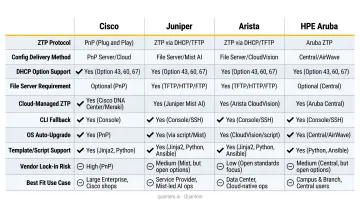
A workflow designed for one vendor will likely fail for another without template adaptation. Document firmware versions in your source of truth and define minimum firmware requirements as a pre-provisioning check.
Security Configuration of the Provisioning Pipeline
An unsecured provisioning server is an attack surface. Standard ZTP can rely on unencrypted protocols like HTTP or TFTP, leaving configuration files open to interception. Without device authentication, unauthorized hardware can trigger enrollment and receive production configs.
Mitigations that should be standard, not optional:
- Enforce TLS encryption for all configuration file delivery
- Require certificate-based or token-based authentication before any device enrolls
- Restrict access to the provisioning server with role-based controls
- Log every enrollment and configuration event for audit purposes
NIST SP 1800-36 provides specific guidance on trusted IoT device onboarding, including unique per-device credentials, X.509 certificates, mutual authentication, and network segmentation based on device identity.
Common Mistakes and How to Troubleshoot Them
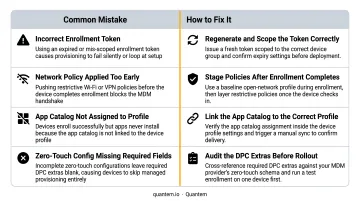
Template validation skipped before deployment - Scripts pushed directly to production without staging cause misconfigurations at scale. Roll back to a known-good config from version control and validate all templates before re-deploying.
Stale source of truth - Outdated device inventory or templates produce configs that don't match actual device state. Post-provisioning compliance checks that compare running configs against expected templates will surface these gaps. Discrepancies point to a data problem, not a tool failure.
Provisioning server overload during mass deployment - Enrolling hundreds of devices simultaneously can saturate server bandwidth or exhaust DHCP lease pools. Mitigate this by:
- Staggering provisioning in batches
- Deploying local config mirrors at high-density sites
- Sizing DHCP pools for peak concurrent enrollments
No post-provisioning verification - Automation confirms a device received a config, not that it's operating correctly. Build automated checks into the workflow - ping tests, interface state verification, policy compliance scans - so failures surface immediately, not during a production incident.
Frequently Asked Questions
What is zero-touch provisioning and how does it work?
ZTP allows network devices to automatically download and apply their configuration upon connecting to the network. The device uses DHCP to get an IP address and locate the provisioning server, then retrieves its config file over TFTP, HTTP, or HTTPS and applies it without any manual console access.
How can automation help with user provisioning?
Automation handles account creation, modification, and deactivation based on triggers like onboarding events. This reduces IT workload and ensures consistent access controls are applied across systems without manual intervention.
What tools are commonly used to automate network device provisioning?
The main categories are IaC tools (Ansible, Puppet, Chef) for configuration management, orchestration platforms (Cisco NSO, Itential) for workflow automation, and MDM platforms like Quantem for zero-touch enrollment and mobile device fleet provisioning. Network infrastructure and endpoints typically require different platforms, so most enterprises combine tools.
What is SSO auto provisioning?
SSO auto provisioning (also called SCIM provisioning) automatically creates and syncs user accounts in connected applications when a user is added to an identity provider. It's part of the broader IT provisioning ecosystem alongside ZTP, but focuses on identity resources rather than device configuration.
What are the biggest security risks in automated network provisioning?
The primary risks are unauthorized device enrollment, interception of unencrypted config files during transmission, and misconfigured access controls on provisioning servers. Encryption (TLS), device authentication (certificates or tokens), and audit logging are the core mitigations.
How do I handle multi-vendor environments in automated provisioning?
Use a vendor-agnostic orchestration platform where possible, maintain separate validated config templates per vendor in your source of truth, and run interoperability tests before deploying any new template across mixed-vendor device groups. A template validated for one vendor cannot be assumed to work for another.