Introduction
Healthcare facilities are under real operational pressure. Patient volumes are climbing while administrative staffing remains thin - MGMA found that 53% of medical group leaders identified front-office support staff as difficult roles to recruit in 2024. Every manual check-in, paper form, and front-desk queue is a drag on throughput that compounds across hundreds of daily interactions.
The healthcare kiosk market reflects this urgency. According to Mordor Intelligence, the medical kiosk market is projected to grow from $1.69B in 2025 to $3.47B by 2031 at a 12.74% CAGR - driven by a straightforward operational case: kiosks reduce administrative load where staff shortages hit hardest.
For IT teams and operations leaders evaluating or expanding kiosk deployments, this article covers where kiosks produce the most consistent results, the benefits they deliver, and what it takes to manage them reliably across multiple facilities.
Key Takeaways
- Healthcare kiosks automate check-in, payments, wayfinding, telehealth, and pharmacy workflows - reducing front-desk load without adding headcount
- A study of 28,636 patient encounters found kiosks cut check-in time by nearly 3 minutes per patient - that adds up fast across a busy facility
- Shorter wait times drive higher satisfaction scores - kiosks that reduce intake friction have a direct impact on patient experience metrics
- HIPAA compliance must be built into kiosk software and device management from the start, not retrofitted
- Multi-location deployments need centralized device management - without it, security gaps and policy drift are nearly inevitable
What Are Healthcare Kiosk Solutions?
Healthcare kiosk solutions are secure, self-service digital terminals deployed within medical facilities. They let patients, staff, and visitors complete routine tasks - checking in, paying bills, finding departments, joining telehealth visits - without requiring staff assistance.
Common deployment locations include:
- Hospital lobbies and outpatient reception areas
- Emergency department waiting rooms
- Pharmacies and diagnostic centers
- Cafeterias and visitor services areas
- Remote community health clinics
They're relevant across facility sizes, from single-location urgent care centers to multi-campus hospital networks. That range matters because the underlying purpose stays the same regardless of scale: kiosks are a workflow tool. They handle high-volume, repetitive interactions so clinical and administrative staff can focus on work that genuinely requires human judgment.
Top Uses for Healthcare Kiosk Solutions
Most facilities start with one use case and expand once operational results are visible. These five are where kiosks consistently deliver the highest measurable value.
Patient Check-In and Self-Registration
Check-in kiosks let patients confirm appointments, update insurance details, and complete intake forms on arrival - independently. For facilities running EHR systems like Epic or Cerner, API-based integrations using HL7 FHIR standards allow real-time data sync, so information entered at the kiosk flows directly into the clinical record without duplicate manual entry.
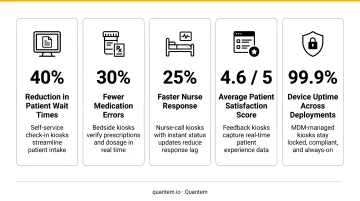
A 2020 study covering 28,636 patient encounters at an orthopedic clinic found that six check-in kiosks reduced check-in duration by 2 minutes and 47 seconds per patient, while daily gross point-of-service collections rose by $532. That's both a throughput win and a revenue cycle benefit from the same deployment.
Wayfinding and Navigation
Large hospital campuses are genuinely difficult to navigate. Interactive wayfinding kiosks give patients and visitors real-time directions to departments, updated hours, and closure notices - replacing static printed signage that goes out of date immediately and costs money to reprint. Multilingual support extends this value to non-English-speaking patients, which matters in urban facilities serving diverse populations.
Bill Payment and Copay Collection
Payment kiosks let patients settle copays, view outstanding balances, and set up payment plans on-site. The operational impact is direct:
- Reduces inbound billing calls to front-desk staff
- Eliminates manual payment entry and reconciliation errors
- Creates a self-service channel that runs outside front-desk hours
- Accelerates cash collection for facilities dealing with payment delays
Telehealth and Remote Consultations
Telehealth kiosks enable video consultations with remote physicians, often paired with peripherals - blood pressure monitors, pulse oximeters - that capture and transmit vitals in real time. HRSA notes that 57 million Americans live in rural communities, many with limited access to specialists. Telehealth kiosks placed in community health centers or remote clinics address exactly this gap, and the VA's ATLAS program is an established example of this model in action.
Pharmacy and Prescription Automation
Pharmacy kiosks handle refill requests, pickup alerts, and inventory checks - taking transaction volume off the pharmacy counter. Chain pharmacies fill over 3 billion prescriptions annually (NACDS), with volume growing roughly 2.4% per year - pressure that kiosks absorb at the counter. Pharmacists redirect that recovered time toward clinical verification and patient counseling, where their expertise actually matters.
Key Benefits of Healthcare Kiosk Solutions
Benefit 1: Operational Efficiency and Staff Productivity
Kiosks shift routine, high-frequency interactions (check-ins, form updates, copay collection) away from front-desk staff. During peak hours, this directly reduces queue buildup and frees staff for work that requires human judgment.
The 2020 orthopedic study referenced above gives the clearest operational benchmark: 2 minutes 47 seconds saved per patient interaction. Multiply that across a busy outpatient department handling 150 check-ins per day and the annual labor hours recovered become substantial - time that can be redirected toward patient-facing clinical support rather than data entry.
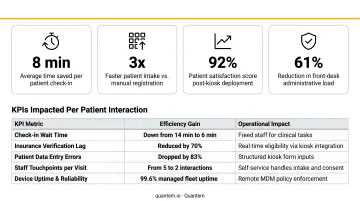
KPIs this affects:
- Patient intake time
- Front-desk staff hours per patient
- Administrative error rate
- Appointment throughput per hour
- Cost per patient interaction
This matters most in high-volume outpatient environments during morning rushes, facilities experiencing front-desk staffing shortages, and multi-location networks standardizing intake workflows across sites.
Benefit 2: Improved Patient Experience and Satisfaction
Patients value control. Kiosks give them the ability to check in, review their information, pay, and navigate the facility on their own terms - without waiting in line for a staff member to become available.
The wait time connection is direct. A 2023 outpatient study found that each additional minute of perceived wait time lowered satisfaction by 0.17 points on a 0-100 scale. Kiosks that speed up intake or give patients more transparency into their wait reduce the frustration that drives down scores.
Patient satisfaction scores also carry financial weight. CMS's Hospital Value-Based Purchasing Program ties HCAHPS performance to incentive payments for acute care hospitals - meaning satisfaction improvements have reimbursement implications beyond reputation.
KPIs this affects:
- Patient satisfaction scores (HCAHPS)
- Average wait time
- Check-in completion rate
- Appointment no-show rate
Priority use cases include facilities serving diverse demographic populations, high-volume outpatient centers where wait time directly affects satisfaction, and health systems competing on patient experience.
Benefit 3: Data Accuracy and Compliance Readiness
When patients enter their own information at a kiosk (insurance details, medication history, contact updates), the data goes directly into the EHR without passing through a staff member who may mishear or mistranscribe.
Registration errors are a well-documented source of downstream problems: misidentification, duplicate medical record numbers, and wrong patient identification all create billing and clinical complications that compound over time.
Those errors feed directly into billing problems. MGMA reported that 60% of medical group leaders saw increased claim denial rates in 2024, with a portion attributable to front-end data errors at registration.
HIPAA compliance requires building safeguards in from the start, not retrofitting them later. HHS guidance permits patient intake at self-service touchpoints, but only when the controls are already in place. That means encrypted sessions, controlled device access, audit trails, and physical privacy measures like screen positioning. These aren't optional additions - they define whether the deployment is compliant at all.
KPIs this affects:
- Data entry error rate
- Claim denial rate
- Compliance audit pass rate
- Time to complete patient registration
When this matters most: Multi-facility networks where patient records must stay consistent across locations, specialty clinics with detailed intake requirements, and facilities subject to CMS or HIPAA audit scrutiny.
What Happens When Healthcare Kiosk Solutions Are Missing or Poorly Managed
Facilities that skip kiosk adoption - or deploy kiosks without a structured management approach - tend to run into a predictable set of problems:
- Inconsistent wait times and patient frustration when some departments are automated while others rely on overburdened front-desk staff
- Claim denials, scheduling conflicts, and record discrepancies driven by manual data entry that staff then spend hours correcting
- HIPAA exposure when kiosk devices run outdated software, lack access controls, or operate without audit trails - a risk that scales with fleet size
- Reactive IT costs as unmanaged devices go down, require on-site fixes, and can't be patched remotely across multi-location deployments
That last risk connects to a broader security problem. Becker's Hospital Review reported that ransomware attacks cost healthcare $21.9 billion in downtime from 2018–2024. Unmanaged kiosk devices sitting on facility networks without proper patching and access controls are a real entry point for those attacks.
How to Get the Most Value from Healthcare Kiosk Solutions
Kiosk deployments deliver consistent value when treated as managed infrastructure - not standalone hardware. Four conditions determine whether a kiosk program sustains its ROI:
- EHR/EMR integration - kiosks must connect to clinical systems via FHIR-based APIs to eliminate manual re-entry and keep patient data current
- Consistent policy enforcement - every kiosk across every location should operate under the same approved application set and security controls
- Regular performance monitoring - track check-in completion rates, device uptime, and billing collection to identify what's working and where to expand
- Remote management capability - the ability to push updates, troubleshoot issues, and monitor device health without sending a technician on-site
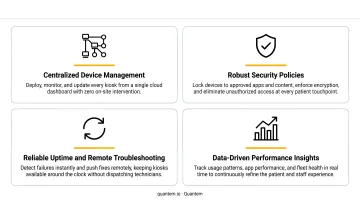
For healthcare teams managing kiosk fleets across departments or multiple locations, centralized Mobile Device Management (MDM) is what makes this scalable. Platforms like Quantem - with built-in kiosk mode across all plans and zero-touch provisioning - let IT teams lock devices to approved applications, push policy updates remotely, and monitor device health from a single console.
For multi-facility networks like ATHMA Hospitals, that kind of fleet visibility is what prevents device downtime from becoming a patient experience problem.
Zero-touch provisioning cuts the time and labor cost of large rollouts. When a new kiosk device arrives at a department, it powers on, self-enrolls, and pulls down its approved configuration automatically - no IT staff on-site required. For a network deploying across 10 or 20 locations, that eliminates days of travel time and on-site setup labor.
Kiosk value grows when outcomes are reviewed consistently. Track these metrics to identify what's performing and where to expand next:
- Patient throughput and check-in completion rates
- Payment and copay collection volume
- Device uptime and error frequency
- Staff time saved at front-desk check-in
Conclusion
Healthcare kiosk solutions work when they're applied to the right use cases - check-in, wayfinding, payment, telehealth, pharmacy - and when each deployment is built on solid system integration, HIPAA-compliant controls, and centralized device management.
Those benefits don't stay flat. They compound as kiosk programs scale across departments and facilities, and as deployment data shapes where to invest next. What sustains that growth isn't the kiosk hardware - it's the device management layer running behind it. When IT teams can monitor device health, push policy updates, and lock down configurations remotely, kiosk programs stay reliable at scale rather than becoming a maintenance burden.
Platforms like Quantem give healthcare IT teams that control - centralized fleet management, kiosk mode enforcement, and real-time device visibility across every touchpoint, without adding operational overhead.
Frequently Asked Questions
What types of kiosks are most commonly used in healthcare facilities?
The most common types are patient check-in and self-registration, wayfinding, bill payment, telehealth consultation, and pharmacy automation kiosks. Multi-department hospitals typically deploy several types simultaneously - patient-facing kiosks in lobbies, payment kiosks near discharge, and pharmacy kiosks at prescription counters.
How do healthcare kiosks improve patient satisfaction?
Kiosks reduce the friction patients experience at administrative touchpoints - shorter check-in queues, faster intake, and the ability to review and update their own information. Research confirms that even small reductions in perceived wait time measurably improve satisfaction scores, which matter for both patient retention and value-based care reimbursement.
Are healthcare kiosks HIPAA-compliant?
HIPAA compliance requires encrypted data sessions, secure patient authentication, audit trails, and physical safeguards like privacy screens and controlled device placement. Compliance must be built into both the kiosk software and the device management layer from the start; retrofitting it after deployment requires significant rework.
Can healthcare kiosks integrate with existing EHR and EMR systems?
Modern healthcare kiosk software supports API-based integration with major EHR platforms including Epic and Cerner using HL7 FHIR standards. This enables real-time patient data sync and eliminates manual re-entry of information already captured in the clinical record, reducing both errors and staff workload.
What is the ROI of implementing healthcare kiosk solutions?
A 2020 study found nearly 3 minutes saved per patient check-in and a daily revenue cycle improvement of over $500 from a six-kiosk deployment. Additional gains come from reduced front-desk labor, faster payment collection, lower claim denial rates, and improved patient retention.
How do healthcare facilities manage kiosk devices across multiple locations?
Centralized MDM platforms let IT teams remotely monitor device health, push software updates, enforce lockdown policies, and troubleshoot issues across all locations without on-site visits. Without this layer, unmanaged devices become a reliable source of security gaps and unplanned downtime at scale.