Introduction
Walk into any busy hospital lobby on a Monday morning and the scene is familiar: a line of patients snaking toward a front desk, two staff members juggling phone calls and paper clipboards, and a waiting room that fills up faster than it empties. Front-desk check-in can consume 15–20 minutes per patient - time neither the patient nor the clinician can afford to lose.
Healthcare kiosk software changes that equation. By moving check-in, bill payment, appointment scheduling, and wayfinding onto self-service terminals, hospitals free staff for higher-value work and give patients faster, more consistent service.
According to Mordor Intelligence, the global medical kiosk market sits at $1.91 billion in 2026, projected to reach $3.47 billion by 2031 at a 12.74% CAGR. Coherent Market Insights puts the number even higher: $5.12 billion by 2033 at 15.3% CAGR.
These aren't speculative figures. They reflect active hospital investment in self-service infrastructure happening right now - driven by staffing pressures, patient experience demands, and post-pandemic appetite for contactless workflows.
This guide covers everything development teams and healthcare IT leaders need to plan, build, deploy, and manage healthcare kiosk software in 2026 - from architecture decisions and compliance requirements to deployment strategies and ongoing device management.
Key Takeaways
- Healthcare kiosk software automates check-in, scheduling, billing, and record access without staff involvement
- Core use cases span patient self-check-in, telehealth, pharmacy, wayfinding, and health screening
- Must-have features include EHR integration, HIPAA-compliant authentication, payment processing, and touchless interaction
- Development costs range from $40K for basic systems to $400K+ for enterprise-grade deployments
- MDM handles kiosk lockdown, remote monitoring, and zero-touch provisioning across multi-site fleets
What Is Healthcare Kiosk Software and How Does It Work?
Healthcare kiosk software is the application layer running on self-service terminals deployed at hospitals, clinics, pharmacies, and diagnostic centers. It lets patients complete tasks independently (checking in, paying bills, booking appointments, updating insurance details) that would otherwise require front-desk intervention.
The Patient Interaction Workflow
A typical kiosk session runs like this:
- Patient arrives and approaches the terminal
- Authentication via QR code scan, OTP, or biometric (fingerprint or facial recognition)
- Data retrieval - the kiosk pulls relevant records from the connected EHR or hospital management system
- Task completion - patient selects a service (check-in, co-pay, appointment booking) and completes it
- Real-time sync - data flows back to the hospital's systems instantly, no manual re-entry required
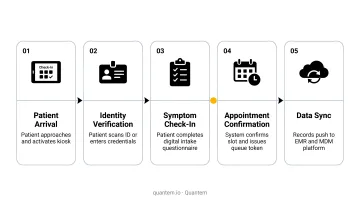
The whole interaction, when designed well, takes under two minutes. Essentia Health's Epic Welcome deployment across 80 clinics confirmed this - most registrations completed in under one minute, with nearly 500,000 self-service arrivals in the first six months of full-fleet rollout.
The Two-Layer Architecture
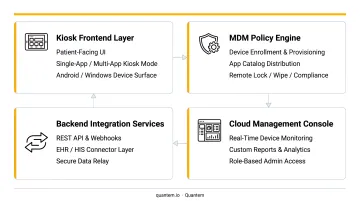
Every production healthcare kiosk deployment has two distinct layers, and both matter:
| Layer | What It Does | Who Manages It |
|---|---|---|
| Patient-facing application | The UI patients interact with - check-in flows, payment screens, wayfinding maps | Dev team / clinical ops |
| Device management layer (MDM) | Keeps deployed hardware secure, updated, locked to approved workflows, and remotely monitored | Healthcare IT |
Treating MDM as an afterthought is where most kiosk deployments break down. A flawless patient-facing application still fails operationally when the underlying device isn't locked down, updated, and monitored centrally. Both layers need equal attention from day one.
Core Use Cases of Healthcare Kiosks in 2026
Patient Self-Check-In and Registration
Check-in kiosks replace paper clipboards and front-desk queues. Patients arrive at the terminal and handle the full intake sequence independently:
Check-in kiosks replace paper clipboards and front-desk queues. At the terminal, patients handle the full intake sequence independently:
- Verify identity and confirm appointments
- Update insurance information
- Review and sign consent forms
The time savings are real. KIOSK Information Systems documented a 135-kiosk healthcare deployment where patients who completed forms before arrival finished check-in in under two minutes. Boston Medical Center installed iPad-based kiosks across inpatient and outpatient departments in 2024, with Becker's Hospital Review reporting the system helped gather consent signatures more efficiently and freed measurable staff time.
Appointment Scheduling and Wayfinding
Scheduling kiosks let patients browse available providers, select time slots, and confirm bookings without staff assistance.
In large hospital complexes, the same lobby kiosks serve a second function: interactive wayfinding maps help patients navigate multi-floor facilities, locate departments, and find parking. This reduces patient anxiety and cuts the volume of directional questions staff field throughout the day.
Bill Payment and Insurance Verification
Billing kiosks let patients settle co-pays and outstanding balances via card, digital wallet, or other payment methods directly at the terminal.
OhioHealth's Epic Welcome stations collect copays at twice the rate of standard registration workflows, saving the health system $3,000 per day in balance recovery.
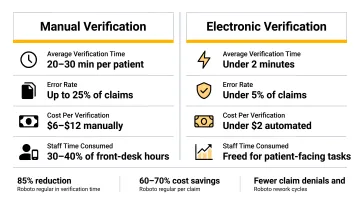
Real-time insurance eligibility verification at the kiosk addresses another pressure point. CAQH's 2023 Index Report found eligibility verification costs $10.13 per transaction manually versus $0.98 electronically, with 16 minutes saved per transaction. Moving this step to the kiosk, before the patient even reaches a clinician, reduces claim denials that stem from eligibility errors.
Telehealth and Remote Consultation Kiosks
Specialized telehealth kiosks enable video consultations with remote physicians and include peripherals that capture vitals in real time: blood pressure, weight, and temperature, transmitted directly to the consulting provider.
A 2025 PMC study found rural patients using telehealth kiosk sites saved an average of 5 hours and 324 miles per round trip to an academic medical center. OnMed's CareStation at the Milam County Sheriff's Office in Texas provides no-cost, no-appointment consultations for residents in a healthcare desert. The University of Rochester Medical Center established telemedicine stations in rural bank branches for confidential virtual consultations.
Health Screening and Pharmacy Kiosks
Health screening kiosks let patients self-monitor basic vitals and complete simple diagnostics as a preventive touchpoint, easing the load on primary care intake. Core functions typically include:
- Blood pressure, BMI, and glucose self-monitoring
- Symptom screening questionnaires
- Routing to appropriate care based on results
Pharmacy kiosks handle prescription verification, payment, and in advanced configurations, automated dispense, cutting wait times in high-traffic environments. Both kiosk types involve peripheral hardware integration and real-time data sync with EHR systems - factors that significantly shape the software architecture decisions covered in the next section.
Must-Have Features for Healthcare Kiosk Software
Intuitive, Accessible UI
The interface must work for every patient - an 80-year-old unfamiliar with touchscreens and a 30-year-old who navigates apps instinctively. Non-negotiable design requirements:
- Large touch targets with clear visual hierarchy
- Multi-language support (13+ languages, as Clearwave supports)
- ADA-compliant design including height-adjustable hardware compatibility
- Screen reader support for visually impaired users
HHS updated Section 504 requirements in 2024, setting specific accessibility standards for kiosks made available by healthcare providers receiving federal financial assistance. ADA compliance isn't optional - it's federally mandated.
Secure Authentication
Authentication options vary by use case and risk level:
- OTP verification - SMS or email one-time passcodes for standard check-in
- QR code login - patient scans a code from their phone; minimal physical contact
- Biometric - fingerprint or facial recognition for higher-security workflows
For kiosks integrated with Epic or similar enterprise EHR platforms, multifactor authentication combining two factors (something you know + something you are) has become standard practice.
EHR and Hospital System Integration
This is the technical backbone of any healthcare kiosk. Without clean API-based integration to EHR, billing, scheduling, and hospital management systems, the kiosk is an island. Data mismatches, duplicate entries, and workflow breakdowns follow quickly.
Epic holds 43.7% of the US acute-care EHR market and 56.9% of hospital beds as of 2025. Epic's FHIR APIs (supporting R4, STU3, and DSTU2) are available free to developers, with over 750 APIs and 273 billion annual web service transactions. Any kiosk targeting a large US health system needs to be built around this integration reality from day one.
Touchless Interaction Support
Post-pandemic patient expectations include:
- QR code check-in from personal devices
- Mobile handoff (patient starts on phone, completes on kiosk or vice versa)
- Voice command navigation for patients uncomfortable with touchscreens
These aren't premium features anymore - they're baseline expectations in high-traffic clinical environments where shared surfaces carry infection risk.
Remote Device Management and Kiosk Lockdown
Patient-facing features only deliver value if the hardware behind them stays online and secure. Once kiosks are deployed across a facility or multi-site network, the software must be remotely manageable. Healthcare IT teams need to:
- Push software updates and security patches without on-site visits
- Enforce kiosk-mode lockdown so patients can only access approved workflows
- Monitor device health in real time
- Troubleshoot and reboot devices from a central dashboard
This is where an MDM layer becomes essential. Platforms like Quantem provide built-in kiosk mode, geofencing, zero-touch provisioning, and centralized fleet monitoring - SOC-2, GDPR, and CCPA certified - at $1–$3 per device per month, compared to the $3–$10+ typical of legacy MDM tools.
For a 50-device hospital fleet, the Professional or Enterprise tiers add:
- 5-minute device sync intervals for near-real-time visibility
- Event-based alerts for proactive issue detection
- Group-based policy enforcement across multiple facilities from a single dashboard
The 5-Step Healthcare Kiosk Software Development Process
Step 1 - Requirement Gathering and Workflow Mapping
Development starts by mapping actual hospital workflows - not assumed ones. Identify:
- Which tasks will move to the kiosk (check-in only? billing? scheduling?)
- Which patient populations will use it (age range, language needs, digital literacy)
- How data flows to and from existing systems
- Which compliance obligations apply (HIPAA, ADA, CCPA if California-based)
Skipping this step causes more failed deployments than any other factor. Building the wrong feature set in a clinical environment isn't just wasteful - it disrupts patient care workflows that staff depend on daily.
Step 2 - UI/UX Design for Clinical Environments
Healthcare kiosk design follows different rules than consumer app design:
- Minimize steps per task - patients aren't there to explore, they have appointments
- Write error messages in plain language, not technical jargon
- Build session timeout and privacy screen features (required for HIPAA compliance)
- Test across age demographics before development begins - not after
A design that works for a tech-savvy 35-year-old may fail completely for a 72-year-old first-time user.
Step 3 - Backend Development and System Integration
This phase builds the kiosk's functional core:
- Front-end kiosk application - the patient-facing UI
- Backend APIs - connecting to EHR, billing, appointment, and lab systems
- Payment gateway integration - card processing, digital wallets, eligibility verification
- Security architecture - encryption, access controls, session management
Security and reliability must be built in from the start, not retrofitted after launch. In clinical environments, even minor bugs carry real weight - a payment processing failure at the kiosk erodes patient trust and creates billing reconciliation work that ripples through finance teams.
Step 4 - Compliance Testing and Quality Assurance
QA in healthcare kiosk development goes beyond functional testing:
- HIPAA data handling - verify end-to-end encryption, session timeouts, and audit log generation
- ADA accessibility - automated and manual testing against WCAG 2.0 standards
- Load performance - simulate high patient volumes to identify bottlenecks before go-live
- Security penetration testing - required before any patient data is processed
No shortcutting here. Compliance failures discovered post-deployment are exponentially more expensive than pre-launch testing.
Step 5 - Deployment, Provisioning, and Ongoing Maintenance
Deployment covers hardware installation, network configuration, and initial device provisioning. Zero-touch enrollment through an MDM platform like Quantem eliminates manual device-by-device setup - a significant time saver when rolling out across dozens of locations simultaneously.
Maintenance doesn't end at launch. Plan explicitly for:
- Continuous software updates and security patches
- Performance monitoring dashboards
- Staff training on kiosk management and troubleshooting protocols
- A support escalation path when devices go offline
Without a structured maintenance plan, unpatched security vulnerabilities and unmonitored device failures are the predictable result - both of which carry compliance and operational consequences in a clinical setting.
Compliance, Security, and Device Fleet Management
HIPAA, ADA, and Data Privacy Requirements
Every US healthcare kiosk deployment must address three compliance layers:
HIPAA Technical Safeguards (45 CFR 164.312) require:
- Unique user identification and access controls
- Audit logging of all activity in systems containing ePHI
- Automatic session logoff (addressable)
- End-to-end encryption of data in transit
ADA and HHS Section 504 require kiosks to be fully accessible or provide an equivalent alternative experience. The 2024 HHS Section 504 update set specific standards for healthcare providers receiving federal funds.
CCPA excludes PHI governed by HIPAA, but non-PHI consumer data collected by the kiosk vendor may require separate analysis. GDPR Article 9 applies if any EU patient data is processed - health and biometric data are special categories with strict processing restrictions.
Meeting these compliance requirements starts at the software layer, but enforcement depends on how the physical device itself is locked down.
Securing the Kiosk Device Layer
Physical device configuration is where compliance policy becomes enforceable. The device must:
- Run in enforced kiosk mode - locked to approved applications, no OS access for patients
- Support remote-wipe capability if a device is stolen or compromised
- Prevent unauthorized access to the underlying operating system
MDM platforms enforce these restrictions through policy-based lockdown - no scripting required. Quantem's 250+ toggle-based policy controls let IT teams apply these configurations across an entire fleet without custom scripts or manual device-by-device setup.
Managing a Multi-Device Healthcare Fleet with MDM
Hospitals deploying kiosks across multiple departments or campuses need centralized MDM that handles:
- Zero-touch enrollment - devices ship pre-configured, no manual setup required
- Group-based policy enforcement - apply different configurations to different departments or facilities simultaneously
- Real-time device health monitoring - battery status, online/offline state, event-based alerts
- Remote troubleshooting - push updates, reboot devices, apply patches without on-site visits
Quantem's geofencing capabilities (available on Professional and Enterprise plans) trigger automated actions when a kiosk moves outside an approved physical zone, which matters most for tablet-based deployments in high-traffic areas. The Enterprise plan adds 2-minute device sync intervals and 30-day device history, giving healthcare IT teams continuous visibility across their entire fleet from a single dashboard.
Understanding Development Costs: What to Budget in 2026
Cost Tiers by Complexity
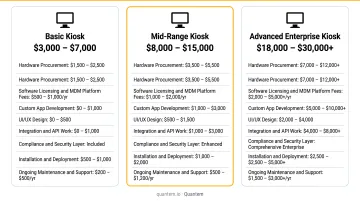
The following ranges reflect vendor-published estimates, as no independent benchmark exists for healthcare kiosk development costs. Treat them as starting references, not guaranteed quotes.
| Tier | What's Included | Estimated Range |
|---|---|---|
| Basic | Patient check-in, appointment booking, simple UI | $40,000 – $80,000 |
| Mid-Level | Adds payment processing, EHR integration, digital consent | $80,000 – $200,000 |
| Advanced | Telehealth, AI features, multi-site management, extensive integrations | $200,000 – $400,000+ |
Key Cost Drivers
These variables push development costs higher:
- Integration complexity - number of EHR, billing, lab, and scheduling systems connected
- Compliance requirements - HIPAA certification, ADA audits, penetration testing
- Hardware compatibility - number of device form factors supported
- Number of kiosk types - check-in only vs. check-in + telehealth + pharmacy
- Deployment scale - single facility vs. multi-site network rollout
Build vs. Buy Considerations
Custom development gives full control over workflows and integrations but requires larger upfront investment and 6–12 month timelines for complex systems. Configurable kiosk platforms reduce development time but may limit customization depth.
Whichever path you choose, budget the MDM layer as a separate ongoing cost - not a one-time line item. MDM runs as a recurring subscription that scales with your device count. At Quantem's pricing ($1–$3 per device per month), a 50-device fleet costs $50–$150/month, compared to $150–$500/month on legacy MDM platforms.
Frequently Asked Questions
What software do hospital kiosks use?
Hospital kiosks typically run a patient-facing application - built custom or using platforms like Epic Welcome, Phreesia, Clearwave, SPRY, or AdvancedMD - integrated with the facility's EHR/EMR system. An MDM layer sits underneath, keeping devices locked to approved workflows and remotely managed.
What are the 7 types of kiosks?
The seven types relevant to healthcare are:
- Patient check-in kiosks
- Appointment scheduling kiosks
- Bill payment kiosks
- Wayfinding and information kiosks
- Telehealth kiosks
- Pharmacy kiosks
- Health screening kiosks
Many modern deployments combine multiple functions in a single terminal.
How much does healthcare kiosk software development cost?
Costs typically range from around $40,000 for basic check-in systems to $400,000+ for fully integrated enterprise solutions with telehealth and advanced analytics. The actual figure depends on feature complexity, integration count, compliance requirements, and deployment scale.
How long does it take to develop healthcare kiosk software?
Basic systems typically take 3–4 months from requirements through go-live. Mid-to-advanced deployments with deep EHR integrations and full compliance testing generally require 6–12 months, though complex multi-site deployments often run beyond these vendor-reported estimates.
How do you ensure HIPAA compliance in healthcare kiosk software?
Key requirements under 45 CFR 164.312 include:
- End-to-end encryption of patient data
- Automatic session timeouts with screen clearing
- Unique user identification and access controls
- Audit logging of all ePHI activity
- Secure device management via MDM to prevent unauthorized OS access