Introduction
Walk into many retail stores today and you'll find the same scene: understaffed sales floors, long checkout lines, and shoppers quietly putting items back on the shelf before walking out. Meanwhile, those same customers just spent the morning navigating Amazon's frictionless checkout and a hotel app that handled everything from check-in to room service.
That gap is growing fast. The global interactive kiosk market is projected to reach $65.34 billion by 2033, growing at a 7.3% CAGR according to Grand View Research. Retailers, healthcare operators, and hospitality brands are all responding with in-store kiosk deployments that put customers in control of their own experience.
This guide breaks down what interactive kiosks are, which types are gaining traction across retail and hospitality, and what it takes to deploy and manage them at scale - from a single location to hundreds.
Key Takeaways
- 84% of consumers avoid stores with long lines - kiosks reduce wait times by letting customers self-serve on their schedule
- Multiple kiosk types serve distinct functions across the in-store journey, from wayfinding to self-checkout
- Average transaction value rises when kiosks surface upsells without human pressure
- Effective fleet management requires MDM software to keep kiosk devices locked, updated, and secure
- Retail, healthcare, and hospitality are all accelerating kiosk adoption
What Is an Interactive Kiosk?
An interactive kiosk is a purpose-built terminal combining hardware and software that lets customers access information, complete transactions, or navigate a space without staff assistance. The touchscreen is the primary interaction layer. Specialized kiosk software - or an MDM (mobile device management) platform running in kiosk mode - controls exactly what the device displays and what users can do.
Physical Form Factors
Placement matters as much as the technology:
- Floor-standing - high-traffic areas like store entrances and mall corridors; ideal for wayfinding and catalog browsing
- Wall-mounted - tight spaces where floor real estate is limited; common in healthcare waiting areas
- Countertop - checkout counters and service desks for payment or feedback collection
- Pole-mounted - aisle-level product information in large-format retail
Core Components
Every functional kiosk includes four layers:
- Display screen - touchscreen panel, sized by use case
- Underlying device or media player - Android tablet, Windows mini-PC, or dedicated hardware
- Application or CMS layer - the software customers actually interact with
- Peripheral integrations - barcode scanners, payment terminals, receipt printers, cameras
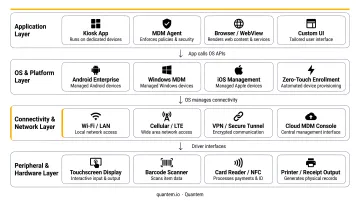
The software layer carries the most operational weight. Without a reliable device management platform underneath, tasks like pushing app updates, enforcing content policies, or rebooting a stuck kiosk remotely become manual - and across a fleet of dozens or hundreds of units, that adds up fast.
Types of Interactive Kiosks for In-Store Use
Different kiosk types solve different problems across the in-store journey. Most mature deployments combine several types across a single location.
Wayfinding Kiosks
These help shoppers navigate large-format stores, malls, and multi-floor environments. Effective wayfinding kiosks go beyond a static floor plan - they offer turn-by-turn routing, multi-floor maps, accessible path options, and real-time updates when store layouts change. For first-time visitors in a 200,000 sq ft home improvement store, a well-placed wayfinding kiosk frequently determines whether a customer completes their purchase or leaves without finding what they came for.
Product Catalog and Product-Finding Kiosks
These act as digital catalogues, letting customers filter by size, color, price, or specification - and then locate the item physically within the store. They extend the virtual shelf well beyond what physical floor space allows, surfacing products that might otherwise never be found. For specialty retailers with deep SKU counts, this is particularly valuable.
Self-Checkout and Payment Kiosks
Self-checkout has moved from novelty to expectation. FMI data shows 35% of supermarket transactions used self-checkout in 2024, and adoption continues to climb. Beyond speed, there's a behavioral dimension: research from the University of Illinois found that consumers strongly prefer self-checkout when purchasing stigmatized products - removing the cashier interaction reduces discomfort and increases purchase completion.
Brand Engagement and Informational Kiosks
These cover a wide range of engagement formats, all aimed at increasing dwell time without requiring staff involvement:
- Product demos and video content
- Loyalty program sign-ups and account management
- Virtual try-ons and fit guides
- "Lift and learn" displays, where picking up a product triggers relevant on-screen content
Done well, these kiosks keep customers engaged longer and deliver consistent brand messaging across every store location.
Customer Feedback and Check-In Kiosks
Used for in-store surveys, appointment or queue check-ins, and contact data capture. The behavioral data these kiosks generate - what customers respond to, how long they engage, what content they skip - is often more actionable than traditional surveys because it reflects real in-store behavior.
How Interactive Kiosks Enhance the In-Store Customer Experience
Reducing Wait Times and the Psychology Behind Them
Lines are a conversion killer. Waitwhile's 2025 consumer survey found 84% of consumers avoid a business entirely because of visible lines, and 39% will switch to a competitor when faced with a wait.
Self-service kiosks attack this problem on two fronts. First, they add transaction capacity without adding headcount.
Second - and less obvious - customers actively engaged at a kiosk perceive their wait as shorter than customers standing passively in a queue. Research in service design calls this the "wait-warping" effect: occupied time feels shorter than idle time.
Shoppers Who Prefer Not to Ask
A growing share of shoppers simply prefer to handle things themselves. NCR Voyix's 2025 survey found:
- 77% of self-checkout users choose it because it's faster
- 63% of Gen Z prefer self-checkout over traditional lanes
- 45% of Millennials prefer self-checkout
- 39% want more self-service kiosks in restaurants
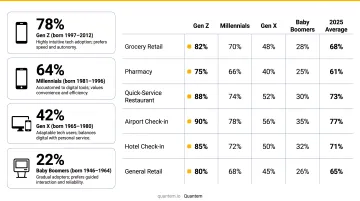
Kiosks give these customers full control over their browsing and purchasing journey - no waiting for someone to become available, no pressure to decide faster than they're comfortable with.
Personalized Recommendations Without Pressure
Customers tend to spend more freely when there's no human watching the decision. Kiosks connected to CRM or POS data tap into this behavior - surfacing cross-sell and upsell suggestions based on purchase history or browsing patterns. Unlike a sales associate, a kiosk never forgets to recommend.
Bridging Online and In-Store
Omnichannel capabilities make kiosks a connective layer between digital and physical retail. Practical integrations include:
- Loyalty card scanning and reward redemption
- Saved cart retrieval from online sessions
- Buy-online-pick-up-in-store (BOPIS) workflows
- Real-time inventory checks across locations
This matters because omnichannel shoppers spend more - McKinsey reports they shop 1.7x more frequently than single-channel shoppers and generate higher per-visit revenue.
How Interactive Kiosks Drive Sales and Business Results
Increasing Average Order Value
The mechanism is straightforward: kiosks can be programmed to always suggest complementary items, bundle deals, and add-ons at the right moment in the purchase flow. And without a human present, customers feel less self-conscious about adding extras.
Real-world evidence is consistent across industries:
- QSR Magazine reported analyst estimates that Shake Shack kiosk orders ran 15-20% higher in average check than traditional counter orders
- BurgerFi told investors kiosk orders were 12-15% higher than counter orders
- PDQ Chicken reported a 25% average ticket increase after kiosk deployment (vendor-reported figures)
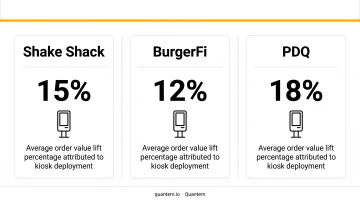
The pattern holds across categories - kiosks remove the social friction that limits impulse purchases.
Reallocating Staff to Higher-Value Work
When routine transactions shift to kiosks, staff capacity shifts with them. Associates previously tied to basic checkouts can shift to complex questions, product consultations, and interactions that require real judgment. The result: better customer satisfaction and stronger unit economics from the same headcount.
Capturing Behavioral Data
Kiosk interaction data is an operational asset. What products customers search for, how long they engage with specific content, what drives them to add items versus walk away - this behavioral signal can improve:
- Promotional targeting and offer timing
- Product placement and shelf adjacency decisions
- Inventory allocation across locations
- Content and messaging strategy for future campaigns
Most retailers generate this behavioral data every day but have no structured way to capture it. Kiosks with analytics integration route those signals directly into merchandising, marketing, and inventory decisions - turning passive foot traffic into actionable intelligence.
Deploying and Managing Interactive Kiosks at Scale
The customer-facing value of kiosks is clear. The operational reality of maintaining them across multiple store locations is where many deployments fall short.
The IT Complexity of Multi-Location Fleets
A single kiosk going down during peak hours is a customer experience problem. Fifty kiosks drifting from approved configurations across twenty locations is a security and compliance problem.
Keeping content current, catching tampering early, and troubleshooting without rolling a truck every time - these are real operational costs. Plan for them before launch, not after.
Kiosk Mode as the Foundation
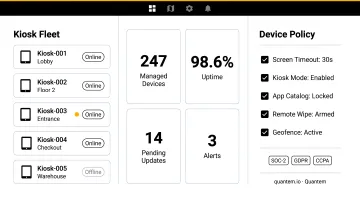
Kiosk mode locks a device to a specific app or content set, preventing customers from exiting the intended interface, accessing browser settings, or causing configuration drift. This protects both the business and any customer data entered on the device.
Quantem includes built-in kiosk mode across all plans as a standard feature rather than a premium add-on. It's easy to lock Android or Windows devices into a dedicated kiosk experience without custom scripting. The platform supports managing hundreds of thousands of kiosk devices centrally, with alert systems that flag offline devices before they cause customer-facing problems.
Zero-Touch Enrollment for Fast Deployment
Zero-touch provisioning means kiosk devices can be configured and enrolled remotely before they physically arrive at a store. A device can be unboxed, powered on, and customer-ready without IT staff on-site.
For a retail chain deploying across 50 locations simultaneously, this isn't a nice-to-have. It's the only way the rollout is operationally feasible.
Quantem's platform is built around this zero-touch model: policies and profiles are set by toggle rather than script, and the provisioning process eliminates the manual per-device configuration that makes large deployments slow and error-prone.
Remote Management and Compliance
Once deployed, IT teams need a central console to:
- Push app updates and content changes across the fleet
- Enforce security policies without physical access
- Monitor device health and troubleshoot issues remotely
- Maintain audit logs for compliance purposes
Compliance is not optional when kiosks collect customer data. Any kiosk capturing email addresses, loyalty IDs, survey responses, or payment-adjacent information must meet GDPR Article 13 (notice at point of collection) and CCPA requirements for in-store data collection.
Quantem holds SOC-2, GDPR, and CCPA certifications. That means the device management layer itself meets these standards - which matters when demonstrating compliance to enterprise customers or auditors.
Frequently Asked Questions
How much does an interactive kiosk cost?
Hardware ranges from roughly $500–$1,000 for tablet-based setups to $10,000+ for full floor-standing enclosures with integrated peripherals. Add software licensing or MDM subscriptions on top. Total cost of ownership depends heavily on fleet size - cloud-based MDM platforms like Quantem start at $1/device/month, lowering per-device management cost as the fleet grows.
How do kiosks improve customer service?
Kiosks reduce wait times by adding transaction capacity, enable self-service for routine requests, and give customers instant access to product information. They also free staff to focus on complex interactions where human judgment actually matters - which tends to improve satisfaction for both customers and employees.
What types of interactive kiosks are most commonly used in retail stores?
Self-checkout, product catalog/browsing, wayfinding, and loyalty kiosks are the most common. Many retail deployments combine multiple functions on one screen - a checkout kiosk that also surfaces loyalty rewards and product recommendations, for instance.
What is kiosk mode and why does it matter for in-store deployments?
Kiosk mode locks a device to a specific app or interface, preventing customers from accessing other apps, browser settings, or system configurations. It ensures a consistent, branded experience across every device in the fleet and protects against unauthorized use or configuration changes that could expose customer data.
How do retailers manage multiple kiosks across different store locations?
Retailers use mobile device management (MDM) platforms to remotely enroll, configure, monitor, and update kiosk devices from a central console - no on-site IT required. Alerts flag offline or non-compliant devices, and updates push fleet-wide from a single dashboard.
Are interactive kiosks a good fit for small or mid-sized retail businesses?
Yes - cloud-based MDM platforms with pay-as-you-go pricing let small retailers start with a single kiosk at a high-traffic point and scale from there. Even one well-placed self-checkout or product-finding kiosk can reduce wait times and lift average order value.