Introduction
Retail operators are caught between two converging pressures: labor costs that keep climbing and customers who expect faster, more consistent in-store experiences than ever before. In-store wait times have surged 61% since 2022, and nearly 40% of consumers will walk to a competitor or abandon a purchase entirely rather than wait in a long line.
Self-service kiosks are a widely accepted response to both problems. But here's what the hardware conversation misses: the device on the floor is not the differentiator. The software running inside it is.
A retail tablet without the right software is vulnerable to staff misuse, prone to going offline unnoticed, and likely to deliver a different experience at every location. The right kiosk software turns that same device into a consistent, manageable touchpoint that performs predictably across every store in your fleet.
This article covers how kiosk software drives measurable retail CX improvements - from checkout speed and order value to fleet-wide uptime - and what the gaps look like without it.
Key Takeaways
- Kiosk software locks devices to approved workflows, removing human variability from the customer experience
- Self-service ordering consistently increases average transaction values through guided upsell prompts
- Centralized MDM-backed management enables remote updates, health monitoring, and troubleshooting across all store locations
- Without proper software management, downtime goes undetected until customers report it - costing revenue and brand trust
- Continuous kiosk optimization - not a set-and-forget approach - compounds CX and revenue gains over time
What Is Kiosk Software?
Kiosk software is the application and management layer that controls what a customer sees and can do on a kiosk device. It locks the device to specific functions, enforces brand-consistent interfaces, and connects it to backend retail systems like POS and inventory.
Two layers matter in retail:
- The customer-facing application - the interface shoppers interact with: menus, product catalogs, checkout flows, and payment screens
- The device management layer - the back-end software controlling security policies, software updates, remote monitoring, and access controls across a fleet of devices
The distinction matters because most kiosk conversations focus on the first layer and ignore the second. A beautiful customer interface running on an unmanaged device is a liability. It can drift offline, display outdated pricing, or get hijacked by a curious staff member navigating away from the app - and no one finds out until a customer complains.
Device management is what turns a tablet bolted to a counter into a consistent retail touchpoint - one that behaves the same way in store one as it does in store fifty, across every shift.
Key Advantages of Kiosk Software for Retail Customer Experience
The advantages below focus on operational outcomes retailers can measure: wait times, order accuracy, average transaction value, device uptime, and staff allocation.
Consistent, On-Brand Interactions Across Every Location
Retail staff turnover is a genuine operational problem - McKinsey data puts annual frontline retail turnover at above 60%, with Korn Ferry reporting 75.8% for hourly in-store positions. In high-turnover environments, training staff to deliver a consistent brand experience at every location is an ongoing, expensive battle.
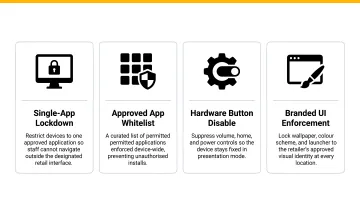
Kiosk mode software removes that dependency entirely. By locking a device to a single approved application or workflow, it ensures every customer at every store sees the exact same interface, messaging, and process - regardless of who's working that shift.
In practice, this means:
- Hardware buttons are disabled to prevent unintended navigation
- The home screen is locked so staff or customers can't exit the intended app
- Display settings are enforced uniformly across all enrolled devices
- Brand guidelines are applied automatically - fonts, colors, promotional content, pricing
The business case extends beyond CX. PwC's 2025 Customer Experience Survey found that 52% of US consumers stopped using a brand because of a bad experience with its products or services, and 29% stopped due to poor in-person CX specifically. Inconsistency is a direct driver of those numbers.
KPIs impacted: Customer satisfaction (CSAT), first-interaction completion rate, brand compliance rate, staff training hours
When it matters most: Multi-location chains, franchise environments, and any store running seasonal staffing where human consistency is hardest to maintain at scale.
Faster Checkout and Higher Average Transaction Value
Kiosk software connected to POS and inventory systems allows customers to browse, select, and pay independently - cutting the time from decision to completed transaction without requiring a staff member to be available.
The software creates this advantage through several specific mechanisms:
- Prevents out-of-stock friction by pulling live inventory data before customers reach the register
- Surfaces complementary products at the right moment in the checkout sequence through guided order flows
- Supports card, NFC, and digital wallets, removing friction at the final step where abandonment most commonly occurs
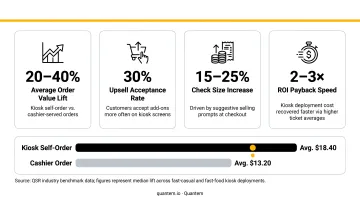
The revenue impact is well-documented. Tillster reports a 10-15% average lift in check size for operations using self-order kiosk solutions, attributing the gain to high-margin item promotion and automated recommendation engines. At higher optimization levels, the lift is more pronounced: Tillster case studies of two large QSR chains showed reactivated customers spending 30-51% more than their initial averages after targeted kiosk upselling.
There's also a behavioral dynamic at work. A University of South Florida study on digital food ordering found that digital ordering leads to more indulgent choices and higher spending - with 61% of digital orders classified as less healthy compared to non-digital, across 23,000 orders. The mechanism is reduced social friction: customers make different (and often higher-value) selections when they're not making choices in front of another person.
More completed orders per hour at a higher average spend translates directly into measurable revenue gains per kiosk, per day.
KPIs impacted: Average order value (AOV), transactions per hour, checkout abandonment rate, upsell conversion rate, queue length
When it matters most: Peak shopping hours, holidays, stores with limited checkout staff, and any context where queue length drives walk-outs.
Centralized Device Management and Guaranteed Uptime
A kiosk that's offline, frozen, or displaying the wrong content delivers zero value. Managing dozens - or hundreds - of kiosk devices across multiple store locations without a dedicated software layer is operationally unsustainable.
MDM-backed kiosk software addresses this at scale. IT teams can:
- Push software updates and configuration changes remotely across the entire fleet
- Monitor device health in real time and receive alerts before store managers report issues
- Lock or wipe individual devices instantly in response to security events
- Troubleshoot most issues from a central dashboard without dispatching on-site technicians
- Provision new kiosk devices in bulk using zero-touch enrollment
Quantem's platform supports this model with online/offline status monitoring (2-minute sync intervals on Enterprise), event-based alerting, and 30-day device uptime history. Kiosk management controls are built into every plan tier - not locked behind a premium add-on.
A convenience-store study cited by Retail TouchPoints put the hourly cost of a single system going down at up to $855 per store - and that's a single location with a single outage. Across a 50-location chain, undetected downtime events accumulate fast.
Zero-touch enrollment compounds the uptime advantage. New kiosk devices can be enrolled, configured, and ready to go without someone physically touching each unit - cutting deployment time from days to hours when opening new locations.
KPIs impacted: Device uptime %, mean time to resolution (MTTR), IT support tickets per device, deployment time per new location
Best suited for: Retail chains with 10+ locations, seasonal kiosk programs, and any environment where IT is centralized but stores are geographically distributed.
What Happens When Kiosk Software Is Missing or Mismanaged
Skipping proper kiosk software management doesn't just limit upside - it creates specific, measurable problems:
- Devices go off-script: Kiosk mode enforcement keeps devices locked to the intended app. Without it, staff or customers navigate away, leaving shoppers at dead ends or exposing content that was never meant to be public
- Stale data drives bad orders: Kiosks disconnected from live POS and inventory sync display outdated prices, unavailable products, or missed promotions, generating complaints and transaction reversals
- Failures go undetected until customers notice: Centralized monitoring catches kiosk issues before shoppers do. Without it, IT dispatches on-site technicians for problems that remote access could have resolved in minutes
- IT hours scale with location count: Manual content updates, ad hoc changes per store, and repeated device reimaging without automation consume IT time linearly, eroding the labor savings that justified the kiosk investment in the first place
- Expansion stalls at the software layer: Without a managed deployment process, adding new locations takes weeks per site instead of hours, stalling rollout plans and pushing ROI further out
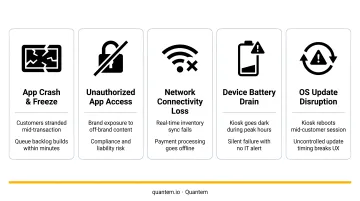
In each case, the cost isn't just operational - it's visible to customers. The right software layer prevents these failure modes before they reach the sales floor.
How to Get the Most Value from Kiosk Software in Retail
Getting the full benefit from kiosk software comes down to three operational disciplines:
1. Standardize before you scale Kiosk software only solves consistency problems if it's consistently applied. Retailers who deploy kiosk mode policies, interface templates, and update schedules across all devices from day one avoid the patchwork configurations that create the same variability they're trying to eliminate.
2. Treat the data as an operational input Kiosk software surfaces session length, transaction completion rates, product interaction patterns, and abandonment points. Platforms like Quantem make this visible through real-time device analytics and scheduled custom reports. Teams that actively review and act on this data see continuous improvement - those that don't plateau after the initial deployment gain.
3. Iterate on the experience continuously If usage data shows customers abandoning at a specific step, or that certain upsell prompts convert at significantly higher rates, that's a signal to change the interface, not a data point to file away. Retailers who treat their kiosk program as a living system see compounding returns. Those who treat it as a set-and-forget installation plateau quickly.
The kiosk programs that consistently outperform share one trait: a clear owner for both the data and the experience, with a feedback loop connecting the two. That's what turns a kiosk deployment into a durable retail asset.
Conclusion
The case for kiosk software in retail isn't abstract. It compresses into three capabilities that compound on each other: control over what customers see and do, real-time visibility into how every device is performing, and consistency enforced across every location without relying on individual staff execution.
Hardware gets kiosks on the floor. Software determines whether they stay on, stay useful, and keep earning their place in the store.
Retailers who manage their kiosk software - reviewing usage data, pushing improvements, and monitoring uptime across their fleet - will see those three capabilities reinforce each other over time. Those who treat deployment as the finish line tend to discover that problem the hard way: dead screens, outdated content, and missed upsell opportunities during the busiest seasons.
Frequently Asked Questions
How do you increase customer experience in retail?
Start by reducing friction at key touchpoints: faster checkout, consistent product information, and self-service options that let customers transact without waiting for staff. Kiosks address all three simultaneously - without adding headcount.
What is kiosk mode software and how does it work in retail?
Kiosk mode locks a device to one or more approved applications, preventing anyone from navigating outside the intended workflow. In retail, this ensures every customer sees a consistent, tamper-proof experience on every device - regardless of which staff member is present or what shift it is.
How does kiosk software help reduce wait times in retail stores?
Kiosk software lets customers self-checkout, browse inventory, and complete transactions simultaneously, spreading demand across self-service terminals instead of staffed registers. During peak periods, this directly reduces queue length without adding staff hours.
Can kiosk software be managed remotely across multiple store locations?
Yes. MDM-backed kiosk software allows IT teams to push updates, monitor device health, and troubleshoot issues from a central dashboard across every enrolled device - eliminating the need for on-site visits for routine maintenance, content changes, or most software issues.
Does kiosk software replace retail staff?
Kiosk software automates high-volume, repetitive tasks like checkout and product lookup - freeing staff to focus on customer assistance, complex queries, and relationship-building. The goal is reallocation of staff time toward higher-value interactions, not elimination of roles.
How do retailers ensure kiosk devices stay secure and compliant?
MDM platforms enforce security policies remotely, covering app access controls, data loss prevention, and regulatory compliance (GDPR, CCPA). Quantem holds SOC-2, GDPR, and CCPA certifications, with controls applied automatically across all enrolled devices - no manual configuration per device required.