Introduction
Long queues at venue box offices, hospital service desks, and transit counters create real costs - lost revenue, frustrated visitors, and staff stretched thin handling tasks that a machine can do faster. Manual ticketing makes things worse: printed confirmations get lost, staff enter codes incorrectly, and peak-hour demand overwhelms even well-staffed counters.
Android-powered self-service ticket printing kiosks address all of this directly. They handle point-of-sale purchases, will-call pickup, and queue ticket issuance around the clock - without adding headcount.
That capability matters only if the platform behind it is manageable at scale. Android's appeal comes from hardware flexibility, an open app ecosystem, native enterprise management tools, and a per-unit cost structure that makes expanding from one kiosk to a hundred financially viable. This guide walks through the hardware components, real-world use cases, MDM deployment, and the specific features worth evaluating before you build or expand a ticket kiosk rollout.
Key Takeaways
- Android's open ecosystem and native kiosk mode make it the most cost-flexible OS for ticket printing deployments
- A complete kiosk requires five components: display, enclosure, thermal printer, optional payment terminal, and optional barcode scanner
- MDM software converts any Android tablet into a dedicated, locked-down kiosk terminal you can configure and manage remotely across your entire fleet
- Zero-touch enrollment eliminates manual IT setup for each new kiosk device
- Quantem includes built-in kiosk mode and zero-touch provisioning across all plans, starting at $1/device/month
Why Android Is the Right OS for Self-Service Ticket Printing Kiosks
Cost and Hardware Flexibility
Android's cost advantage starts at the hardware level. A 2025 guide from Kiosk Group confirms that Android and Chromebook tablets typically carry the lowest initial hardware costs among tablet OS options - noting that even an entry-level 11-inch iPad begins at $349 before any kiosk-grade enclosure, management software, or peripheral integrations are added. Android alternatives from commercial-grade manufacturers start lower and scale more predictably.
Hardware variety is the other half of the cost story. Android runs across:
- Countertop tablet-style units: Zebra CC600/CC6000 in 5-inch and 10-inch configurations
- Floor-standing all-in-one kiosks: Advantech UTK-752 at 21.5 inches
- Wall-mounted open-frame displays: Elo touchscreens ranging from 10 to 55 inches
- Purpose-built kiosk computers: Zebra KC50, designed specifically for travel and ticketing environments
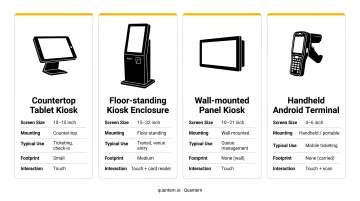
No single-vendor lock-in. Operators can match hardware to their environment, whether that's a compact countertop unit for a clinic reception desk or a floor-standing kiosk for a stadium concourse.
Open Ecosystem and Enterprise Management
Android's open ecosystem means ticketing apps can be deployed from the Google Play Store or sideloaded as private APKs. That flexibility matters for operators running proprietary ticketing software that isn't publicly listed. Android Enterprise handles management-grade security and kiosk lockdown at the OS level, without relying on third-party workarounds.
Google documents Android dedicated devices specifically for single-use cases including ticket printing. The Android Management API's installType: KIOSK configuration auto-launches the assigned app on boot, pins it full-screen, and disables the status bar, turning any compatible Android device into a purpose-built terminal.
Peripheral Compatibility
Thermal ticket printers, barcode scanners, and card readers all connect to Android devices via USB, Bluetooth, or network interfaces. Major hardware vendors each publish Android SDKs that handle printer discovery and print job routing natively:
- Zebra - full Android SDK with direct Bluetooth and USB print support
- Epson - ePOS SDK covering receipt and ticket thermal printers
- Boca Systems - Android-compatible drivers for high-volume ticket printing
This broad compatibility reduces integration friction compared to more closed platforms, where peripheral support often requires custom drivers or vendor-specific workarounds.
Scalability Through MDM
Android's MDM ecosystem supports deployments from a single kiosk to enterprise fleets spanning hundreds of locations. Centralized management means app updates, policy changes, and device monitoring happen from one dashboard, not on-site at each unit. That operational efficiency is ultimately what makes Android the practical choice for organizations running ticket printing at scale.
Essential Hardware Components of an Android Ticket Printing Kiosk
Getting the hardware stack right matters before selecting software. A misconfigured peripheral or an incompatible printer will surface as a customer-facing failure.
Touchscreen Display or Tablet
The primary interface needs to handle continuous public use without degrading. Commercial-grade Android tablets (Zebra, Lenovo Tab K11, Samsung Galaxy Tab Active) are built for this; consumer tablets are not.
Zebra's kiosk systems offer 15-inch and 22-inch options, while Elo open-frame touchscreens cover 10 to 55 inches. For public-facing ticket kiosks, 15 inches is a practical minimum - large enough for clear ticket selection UI without requiring users to lean in.
PCAP (projected capacitive) touch panels are the right choice for these deployments. They support multi-touch and respond through glass up to 6mm thick, which matters for units with protective covers.
Kiosk Enclosure
A kiosk enclosure physically secures the device, hides ports and power supplies from tampering, and gives you a branded surface to work with.
Enclosure form factors - countertop, freestanding pedestal, or wall-mount - should match the deployment location. For public deployments, ADA compliance is non-negotiable: the 2010 ADA Standards require an unobstructed forward reach maximum of 48 inches and a minimum of 15 inches, with constrained specifications for obstructed reach configurations.
Thermal Ticket Printer
The thermal printer is the core output device. It produces paper tickets, receipts, and boarding passes with barcodes or QR codes quickly and without consumable ink. Three printer families have documented Android SDK support:
- Zebra – Link-OS SDK for Android supports USB and TCP/IP network printing across ZD, ZT, and ZQ printer families
- Epson – ePOS SDK for Android (version 2.27.0a) supports Android 5.0–14.0 via LAN, Bluetooth, and USB; compatible with TM-T88V, TM-T70, TM-m10, and others
- Boca Systems – Android SDK listed with USB and Ethernet communication for Lemur-series kiosk ticket printers
Confirm printer-SDK compatibility before finalizing the kiosk software stack. A printer that works with one ticketing application may not integrate cleanly with another.
Payment Terminal and Barcode Scanner
For ticket purchase workflows (not just will-call), an EMV-compliant, NFC-capable payment terminal must integrate with the Android device. PCI DSS applies to any entity that stores, processes, or transmits cardholder data - no matter your transaction volume. Build payment architecture around PCI DSS scope from the start.
For will-call workflows, a barcode or QR scanner lets visitors present a mobile confirmation code for kiosk validation before triggering print. Scanner options break down simply:
- Integrated scanners (built into the enclosure) keep the footprint compact
- External USB scanners are easier to swap out if they fail
Common Industries and Use Cases
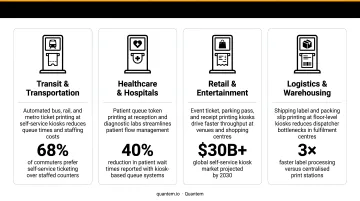
Grand View Research projects the global self-service kiosk market to reach $62.46 billion by 2030 at a 10.9% CAGR - with transportation, travel, and hospitality holding the largest segment share at 35.46% in 2024. Android ticket kiosks sit at the center of this growth.
Four industries account for the majority of Android ticket kiosk deployments today:
- Events and entertainment: Stadiums, arenas, movie theaters, and theme parks use Android kiosks for point-of-sale purchases and will-call pickup. The goal is absorbing peak-entry demand without expanding box office staff. The Zebra KC50, a purpose-built Android kiosk computer, handles event tickets, boarding passes, and seat upgrades.
- Healthcare and public services: Clinics and hospitals rely on numbered queue tickets rather than barcode passes. A patient selects a service type at the kiosk, gets a printed number, and waits to be called - no staff required. The medical kiosk market is projected to reach $3.76 billion by 2030 at a 15.1% CAGR. Quantem counts ATHMA Hospitals among its customers, demonstrating how MDM platforms keep healthcare kiosk fleets running at scale.
- Transportation hubs: Train stations, airports, and bus depots run Android kiosks for transit pass purchase, ticket printing, and boarding pass issuance. BIXOLON specifically documents Android-compatible printer deployments for these environments.
- Retail and venue admissions: Smaller venues - amusement parks, zoos, sports complexes - use Android kiosks to handle general admission tickets and timed-entry passes without staffing a dedicated window.
How MDM Software Enables Android Kiosk Mode for Ticket Printing
What Kiosk Mode Actually Does
MDM software enforces Android kiosk mode at the OS level: it locks the device to a single ticketing application (or a curated set), disables navigation bars and settings access, and prevents users from exiting the interface. A general-purpose Android tablet ends up behaving like a purpose-built terminal.
This is distinct from app-level restrictions. OS-level lockdown means users cannot exit through multitasking gestures, access notification shade settings, or install unauthorized apps - regardless of how tech-savvy they are.
Zero-Touch Enrollment at Scale
For multi-location deployments, zero-touch enrollment changes the logistics equation entirely. Google's zero-touch provisioning allows organizations to preconfigure devices before they ship. When a new Android kiosk powers on and connects to Wi-Fi, it automatically:
- Downloads the correct MDM policy
- Installs the ticketing app and configures printer settings
- Locks itself to kiosk mode
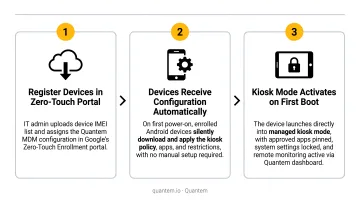
No IT technician needs to be on-site.
Operators opening a new venue or expanding an existing location can ship hardware directly to site staff without requiring IT travel.
Remote Management and Fleet Visibility
Once deployed, an MDM dashboard gives IT teams real-time visibility and remote control:
- Push app updates to all kiosks simultaneously without touching each device
- Monitor online/offline status, battery levels, and connectivity across every location
- Receive automated alerts when a device goes dark or disconnects
- Troubleshoot a frozen kiosk remotely rather than dispatching a technician
Quantem's platform includes device health monitoring with automated offline alerts across all plans - Essential, Professional, and Enterprise - with online status sync intervals ranging from 15 minutes (Essential) to 2 minutes (Enterprise). The Enterprise plan also maintains 30 days of device online/offline history, useful for identifying recurring connectivity issues at specific locations.
Security Policy Enforcement
For public-facing kiosks, security policies matter beyond just app lockdown:
- Disable physical ports to prevent unauthorized USB connections
- Enforce screen timeout rules for idle devices
- Restrict network access to approved ticketing platform domains
- Trigger remote lock or data wipe if a device is moved outside an approved location
Quantem includes AES-256 encryption for data at rest and TLS 1.2 for data in transit across all plans, with geofencing-based device actions (lock, alarm) available through its API for location-boundary enforcement.
Pricing Context
MDM pricing for kiosk fleets ranges widely. Capterra's 2026 benchmark puts entry-level MDM at $1–$9+ per device per month. Quantem's plans start at $1/device/month (Essential), $2/device/month (Professional), and $3/device/month (Enterprise) when billed annually. Kiosk mode is included across all tiers, not gated behind a premium add-on.
What to Look for in an Android Kiosk Management Solution
Kiosk Mode Depth and Printer Support
Not all kiosk modes are equal. Look for OS-level lockdown, not just an app wrapper. The MDM should:
- Auto-launch the ticketing app on boot with no user interaction
- Disable navigation gestures, status bar, and settings access
- Support both single-app and multi-app configurations (relevant when a printer utility needs to run alongside the ticketing app)
Peripheral management deserves specific attention. Confirm whether the MDM can push printer driver configurations or Bluetooth pairing settings from the central console - or whether each device requires manual setup at the kiosk.
Centralized Fleet Visibility
For any deployment beyond a single kiosk, the management dashboard needs to show:
| Data Point | Why It Matters |
|---|---|
| Online/offline status per device | Catch failures before visitors do |
| Battery level | Prevent unexpected shutdowns |
| App version installed | Confirm updates have propagated |
| Last sync timestamp | Identify communication gaps |
| Automated alerts | Get notified without manual polling |
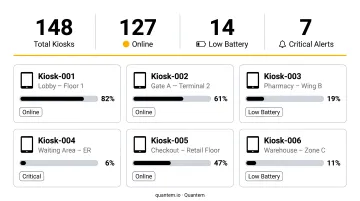
Real-time alerting - not polling every few hours - is the difference between proactive response and a visitor-reported failure.
Compliance and Security Certifications
For healthcare and government deployments, the MDM vendor's compliance posture matters as much as the features. Confirm:
- SOC 2 – Covers security, availability, processing integrity, confidentiality, and privacy controls at the service organization level (AICPA framework)
- GDPR – Required for any data processed on behalf of EU residents
- CCPA – Applies to California consumers' data rights
Quantem holds SOC 2, GDPR, and CCPA certifications, making it a fit for operators deploying ticket kiosks in healthcare, government, or other regulated environments.
Frequently Asked Questions
What hardware components does an Android ticket printing kiosk typically require?
The core components are a commercial-grade Android touchscreen device, a physical kiosk enclosure, and a thermal ticket printer connected via USB or network. Purchase workflows add an EMV-compliant payment terminal; will-call workflows add a barcode or QR scanner to validate pre-purchased ticket confirmations.
How do you lock down an Android tablet so it functions only as a ticket kiosk?
An MDM platform enforces Android kiosk mode at the OS level - restricting the device to a single ticketing app, disabling navigation and settings access, and applying security policies that prevent users from exiting the interface. This is configured remotely from the MDM dashboard, not manually on each device.
Can Android ticket kiosks handle both ticket purchasing and will-call ticket pickup?
Yes. The two workflows use different peripheral hardware and have different compliance requirements - the last question in this FAQ breaks down the key distinctions between purchase and will-call setups.
How do you manage a fleet of Android ticket printing kiosks across multiple locations?
An MDM platform with a centralized dashboard lets IT teams push app updates, monitor device health, and troubleshoot issues remotely. Zero-touch enrollment - included across all plan tiers in platforms like Quantem - means new devices configure automatically on first Wi-Fi connection, with no on-site IT visits required.
Is Android a secure operating system for self-service ticket kiosks in public environments?
When combined with an MDM that enforces OS-level kiosk lockdown, disables physical ports, restricts network access, and applies encryption policies, Android is a secure and enterprise-grade choice for public-facing kiosk deployments. The MDM configuration - not the OS alone - is what determines whether a deployment meets enterprise security standards.
What is the difference between a will-call ticket kiosk and a ticket purchase kiosk?
A purchase kiosk allows visitors to buy tickets on-site using a card reader - requiring PCI DSS-compliant payment architecture. A will-call kiosk only prints tickets that were already purchased, triggered by scanning a confirmation code. Will-call setups are simpler and less expensive to deploy because they skip the payment terminal and associated compliance requirements.