Introduction
Businesses across healthcare, retail, government, and hospitality face a compounding pressure: labor costs keep climbing - private-industry compensation rose 3.4% from March 2024 to March 2025 - while customers increasingly expect service outside standard business hours. Self-service payment kiosks address both problems simultaneously.
But the buying decision carries real risk. A kiosk that mismatches your customer base, transaction type, or back-end systems won't pay for itself. It will collect dust, generate support tickets, and frustrate the customers it was meant to serve. The right kiosk, by contrast, reduces labor load, shortens wait times, and keeps transactions flowing around the clock.
The market signals the momentum: Grand View Research values the global self-service kiosk market at $34.36 billion in 2024, projected to reach $62.46 billion by 2030 at a 10.9% CAGR. That growth rate means the operational gap between early adopters and late movers widens every quarter.
This guide covers what payment kiosks are, which types fit which environments, the six factors that determine whether a deployment succeeds, and how device management keeps a kiosk fleet running at scale.
Key Takeaways
- Payment kiosks automate transactions - card, cash, or mobile - without staff involvement, but only deliver ROI in high-volume, repeatable transaction environments.
- Hardware specs must match your customers' payment preferences; a mismatch kills adoption regardless of software quality.
- PCI-DSS v4.0.1 compliance, ADA accessibility, and AES/TDES/DUKPT encryption are non-negotiable - not optional upgrades.
- Fleet management software (MDM) separates a scalable kiosk operation from an ongoing maintenance burden.
- TCO spans 5–7 years; factor in licensing, maintenance, connectivity, and processing fees beyond upfront hardware cost.
What Are Self-Service Payment Kiosks?
A self-service payment kiosk is a standalone machine that lets customers select a service, confirm an amount, and complete payment - without staff involvement. It delivers a receipt, ticket, product, or access confirmation in return.
This distinguishes payment kiosks from wayfinding or information kiosks. Payment kiosks are purpose-built around transaction completion, which means they must integrate with payment processors and back-end operational systems - ticketing platforms, account databases, inventory systems, access control software.
Core Components of a Payment Kiosk
Every payment kiosk is a stack of hardware and software layers. A failure anywhere in that stack creates downtime that directly costs revenue.
Display and user interface: The touchscreen (or button-based) interface guides customers through the transaction. An unclear UI is one of the top drivers of abandonment - particularly in multilingual or accessibility-sensitive deployments.
Payment acceptance hardware: The physical inputs vary by model and must match your customer base:
- EMV chip card readers
- NFC/contactless readers (Apple Pay, Google Pay)
- Magnetic stripe readers
- Cash acceptors and bill validators
- Check scanners (common in bill payment deployments)
Not every kiosk supports every payment type - confirm hardware compatibility with your customer base before purchasing.
Connectivity and processing layer: Real-time card authorization requires an active network connection - wired or cellular. The kiosk communicates simultaneously with a payment processor for authorization and with back-end systems to record and complete the transaction. Redundant connectivity is standard practice; a single-point failure here stops every transaction.
Software and management layer: Kiosk software handles the transaction UI, connects to back-end platforms via APIs or SDKs, and enforces security policies. This layer also enables remote monitoring, software updates, and kiosk-mode lockdowns - the operational infrastructure that keeps a fleet visible and controllable.
Device management platforms like Quantem operate at this layer, giving IT teams real-time visibility across their entire kiosk fleet from a single dashboard.
Benefits of Deploying Self-Service Payment Kiosks
Understanding what's inside a kiosk makes the operational case clearer. When matched to the right environment, payment kiosks deliver measurable gains:
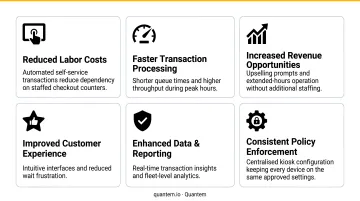
- Reduced staffing load for repetitive, high-volume transactions
- Extended service hours without added labor cost
- Shorter wait times and higher throughput during peak periods
- Lower error rates compared to manual transaction processing
- Cash access for unbanked and underbanked customers - the FDIC reported 5.6 million U.S. households were unbanked in 2023
- Multilingual accessibility for diverse customer populations
Types of Self-Service Payment Kiosks
Kiosk type should follow the transaction being automated and the environment it operates in - not market trends or vendor defaults.
Bill Payment Kiosks
The most common deployment type for utilities, local governments, telecom providers, and healthcare billing. These kiosks accept cash, check, and card payments for recurring bills and are critical for serving customers who cannot pay online. Outdoor deployments with 24/7 access are common.
Cash handling adds meaningful complexity to the total cost of ownership. Key factors to account for:
- Bill validators and regular hardware maintenance
- Reconciliation processes and audit requirements
- Armored cash collection service contracts
- Higher service frequency compared to card-only units
Self-Order and Self-Pay Kiosks
In quick-service restaurants, retail, and corporate dining, payment is embedded within a larger ordering workflow. These kiosks reduce front-counter congestion, shift staff toward fulfillment rather than order-taking, and give customers time to browse - which drives higher average order values. QSR Magazine reported that kiosk users typically spend 10%–30% more than counter-service customers.
UI complexity is a documented risk here. Cluttered or confusing interfaces slow ordering and create frustration - negating the throughput advantage.
Ticketing, Transit, and Parking Kiosks
High-volume, fixed-price environments where speed and clarity are the priority. These kiosks integrate with access control systems, validation databases, and ticketing platforms, making back-end integration complexity a key evaluation factor. NJ TRANSIT's deployment of 558 new ticket vending machines across bus, rail, and light rail illustrates how quickly these fleets scale.
Key Factors to Evaluate Before Buying a Payment Kiosk
The right payment kiosk choice depends on how well the unit aligns with your specific transaction type, customer population, physical environment, and the operational infrastructure behind it.
Each factor below ties directly to measurable business outcomes.
Hardware Specs and Payment Method Support
If the kiosk cannot accept the payment types your customers use, adoption will be low regardless of everything else. Mismatched payment hardware is a common and costly buying mistake.
KPIs affected: payment acceptance rate, transaction abandonment rate, customer satisfaction.
Map your customer payment preferences before specifying hardware. If a significant portion of your customer base is unbanked, cash acceptance is non-negotiable. If your customers skew mobile-first, NFC/contactless support is essential.
Software Capabilities and System Integrations
The transaction UI is the easy part. The complexity is in connecting the kiosk to everything behind it: POS platforms, account databases, ticketing systems, access control software, and payment processors all need clean integration - typically via APIs or SDKs.
KPIs affected: transaction success rate, reconciliation accuracy, back-office workload.
Ask vendors for a detailed integration map before committing. Integration failures discovered post-deployment are expensive to fix.
Device Management and Remote Monitoring
For any multi-unit deployment, remote fleet management is not optional. Without it, IT teams respond to every issue on-site - a maintenance model that doesn't scale.
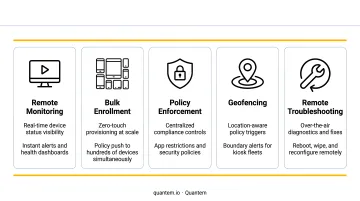
Effective kiosk fleet management requires:
- Real-time device status monitoring
- Remote software updates and patch deployment
- Kiosk-mode lockdowns that restrict devices to the payment application only
- Offline detection and alerting before customers notice
- Zero-touch provisioning for new unit deployments
KPIs affected: kiosk uptime percentage, mean time to resolution (MTTR), IT labor hours per device.
Quantem's MDM platform covers each of these requirements out of the box. Built-in kiosk mode is included across all plans, zero-touch provisioning ships with every tier, and offline detection is tiered by plan - 15-minute sync on Essential, 5-minute on Professional, and 2-minute on Enterprise with 30 days of offline history. For high-traffic deployments where every minute of downtime has a dollar cost, faster detection windows matter.
That operational visibility also feeds directly into your security posture: knowing when a device goes offline unexpectedly is often the first signal of a tampering attempt.
Security and Regulatory Compliance
Payment kiosks handle card data, which makes them targets for skimming and tampering. Three compliance frameworks are non-negotiable:
- PCI-DSS v4.0.1 - the only supported version since December 31, 2024; required for any kiosk that accepts card data
- AES/TDES encryption and DUKPT key management - required at the hardware level per PCI PTS POI v6.1
- ADA accessibility - reach range requirements (15" minimum low reach, 48" maximum high reach per ADA Standards Section 308), speech output, and tactile controls (Section 707); design these in from the start, not as retrofits
Confirm vendor PCI certification documentation and ask specifically how PCI scope is managed and who bears the compliance burden.
KPIs affected: compliance audit outcomes, chargeback rates, liability exposure.
Deployment Environment: Indoor vs. Outdoor
This choice affects enclosure design, display brightness, temperature tolerance, vandalism resistance, and component selection. Modified indoor units fail in outdoor environments - purpose-built outdoor enclosures are required.
Outdoor deployments typically need only a power outlet for installation but carry higher upfront costs due to weatherproofing, thermal management, and sunlight-readable displays. Factor this into your 5–7 year TCO model.
KPIs affected: hardware lifespan, maintenance frequency, total cost of ownership.
Total Cost of Ownership
Upfront hardware cost is one line item. The full TCO picture includes:
- Installation and site preparation
- Software licensing fees
- Payment processing fees
- Consumables (receipt paper, cash drawer maintenance)
- Connectivity (primary and backup)
- Ongoing service contracts and support
- MDM/fleet management software
Pricing varies significantly based on enclosure type, payment hardware, cash/check handling capability, and integration complexity. Outdoor units cost more than indoor equivalents due to hardening requirements. Get vendor quotes based on your specific configuration rather than relying on published ranges.
Evaluate TCO over a 5–7 year lifespan - the typical useful life of a payment kiosk - rather than optimizing for the lowest upfront price.
When Do Payment Kiosks Make Financial Sense?
The core financial logic is straightforward: kiosks deliver ROI where transaction volume is high, transaction types are consistent, and labor costs for handling those transactions are significant. The economics rarely support the investment in low-volume or high-complexity environments.
A practical decision framework:
| Environment | Kiosk ROI Potential |
|---|---|
| High transaction volume, consistent transaction type | Strong - labor savings and throughput gains are measurable |
| Moderate volume, predictable transactions | Moderate - evaluate TCO carefully against labor savings |
| Low volume or variable transactions | Weak - friction often exceeds benefit |
| High-touch interactions requiring staff judgment | Avoid - kiosk creates frustration, not efficiency |
Hidden costs that undermine ROI projections:
- API and back-end integration work is almost always underestimated at the scoping stage
- A capable kiosk customers don't use generates zero return - adoption is not guaranteed
- Every offline minute in a high-volume environment has a direct, measurable revenue impact
- Ongoing software and maintenance fees routinely get underweighted in initial ROI calculations
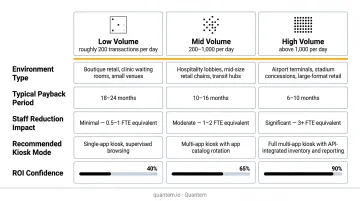
Build your ROI model around transaction volume, labor redeployment, and average order value. Theoretical payback periods look compelling on paper; actual return depends on adoption rates and uptime.
How Quantem Helps You Manage Your Payment Kiosk Fleet
Once kiosks are deployed, keeping them running across multiple locations is where most IT teams run into trouble.
Quantem's MDM platform gives IT teams the visibility and control needed to keep kiosk fleets running, secure, and compliant - without scripting expertise or on-site visits for routine tasks.
Capabilities that map directly to payment kiosk fleet needs:
- Built-in kiosk mode - locks devices to the payment application only; available across all plans, not a premium add-on
- Zero-touch provisioning - deploy new units remotely without manual, device-by-device configuration
- Tiered offline detection - 2-minute sync intervals on Enterprise, with 30-day offline history for pattern analysis
- Geofencing and location tracking - enforce location-based policies and monitor device placement
- Toggle-based policy controls - 250+ pre-built controls with no scripting required
- Alert channels - battery status, offline status, and event-based alerts across plan tiers
Quantem holds SOC-2, GDPR, and CCPA certifications, which matters for customers managing fleets that touch sensitive transaction environments. Pricing starts at $1/device/month on the Essential plan - well under the $4–$9+/device/month typical for enterprise MDM tools like SOTI MobiControl.
A 21-day free trial is available with no credit card required, letting operations teams evaluate fleet management capabilities before any commitment.
Conclusion
The right payment kiosk is not the most feature-rich model or the most common deployment in your industry. It is the one that aligns with your specific transaction type, customer payment preferences, deployment environment, and operational infrastructure.
Buyers who work through all six factors make deployments that last and generate measurable returns. Those who optimize for upfront price alone tend to find the hidden costs later. The six factors worth evaluating:
- Hardware specs and build quality for your environment
- Software integrations with existing POS and back-office systems
- Device management capabilities for your fleet size
- Security compliance (PCI DSS, EMV, encryption standards)
- Deployment environment (indoor, outdoor, high-traffic, unattended)
- Total cost of ownership across a 3–5 year horizon
Payment kiosk technology continues to evolve. Contactless acceptance is now standard. Biometric authentication is gaining ground in healthcare and high-security environments. Remote fleet management has moved from optional to essential for any multi-unit operation. Plan for a technology refresh cycle and build vendor relationships that support it - your first deployment sets the baseline, not the ceiling.
Frequently Asked Questions
How do payment kiosks work?
A customer selects a service, reviews the amount, and pays via card, cash, or mobile wallet. Behind the interface, the kiosk connects in real time to a payment processor for card authorization and to back-end systems - ticketing, inventory, or account databases - to complete and record the transaction.
What payment methods do kiosks accept?
Most payment kiosks support EMV chip cards, magnetic stripe cards, NFC/contactless (including Apple Pay and Google Pay), and cash via integrated bill acceptors. Some bill payment kiosks also accept checks. Supported payment types vary by model and manufacturer - confirm exact hardware capabilities before purchasing.
How much do self-service payment kiosks cost?
Pricing depends on enclosure type, payment hardware, cash/check handling, software, and integration complexity - outdoor units run significantly more than indoor models due to weatherproofing requirements. Factor in ongoing costs (software licensing, processing fees, connectivity, maintenance) when calculating total cost of ownership across a 5–7 year lifespan.
Are payment kiosks ADA compliant?
Compliance must be designed in from the start - it cannot be retrofitted. Key requirements under ADA Sections 308 and 707 include specific reach ranges, speech output, and tactile controls for visually impaired users. Confirm compliance certifications with any vendor before purchasing.
Do payment kiosks require internet connectivity?
Yes - real-time card authorization requires an active network connection, wired or cellular. Connectivity is also needed for remote monitoring, software updates, and transaction reporting. Most deployments include redundant connectivity to minimize downtime risk.
What is the typical lifespan of a payment kiosk?
Most payment kiosks have a useful operational lifespan of five to seven years, depending on deployment environment, usage volume, and maintenance quality. Outdoor deployments in harsh conditions may see shorter lifespans, making enclosure quality and serviceability important factors in the buying decision.