That combination - fewer staff, higher guest expectations - is exactly the environment where self-service kiosks stop being optional and start being operational.
This guide covers what hotel kiosks actually do, where the real benefits show up in day-to-day operations, what gets left on the table when they're absent or poorly managed, and how to extract maximum value from your deployment.
Key Takeaways
- Self-service kiosks let guests check in, pay, and collect room keys in under a minute - reducing front desk queues during peak hours
- Kiosks create a low-pressure upsell opportunity at check-in, surfacing room upgrades and add-ons without staff involvement
- Staff freed from data-entry workflows can focus on guest engagement, issue resolution, and personalized service
- PMS integration is non-negotiable: without real-time sync, kiosks function as isolated touchpoints rather than connected tools
- Device reliability matters as much as deployment; a kiosk that freezes during peak check-in creates more friction than having no kiosk
What Are Self-Service Kiosks in Hotels?
Hotel self-service kiosks are touch-screen terminals, typically positioned in the lobby, that allow guests to complete key parts of their stay independently. That includes:
- Checking in by looking up a booking via name, confirmation number, or ID scan
- Verifying identity and confirming reservation details
- Processing payment for the stay and any add-ons
- Encoding and receiving a room key - in some implementations, in under a minute
- Accessing hotel services such as late checkout requests, restaurant bookings, or local information
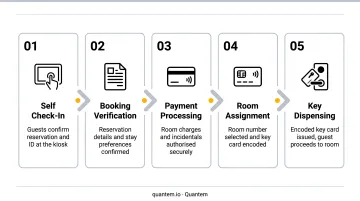
The critical distinction is that kiosks work through the hotel's Property Management System. They pull real-time reservation data, check room availability, and update guest profiles. Any check-in completed at a kiosk is immediately reflected across the hotel's operations. A kiosk that isn't integrated with the PMS is essentially a standalone terminal - and a standalone terminal doesn't deliver the benefits below.
Kiosks work alongside front desk staff, not in place of them. They handle routine, high-volume transactions so staff can focus on guests who need more hands-on assistance.
Key Benefits of Self-Service Kiosks in Hotels
These benefits map directly to metrics hotel managers already track: queue times, revenue per guest, labor cost per check-in, and satisfaction scores.
Faster, Friction-Free Guest Arrival
The most visible benefit is queue elimination. A staffed front desk, however well-run, can only process one guest per agent at a time. During a 6pm peak arrival window, that creates bottlenecks that compound fast.
Kiosks run in parallel. Multiple guests can check in simultaneously, with no dependency on staff availability. Implementations like citizenM's self-service model have demonstrated key-in-hand check-in in under one minute. That's not a universal benchmark, but it's a useful reference for what good execution looks like.
Why arrival speed matters so much:
- Satisfaction research cited by Stayntouch suggests hotel guest satisfaction drops when check-in wait exceeds 5 minutes - and recovering from a bad first impression during a stay is difficult
- J.D. Power's 2025 North America Hotel Guest Satisfaction Index includes check-in/check-out as one of seven core satisfaction dimensions - it's measured, and it affects scores
- For business travelers and late-night arrivals, bypassing the desk entirely is a preference that influences repeat bookings
KPIs impacted: Front desk queue time, CSAT at arrival, check-in processing time per guest, NPS
When it matters most: High-volume properties, group arrival days, peak travel seasons, and any property running reduced front desk staffing will see the sharpest impact.
Upsell-Driven Revenue Generation
Kiosks don't just process arrivals - they present offers. At the moment a guest is actively engaged with completing check-in, the interface can surface:
- Room upgrade options with pricing
- Breakfast packages
- Spa bookings, late checkout, or activity add-ons
- Loyalty program enrollment
The environment matters here. A self-directed screen removes the social awkwardness of a staff upsell pitch. Guests browse at their own pace, without pressure, and make decisions based on what's in front of them. Oracle research found 49% of travelers strongly agreed that special amenities and upgrades are critical to their trip experience - which indicates appetite for these offers exists; the question is how you present them.
The operational case is clear: kiosk upselling runs 24/7 at zero additional labor cost. No missed pitch during a busy shift, no inconsistency based on who's working. Every arriving guest sees the same offer.
Specific conversion figures vary by property and aren't reliably benchmarked across the industry. Any vendor quoting precise uplift percentages without first-party data deserves skepticism. Automated offer presentation at the point of check-in is, however, an established revenue management technique - the execution details determine the outcome.
KPIs impacted: Average revenue per guest (RevPAG), upsell conversion rate, ancillary revenue per booking, loyalty enrollment rate
When it matters most: Properties with a strong F&B, spa, or activities offering, and those looking to grow ancillary revenue without adding front office headcount.
Staff Reallocation and Operational Efficiency
When kiosks absorb check-in, checkout, and payment processing, front desk staff shift from data entry to guest engagement. The workload changes - not the headcount.
That reallocation changes what the lobby looks like in practice. Instead of processing a queue, staff can:
- Proactively approach arriving guests who look uncertain
- Handle complex requests, complaints, and special circumstances
- Provide local recommendations and build the kind of rapport that drives loyalty
- Monitor lobby activity and identify guests who need assistance
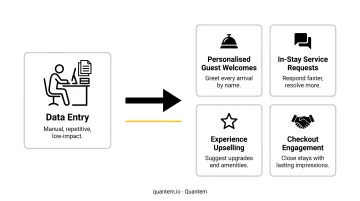
There's also an error reduction benefit. Manual check-in - especially during busy periods - introduces misspellings, wrong room assignments, and missed requests. When guests input their own details at a kiosk, those errors drop. It's not a marginal improvement; human data-entry errors during high-pressure check-in windows are a documented source of complaints and refunds.
CBRE reported that hotel labor costs per available room rose 11% year-over-year in 2024, with hours worked still below 2019 levels while compensation costs are up over 22%. Kiosks help hotels maintain consistent service output without requiring headcount increases to match demand spikes.
KPIs impacted: Labor cost per check-in, error rate in guest data, staff hours redirected to guest-facing activities, repeat booking rate
Properties with high turnover, seasonal demand swings, or tight local labor markets will see the most immediate impact on these numbers.
What Happens When Kiosks Are Absent or Poorly Managed
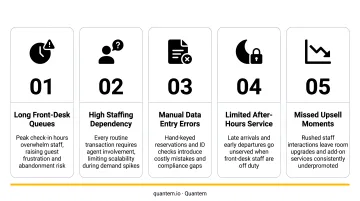
Skipping self-service technology doesn't just mean missing upside - it creates compounding operational exposure:
- Arrival bottlenecks are structural. A fully staffed front desk still processes one guest per agent. Peak windows produce queues regardless of how well-trained the team is. According to hospitality industry data, 65% of hotels are already understaffed at the front desk, making the math worse.
- Upsell opportunities are inconsistent. Without a systematic offer surface, revenue from room upgrades and add-ons depends entirely on individual staff interactions - some guests get the pitch, most don't. The revenue gap compounds over thousands of arrivals.
- Manual data entry errors accumulate. Misspelled names, wrong room assignments, missed preferences - these generate complaints, require correction time, and occasionally result in refunds. They're largely preventable with guest-inputted data.
- Scaling requires headcount. During group arrivals, peak seasons, or late-night check-ins, properties without kiosks must add staff to maintain service levels. Kiosk-equipped hotels absorb volume without proportional cost increases.
- Perception risk grows. Younger travelers and business travelers increasingly treat self-service capability as a baseline expectation. Properties that lack it are perceived as behind - which affects booking intent before a guest ever arrives.
Poorly implemented kiosks carry their own risks. Research published in the International Journal of Hospitality Management found that slow processing times and device failure rates can lengthen perceived wait times compared to traditional check-in. That means reliable hardware, responsive software, and a clear fallback process aren't optional - they're part of the deployment plan.
How to Get the Most Value from Hotel Kiosks
Implementation quality determines whether kiosks deliver the benefits above or become expensive lobby furniture. Three factors matter most:
1. PMS integration first, everything else second AHLA/HTNG has completed a dedicated Kiosk Integration workgroup to standardize self-check-in/check-out interfaces between kiosk terminals and PMS platforms. That standardization work exists because integration failures are the primary reason kiosk deployments underperform. Require real-time sync of reservations, room availability, payment, and key encoding before going live. A kiosk that can't pull accurate data is an unreliable terminal, not a guest service tool.
2. Device reliability is an operational imperative A kiosk that goes offline or freezes during a 6pm arrival window creates a worse experience than the queue it was meant to eliminate. Hotels managing multiple terminals - or properties across a group - benefit from mobile device management (MDM) software like Quantem. Core capabilities include:
- Kiosk mode lockdown to prevent unauthorized access
- Real-time device health monitoring (battery, RAM, storage, connectivity)
- Proactive alerts when a device goes offline or degrades
- Remote troubleshooting from a central dashboard - no on-site IT required
That last point matters for properties without dedicated tech staff. Quantem is also SOC-2, GDPR, and CCPA compliant, which is relevant when kiosk terminals handle guest identity data and payment information.
3. Treat upsell content as a managed asset The kiosk interface requires ongoing attention. Offers, language options, and promotions should be reviewed regularly against PMS data - what's actually converting, what seasonal packages are driving ancillary revenue, which guest segments are using kiosks most. A static interface that still shows a Valentine's Day package in March isn't selling anything. Quantem's remote app management and push update capabilities allow content changes to be deployed across an entire kiosk fleet without on-site visits.
Conclusion
Self-service kiosks deliver value across three dimensions that compound over time: faster, more consistent guest arrivals; higher ancillary revenue through automated upselling; and a front desk operation that scales with demand rather than against it.
The business case maps directly to metrics hotels already track: CSAT scores, RevPAG, labor cost per check-in, and error rates. Integration with the PMS, reliable hardware, and active content management are what separate deployments that perform from ones that stall.
The operational keyword is ongoing. Hotels that treat kiosk deployment as a one-time installation miss most of the return. The properties that see consistent gains are the ones that monitor device health, update upsell content based on real data, and use the staff hours reclaimed by kiosks to actually improve the guest experience - not just reduce headcount.
Frequently Asked Questions
What is a kiosk in the hotel industry?
A hotel kiosk is a touch-screen self-service terminal - typically placed in the lobby - that allows guests to check in, check out, make payments, receive room keys, and access hotel services without front desk assistance. It connects to the hotel's PMS in real time to access reservation data and room availability.
What are the main types of kiosks used in the hospitality industry?
The primary types include check-in/check-out kiosks, concierge and information kiosks, room service order kiosks, event registration kiosks, and wayfinding kiosks. Check-in/check-out kiosks are the most widely deployed in hotel environments.
Do self-service kiosks replace hotel front desk staff?
No - kiosks are designed to support front desk teams, not replace them. They handle routine administrative tasks (check-in, checkout, payment) so staff can focus on personalized service, complex guest needs, and the human interactions that build loyalty and drive repeat bookings.
How do hotel kiosks integrate with property management systems?
Hotel kiosks connect directly to the PMS to access real-time reservation data, room availability, and guest profiles. This integration enables accurate check-in, live payment processing, and room key encoding, while keeping all guest data centralized and immediately updated across hotel systems.
Are self-service hotel kiosks secure?
Well-implemented kiosks use encrypted data transmission, PCI DSS v4.0.1-compliant payment processing, and identity verification via ID scanning and confirmation codes. Kiosk mode lockdown and MDM software prevent unauthorized access - Quantem's device management layer holds SOC-2, GDPR, and CCPA compliance.
Can self-service kiosks help increase hotel revenue?
Yes. Kiosks present room upgrades, breakfast packages, spa services, and loyalty program offers during check-in in a self-directed, low-pressure environment. Because the offer surface runs 24/7 at no additional labor cost and reaches every arriving guest consistently, it outperforms inconsistent staff upselling in reach and reliability.