Introduction
Paper sign-in sheets still sit on front desks across thousands of facilities - and every one of them is a liability. Handwritten logbooks can't screen visitors against watchlists, can't notify hosts instantly, and can't produce an accurate headcount during an emergency evacuation. They're also a compliance problem: NIST SP 800-53 Rev. 5 PE-8 requires visitor access records to capture names, identification forms, entry and departure times, purpose, and person visited - details paper logs routinely miss.
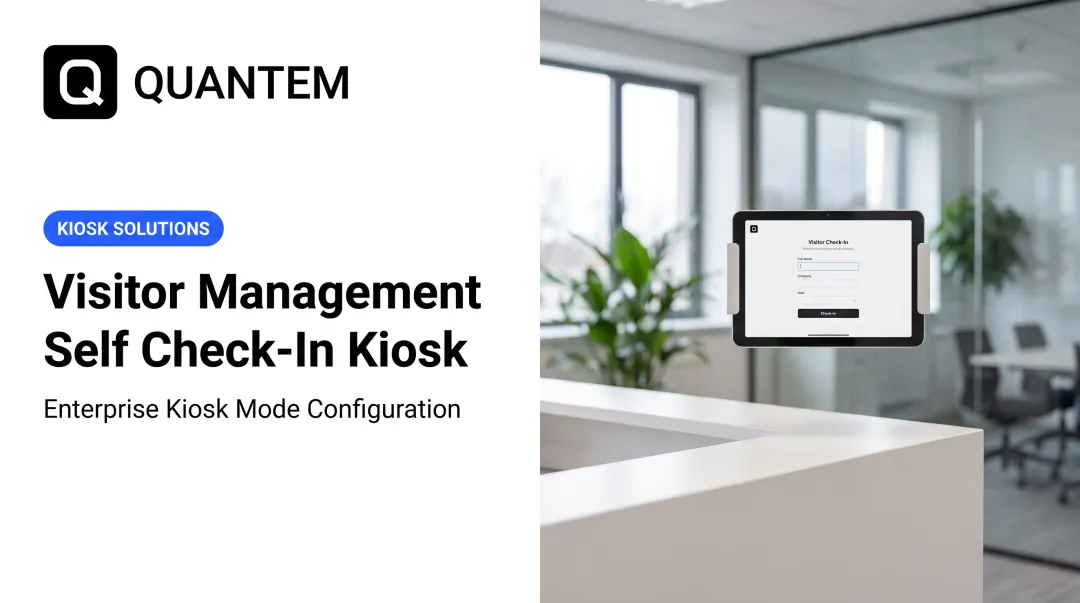
A visitor management kiosk replaces all of that with an automated, self-service check-in station. Positioned at building entry points, these systems handle the full arrival workflow: identity verification, host notification, and badge printing - no staff required.
This guide covers how kiosk systems work step by step, the hardware and software components involved, key features to evaluate, use cases by industry, and how to select and deploy the right system for your organization.
Key Takeaways:
- Visitor kiosks automate check-in, ID verification, badge printing, and host alerts from a single entry-point device
- Every system combines hardware (touchscreen, camera, ID scanner, badge printer) with a cloud platform managing the workflow
- MDM software secures and manages the kiosk devices themselves across multiple locations
- Software costs range from free to $362+/location/month; hardware adds $150–$900+ depending on components
- Healthcare, education, corporate, government, and manufacturing facilities see the highest ROI from deployment
How a Visitor Management Kiosk System Works - Step by Step
Modern kiosk systems follow a structured workflow that's self-directed for visitors while giving staff real-time visibility throughout.
Pre-Registration and Invitation
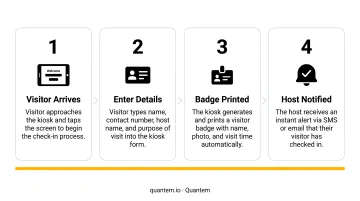
Before arriving, visitors can pre-register through a web portal, email link, or SMS. They enter their name, contact details, purpose of visit, and host employee. On arrival, they skip manual data entry entirely - a QR code or pre-issued credential gets them checked in almost instantly.
In high-traffic lobbies, this is where pre-registration earns its keep: the friction moves before the visitor ever walks through the door.
On-Site Check-In and Identity Verification
At the kiosk, the visitor follows on-screen prompts and scans a government-issued ID - a driver's license or passport. The system reads the ID using AAMVA PDF417 barcode standards for domestic licenses and ICAO MRZ specifications for passports, then cross-references the data against internal watchlists or banned visitor databases.
If a match is found, the kiosk flags the attempt, alerts security, and denies access - all without staff needing to intervene.
Badge Printing and Orientation
After successful verification, the kiosk captures a visitor photo and prints a time-stamped, branded badge. Integrated thermal printers handle this in seconds (the Brother QL-820NWBC, for example, prints up to 110 labels per minute).
Before the visitor proceeds, the kiosk can also display:
- Facility maps and wayfinding instructions
- Safety briefing acknowledgment prompts
- NDA or liability waiver signature screens
Each step is logged automatically, building a timestamped record ready for compliance reporting or security audits.
Real-Time Host Notifications and Check-Out
The moment a visitor completes check-in, the system notifies their host via SMS, email, or app push notification. Average lobby wait times drop significantly when hosts are alerted before their guest reaches the elevator.
Check-out tracking closes the loop. Key capabilities this enables:
- Real-time headcount: Always know who is physically on site
- Emergency mustering: Accurate roll calls during fire evacuations or lockdowns
- Overstay alerts: Automated flags when a visitor exceeds their scheduled window
Key Components of a Visitor Management Kiosk System
A visitor management kiosk isn't a single device - it's a system. Understanding each component separately helps organizations make smarter procurement decisions and avoid being locked into one vendor's bundled hardware.
Touchscreen Interface and Kiosk Enclosure
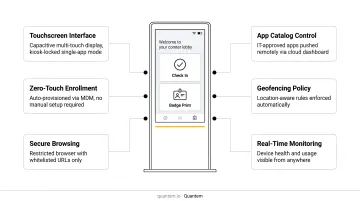
The touchscreen tablet is the visitor-facing interface. Kiosk enclosures - floor-standing units, countertop mounts, or wall-mounted brackets - secure the device, protect internal components from tampering, and typically carry branded signage guiding visitors to check in.
Bouncepad enclosures, for example, range from roughly $150 to $525 depending on mount type and configuration. Organizations can choose the form factor that fits their lobby layout without committing to a specific software vendor.
Camera, ID Scanner, and Badge Printer
Three peripherals handle the identity and credentialing functions:
- Camera - captures a visitor photo at check-in, embedded in the printed badge
- ID scanner - reads barcodes from driver's licenses (AAMVA standard) and OCR data from passport MRZ zones; IDScan.net models run $849–$899, while the Ambir ImageScan Pro 490i is available at $299.95
- Badge printer - thermal label printers produce photo ID badges instantly; the Brother QL-820NWBC lists at $229.99
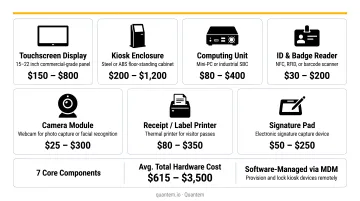
These components can be sourced independently, which gives organizations flexibility to match hardware to their actual visitor volume and budget.
Visitor Management Software and Cloud Backend
The software platform is what makes the hardware work as a system. It manages visitor workflows, stores check-in records, triggers notifications, and provides a management dashboard where staff can see who's on site, run visitor reports, and configure check-in rules.
According to MarketsandMarkets, the visitor management system market is projected to grow from $1.6 billion in 2023 to $3.0 billion by 2028 at a 13.7% CAGR - a signal of how broadly enterprises across industries are adopting these platforms.
Device Management Layer (MDM)
IT teams must secure and manage the tablets and touchscreens running visitor management software. Without MDM, a kiosk device is just a tablet that a visitor could accidentally - or intentionally - exit out of.
Quantem's kiosk mode functionality, available across all plan tiers, locks devices to a single application and lets IT push software updates remotely. Staff can monitor device status across an entire fleet of lobby kiosks from a central dashboard - no technician dispatches required. For organizations running kiosks across multiple buildings or sites, that remote visibility eliminates the guesswork of knowing whether every location is operating correctly.
Must-Have Features in a Visitor Kiosk Management System
Not all visitor kiosks are built the same - but the features below show up in every deployment that actually works, whether you're managing a 50-person office or a multi-facility enterprise.
Self-Service Check-In and Pre-Registration
The kiosk interface must be intuitive enough that visitors can complete check-in without staff assistance. Clear on-screen prompts, minimal steps, and large touch targets matter - especially for visitors who aren't regular users of self-service technology.
Pre-registration portals reduce on-site friction significantly. When visitors arrive with a QR code already on their phone, lobby congestion drops and the check-in experience improves for everyone.
ID Verification and Watchlist Screening
Basic visitor name collection isn't enough for any facility with real security requirements. Purpose-built systems scan government IDs, extract structured data, and match it against internal or external watchlists automatically.
Under Texas Education Code 38.022, school districts are permitted to require government photo ID from campus visitors and compare that data against the statewide sex offender registration database in real time. Similar requirements and best practices apply across healthcare and government facilities.
When a flagged individual attempts to check in, the system alerts security instantly - without the visitor knowing a check has occurred.
Customizable Workflows, Badge Printing, and Waiver Capture
Different visitor types require different check-in paths:
- Contractors acknowledge safety briefings before a badge prints
- Vendors get verified against an approved supplier list
- Guests sign an NDA before accessing secure areas
The best systems let organizations configure distinct flows for each visitor type, capture digital signatures, and print badges that include the visitor's photo, host name, visit date, and an expiration timestamp.
System Integrations and Scalability
A kiosk that can't talk to your other systems creates data silos and manual workarounds. Strong integrations connect the kiosk to:
- Access control systems (door unlocks on successful check-in)
- HR directories (auto-populate host lookup)
- Security cameras
- Emergency alert platforms
For organizations with multiple entry points or facilities, centralized management is equally critical. A single dashboard with unified policy control - rather than configuring each device individually - is what separates scalable deployments from ones that collapse under their own complexity.
Benefits of Visitor Management Kiosks for Businesses
Improved Operational Efficiency and Cost Savings
Automating visitor check-in reduces the hours front-desk staff spend on manual sign-in processing, badge creation, and host notifications. The BLS reports median receptionist pay at $37,230 per year - and that's before factoring in benefits, overhead, and after-hours coverage gaps.
Real deployments reflect this. Menkes, a real estate development firm, processes over 2,000 visitors per month through automated kiosks and QR sign-ins, citing cost savings from reducing front-desk resource use and verifying contractor time on-site.
Beyond labor, kiosks eliminate:
- Paper logbook procurement and storage costs
- Manual data entry errors that create compliance gaps
- Time spent searching paper records during audits or investigations
Strengthened Physical Security
Every kiosk check-in creates a complete, timestamped record: visitor name, photo, ID data, host, purpose, arrival time, and departure time. That's the audit trail paper logbooks have never reliably produced.
An ASIS survey reported by Facilities Dive found that more than 90% of organizations experienced an access-control failure in the prior six months, with tailgating and piggybacking topping the list. Kiosks don't eliminate tailgating on their own, but they close the identity verification gap. The instant security alerts triggered by a watchlist match give security teams time to respond before an unauthorized visitor reaches a restricted area.
Better Visitor Experience and Professional First Impression
A self-service kiosk signals that an organization values visitors' time - and for client-facing businesses, that first impression carries real weight. Key experience improvements include:
- Pre-registration eliminates wait time at the front desk
- Instant host notifications prevent visitors from waiting while staff track down a contact
- On-screen guidance reduces confusion in large or unfamiliar facilities
- Consistent, branded check-in flows reinforce professionalism across every visit
Top Use Cases for Visitor Check-In Kiosks
Healthcare, Corporate, and Education
Healthcare: Hospital kiosks screen guests against security lists, collect consent acknowledgments, and support the facility access controls required under the HIPAA Security Rule. They serve as a support layer for physical safeguard compliance - one component in a broader access control strategy.
Corporate: Branded kiosks in shared lobbies route different visitor types to correct floors and issue time-limited badge credentials. Contractors and clients follow distinct check-in paths without front-desk staff managing the process manually.
Education (K-12): School kiosks compare visitor IDs against sex offender registries in real time - a requirement or best practice in many states. Raptor Technologies reports its K-12 safety software is used by 7,300 districts, which shows how standard automated visitor screening has become in school security.
The same logic extends across public-sector and industrial environments, where visitor volume, liability, and compliance requirements are equally demanding.
Government, Hospitality, and Manufacturing
Government: Courthouses use self-service visitor check-in for wayfinding, document processing, and appointment management. The kiosk reduces front-counter load while maintaining an accurate visitor log.
Hospitality: Hotels deploy kiosks for 24/7 self-check-in, room key issuance, and amenity booking - removing the constraint of staffed reception hours.
Manufacturing: OSHA 1910.119 requires employers to control the entrance, presence, and exit of contractors in covered process areas and communicate relevant hazard information. Visitor kiosks enforce safety briefing acknowledgment before issuing a badge, maintain accurate on-site headcounts for emergency evacuation compliance, and verify contractor credentials.
How to Choose and Implement a Visitor Management Kiosk System
Defaulting to an all-in-one vendor can limit flexibility and increase long-term costs. Organizations get better outcomes by evaluating hardware and software separately, then selecting components that fit their specific entry points, visitor volumes, and security requirements.
Key Selection Criteria
Ask these questions before shortlisting vendors:
- Software pricing model: Envoy Visitors offers a free tier up to 100 entries/month, with Premium at $362/location/month billed annually. Sign In App starts at £415/site/year (UK pricing). Pricing structures vary significantly: per-visitor, per-location, and flat subscription models all exist.
- Compliance certifications: Look for SOC-2, GDPR, and CCPA compliance at minimum. HIPAA alignment matters for healthcare. Quantem holds SOC-2, GDPR, and CCPA certifications - important for organizations that need the MDM layer of their kiosk stack to meet the same data privacy standards as the visitor management software itself.
- Hardware costs: Budget separately for enclosure ($150–$525), badge printer (~$229.99), and ID scanner ($299–$899 depending on capability).
- ADA accessibility: Confirm the hardware configuration meets accessibility standards for your jurisdiction.
- Free trial availability: Most reputable platforms offer trials. Quantem provides a 21-day free trial with no credit card required, which is useful for evaluating kiosk mode configuration before committing.
Implementation Best Practices
A successful rollout depends on setup decisions made before the kiosk goes live:
- Position kiosks at all entry points in highly visible locations covered by security cameras
- Test all peripherals before launch - scanner reads, badge print quality, camera capture, and software workflows
- Train staff on dashboard monitoring, alert response, and how to assist visitors who need help
- Establish a maintenance schedule covering device cleaning, badge stock replenishment, and software update verification
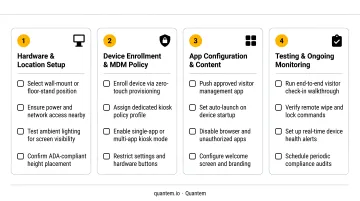
For organizations managing multiple kiosk locations, pairing visitor management software with an MDM solution like Quantem lets IT teams push updates remotely, monitor device uptime, and control the entire kiosk fleet from one platform. No on-site visits required. Quantem includes zero-touch enrollment across all plans, so adding new kiosk devices is straightforward as facilities expand.
Frequently Asked Questions
What is a visitor kiosk?
A visitor kiosk is an automated, self-service check-in station (typically a touchscreen tablet in a secure enclosure) that allows guests to register, verify their identity, and receive a printed badge upon entering a facility. The process requires no staff assistance for standard check-ins.
How much does a visitor management system cost?
Software ranges from free (limited entries) to $362+/location/month for premium tiers. Hardware costs vary by component: enclosures run $150–$525, thermal badge printers around $229.99, and ID scanners $299–$899. Total deployment costs depend on location count and feature requirements.
What is the best visitor management software?
The right platform depends on your visitor volume, security requirements, integrations, and budget. Before comparing vendors, confirm support for pre-registration, ID verification, host alerts, badge printing, and SOC-2, GDPR, and CCPA compliance.
Can visitor management kiosks work without Wi-Fi?
Many systems offer offline mode. Envoy, for example, states that its visitor check-in kiosks can continue operating offline, store data locally, and sync once connectivity is restored. Wired Ethernet connections provide a more reliable alternative in environments where Wi-Fi is inconsistent.
What industries benefit most from visitor check-in kiosks?
Healthcare, corporate offices, K-12 and higher education, government facilities, manufacturing plants, and hospitality see the highest impact - especially where security screening and compliance recordkeeping are both priorities.
How do visitor management kiosks handle data privacy and compliance?
Reputable systems encrypt visitor data in transit and at rest, restrict access to authorized personnel, and support configurable data retention - with GDPR, CCPA, and HIPAA as the key certifications to verify. Always request current compliance documentation directly from vendors rather than relying on marketing pages.