Introduction
Deploying kiosk devices across 50 store locations sounds straightforward until you're three weeks into rollout with inconsistent app versions, security policies that don't match, and IT staff driving between sites to fix configurations manually. At scale, these aren't edge cases — they're the norm.
The interactive kiosk market is projected to reach $35.65 billion by 2030, growing at 10.3% annually. As kiosk fleets grow, the gap between teams using purpose-built management software and those relying on manual setup widens dramatically.
Choosing the right platform determines whether your next rollout takes days or weeks. This guide breaks down the top MDM and kiosk management platforms built for retail-scale deployments, covering capabilities, pricing, and where each tool fits best.
Key Takeaways
- Manual kiosk setup doesn't scale — dedicated MDM software is required for fleets beyond 10-15 devices
- Zero-touch enrollment, centralized policy enforcement, and remote monitoring are non-negotiable features
- Pricing ranges from $1 to $8+ per device per month, with kiosk mode sometimes locked behind premium tiers
- Kiosk mode is included across all Quantem plans at $1–$3 per device per month, with no premium tier required to access it
- Compliance certifications (SOC-2, GDPR, CCPA) matter when kiosks collect customer interaction data
Why Configuring Retail Kiosks at Scale Is a Different Challenge
Managing 10 kiosk devices manually is tedious. Managing 200 that way breaks your IT operation entirely.
"At scale" means provisioning devices across dozens of store locations, enforcing uniform security policies, pushing app and OS updates remotely, and maintaining uptime without dispatching IT staff on-site for every change. A single configuration error replicated across hundreds of devices creates fleet-wide problems that can take days to untangle.
The Failure Modes of Manual Setup
Manual provisioning processes fail in predictable ways at scale:
- Configuration drift: Devices diverge from baseline settings as updates, user changes, and inconsistent policies accumulate. Research from Reach Security found that 97% of security practitioners reported a confirmed breach or near miss tied to tool misconfiguration in the past year.
- No central visibility: Without a unified dashboard, IT teams can't identify which devices are offline, running outdated software, or out of compliance.
- High IT labor costs: Manual device setup can take 45 minutes or more per device; automation can cut that time by up to 75%.
- Inconsistent security: Policies applied by hand vary between technicians, leaving gaps across store locations.
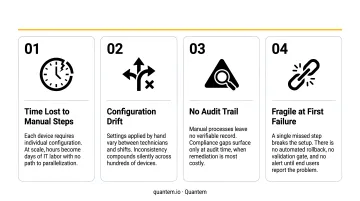
The tools below address each of these failure points directly — evaluated for how well they handle provisioning, policy enforcement, and remote management at retail scale.
Top Tools for Configuring Retail Kiosk Devices at Scale
The tools below cover the strongest options for retail kiosk deployments at scale — from small pilot fleets to enterprise-wide rollouts. Each was evaluated on kiosk lockdown capability, zero-touch enrollment support, remote management depth, scalability, retail relevance, and pricing transparency.
Quantem
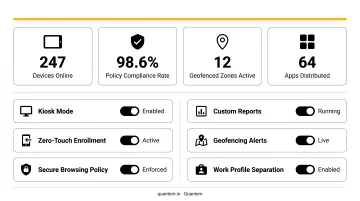
Quantem is an enterprise-grade MDM platform built for teams that need comprehensive kiosk management without the enterprise price tag. It supports Android and Windows kiosk deployments with built-in kiosk mode available across all pricing plans — not as a premium add-on.
What sets it apart for retail: zero-touch enrollment is included in every plan, policy management requires no scripting (toggle-based controls only), and compliance certifications cover SOC-2, GDPR, and CCPA — relevant for any kiosk fleet collecting customer interaction data.
| Details | |
|---|---|
| Key Features | Built-in kiosk mode (all plans), zero-touch provisioning, real-time device monitoring, geofencing (mid-tier+), private app management with version control, API access, BYOD work profile support |
| Pricing | $1–$3 per device/month; pay-as-you-go, no hidden fees, no cancellation fees; 21-day free trial with no credit card required |
| Platform Support | Android, Windows |
| Compliance | SOC-2, GDPR, CCPA certified |
At $1–$3 per device per month, Quantem's pricing runs 50–70% below most competing MDM platforms — a meaningful difference for a fleet of 500+ kiosks over a multi-year deployment.
Scalefusion
Scalefusion is an established MDM platform with strong kiosk lockdown capabilities, popular in retail and hospitality for device fleet management. It holds Android Enterprise Recommended status and supports single-app and multi-app kiosk modes across Android, iOS, and Windows.
Scalefusion differentiates through deep Android Enterprise integration, remote cast and control across Android, iOS, Windows, and macOS, and content management suited to digital signage kiosk deployments.
| Details | |
|---|---|
| Key Features | Single/multi-app kiosk mode, browser lockdown (Android, Windows, iOS), remote cast & control, app management via Google Play/Apple App Store/private store, OS update scheduling, compliance reporting |
| Pricing | Essentials $2 / Growth $3.50 / Business $5 / Enterprise $6 per device/month; 14-day free trial |
| Platform Support | Android, iOS, tvOS, Windows, macOS, Linux, Chromebooks |
| Compliance | ISO/IEC 27001:2022, SOC 2 Type 2, GDPR, HIPAA |
Scalefusion's broader OS coverage suits mixed-device retail environments well — though teams managing 50+ devices at the Business or Enterprise tier should model total cost carefully before committing.
Hexnode UEM
Hexnode, the enterprise software division of Mitsogo Inc., is a Unified Endpoint Management solution with one of the most flexible kiosk mode feature sets available. It was named a Leader in the IDC MarketScape Worldwide UEM Software Vendor Assessment for 2025/26.
Kiosk mode options include:
- Single-app, multi-app, and website-only lockdown configurations
- Remote view and control for Android devices
- Windows lost mode for securing unattended kiosks
- Enrollment integrations via Apple Business Manager, Android Zero-Touch, and Samsung Knox
| Details | |
|---|---|
| Key Features | Single-app, multi-app, and web-only kiosk modes; remote view/control (Android); Windows lost mode; patch management (Windows/macOS); geofencing and location tracking; kiosk browser customization |
| Pricing | Pro $2.20 / Enterprise $3.20 / Ultimate $4.70 per device/month; Ultra requires custom pricing; 14-day free trial; minimum 15 devices |
| Platform Support | Android, iOS, iPadOS, Windows, macOS, tvOS, visionOS, Fire OS, Apple TV |
| Compliance | ISO/IEC 27001:2022, SOC 2 Type 2, GDPR |
The 15-device minimum rules it out for very small pilots, but the depth of kiosk customization — particularly web-only lockdown and granular browser controls — gives larger mixed-fleet retailers more configuration options than most competitors at this price point.
42Gears SureMDM
42Gears SureMDM has a long-standing focus on rugged and Android retail device management. Its dedicated kiosk lockdown module (SureLock) and browser lockdown tool (SureFox) are widely used in point-of-sale and customer-facing kiosk deployments, and SureMDM holds Android Enterprise Recommended status.
SureLock restricts Android devices to specific applications, websites, and settings, configurable remotely from the SureMDM console. Bulk enrollment workflows support Android Zero-Touch Enrollment, Samsung Knox Mobile Enrollment, and QR code-based provisioning.
| Details | |
|---|---|
| Key Features | SureLock kiosk module (single/multi-app), SureFox browser lockdown, app whitelisting, bulk enrollment (QR, Zero-Touch, Knox), unattended remote access & screen viewing, file transfer, remote diagnostics |
| Pricing | Standard $3.99 / Premium $5.49 / Enterprise $7.99 per device/month; 30-day free trial |
| Platform Support | Android, iOS/iPadOS, Windows, macOS, Linux, Chrome OS, Wear OS, IoT |
| Compliance | ISO/IEC 27001:2022, Android Enterprise Recommended |
42Gears' offline policy enforcement is a standout feature — retail environments with patchy network coverage (warehouse floors, outdoor kiosks, remote locations) benefit directly from policies that hold without a live connection.
ManageEngine Mobile Device Manager Plus
ManageEngine Mobile Device Manager Plus is the enterprise MDM solution from Zoho's IT management division. It's most common in mid-to-large retail enterprises that already use ManageEngine's broader IT suite — especially where Active Directory integration and ServiceDesk Plus ticketing are already part of the workflow.
It supports kiosk mode across Android, iOS, Windows, macOS, tvOS, and ChromeOS, with tight integration between MDM policy management and existing enterprise IT infrastructure.
| Details | |
|---|---|
| Key Features | Kiosk profile management (single/multi-app), remote lock and wipe, OS update scheduling (iOS, Android, Chrome), Active Directory integration, ServiceDesk Plus integration, compliance reporting |
| Pricing | Cloud: Standard $1.28 / Professional $2.38 per device/month. On-premises: Standard $9.90 / Professional $17.90 per device annually. Free edition for up to 25 devices; 30-day free trial |
| Platform Support | Android, iOS, iPadOS, Windows, macOS, tvOS, ChromeOS |
| Compliance | GDPR (product-level); Zoho-level ISO/IEC 27001, ISO/IEC 27701, SOC 2 Type 2 |
ManageEngine's cloud pricing is competitive, but teams should note that on-premises costs scale significantly. The free 25-device edition is genuinely useful for pilot programs before committing to a full retail rollout.
How We Chose These Tools
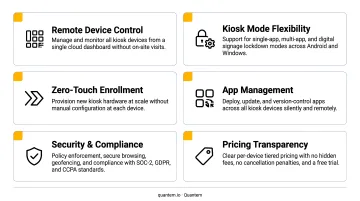
Every tool on this list was assessed against six criteria:
- Kiosk lockdown depth — single-app, multi-app, and browser-only modes
- Zero-touch and bulk enrollment support — Android Zero-Touch, Knox, Apple Business Manager, or proprietary QR-based workflows
- Remote monitoring and diagnostics — real-time device health, remote reboot/lock, offline alerts
- Scalability — whether the platform holds up operationally at 100+ devices, not just in demos
- Pricing transparency — no hidden per-feature paywalls or kiosk mode locked behind the most expensive tier
- Compliance certifications — SOC-2, GDPR, CCPA coverage matters for kiosks that touch customer data
The Mistake Most Retail IT Teams Make
The most common selection error is prioritizing hardware-specific compatibility over software scalability. A tool that works perfectly on a specific Samsung tablet model may rely on Knox-specific controls that don't apply to other devices in a mixed fleet.
At 10 devices, that's manageable. At 200, it creates two separate management workflows and doubles IT overhead.
Scripting-free policy management and a centralized dashboard determine whether one IT generalist can run your fleet or whether you need a dedicated team. At retail scale, that distinction has real staffing and cost implications.
According to Gartner's Critical Capabilities for Endpoint Management Tools (2026), shared device and kiosk management is now an explicit evaluation dimension for enterprise endpoint tools. As kiosks collect more customer interaction data, missing SOC-2, GDPR, or CCPA certifications can disqualify vendors during enterprise security audits.
Conclusion
The right retail kiosk configuration tool needs to handle zero-touch deployment across every new store opening, enforce policies remotely without IT travel, surface device health issues before they cause downtime, and scale without adding headcount.
Before committing to any platform, run through this checklist:
- Test with a free trial on your actual devices — not a sanitized demo environment
- Validate peripheral compatibility (receipt printers, barcode scanners, card readers) in your real store setup
- Check vendor support responsiveness before you're troubleshooting at 9pm on a busy weekend
Quantem offers a 21-day free trial with full feature access and no credit card required. Retail teams looking to simplify kiosk fleet management without the enterprise price tag can start at quantem.io.
Frequently Asked Questions
Frequently Asked Questions
What software is used for kiosks?
Kiosks typically run MDM or UEM platforms — such as Quantem, Hexnode, or Scalefusion — that enforce kiosk lockdown mode, restrict device access to approved apps, and allow remote management. Your device OS, fleet size, and integration needs will determine which platform fits best.
How do I manage multiple kiosk devices remotely?
Remote kiosk management is handled through MDM platforms that provide a centralized dashboard. Admins can push app updates, enforce policies, reboot devices, and monitor health across all locations without visiting each site physically.
What is zero-touch provisioning for retail kiosks?
With zero-touch provisioning, kiosk devices automatically enroll and configure themselves when first powered on. This eliminates manual IT setup and makes large-scale retail rollouts feasible without hands-on handling at each location.
What is the difference between MDM and kiosk mode?
MDM (Mobile Device Management) is the broader platform for managing, securing, and monitoring devices. Kiosk mode is a specific feature within MDM that locks a device to one or more approved apps. Both are needed for effective retail kiosk deployments.
How much does kiosk management software cost?
According to Capterra's MDM software pricing data, costs typically range from $1 to $9+ per device per month, with enterprise tools often charging extra for kiosk-specific features. Quantem bundles kiosk mode into all plans at $1–$3 per device per month — no add-on fees required.
What features should I look for in retail kiosk configuration software?
Prioritize kiosk lockdown mode (single-app and multi-app), zero-touch enrollment, bulk policy management, and remote monitoring. Compliance certifications (SOC-2, GDPR, CCPA) and transparent, scalable pricing are also worth confirming before committing.