Introduction
Hospital tablets have moved well beyond "nice to have." A 2025 survey of 204 clinicians found that 57.5% used Apple iPads for healthcare delivery, and nearly half considered mobile devices more efficient than traditional workstations. At this scale, they function as documentation tools, EHR access points, and patient engagement portals running continuously across every shift.
The operational reality is messy: tablets spread across floors and facilities run different OS versions, clinicians install personal apps on shared work devices, and IT teams often have no real-time visibility into what's installed where. An unplanned OS update mid-shift can interrupt an active EHR charting session.
A lost, unencrypted tablet is a different problem entirely — one that can trigger a HIPAA breach notification before IT even knows the device is missing.
This guide covers how MDM addresses these problems in hospital settings — from enrollment strategy and app deployment to controlled OS update management — so clinical IT teams can maintain compliance and device reliability without disrupting care workflows.
Key Takeaways
- MDM gives hospital IT centralized, remote control over every tablet — enforcing approved apps and blocking unauthorized downloads
- Segment devices into policy groups from day one: patient-facing tablets need kiosk mode, clinician tablets need managed multi-app environments
- OS updates must be deferred and tested against clinical app compatibility before fleet-wide deployment; auto-installing on release day is a patient safety risk
- Remote wipe policies should be configured and tested before a device goes missing, not after
- SOC-2 compliant MDM platforms with built-in audit logging reduce the documentation burden significantly during HIPAA reviews
When Should a Hospital Deploy MDM for Tablets?
The short answer: the moment any tablet accesses PHI, a clinical app, or hospital Wi-Fi — even in a single-ward pilot.
Many hospitals delay MDM adoption when device counts are small, reasoning that the complexity isn't worth it yet. That logic fails on compliance grounds. HIPAA's device and media controls under 45 CFR 164.310(d) apply regardless of fleet size. An unencrypted tablet with EHR access is a liability whether you have 5 devices or 500.
That exposure is common. A 2025 international survey found that less than half of healthcare delivery organizations had seven core MDM capabilities in place, and over one-fourth had implemented none — including basic controls like password enforcement and remote wipe.
Signs You Need MDM Now
If any of these apply, delay is already a risk:
- Tablets across departments run different OS versions with no standardization
- IT cannot remotely wipe or lock a lost device
- Clinicians have installed personal apps on work tablets
- An OS update has interrupted a clinical session
- No centralized view exists of what software runs on which device
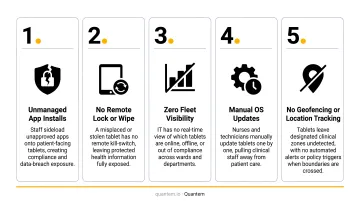
Hospitals managing multiple facilities or shift-based care face additional pressure — physical IT presence on every floor isn't feasible. MDM enforces consistent configurations remotely, without sending someone to each device.
What You Need Before Deploying MDM on Hospital Tablets
Rushing enrollment without prerequisites creates policy churn and configuration drift. Get these in place first:
| Prerequisite | Why It Matters |
|---|---|
| Device inventory and ownership model | Hospital-owned devices allow full MDM management including kiosk mode and app whitelisting; BYOD limits policy scope to a managed work profile |
| Network readiness | Confirm clinical VLANs allow MDM traffic without exposing PHI on guest networks |
| Defined app catalog | Finalize approved apps (EHR clients, telehealth tools, communication apps) with version requirements before enrollment begins |
| MDM platform selection | Prioritize zero-touch enrollment, private app distribution with version control, kiosk mode, remote wipe, and compliance certifications (SOC-2 minimum) |
On platform selection: healthcare-labeled MDM tools often carry premium pricing that strains fleet-wide budgets. Quantem covers all four prerequisites above — zero-touch enrollment, kiosk mode, private app management with version control, and SOC-2 compliance — starting at $1 per device per month, with a 21-day free trial and no credit card required.
How to Manage Apps and OS Updates on Hospital Tablets
MDM works in a defined sequence: enroll first, configure policies before pushing apps, test updates on a staging group before fleet-wide deployment. Skipping any stage creates the configuration drift or clinical disruption you're trying to prevent.
Enrollment and Device Setup
Zero-touch enrollment is the right approach for hospital tablets at scale. Devices arrive pre-configured or self-enroll on first power-on — no hands-on IT time per device. This matters when you're onboarding tablets across multiple floors or facilities simultaneously.
Common enrollment errors that cause downstream problems:
- Assigning devices to the wrong policy group (patient-facing vs. clinical)
- Skipping Wi-Fi profile configuration, causing devices to fall off the managed network
- Omitting a device naming convention that lets IT locate a specific tablet remotely
Quantem's zero-touch enrollment is included across all pricing tiers, and the platform supports group-level policy assignment during provisioning — so devices land in the right configuration group automatically.
App Deployment and Management
MDM pushes apps silently to managed tablets. IT selects approved apps from a managed catalog (public store or private/in-house distribution), assigns them to device groups, and the MDM installs them without user interaction. Neither patients nor clinical staff can install or remove apps outside the approved set.
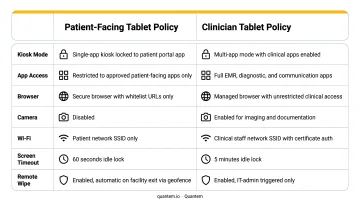
Two distinct configurations apply in hospital environments:
- Patient-facing tablets — Single-app or kiosk mode, locked to a patient portal or entertainment app. No access to settings, app stores, or browser navigation outside the approved experience.
- Clinician tablets — Multi-app managed environment with EHR, communication, and diagnostic tools. Broader access, but still governed by the approved catalog with no unauthorized installs.
These configurations require separate MDM policy groups. Applying one policy to both device types creates security gaps on clinical devices or frustrating restrictions on patient tablets.
Pin specific app versions and test before promoting fleet-wide. IT should validate new versions against clinical workflows in a small device group before any broader rollout. Epic Canto, for example, currently requires iPadOS 18.0 or later. An app update that shifts minimum OS requirements will break compatibility on devices not yet running the required version.
An unvetted EHR update that breaks charting workflows is a patient safety risk — not just an IT inconvenience.
Quantem's platform includes staged app update capability, allowing IT to roll an update to a test group before fleet-wide deployment, with the option to pause if issues surface.
Managing OS Updates
Never set hospital tablets to auto-install OS updates on release.
Instead, use your MDM's deferral controls to buy time for compatibility testing. Apple supervised devices, Microsoft Intune, and Jamf all support iOS/iPadOS update deferral of 1 to 90 days. No universal healthcare-specific deferral window exists in published guidance; the right window for your environment depends on how long testing takes for your clinical apps.
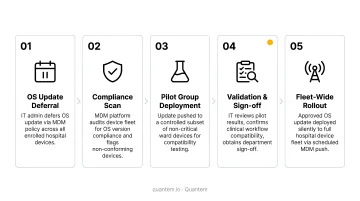
The deployment sequence that reduces clinical disruption:
- Defer the update — Configure your MDM to hold the update from appearing on devices for a defined window (use the full deferral period if testing requires it)
- Test on a staging group — Push the update to a small set of non-clinical or low-risk tablets first
- Validate clinical apps — Confirm that EHR clients, telehealth tools, and clinical decision support apps function correctly against the new OS
- Coordinate with clinical stakeholders — IT should not be the sole approver of updates that affect clinical workflows
- Schedule fleet deployment — Push to the broader fleet during overnight or low-census windows to minimize disruption
Security patches vs. major OS upgrades require different timelines:
- Security patches — Apply faster, often within days. Extended exposure to a known vulnerability is a greater risk than a brief compatibility window.
- Major OS version upgrades — Require full compatibility testing and change management communication to clinical staff before deployment.
Where MDM Fits in the Hospital Device Ecosystem
MDM for tablets is one layer in a broader hospital technology stack — not the whole stack.
Tablets running clinical apps sit alongside connected medical devices, workstations on wheels, and nurse call systems. MDM governs the tablet layer.
Biomedical device security falls under separate frameworks — NIST SP 800-213 covers IoT device cybersecurity as its own category, distinct from mobile device management. Treating them as the same thing tends to push MDM policy into areas it can't govern, while leaving actual medical device security under-resourced.
Where tablet MDM has direct operational impact:
| Use Case | MDM Priority |
|---|---|
| Patient bedside tablets (engagement, consent forms) | Kiosk mode, single-app lock, auto-reset on discharge |
| Nurse station shared tablets (medication, documentation) | Shared device policies, rapid re-authentication, consistent app catalog |
| Mobile physician tablets (EHR rounding) | Multi-app managed environment, version-controlled EHR access |
| Telehealth carts | Managed browser, app enforcement, camera/mic access controls |
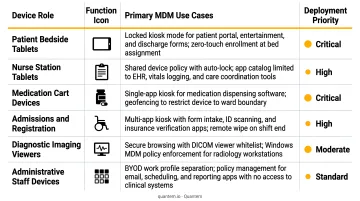
Each use case carries different update tolerance and app requirements. Separate policy groups, configured from the start, are what keep those differences manageable at scale.
Best Practices for Hospital Tablet MDM
Segment by device role from day one. Patient-facing, clinical staff, and administrative tablets each need separate app catalogs, update schedules, and security configurations. One blanket policy across all hospital tablets creates security gaps and operational disruptions simultaneously.
Test OS updates and app version changes on a small, non-clinical staging group before fleet-wide deployment. Include clinical stakeholders in the sign-off process, not just IT.
Verify remote wipe and device lock policies before a device goes missing — not after. HHS OCR enforcement is clear: Catholic Health Care Services paid a $650,000 HIPAA settlement after an unencrypted device containing nursing home resident ePHI was stolen. Confirming these controls work is a pre-incident requirement, not a post-incident lesson.
Use MDM dashboards to track OS version distribution, app compliance status, and devices that have drifted from policy. Quantem's scheduled custom reports and 30-day event logs (Enterprise plan) surface this data automatically, so HIPAA compliance documentation doesn't depend on manual audits.
Maintain audit logs consistently. HIPAA's audit controls under 45 CFR 164.312(b) require records of activity on systems containing ePHI. MDM audit logs satisfy this requirement directly — keep them accessible and retained for the duration your compliance program requires.
Conclusion
MDM for hospital tablets is less about technical complexity and more about discipline: the right policies, correct enrollment sequencing, and consistent testing before any update reaches clinical devices.
Every unpatched device or unchecked app version carries real risk — compliance exposure, disrupted workflows, or worse, interference during active patient care. MDM configuration is a patient safety practice. In clinical environments, the line between IT reliability and care delivery doesn't exist.
Platforms like Quantem make this discipline easier to maintain, with zero-touch enrollment, scheduled OS update controls, and app version management built in — so your IT team can enforce consistent policies across every hospital tablet without manual overhead.
Frequently Asked Questions
What is MDM in medical devices?
MDM (Mobile Device Management) in healthcare refers to software platforms that centrally manage, secure, and configure devices used in clinical settings. MDM enforces app policies, controls OS updates, and protects patient data in alignment with HIPAA requirements under 45 CFR 164.308–164.312.
What are popular MDM platforms for healthcare?
Commonly used platforms include Jamf (widely deployed for iOS/iPadOS fleets), Microsoft Intune (strong in mixed-OS enterprise environments), VMware Workspace ONE, and more affordable options like Quantem. The best fit depends on your device OS, fleet size, and compliance requirements.
How does MDM help with HIPAA compliance on hospital tablets?
MDM directly supports HIPAA Security Rule requirements by enforcing encryption, requiring passcodes, enabling remote wipe, blocking unauthorized app installs, and maintaining audit logs of device configurations. Together, these controls reduce PHI exposure risk from unmanaged devices.
Can MDM manage patient-facing and clinical staff tablets differently?
Yes. MDM allows hospitals to create separate device policy groups — patient tablets can be locked to a single app in kiosk mode, while clinician tablets receive a broader managed app catalog. Update schedules, security configurations, and app access are applied independently to each group.
How do hospitals prevent OS updates from disrupting clinical workflows?
Hospitals use MDM to defer OS updates for up to 90 days after release, test compatibility with clinical apps on a staging device group, then schedule deployment during off-peak hours. This prevents a live OS push from interrupting an EHR session or clinical decision support tool mid-shift.
What is the difference between MDM and MAM for hospital devices?
MDM manages the entire device — apps, OS, settings, and security. MAM (Mobile Application Management) manages only apps and their data, without controlling the device itself. MAM suits BYOD scenarios where the hospital controls clinical apps on a personal device; MDM is preferred for hospital-owned tablets requiring full device control.