Introduction
In clinical environments, PHI moves constantly — across tablets at nursing stations, personal phones on hospital Wi-Fi, and shared diagnostic devices that rarely stay with one user. According to Verizon's 2025 Data Breach Investigations Report, healthcare recorded 1,542 confirmed data disclosures in a single year, with system intrusion, social engineering, and basic errors driving the majority of incidents.
That volume isn't accidental.
The challenge isn't just technical. It's organizational. Devices move between facilities, staff share tablets on medication carts, and personal phones land on hospital Wi-Fi dozens of times a day — often without IT's knowledge.
This guide covers:
- The specific HIPAA rules that govern mobile devices
- The security risks those devices create in clinical environments
- How MDM maps to HIPAA's three safeguard categories
- A practical compliance checklist and implementation roadmap for healthcare IT teams
Key Takeaways
- HIPAA doesn't name MDM explicitly, but meeting its Security Rule requirements across a mobile fleet without it is nearly impossible
- Lost or stolen unencrypted devices trigger mandatory breach notification to HHS within 60 days of discovery
- MDM covers all three HIPAA safeguard categories: administrative, physical, and technical
- BYOD and shared devices each require different MDM configurations
- A Business Associate Agreement with your MDM vendor is legally required, not optional
Why HIPAA Compliance Matters for Mobile Devices
The Regulatory Foundation
The Health Insurance Portability and Accountability Act of 1996 established the first binding federal standards for protecting Electronic Protected Health Information (ePHI). Two rules matter most for mobile devices:
- The Privacy Rule — governs who can access and use PHI, and under what conditions
- The Security Rule — requires administrative, physical, and technical safeguards specifically for ePHI
Compliance obligations apply to covered entities (health plans, providers, clearinghouses) and their business associates — which includes MDM vendors, IT service providers, and any third party handling ePHI on the organization's behalf.
The Cost of Getting It Wrong
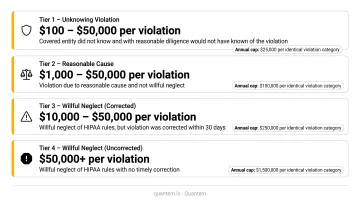
HIPAA penalties scale with severity. The 2026 adjusted civil monetary penalty tiers range from $145 per violation for unknowing violations up to $2,190,294 per year for willful neglect that goes uncorrected.
Lifespan Health System paid $1,040,000 to OCR after a single unencrypted stolen laptop triggered a breach. Remote wipe and encryption enforcement — both standard MDM capabilities — would have stopped it.
The Minimum Necessary Principle in Practice
HHS's minimum necessary standard (45 CFR 164.502(b)) requires covered entities to limit PHI access to only what each staff member's role actually requires.
In practice, a registration clerk shouldn't see the same apps as a treating physician. MDM enforces this distinction through role-based access controls applied at both the device and application level — without requiring manual policy updates for each user.
What Privacy Risks Do Mobile Devices Pose in Healthcare?
Physical Risks
Smartphones and tablets are built to travel — which is what makes them a compliance liability. A device without encryption or remote-wipe capability that contains ePHI constitutes a reportable breach under HIPAA the moment it's lost or stolen.
Physical device loss remains the leading breach vector in healthcare. In environments where devices move between wards, facilities, and personal bags, the exposure window stays wide open — and the Lifespan settlement is one of many examples of what that costs.
Digital and Network Risks
Physical risks are only part of the picture. Clinical environments create constant connectivity pressure, pushing staff toward whatever works fastest — including public Wi-Fi and consumer messaging apps that were never designed for PHI.
A 2020 peer-reviewed study found that 65% of physicians used SMS and 33% used WhatsApp to share patient information, with 14% of personal devices lacking basic authentication. These aren't fringe behaviors. They reflect the gap between official policy and clinical reality.
Key digital risks include:
- Public Wi-Fi exposing ePHI to interception without VPN protection
- Unsecured third-party apps serving as malware entry points
- Weak or reused passwords on devices accessed by multiple clinical staff
- Outdated OS versions with known, unpatched vulnerabilities
Organizational and Process Risks
Beyond individual behavior, some risks are structural — built into how healthcare organizations operate across sites, staff, and device fleets.
- BYOD without boundaries: personal and clinical data commingling on the same device with no separation controls
- Inadequate offboarding: departed staff retaining active access to PHI systems long after they've left
- Fleet fragmentation: dozens of device models running different OS versions across multiple facilities, each a potential weak point
- Regulatory fatigue: maintaining HIPAA compliance while managing day-to-day clinical demands stretches IT teams thin
A 2025 peer-reviewed survey found that 58.7% of US healthcare delivery organizations had deployed corporate-owned shared mobile devices — each requiring consistent, auditable security configurations across their entire fleet.
How MDM Supports HIPAA's Three Safeguard Requirements
The HIPAA Security Rule organizes its requirements into three safeguard categories. A properly configured MDM platform maps directly to all three — making it the most practical compliance tool for mobile fleets.
Administrative Safeguards
Administrative safeguards govern how devices are provisioned, used, audited, and decommissioned. MDM supports this by:
- Enforcing acceptable-use policies remotely across all enrolled devices
- Maintaining timestamped audit logs of device activity and policy changes
- Generating compliance reports for HIPAA audits on demand
- Automating offboarding workflows when staff depart
On Quantem's Enterprise plan, activity logging retains records for up to three months, with event feeds providing 30-day device access history — directly supporting audit trail requirements.
Physical Safeguards
Physical safeguards protect against unauthorized physical access to devices and the ePHI on them. MDM contributes through:
- GPS-based device tracking and geofencing to alert IT when a device leaves a facility boundary
- **Remote lock and remote wipe** to neutralize lost or stolen devices without physical access
- Centralized device inventory recording every enrolled device, its assigned user, and current status
Quantem's geofencing feature tracks devices even when the management app isn't actively running, and the platform supports remote lock actions triggered from its centralized dashboard.
Technical Safeguards
Technical safeguards are the digital controls protecting ePHI on devices and in transit. Four core MDM-enforced controls apply here:
- Encryption — Full-disk encryption protects data at rest, ensuring a lost device doesn't become a reportable breach. Quantem uses AES-256 encryption for data at rest and TLS 1.2 for data in transit.
- Authentication controls — Strong passcode policies and multi-factor authentication restrict unauthorized access at the device and app level.
- VPN configurations — Per-app or device-level VPN ensures ePHI isn't exposed when staff connect to untrusted networks.
- App management and DLP — App allowlisting, containerized work profiles, and data loss prevention controls prevent PHI from leaking into personal apps or unmanaged cloud storage.
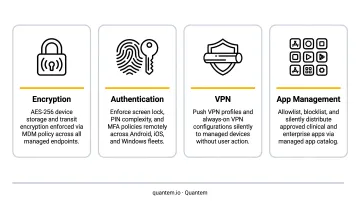
Quantem's SOC-2 certified platform covers all three safeguard categories through toggle-based policy controls, with no scripting required. Healthcare-specific capabilities include BYOD work profile separation, geofencing, zero-touch enrollment for large fleet deployments, and real-time device visibility across hospital networks and diagnostic chains.
Pricing runs $1–$3 per device per month, well below the $3–$10+ range typical of comparable enterprise MDM platforms.
HIPAA Device Compliance Checklist for Healthcare Organizations
Use this as a self-audit starting point to evaluate whether your current device management meets HIPAA's Security Rule requirements — it is not a substitute for legal counsel.
Encryption and Access Controls
- ☐ Full-disk encryption on all devices storing or accessing PHI
- ☐ Multi-factor authentication enforced across all PHI-accessing apps and accounts
- ☐ Automatic screen lock set to trigger after a defined inactivity period
- ☐ Role-based access controls configured so staff access only PHI relevant to their role
Remote Management and Patch Hygiene
- ☐ Remote wipe capability confirmed and tested for all enrolled devices
- ☐ Supported OS versions running on all devices, with security patches applied monthly or more frequently (per CIS Controls v8.1)
- ☐ Jailbroken or rooted devices automatically detected and quarantined
- ☐ Audit logs capturing device activity, access events, and policy changes
BYOD, Offboarding, and Breach Readiness
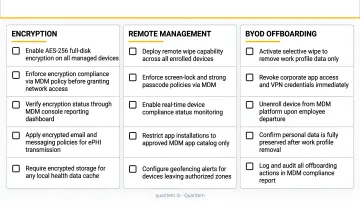
- ☐ Personal devices enrolled in MDM with work data containerized and personal data protected from IT access
- ☐ Offboarding protocol requiring device access revocation and PHI wipe within 24 hours of employee offboarding
- ☐ Documented breach response procedure for reporting device-related PHI exposures to HHS within 60 days as required by HIPAA
- ☐ Business Associate Agreement signed with the MDM vendor
BYOD and Shared Device Management Under HIPAA
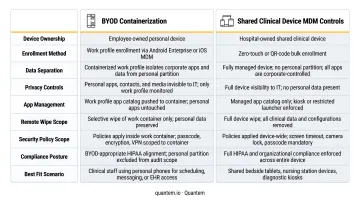
Healthcare organizations typically run two distinct device ownership models — and each demands a different MDM approach.
BYOD: Containerization as the Practical Solution
When clinical staff use personal phones for work tasks, the compliance challenge is separating organizational data from personal data without invading employee privacy.
Containerization solves this. By creating a fully encrypted, isolated work profile on a personal device, MDM keeps ePHI within a managed workspace that:
- Can be selectively wiped upon offboarding without touching personal photos, contacts, or apps
- Enforces encryption and authentication policies only within the work container
- Prevents PHI from being shared to personal apps, personal email, or consumer cloud storage
That balance — protecting ePHI without overreaching into personal data — is often what determines whether staff actually enroll their devices voluntarily.
Shared Clinical Devices: Kiosk Mode and Session Controls
Shared devices present a different challenge than BYOD. Tablets on medication carts, check-in kiosks, and nursing station hardware are accessed by multiple clinicians across a single shift — creating real PHI cross-contamination risk between sessions.
Required controls for shared clinical devices:
- Kiosk mode — locks the device to approved clinical applications only
- Session timeouts — automatically log out inactive users to prevent the next staff member from accessing a previous session
- Data purge between sessions — ensures one clinician's PHI isn't visible to the next user
Quantem includes kiosk mode across all plan tiers, with advanced kiosk configurations on Professional and Enterprise plans. That matters in high-throughput environments like diagnostic labs, rehabilitation centers, and multi-bed hospital wards, where session control isn't a nice-to-have — it's a HIPAA safeguard.
Implementing MDM in Your Healthcare Organization
Step 1 — Map Your Device Landscape
Before deploying MDM, conduct a device inventory to identify:
- Every device type and OS version in use
- Ownership model (BYOD vs. corporate) for each device
- Which apps access ePHI and which staff roles use them
- Network segments where ePHI flows
The HIPAA Security Rule (45 CFR 164.308(a)(1)) explicitly requires a risk analysis as a foundational step. Your device inventory feeds directly into that analysis.
Step 2 — Select a Vendor That Will Sign a BAA
Under HIPAA, any vendor that processes ePHI on your behalf is a business associate and must sign a Business Associate Agreement. BAA availability is a mandatory selection criterion — confirm it before evaluating anything else.
Key evaluation criteria:
- BAA availability (confirm before any other evaluation)
- Platform support for your device mix (Android, iOS, Windows)
- Encryption enforcement and audit logging depth
- BYOD containerization capability
- Total cost of ownership for your fleet size
Quantem is SOC-2 certified and provides a BAA for healthcare customers — reach out to sales@quantem.io to confirm compliance documentation for your organization.
Step 3 — Configure Baseline Policies and Enroll Devices
Configuration sequence for a HIPAA-aligned baseline:
- Enable encryption and passcode enforcement
- Configure MFA and role-based access controls
- Set up remote wipe and remote lock
- Deploy app allowlists and DLP rules
- Configure VPN profiles for untrusted network protection
- Define geofencing boundaries for facility perimeters
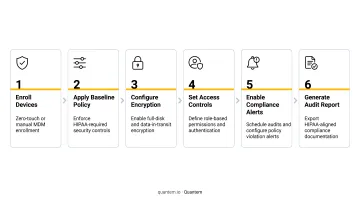
For hospital networks with hundreds of devices across multiple sites, zero-touch enrollment eliminates hands-on IT provisioning per device. Quantem includes zero-touch enrollment in every plan tier, so this capability isn't gated behind an enterprise upgrade.
Step 4 — Train Staff, Pilot, Then Roll Out
Workforce training is an explicit HIPAA administrative safeguard requirement under 45 CFR 164.308(a)(5) — not optional. Training must cover:
- Acceptable device use policies
- Immediate reporting of lost or stolen devices
- Safe app usage and avoiding public Wi-Fi for PHI access
- Offboarding procedures
Pilot your MDM configuration with a small clinical cohort first. Gather feedback, resolve friction points, then roll out in phases with clear IT support channels. Quantem's 21-day free trial (no credit card required) lets healthcare IT teams test policies at full scale before committing. Organizations switching from legacy MDM tools also get free migration support on the Enterprise plan.
Frequently Asked Questions
Does HIPAA require MDM?
HIPAA doesn't mandate MDM by name. It requires covered entities to implement administrative, physical, and technical safeguards to protect ePHI. In practice, MDM gives IT teams the encryption, access controls, and audit trails needed to demonstrate compliance across every managed device.
What are the privacy risks when using mobile devices in healthcare?
Three categories cover most mobile security exposure in healthcare:
- Physical: Device loss or theft exposing unencrypted PHI
- Digital: Unsecured apps, public Wi-Fi interception, weak authentication
- Organizational: BYOD data commingling, inadequate offboarding, inconsistent patch management
What MDM features are most important for HIPAA compliance?
Seven features are non-negotiable for HIPAA-compliant MDM:
- Full-disk encryption
- Remote wipe and lock
- Multi-factor authentication
- Audit logging
- BYOD containerization
- App allowlisting
- A signed BAA from your MDM vendor
What happens when a healthcare device containing PHI is lost or stolen?
Under HIPAA, a lost device with unencrypted PHI is a reportable breach requiring notification to affected individuals and HHS within 60 days. MDM's remote wipe capability, executed quickly on an encrypted device, can prevent the incident from triggering breach notification requirements at all.
How should healthcare organizations handle BYOD devices under HIPAA?
BYOD devices must be enrolled in MDM with containerization isolating PHI in an encrypted work profile, selective wipe enabled for offboarding, and MFA enforced — paired with a written BYOD policy that staff acknowledge before enrollment.
Does an MDM vendor need to sign a Business Associate Agreement?
Yes. Any MDM vendor with potential access to ePHI during device management must sign a BAA. This makes BAA availability a mandatory evaluation criterion when selecting an MDM platform for healthcare use.