What is Endpoint Management? A Detailed Guide
Managing a handful of company devices is usually straightforward. You know what devices you have, who uses them, and what needs to be maintained.
Then the organization grows.
New laptops arrive. Employees start working remotely. Smartphones and tablets become part of everyday operations. Different operating systems enter the mix. Suddenly, keeping track of device configurations, updates, access, and security becomes much harder.
Microsoft research found that 80–90% of successful ransomware attacks come from unmanaged devices.[1]
This is where endpoint management becomes important.
Instead of managing every device separately, IT teams can use a centralized approach to monitor, configure, secure, and maintain organizational endpoints. It provides greater visibility into the device environment while helping teams apply consistent policies across devices.
But what exactly counts as an endpoint? How does endpoint management work? And how is it different from endpoint security?
In this blog, we will explain what endpoint management is, its key components, how it works, why it matters, and the best practices IT teams can follow to manage endpoints more effectively.
What Are Endpoints?
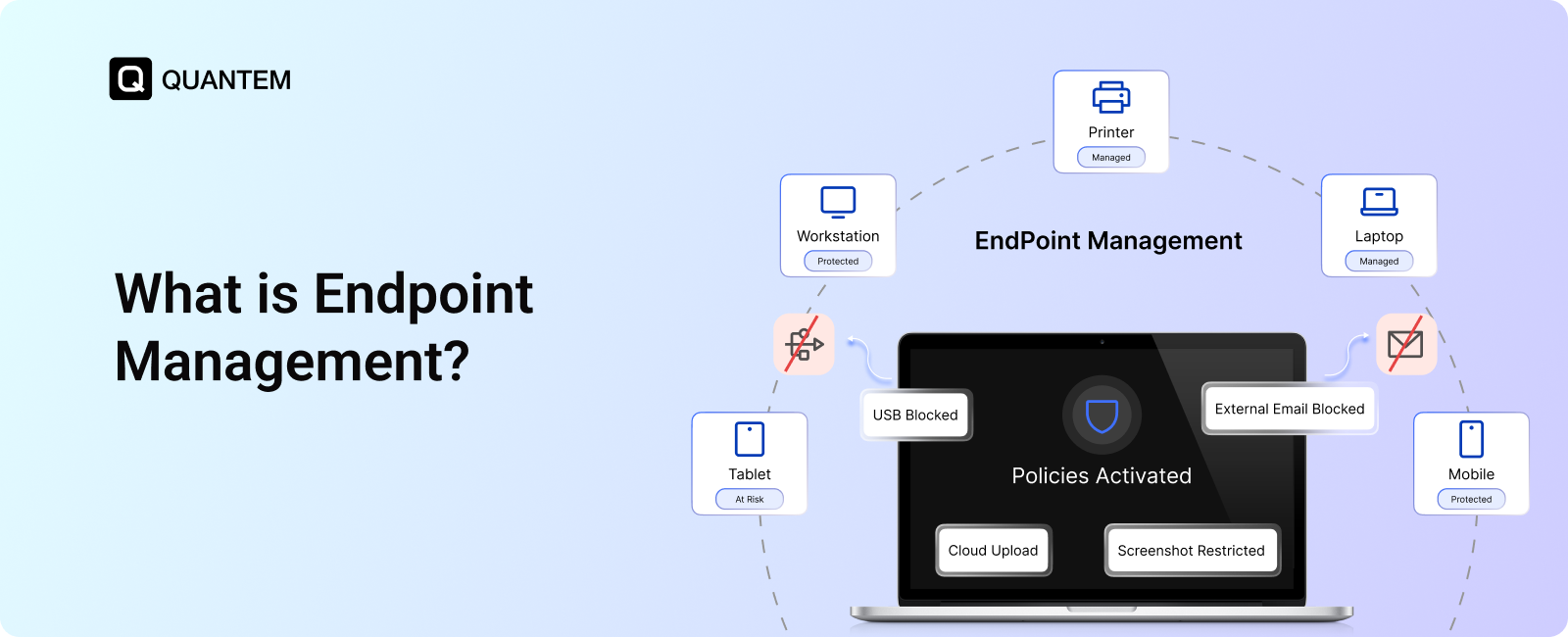
An endpoint is a device that belongs to or is used by an organization and can connect to its systems, networks, or business data. This can include devices issued by the company as well as personal devices used for work.
Common examples include:
- Laptops and desktops
- Smartphones and tablets
- Servers
- Printers
- IoT devices
- POS and other connected business devices
Every endpoint can potentially become an entry point into the organization's environment. A compromised, outdated, or poorly configured device can put business systems and data at risk.
That’s why organizations need visibility into what devices are connected, how they are configured, and whether they meet security requirements.
What is Endpoint Management?
Endpoint management is the process of monitoring, managing, and securing an organization's devices through a centralized platform. It gives IT teams control over device configurations, applications, access, updates, and security policies.
Instead of handling each device separately, endpoint management brings devices under a unified management system. IT teams can apply policies, deploy updates, monitor device status, and troubleshoot issues remotely.
This centralized approach helps maintain consistency across devices, whether employees are working from the office, remotely, or across multiple locations.
Key Components of Endpoint Management
Endpoint management is not a single feature. It brings together several capabilities that help IT teams maintain visibility, control devices, and keep endpoints secure throughout their lifecycle.
1. Inventory and Monitoring
You need to know what devices are in your environment before you can manage them effectively. Endpoint inventory provides visibility into managed devices, their configurations, users, and status. Monitoring builds on that visibility by helping IT teams identify outdated systems, unusual activity, or devices that may require attention.
2. Policy Enforcement
Endpoint management turns security and operational requirements into enforceable rules. IT teams can apply policies for passwords, encryption, application usage, device configurations, and other controls across managed endpoints. This ensures devices follow the organization's standards without requiring administrators to configure each one manually.
3. Patching and Updates
Outdated software can leave devices exposed to known vulnerabilities. Endpoint management helps IT teams automate operating system and software updates, reducing reliance on users to keep their devices current.
4. Access Control
Not every user or device needs access to every business resource. Endpoint management can apply access rules based on factors such as user roles, device status, and other organizational requirements. This supports a more controlled approach to access, particularly in environments following Zero Trust principles.
5. Remote Management
With employees working across offices, homes, and other locations, IT teams cannot always rely on physical access to devices. Remote management allows administrators to troubleshoot issues, apply changes, lock devices, or wipe data without being physically present.
What Are Endpoint Management Policies?
Endpoint management policies are predefined rules that determine how organizational devices should be configured, accessed, and used. IT teams can apply these policies across managed endpoints to maintain consistent security and operational standards.
Common endpoint management policies include:
- BYOD policy: Defines how employees can use personal devices to access business resources.
- Role-based access control policy: Determines what users can access based on their roles and responsibilities.
- Password policy: Defines password requirements such as complexity, length, and expiration.
- Network policy: Controls which networks devices can connect to and how network access is managed.
- Browser management policy: Controls browser usage and restricts access to unwanted or risky websites.
- Device security and compliance policy: Enforces requirements such as encryption, antivirus protection, and secure configurations.
- Application management policy: Controls which applications can be installed, accessed, or restricted.
- Content management policy: Controls how business content is distributed, accessed, and managed across devices.
- Patch management policy: Defines how operating system and software updates are deployed.
- Time-based usage policy: Restricts device or application usage during specific times or outside defined working hours.
These policies help IT teams standardize device management, strengthen security, and reduce the need for manual configuration and monitoring.
How Does Endpoint Management Process Work?
Endpoint management works through a continuous cycle of enrollment, configuration, monitoring, and response. Once a device is enrolled into an endpoint management platform, IT teams can manage it centrally instead of configuring it manually.
The process typically involves:
- Enroll devices: Devices are registered with the endpoint management platform so IT can manage them remotely.
- Apply policies and configurations: Administrators deploy settings, security policies, applications, and access controls based on organizational requirements.
- Monitor device status: The platform continuously tracks device health, configuration status, compliance, and other relevant information.
- Take automated or remote action: If a device falls out of compliance or requires attention, IT can trigger actions such as applying updates, changing configurations, restricting access, or sending alerts.
This makes endpoint management an ongoing process rather than a one-time setup. Devices remain visible and manageable throughout their lifecycle, helping IT teams maintain consistent configurations and reduce manual administrative work.
What is the Importance of Endpoint Management? Benefits Explained
As organizations add more devices, users, locations, and operating systems, manually managing endpoints becomes difficult to scale. Endpoint management gives IT teams a centralized way to maintain visibility and control across the device environment.
Here are some of its key benefits:
1. Centralized Device Visibility
IT teams can maintain a clear inventory of organizational devices, including their users, configurations, and current status. This makes it easier to identify unmanaged or outdated devices.
2. Consistent Policy Enforcement
Instead of configuring devices individually, administrators can apply standardized policies across managed endpoints. This helps maintain consistent security and operational requirements.
3. Reduced Manual Work
Automating routine tasks such as software updates, configuration changes, and device provisioning can reduce repetitive work and allow IT teams to focus on higher-priority tasks.
4. Faster IT Support
Remote management allows administrators to troubleshoot devices and resolve common issues without requiring physical access. This is particularly useful for remote and distributed workforces.
5. Better Security and Compliance
Keeping devices updated, configured correctly, and aligned with organizational policies can reduce security gaps and support compliance requirements.
6. Improved Device Lifecycle Management
Endpoint management helps IT teams manage devices from deployment and configuration through ongoing maintenance, updates, troubleshooting, and retirement.
Overall, endpoint management gives organizations greater control over their devices while making day-to-day IT operations more efficient.
What is the Difference Between Endpoint Management and Endpoint Security?
Endpoint management and endpoint security are closely related, but they serve different purposes. Endpoint management focuses on controlling and maintaining devices, while endpoint security focuses on protecting those devices from malware and cyber threats.
The two approaches work best together. Endpoint management provides the administrative control, while endpoint security provides the protection needed to defend devices against threats.
For example, an IT administrator might use endpoint management to ensure every company laptop has the latest updates and required security settings. Endpoint security tools can then help detect and respond to malicious activity on those devices.
In short, endpoint management answers “How do we manage and control our devices?”, while endpoint security answers “How do we protect them?”
What Are the Challenges of Endpoint Management?
Managing endpoints becomes more complex as organizations grow. Different devices, operating systems, users, and work environments can make it difficult for IT teams to maintain consistent control.
Some common challenges include:
1. Managing Diverse Devices and Operating Systems
Organizations often use a mix of laptops, desktops, smartphones, tablets, and specialized devices across different operating systems. Managing each platform with separate tools can create additional administrative work.
2. Maintaining Consistent Configurations
Keeping every device aligned with the organization's required settings and policies can be difficult, especially when devices are deployed across multiple locations or used remotely.
3. Keeping Devices Updated
Operating systems and applications require regular updates and patches. Without centralized management and automation, outdated devices can be easily overlooked.
4. Supporting Remote and Distributed Devices
IT teams may need to troubleshoot or configure devices they cannot physically access. This can make routine support more time-consuming when remote management capabilities are limited.
5. Controlling Access Across Devices
Ensuring that users have appropriate access while preventing unauthorized access requires consistent policies and visibility into device status.
6. Scaling Device Management
As the number of endpoints increases, manual processes become harder to maintain. What works for a small device fleet may quickly become inefficient for a larger organization.
Endpoint Management Best Practices
Effective endpoint management is not just about having the right tools. IT teams also need clear processes and policies to keep devices manageable as the environment grows.
1. Invest in an MDM or UEM Solution
Choose an MDM (Mobile Device Management) or UEM (Unified Endpoint Management) solution that can centrally manage the devices and operating systems used across your organization. A suitable platform can simplify device enrollment, policy enforcement, application management, updates, monitoring, and remote support.
2. Build a Complete Device Inventory
Maintain an up-to-date inventory of all managed endpoints. Track important details such as device type, operating system, user, configuration, and status.
3. Standardize Device Policies
Create consistent policies for security settings, applications, access, updates, and device configurations. Standardization reduces configuration gaps and makes device management easier at scale.
4. Implement Role-Based Access Control
Limit administrative access based on job responsibilities. This reduces unnecessary privileges and helps prevent unauthorized changes to device configurations or policies.
5. Automate Patching and Updates
Keep operating systems and applications updated through automated patching wherever possible. This reduces manual effort and helps address known vulnerabilities more quickly.
6. Enable Remote Management
Make sure administrators can manage and troubleshoot devices remotely. This is especially important for distributed teams and devices that are rarely accessible in person.
7. Monitor Device Compliance
Regularly check whether devices continue to meet organizational policies. Set up alerts or automated actions when devices become noncompliant.
8. Align Endpoint Management With Your Security Strategy
Endpoint management should work alongside your broader security controls. Align device policies, access requirements, patching, and monitoring with the organization's overall security strategy.
How to Choose the Right Endpoint Management Tool?
The right endpoint management tool should match your organization's device environment, IT workflows, and security requirements. Look beyond the feature list and consider how well the solution will work as your device fleet grows.
Key factors to evaluate include:
- Device and OS support: Make sure the platform supports the operating systems and endpoint types used across your organization.
- Device enrollment: Look for simple enrollment options that make it easy to provision devices at scale.
- Policy management: Check whether administrators can create, deploy, and update device policies centrally.
- Application management: Evaluate how easily IT teams can deploy, update, restrict, and remove applications.
- Patch management: Choose a solution that can simplify operating system and software updates.
- Remote management: Ensure administrators can troubleshoot, configure, lock, or wipe devices without physical access.
- Security and compliance: Look for controls that help maintain secure configurations and support organizational compliance requirements.
- Scalability: The platform should be able to manage a growing number of devices without adding unnecessary administrative overhead.
- Ease of use: A straightforward interface can reduce the learning curve for IT administrators and make everyday device management more efficient.
Choose a solution that fits your current IT environment while giving your team the flexibility to manage more devices as your organization grows.
Simplify Endpoint Management With Quantem
Managing a growing mix of devices does not have to mean adding more manual work for IT teams. Quantem UEM provides a centralized approach to managing diverse endpoints, helping IT teams configure, monitor, manage, and support devices from one platform.
With Quantem, IT teams can:
- Manage multiple device types: Manage laptops, desktops, smartphones, tablets, and other supported endpoints across Android, iOS, Windows, macOS, and Linux.
- Automate device enrollment: Provision devices using enrollment methods such as QR codes, zero-touch enrollment, and bulk enrollment.
- Enforce policies and configurations: Apply device settings, organizational policies, and configuration requirements consistently across managed devices.
- Manage applications: Deploy, update, restrict, and remove applications based on organizational requirements.
- Manage business content: Distribute and control access to business content across managed devices.
- Monitor devices remotely: Maintain visibility into device status and identify devices that may require attention.
- Troubleshoot remotely: Diagnose and resolve device issues without requiring physical access.
- Remotely lock and wipe devices: Lock lost or compromised devices and remotely wipe corporate data when necessary.
- Apply device security controls: Use features such as factory reset protection, disk encryption, USB blocking, BitLocker management, and network and browser restrictions.
- Manage patches and updates: Keep operating systems and software updated across managed devices.
- Lock down dedicated devices: Use kiosk mode and device lockdown capabilities for devices designed for specific business workflows.
- Control user access: Apply role-based access and user management controls to maintain appropriate administrative permissions.
- Support BYOD environments: Manage business access on employee-owned devices while applying appropriate organizational controls.
Quantem UEM simplifies endpoint management by bringing device enrollment, configuration, application management, monitoring, patching, and remote administration into one platform. This helps IT teams reduce manual work and maintain greater visibility and control across their endpoint environment.
References:
See How Quantem Simplifies Endpoint Management
1. What is the Difference Between Unified Endpoint Management (UEM), Mobile Device Management (MDM), and Enterprise Mobility Management (EMM)?
Although these terms are often used interchangeably, they describe different approaches to managing devices. Mobile Device Management (MDM) focuses exclusively on managing and monitoring mobile devices. Enterprise Mobility Management (EMM) extends this to mobile infrastructure, wireless networks, routers, and IoT devices. Unified Endpoint Management (UEM) takes a broader approach by managing and controlling all endpoints through a centralized console.
2. Can Endpoint Management Support Remote Employees?
Yes. Endpoint management allows IT teams to configure, monitor, update, and troubleshoot managed devices remotely. This makes it easier to support remote work for employees working from home, travel, or operate across multiple locations.
3. Can Endpoint Management Help Manage Personal Devices?
Yes, depending on the solution and its BYOD capabilities. Organizations can use endpoint management to apply appropriate controls to employee-owned devices while managing access to business resources.
4. What Happens When an Endpoint Becomes Non-Compliant?
An endpoint management platform can identify endpoint devices that no longer meet organizational policies and alert IT administrators. Depending on the configured policies, administrators may also take actions such as updating the device, changing its configuration, restricting access, or remotely locking or wiping it.
5. How Does Endpoint Management Help With Device Lifecycle Management?
Endpoint management provides centralized control throughout a device's lifecycle, from initial enrollment and configuration to application deployment, updates, troubleshooting, and retirement. This gives IT teams a consistent process for managing devices as they move through different stages of use.
6. Is Endpoint Management Useful for Small Businesses?
Yes. Small businesses can use endpoint management to centralize routine device administration and establish consistent policies without relying heavily on manual device-by-device management. It can also provide a foundation that scales as the number of users and devices grows.
7. Can Endpoint Management Reduce IT Workload?
Yes. Automation and centralized administration can reduce repetitive tasks such as device enrollment, configuration, application deployment, patching, and remote troubleshooting. This allows IT teams to spend less time on routine endpoint administration.
8. Are Authentication Tools Like Authenticators and IAM Compatible With Endpoint Management Solutions?
Yes. Authenticators and Identity and Access Management (IAM) solutions can work alongside endpoint management platforms. Endpoint management handles devices, while authentication and IAM tools manage user identities and access to business resources. Together, they can apply access policies based on user identity, device status, and organizational requirements.



Get the latest blogs directly delivered to your mail fly arrow