The problem isn't that monitoring tools don't exist. It's that most teams either skip monitoring entirely or configure it so superficially that it offers false confidence. A device showing "online" in your dashboard tells you almost nothing about whether customers can actually use it.
According to a Kiosk Marketplace summary of Raydiant survey findings, 67.3% of respondents had encountered broken or slow self-checkout kiosks - a number that reflects exactly what happens when monitoring is reactive rather than proactive.
This guide covers the full setup process: how to define the right health metrics, configure your MDM platform, build alert campaigns that actually fire when something matters, and create remediation workflows so your team knows what to do when alerts hit.
Key Takeaways
- Effective kiosk monitoring tracks peripheral status, application state, and transaction health - not just connectivity
- Reliable monitoring follows four steps: define health metrics, configure your MDM, set alert thresholds, and build remediation workflows
- Polling frequency and peripheral API depth matter more than which monitoring tool you choose
- A device heartbeat is not proof of kiosk availability - the app can be crashed while the OS reports "online"
- Remote remediation only works when paired with a documented escalation runbook
How to Remotely Monitor Kiosk Device Health & Uptime
Step 1: Define What "Healthy" Means for Your Kiosk Fleet
Before touching any monitoring tool, you need a written definition of "healthy." This sounds obvious - it isn't. Most teams skip it and end up monitoring the wrong things.
The full health stack to monitor:
- Online/offline status and last successful check-in timestamp (device connectivity)
- Memory usage, storage capacity, and application state (OS stability)
- Printer paper level, payment terminal readiness, scanner connectivity (peripherals)
- Transaction success rate, failure rate, and abandonment patterns
Two metrics that look identical on a dashboard can mean very different things in practice: device uptime vs. solution availability.
Device uptime answers: is the hardware on and connected? Solution availability answers: is the kiosk actually doing what it's supposed to do?
These are not the same thing. A self-checkout kiosk where the server is online but the payment application has crashed has 100% device uptime and 0% solution availability. Customers can't complete a transaction. Your dashboard shows green.
Once you understand this gap, prioritize your health metrics accordingly:
| Metric Type | Examples | Priority |
|---|---|---|
| Business-critical | Payment terminal status, paper level (payment kiosk), app foreground state | Alert immediately |
| Operational | CPU load, storage nearing capacity, OS compliance | Alert with grace period |
| Informational | Battery charge on AC-powered device, routine check-in logs | Log, don't alert |
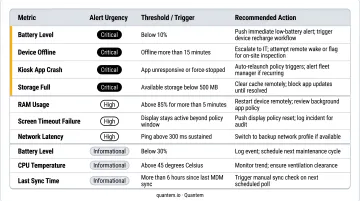
Which metrics are critical depends on your deployment type. Bill acceptor capacity is critical for a cash payment kiosk and irrelevant for a patient check-in terminal.
Step 2: Select and Configure Your MDM/RMM Platform
Not every MDM platform is built for kiosk environments. General-purpose endpoint managers often miss peripheral visibility entirely, requiring a second tool layered on top - which adds cost and complexity.
Minimum requirements for kiosk health monitoring:
- Real-time telemetry (battery, RAM, storage) with configurable polling intervals
- Cross-platform support if you manage mixed Android/Windows fleets from one console
- Centralized dashboard aggregating all device data in a single view
- Alert configuration with action triggers, not just passive notifications
Enrollment configuration matters more than most teams realize. Devices should be enrolled via zero-touch or automated enrollment - ADE for iOS, Android Zero-Touch for Android - so the MDM profile is permanent and non-removable. If a device is factory reset by a vendor or customer, it automatically re-enrolls and returns to managed state. Manually configured devices can be silently unenrolled, creating invisible gaps in your fleet.
Quantem covers these requirements without add-ons: cross-platform fleet management (Android and Windows), device vitals monitoring across all plan tiers starting at $1/device/month, and built-in kiosk mode available at every tier. Its SOC-2, GDPR, and CCPA compliance makes it a workable option for healthcare and retail deployments handling sensitive data.
Step 3: Configure Alert Campaigns and Escalation Rules
This is where most monitoring setups fail. The monitoring data exists, but the alert logic isn't configured to act on it.
Build IF/THEN alert logic for your most critical scenarios:
- If printer reaches low-paper status → alert floor associate immediately
- If paper not refilled within 15 minutes → escalate to supervisor
- If kiosk app not detected in foreground for 5+ minutes → trigger automated restart
- If device goes offline during operating hours → alert IT within one polling cycle
What should trigger automated remote actions vs. human escalation:
| Trigger | Response |
|---|---|
| App freeze or crash | Automated restart (no human needed) |
| Cache buildup causing slowdown | Scheduled automated reboot |
| Hardware component failure | Human escalation required |
| Unexpected USB device access | Security alert → human review |
| Network outage | Alert IT + automatic failover if cellular configured |
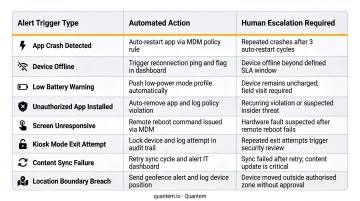
Alert fatigue is a real operational risk. SOTI's 2025 State of Mobility research found that only 31% of organizations proactively monitor battery health despite 97% monitoring it at all - a gap that often reflects teams tuning out noisy dashboards. Setting thresholds too sensitive generates alert volume that trains teams to ignore everything. Start with high-confidence, high-impact alerts and expand coverage once the team is comfortable with the volume.
Step 4: Establish Remote Remediation Workflows and Reporting Cadences
Monitoring data that doesn't trigger action is just noise with better formatting.
Remote actions IT teams should be able to execute without dispatching a technician:
- Remote reboot or power cycle (including hard power cycles for unresponsive OS)
- Silent OTA app updates and security patches
- File and content distribution - updated menu pricing, new signage, config changes
- Remote screen view to see exactly what the end user is seeing
Quantem supports silent OTA app updates and fleet-wide content distribution natively, allowing patches and content changes to be pushed to a single device or the entire fleet simultaneously.
Every alert type needs a documented escalation path mapping to:
- A specific remote action to attempt first
- A named responsible team member
- A maximum time-to-resolution target
- A physical dispatch trigger (when the remote action fails)
Without this runbook, monitoring data accumulates in dashboards without anyone accountable for acting on it.
Scheduled Maintenance Windows
A weekly restart during off-peak hours clears system cache, applies pending patches, and prevents software drift - the gradual degradation that doesn't trigger any single alert but eventually crashes the app. Scheduled maintenance also reduces emergency alert volume, since many issues resolve before they escalate. Quantem supports scheduled app data clearing and automated update deployment on a defined cadence.
When and Why You Need Remote Kiosk Monitoring
Once a kiosk is unattended and physically inaccessible during operating hours, reactive maintenance stops being viable. Dispatching a technician for every hardware issue costs far more - in time, labor, and lost revenue - than a monitoring platform does.
A 2024 Forrester Total Economic Impact study for Intel vPro modeled 1,000 remote customer-facing kiosks and reported that an airline avoided 4,000 onsite IT visits annually for kiosk hardware issues - representing a 90% reduction in endpoint hardware-related onsite visits. That's the scale of efficiency available when remote management is properly configured.
Industries where undetected failures carry the highest cost:
- Retail: Payment kiosks and self-checkout terminals that halt transaction revenue the moment they go down
- Healthcare: Patient check-in systems in HIPAA-sensitive environments where uptime directly affects patient flow
- Transportation: Airport and transit ticketing kiosks with zero tolerance for downtime during peak travel
- Warehouse/logistics: Inventory and fulfillment terminals where every outage reduces throughput
ATHMA Hospitals - a Quantem customer - manages hundreds of Android patient-facing devices across multiple facilities, where a missed alert can disrupt check-in queues at scale.
Basic monitoring is insufficient when:
- Fleet size exceeds 50 devices across multiple sites
- You manage mixed-OS fleets (Android tablets + Windows terminals)
- Kiosks handle payment transactions
- Devices are in unsupervised or physically exposed environments
What You Need Before Setting Up Remote Kiosk Monitoring
Three things determine whether your monitoring setup actually works: OS readiness, peripheral compatibility, and access controls. Skip any one of them and you'll have blind spots from day one.
Equipment and Platform Requirements
- Devices must run a supported OS version for your chosen MDM platform
- The MDM agent must be permanently installable with policy protection against removal
- Each device needs a stable network connection - Wi-Fi with cellular failover for mission-critical deployments
- Telemetry heartbeat capability must be verified before go-live
Peripheral and API Compatibility
OS-level health reporting is only part of the picture. Standard MDM tools confirm whether a device is online, but they often miss component-level failures entirely - which is where most service interruptions actually originate.
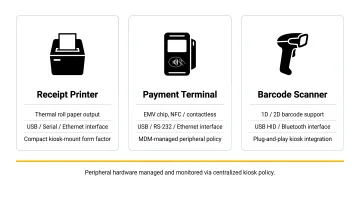
Verify that connected peripherals - printers, payment terminals, barcode scanners, biometric devices - expose machine-readable status via API or SDK integration. A well-integrated monitoring platform can surface granular printer metrics - print-head temperature, memory usage, print cycle counts - via API. Without that level of detail, your IT team has no visibility into the components most likely to cause service failures.
Compliance and Access Readiness
- Remote access to kiosk devices must be authorized under your IT security policy
- The MDM platform must be compliant with applicable regulations (HIPAA for healthcare, PCI DSS for payment kiosks)
- Admin credentials and role-based access controls must be configured before live monitoring begins, not reactively after the first incident forces the issue
Key Parameters That Affect Kiosk Monitoring Results
Two organizations can deploy the same monitoring tool and get completely different results. The gap almost always comes down to how well they configure these four variables.
Polling Frequency (Heartbeat Interval)
Polling frequency determines how quickly a failure is detected. Too infrequent (every 30 minutes) means a kiosk can be down for 29 minutes before anyone knows. Too frequent creates unnecessary network load and data costs.
For most fleets:
- Mission-critical kiosks (payment, healthcare): 1–5 minute intervals
- Lower-stakes digital signage or informational kiosks: 10–15 minute intervals
Your MDM platform should let you configure these per device group. Quantem's online status sync varies by plan - every 15 minutes on Essential, every 5 minutes on Professional, and every 2 minutes on Enterprise - so higher-stakes fleets can run on tighter cycles.
Alert Threshold Calibration
Poorly calibrated thresholds are the leading cause of alert fatigue. A CPU spike alert set at 95% is only useful if 95% actually correlates with application instability for that specific device. On some hardware, 95% CPU is normal under load.
Build thresholds from 2–4 weeks of baseline telemetry data collected post-deployment rather than using default settings. Default thresholds are designed for generic endpoints, not kiosks running specific transaction workloads.
Peripheral Visibility Depth
A jammed receipt printer or a payment terminal that's "connected" but timing out on transactions won't appear in a standard OS health report. Your monitoring platform needs to go deeper.
Look for platforms that integrate with peripheral APIs to report component-specific status for:
- Cash dispensers and bill validators
- Receipt and label printers
- Biometric scanners and card readers
Network Connectivity Redundancy
A kiosk that loses its primary Wi-Fi connection has no way to send health data back to the management platform. Without cellular failover, the device disappears from the dashboard entirely - creating false "offline" readings that erode trust in your monitoring data. Kiosks in public locations should carry a cellular data plan as a fallback to keep telemetry continuous during local network outages.
Common Mistakes When Monitoring Kiosk Devices Remotely
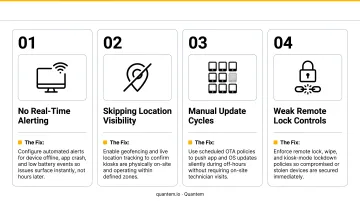
Most kiosk monitoring failures aren't technical - they're process failures. Teams either monitor the wrong signals, respond to too many, or have no clear plan when something goes wrong. Here are four mistakes that consistently undermine remote monitoring programs:
Mistaking connectivity for availability. A device can be online and responding to pings while the kiosk app is frozen and the payment terminal has timed out. Ping checks confirm a system is running - not that it's working. Add application-layer and peripheral health checks to every monitoring policy.
Setting thresholds too sensitive. Flagging every 5-second CPU spike trains teams to ignore alerts. Real failures get missed because noise drowns out signal. Start with fewer, higher-confidence alerts and expand incrementally as your team builds trust in the data.
Monitoring without a remediation runbook. Without a defined process, incidents sit in dashboards unresolved. Each alert type needs a named owner, a specific remote action, and a time-to-response target.
Skipping zero-touch enrollment. Manually configured devices can be factory-reset by vendors or on-site staff, severing the MDM connection entirely. That creates unmanaged, invisible kiosks - exactly what monitoring is designed to prevent.
Troubleshooting Remote Kiosk Monitoring Issues
Monitoring systems surface confusing signals, especially during the early weeks of deployment. These are the three most common problems encountered after setup.
Device Shows "Online" But Kiosk Is Unresponsive to Users
The OS is running and sending heartbeats, but the kiosk application has crashed or frozen on an error screen. The monitoring system reports device-level health - not application-level availability.
To resolve this:
- Enable application-layer monitoring that checks whether the kiosk app is running in the foreground and returning a healthy status
- Configure an automated rule to restart the app or reboot the device if the application isn't detected in the foreground for more than a defined interval
False "Offline" Alerts for Devices That Are Actually Functioning
Brief Wi-Fi drops or DHCP renewal delays cause the device to miss its telemetry check-in window, triggering an offline alert even though the kiosk is serving customers normally. This is especially common in high-traffic retail environments.
Two adjustments typically resolve it:
- Increase the alert grace period from 1 to 2–3 missed intervals before an offline alert fires
- Check whether the polling interval is shorter than the device's average reconnect time after a brief network drop
Peripheral Alerts Not Firing When Components Fail
The peripheral isn't integrated with the monitoring platform's API. The MDM knows the device is online but has no visibility into the printer, scanner, or payment terminal.
Start by auditing your monitoring platform's peripheral API integrations and confirming each component type has an active status feed. If native integration is unavailable, check whether the kiosk application can report peripheral status as a custom telemetry event to the management platform.
Conclusion
Effective remote kiosk monitoring comes down to four sequential steps: defining the right metrics, configuring the platform correctly, setting meaningful alert thresholds, and pairing alerts with a clear remediation process. Skip any one of them and you'll have gaps that lead to undetected failures.
Most kiosk downtime is preventable. Failures are almost always preceded by detectable warning signals - degrading print quality, rising memory usage, increasing transaction abandonment - that a properly configured monitoring setup catches before customers experience them.
That kind of visibility is exactly what Quantem is built for. Its kiosk monitoring dashboard and real-time health telemetry give IT teams full coverage across Android and Windows fleets, starting at $1–$3 per device per month - well below what most enterprise MDM tools charge. The 21-day free trial requires no credit card.
Frequently Asked Questions
What metrics should I monitor for kiosk device health?
Monitor the full health stack: online/offline status, last check-in timestamp, OS vitals (memory, storage), peripheral status (printer, payment terminal, scanner), and transaction success/abandonment patterns. Monitoring only connectivity gives an incomplete picture - a device can be fully "online" while the application and peripherals have failed.
What is the difference between device uptime and solution availability?
Device uptime measures whether the hardware is on and connected. Solution availability measures whether the kiosk is actually performing its intended function. A device can report 100% uptime while delivering 0% solution availability if the application has crashed. That's why application-layer monitoring is a separate, necessary check alongside connectivity status.
Can kiosks be monitored when they go offline?
Real-time telemetry stops when a device is offline, but a well-configured MDM platform logs the last known status and queues pending remote actions. Once the device reconnects, it syncs all logs and executes queued commands, giving IT a complete picture of what happened during the outage.
How often should health data be polled from kiosk devices?
Use 1–5 minute polling intervals for mission-critical kiosks handling payments or patient data, and 10–15 minutes for lower-stakes informational kiosks. The interval should be configurable per device group to balance detection speed against network and data overhead.
Do I need a separate monitoring tool, or does MDM software handle kiosk health?
Modern MDM platforms with built-in kiosk mode - such as Quantem - include real-time health telemetry and alert configuration, so no separate monitoring layer is required. However, peripheral-level visibility depends on whether the platform integrates with component APIs for printers, scanners, and payment terminals.
How does remote monitoring reduce on-site technician visits?
Most software-related kiosk failures - app crashes, cache buildup, pending patches - resolve remotely via reboot, OTA update, or app restart. Organizations using remote endpoint management have avoided up to 90% of on-site technician visits, with some enterprises eliminating thousands of annual dispatch calls through remote resolution alone.