The scale of this challenge is growing. The invidis CMS Ranking 2025 documents over 500 digital signage software providers globally, with leading platforms managing more than one million licensed endpoints each. Managing quality at that scale requires more than occasional troubleshooting.
This guide covers why quality management determines long-term network performance, the four maintenance types every enterprise plan should include, how to spot early warning signs before failures cascade, and a practical tiered schedule for keeping signage fleets reliable across locations.
Key Takeaways
- Deployment alone doesn't sustain performance - enterprise signage networks need structured, ongoing maintenance programs
- Preventive maintenance consistently costs less than emergency reactive repairs at scale
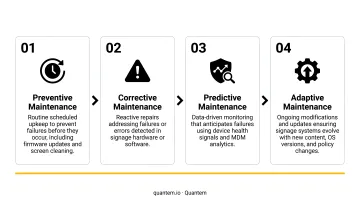
- Build your strategy around four maintenance types: routine, corrective, predictive, and overhaul - each targets different failure modes
- Early warning signs include offline alerts, sluggish playback, content errors, and recurring reboots on specific devices
- A structured maintenance schedule - daily through annual - keeps fleets reliable without taxing your IT team
Why Quality Management Matters for Enterprise Digital Signage
The Scale Problem
A single unmanaged display is an inconvenience. Three hundred unmanaged displays across forty locations is an operational liability. Performance gaps between maintained and unmanaged fleets grow exponentially at scale - one neglected firmware update affects every device running that version, and one misconfigured content schedule can push outdated information to every screen in a region simultaneously.
The business impact is direct: displays showing last quarter's pricing, expired promotions still running, or blank screens in high-traffic areas don't just look unprofessional. They undermine the entire communication investment and erode trust with customers, employees, and compliance auditors alike.
Hardware and Lifespan
Commercial-grade displays are built for continuous operation. The Philips D-Line 50BDL4550D commercial display carries a verified MTBF rating of 50,000 hours, designed for 24/7 landscape and portrait use. Without consistent maintenance - thermal checks, firmware updates, ventilation management - actual lifespan falls well short of that rating, and total cost of ownership rises with each premature failure.
Security and Compliance
Networked digital signage devices are endpoints. Unpatched endpoints are attack surfaces. Research from Unit 42's 2020 IoT Threat Report found that 57% of IoT devices were vulnerable to medium- or high-severity attacks, with 98% of IoT device traffic unencrypted. Signage media players connected to enterprise networks carry the same exposure when firmware goes unmanaged.
That vulnerability extends into compliance territory. For organizations subject to GDPR - particularly those running audience analytics or camera-enabled displays - Article 32 requires ongoing technical measures to ensure data integrity, confidentiality, and resilience. Unmanaged devices create audit gaps that are difficult to close retroactively.
The Cost Argument
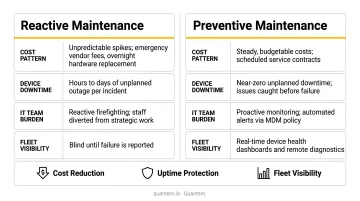
The U.S. Department of Energy's Operations & Maintenance Best Practices Guide estimates preventive maintenance delivers 12–18% cost savings over reactive-only programs. For enterprise signage fleets, that math compounds fast. Consider what drives reactive costs at scale:
- Emergency on-site dispatch per incident
- Replacement hardware for prematurely failed displays
- Staff time diagnosing unpatched, misconfigured devices
- Brand and compliance exposure from unmonitored screens
Shifting from reactive to preventive management doesn't require a larger team - it requires better visibility across the fleet.
Types of Maintenance for Enterprise Digital Signage
No single approach covers all failure modes. A well-structured program combines all four maintenance types based on device usage, environment, and acceptable risk.
Routine / Preventive Maintenance
This is the foundation. Routine maintenance covers:
- Scheduled firmware and software updates across the fleet
- Content library audits to remove expired or off-brand assets
- Display brightness calibration on high-use screens
- Physical inspections - cable integrity, ventilation clearance, mounting stability
Routine maintenance alone is sufficient for lower-traffic indoor locations with stable connectivity and fewer than 12 operating hours per day. For larger fleets, the choice is typically between internal IT labor (time-intensive at scale) or a managed service contract that bundles these tasks into a predictable cost structure.
Corrective / Reactive Maintenance
Corrective maintenance is triggered by failure. Common triggers include:
- A display going offline or a content loop freezing
- A media player crash or hardware fault
- Alerts surfaced through monitoring systems - or, worse, end-user complaints
According to IDC data, infrastructure failures cost large enterprises an average of $100,000 per hour in downtime. For customer-facing signage in retail or healthcare, even short outages carry reputational costs well beyond direct IT spend. Reactive maintenance is unavoidable - no program eliminates all failures - but it works best as a fallback, not a foundation.
Predictive / Condition-Based Maintenance
Predictive maintenance uses real-time device health data to catch at-risk devices before they fail. Key metrics to monitor include:
- CPU load and memory usage trends
- Display temperature and ambient heat
- Uptime percentage and connectivity drop frequency
- Watchdog restart counts per device per week
Quantem's platform supports this model through tiered device monitoring. The Enterprise plan provides 2-minute online status sync intervals, 30-day device online/offline history, and event-based alerts that notify IT teams when devices show abnormal behavior. That visibility converts reactive incidents into scheduled maintenance windows - no on-site dispatch required for every event.
Major / Overhaul Maintenance
Overhaul maintenance addresses full lifecycle events:
- Hardware replacement cycles for displays and media players
- OS migrations (for example, moving from Android 9 to Android 13)
- CMS platform upgrades
- Network infrastructure refreshes
These are planned on 3–5 year cycles, triggered by manufacturer end-of-life announcements, security vulnerabilities with no available patch, or performance degradation that preventive measures can no longer address. Start budget planning 12–18 months before anticipated end-of-life - emergency procurement at end-of-life typically costs significantly more than planned replacement.
How to Check If Your Enterprise Digital Signage Fleet Needs Maintenance
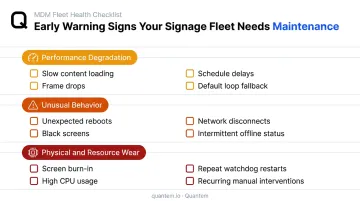
In large networks, early detection is difficult without systematic monitoring. These are the most reliable indicators that maintenance is needed before full failure occurs.
Performance or Output Degradation
Watch for these signals:
- Displays taking longer than normal to load content playlists
- Video playback dropping frames or stuttering mid-loop
- Content schedules running behind their trigger times
- Screens reverting to a default loop instead of the scheduled playlist
In high-visibility environments, even minor degradation carries real operational impact. A hospital waiting room screen cycling a default logo instead of department wait times creates confusion exactly when patients need clarity. In retail, a POS display showing the wrong pricing affects transactions directly.
Unusual Behavior, Errors, or Connectivity Issues
These behavioral red flags warrant immediate investigation:
- Unexpected screen reboots or displays cycling on/off without a schedule trigger
- Error messages or black screens appearing mid-playlist
- Network disconnects preventing remote content pushes
- Devices intermittently showing as offline in the management console
Irregular behavior typically signals firmware incompatibility, corrupted content files, overheating hardware, or network configuration drift. These issues worsen rapidly without intervention. According to incident management benchmarks from Incident.io, critical issues should be identified within 10 minutes of an alert - a threshold only automated monitoring can consistently meet.
Visible Wear, Resource Overconsumption, and Recurring Incidents
Physical and system-level indicators to track:
- Screen burn-in or uneven backlighting on high-use displays
- Media players running abnormally high CPU or memory utilization
- Significant increases in device reboots or watchdog restarts per week
- Repeated manual interventions to restore playback on the same devices
Recurring incidents on specific devices are the strongest predictor of imminent hardware failure. When a particular display or media player requires intervention three or more times in a short period, that's a signal for preventive replacement, not another quick fix. Tracking incident frequency per device in your fleet management dashboard is what makes that pattern visible before it becomes a failure.
Enterprise Digital Signage Maintenance Schedule
Maintenance frequency depends on four factors: deployment environment, daily operating hours, content update frequency, and network size. Organizations running 24/7 or customer-facing displays should apply the higher end of each range.
| Tier | Cadence | Key Activities |
|---|---|---|
| Daily | Every day | Verify content playback, confirm devices show online, review overnight alerts |
| Weekly | Every week | Audit content libraries, review device health metrics, confirm update compliance |
| Monthly / Quarterly | Monthly or quarterly | Apply firmware and OS updates, run connectivity audits, inspect high-traffic hardware |
| Annual | Once per year | Full hardware lifecycle assessment, evaluate display degradation, plan replacement cycles |
Daily checks are the easiest layer to automate. Quantem's device monitoring updates fleet-wide online status as frequently as every 2 minutes on the Enterprise plan, with automated offline alerts and 30-day device history - cutting manual IT checks across large, distributed fleets.
This schedule mirrors AVIXA's industry guidance, which recommends daily playback verification, monthly hardware cleaning and ventilation checks, quarterly software and security updates, and annual infrastructure reviews.
Conclusion
Enterprise digital signage is an ongoing operational responsibility, not a one-time project. Networks that deliver consistent communication value depend on structured maintenance programs, not the strength of their initial deployment alone.
The right approach balances preventive rigor, predictive monitoring, and planned overhaul cycles to protect uptime, content quality, and hardware investment over the full device lifecycle. A tiered maintenance schedule combined with centralized device visibility gives IT teams the control to manage signage fleet quality at any scale. The larger the fleet, the more that visibility gap costs you in unplanned downtime and reactive fixes.
Frequently Asked Questions
What is enterprise digital signage?
Enterprise digital signage refers to large-scale display networks managed across multiple locations, departments, or regions. Unlike single-site deployments, enterprise networks require centralized content management, remote device monitoring, role-based access controls, and enterprise-grade security to operate reliably at scale.
What is the best operating system for enterprise digital signage?
Android and Windows are the most widely supported platforms. Android is the more common choice - cost-effective and hardware-flexible for most signage use cases - while Windows suits high-processing workloads or Windows-native application requirements. Your CMS compatibility, existing hardware fleet, and IT environment should drive the final decision.
How often should enterprise digital signage content be audited?
Weekly reviews are recommended for active content libraries in high-traffic or customer-facing environments. A monthly deep audit should cover brand compliance, expired assets, and scheduling accuracy across the full fleet.
What causes enterprise digital signage displays to go offline unexpectedly?
Common culprits include network drops, firmware crashes, power interruptions without auto-restart, overheating, and OS-level errors. Remote monitoring paired with watchdog auto-recovery resolves most of these before they require an on-site visit.
How does an MDM platform help with digital signage maintenance?
An MDM platform centralizes device health visibility, enables remote app and update management, automates alert-based incident response, and enforces policies across the full signage fleet. This cuts the IT labor required for ongoing maintenance - without requiring on-site intervention for routine issues.
What is the typical lifespan of an enterprise digital signage display?
Commercial-grade displays are rated for up to 50,000 hours - roughly 5–6 years at 24/7 usage. Actual lifespan varies based on operating hours, ambient temperature, and maintenance consistency. Consumer-grade displays repurposed for signage will fail well before that mark.