The scale of adoption reflects real commercial pressure. According to a 2025 Market.us report, the global retail digital signage market was valued at $6.4 billion in 2024 and is projected to reach $21.2 billion by 2034 - a 12.7% CAGR. The in-store segment alone held 74.7% of that market share.
Yet most retailers deploying these systems don't fully understand how they actually work. The result: poor screen placement, underused software features, and displays running promotional content from two months ago. This guide breaks down retail digital signage from end to end - hardware, software, content, connectivity, and the device management layer most retailers overlook until something breaks.
Key Takeaways
- Retail digital signage is a networked system - not a TV with a slideshow - managed through a central content management system (CMS).
- It operates across four layers: hardware, software, content, and connectivity.
- Content is scheduled in the CMS, pushed to media players over a network, and updated in real time based on time, location, or inventory.
- Device management keeps screens enrolled, secured, and monitored across multi-location fleets.
- Strategic deployment measurably improves shopper engagement and purchase intent compared to static print.
What Is Retail Digital Signage?
Retail digital signage refers to networked digital displays - from storefront screens and in-aisle panels to interactive kiosks and shelf-edge displays - used to deliver dynamic, centrally managed content inside or outside a store.
It exists because static printed signage creates real operational friction. Price changes, promotional swaps, and seasonal campaigns that take days to print and distribute can be updated instantly across hundreds of screens when content is managed digitally. That speed advantage compounds at scale: a chain managing 200 stores can push a new promotion across every location simultaneously from a single dashboard.
What Retail Digital Signage Is Not
This distinction matters: retail digital signage is not a consumer TV playing a looped video. It's a managed system with software, networking, device control, and content workflows. A standalone screen with a USB stick running a slideshow is not digital signage - it's a display with no central oversight, no scheduling capability, and no way to update content remotely.
Common Types in Retail
- Window and storefront displays - attract foot traffic, surface current promotions
- In-aisle and product category panels - deliver product education at the decision point
- Checkout and queue screens - reduce perceived wait time, prompt last-minute add-ons
- Interactive kiosks and wayfinding totems - self-service product lookup, store navigation
- Video walls - large-format brand content in flagship and anchor locations
- Shelf-edge displays - real-time pricing and product information at shelf level
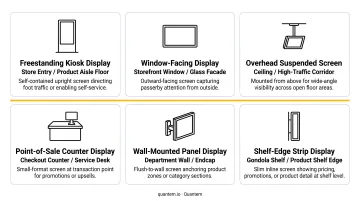
Hardware specs and content strategy vary across these formats, but the system architecture behind them follows the same pattern. The next sections break down exactly how that architecture works.
How Does Retail Digital Signage Work?
Retail digital signage operates through a defined sequence: content is created and scheduled in software, delivered over a network to hardware at each screen location, played out by a local media player, and monitored through a device management layer. Each stage determines what shoppers ultimately see.
Content Creation and Scheduling
The process starts in a cloud-based CMS. A store manager, marketer, or IT team uploads media assets - images, video, HTML layouts, or live data feeds like pricing and inventory - and organizes them into playlists.
Scheduling can be configured in several ways:
- Time-based - breakfast promotions in the morning, dinner specials in the evening
- Location-based - different content per store region or market
- Event-triggered - a weather API pushing warm-beverage ads when temperatures drop
The operational bottleneck at this stage is content governance. A WBR/Hughes retail benchmark study found that 33% of retail leaders cite adapting content to consumer behavior as their biggest content pain point, and 25% lack a defined content strategy. Without clear ownership over who controls which screens and how often content refreshes, displays drift toward irrelevancy.
Content Delivery and Playback
Once scheduled, content is pushed from the CMS over a network connection - Wi-Fi, Ethernet, or cellular - to a media player. This is a small computing device (or a system-on-chip module embedded in the display itself) that stores content locally and renders it on-screen.
Because content is cached locally, playback continues even if the network connection temporarily drops. This local caching is what separates purpose-built signage players from streaming-dependent consumer devices.
Performance at this stage depends on two variables:
- Display specs - brightness, resolution, and refresh rate determine visibility and sharpness
- Media player processing power - determines whether video-heavy or interactive content renders without lag
For window-facing installations where direct sunlight is a factor, commercial displays from manufacturers like LG and Samsung are rated at 3,000 to 4,000 nits - far above the 200–300 nits typical of consumer TVs.
Device and Network Management
This is the layer most retailers underestimate, and it causes the most operational problems at scale.
A device or network management layer continuously monitors each media player: online status, playback confirmation, software version, and error alerts. Without this visibility, a screen that goes offline in a Chicago store on a Tuesday morning might not get noticed until a district manager walks in on Thursday.
MDM (Mobile Device Management) tools address this directly. By enrolling each signage device into a management platform, IT teams can:
- Lock screens into kiosk mode, restricting the device to signage software only
- Push OS and firmware updates remotely across the entire fleet
- Apply security policies without touching individual devices
- Monitor device status in near real-time and receive alerts when devices go offline
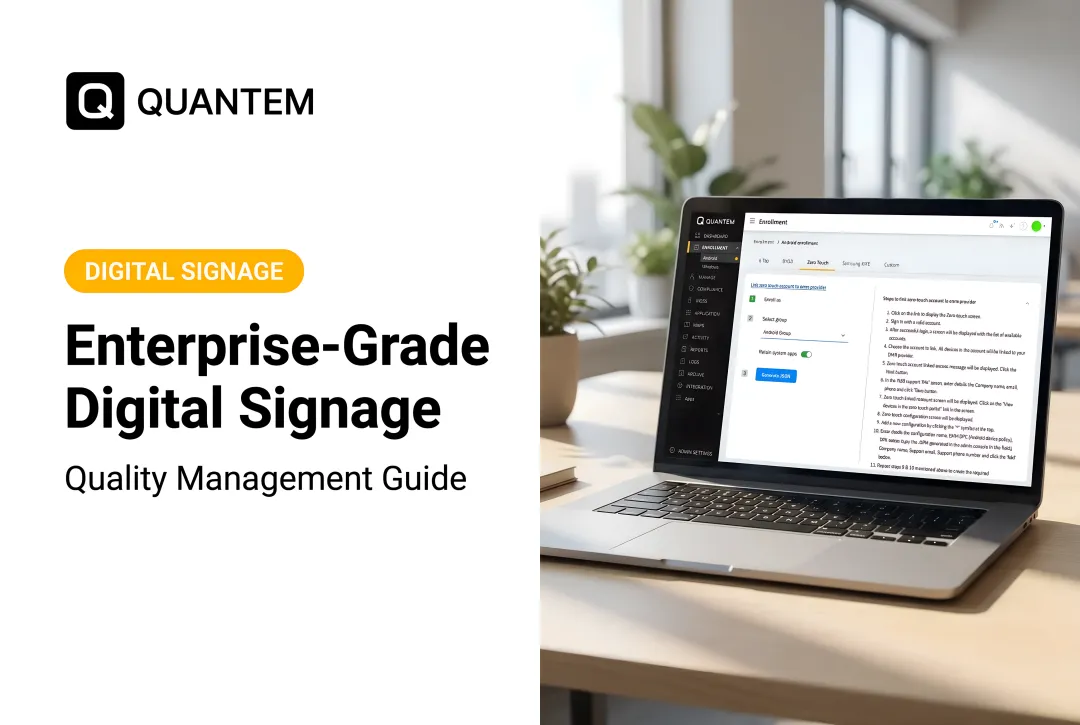
Quantem's MDM platform provides offline status alerts across all subscription tiers, with the Enterprise plan extending device online/offline history tracking to 30 days - giving IT teams the data to diagnose whether a connectivity issue is intermittent or a sign of hardware failure. Zero-touch enrollment removes the need for on-site IT presence when provisioning new signage devices at store locations.
For a retail chain managing dozens or hundreds of screens across multiple states, that remote management capability is the difference between catching a problem in two minutes versus two days.
Shopper Engagement and Output
When every layer upstream runs correctly, the result is a shopper-facing display that earns its placement: a promotional offer near a product display, real-time pricing at shelf edge, queue entertainment at checkout, or an interactive wayfinding kiosk.
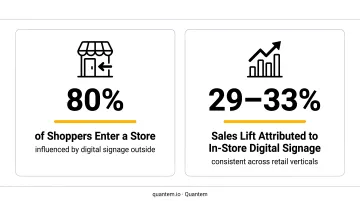
The commercial impact of getting this right is measurable. According to MarketsandMarkets, approximately 80% of shoppers are influenced to enter a store after seeing digital signage, and retail sales can rise 29–33% when digital signage is used effectively. None of those numbers materialize from a screen showing yesterday's promotion or an offline display no one noticed.
Where Retail Digital Signage Is Deployed
Placement determines performance. The same screen and content package will produce dramatically different results depending on where it sits in the store.
High-Impact Placement Zones
| Location | Primary Function | Why It Works |
|---|---|---|
| Store entrance | Set expectations, surface promotions | First touchpoint - shapes the entire shopping mindset |
| In-aisle / product displays | Product education, cross-sell | Reaches shoppers at the decision moment |
| Checkout / queue | Reduce wait perception, prompt add-ons | Natural dwell time with a captive audience |
| Storefront window | Attract foot traffic | Visible from outside - converts passersby |
Digital signage performs best where two conditions overlap: high natural traffic and meaningful dwell time. Shoppers who pause to compare products, wait in line, or browse a category are more receptive to screen content than those moving through a corridor.
A secondary consideration is content volatility - locations where printed signage changes frequently (pricing, weekly promotions, seasonal campaigns) benefit most from digital's ability to update instantly.
Hardware Choices by Environment
The environment directly affects display specifications:
- Indoor standard environments - commercial LCD or LED panels rated for extended runtime (16–24 hours/day vs. 8 hours for consumer TVs)
- Window-facing installations - require high-brightness commercial displays (3,000–4,000 nits) to remain legible in direct sunlight
- Large flagship locations - video walls or large-format LED for brand storytelling that a single panel can't deliver
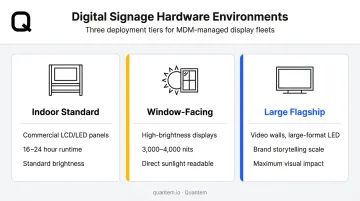
Hardware mismatches are costly to fix after installation. A standard commercial display in a south-facing window will wash out on a sunny afternoon, and replacing it mid-deployment means double the labor and downtime. Spec the display for its environment before purchase, not after.
Frequently Asked Questions
What is retail digital signage?
Retail digital signage is a network of commercial displays - in-store and window-facing - managed through a central CMS to deliver dynamic promotional, informational, and interactive content. Unlike static print, content updates instantly across all screens from one platform.
Where should digital signage be placed?
The highest-impact zones are store entrances, in-aisle displays, checkout areas, and storefront windows. These are the spots where shoppers naturally pause or wait - and dwell time is when screen content drives the most engagement.
What hardware is needed to run digital signage in a retail store?
The core components are a commercial-grade display, a media player (or a system-on-chip module built into the display), a network connection, and mounting hardware. Commercial displays differ from consumer TVs in brightness ratings, runtime durability, and warranty terms for continuous operation.
How do you manage multiple digital signage screens across store locations?
Multi-location signage management requires two systems working together: a cloud-based CMS for content control and scheduling, and an MDM platform for device-level oversight - enrollment, kiosk lockdown, remote troubleshooting, and fleet status monitoring. This combination enables centralized control without requiring on-site IT at every location.
How much does retail digital signage cost?
Commercial displays range from roughly $335 to $1,300+ depending on size and specs. Dedicated media players like the BrightSign HD225 run around $500, though SoC displays eliminate this cost. CMS subscriptions typically run $8–$30 per screen per month depending on the platform and feature tier. Multi-location deployments should also budget for MDM licensing, installation, mounting, and ongoing content production.
What content works best on retail digital signage screens?
Short video and motion graphics outperform static images in recall. Real-time content - live pricing, inventory counts, time-sensitive offers - performs well because it stays current without manual updates. Match message length to dwell time: window displays need to land in under six seconds; in-aisle screens near high-consideration products can support longer-form education.
Conclusion
Retail digital signage is not a single product - it's a layered system where hardware, software, content, connectivity, and device management must operate in sync. A breakdown at any layer produces customer-facing failures: screens showing outdated promotions, displays going dark mid-shift, or content that doesn't match the store location.
Retailers who understand each layer are positioned to avoid the most common deployment failures. The device management layer is where multi-location deployments succeed or fall apart. For a 50-screen fleet, remote monitoring, kiosk lockdown, and zero-touch enrollment aren't optional features - they're operational necessities.
Investing in an MDM solution that supports these capabilities from day one prevents costly troubleshooting as the network scales. Platforms like Quantem include built-in kiosk mode and zero-touch enrollment across all plans, making it straightforward to manage a growing retail signage fleet without adding IT overhead.