Introduction
Managing a fleet of 50, 500, or 5,000 devices is hard enough. Proving to auditors that every one of those devices stayed secure and policy-compliant last quarter? That's where most IT teams hit a wall.
Without automated compliance reporting, answering an auditor's question like "show me your device encryption status from six months ago" means digging through spreadsheets, chasing down IT tickets, and hoping nothing was missed. Meanwhile, 53% of organizations experienced a security incident involving a mobile or IoT device that caused data loss or system downtime in 2024, according to Verizon's Mobile Security Index.
MDM solutions with built-in compliance reporting close this gap. They combine active policy enforcement with the historical, audit-ready documentation regulators require. This guide covers what compliance reporting in MDM means, which frameworks it supports, and the best practices IT teams should follow to build a posture that holds up under scrutiny.
Key Takeaways
- Compliance reporting is separate from real-time monitoring - auditors need documented history, not just live dashboards
- GDPR, HIPAA, SOC-2, and CCPA each require specific evidence types - MDM reports can generate all of them
- Scheduled, automated reports cut manual audit prep and reduce human error
- Non-compliant devices require a documented remediation workflow - alerts alone aren't enough
- Quarterly policy reviews keep your compliance baselines current as regulations and OS versions change
What Is Compliance Reporting in MDM?
MDM compliance reporting is the continuous process of tracking whether managed devices meet defined security policies and regulatory standards - and generating documented evidence of that status over time. This includes device health, policy adherence, app inventory, and user access logs.
Monitoring vs. Reporting: Why You Need Both
These two functions are often confused, but they serve different purposes:
| Function | Purpose | Who Uses It |
|---|---|---|
| Real-time monitoring | Live status alerts, current device health | IT admin, help desk |
| Compliance reporting | Historical, exportable audit documentation | Auditors, regulators, CISO |
Real-time monitoring tells you a device went offline at 2 PM. Compliance reporting tells an auditor that device maintained encryption standards and passed policy checks for the past 12 months. Each serves a different audience at a different point in time - which is why dropping either one creates gaps you won't notice until an audit.
Two Levels of Compliance
MDM compliance operates on two distinct levels:
- Internal policy compliance covers your own security baselines - minimum OS versions, password rules, encryption requirements, and approved app lists
- External regulatory compliance maps to frameworks like GDPR, HIPAA, SOC-2, and CCPA, each requiring specific, exportable documentation
The key advantage of a well-configured MDM platform is that it generates evidence for both from the same underlying data - one source of truth for your security team and your auditors alike.
Why MDM Compliance Reporting Matters for Your Organization
Regulatory and Legal Risk
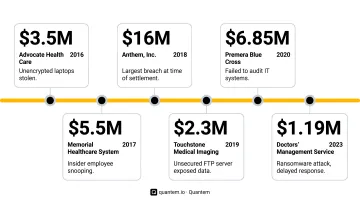
The financial exposure from poor device compliance is real and well-documented. The University of Rochester Medical Center paid a $3 million HIPAA settlement after incidents involving unencrypted mobile devices. Lifespan Health System paid $1.04 million for a stolen unencrypted laptop. HHS OCR has now settled or imposed penalties in 152 cases totaling over $144 million. In nearly every case, the organization could not demonstrate that appropriate device-level controls were in place and operating - a documentation failure MDM compliance reporting is specifically designed to prevent.
Operational Benefits
Beyond avoiding fines, automated compliance reporting has a clear operational benefit. Organizations spend an average of 3,850 hours annually on security compliance activities, according to Coalfire's 2023 Securealities Report. MDM compliance automation directly cuts into that number by:
- Replacing manual spreadsheet audits with real-time dashboards
- Scheduling report exports automatically instead of building them before each audit
- Flagging non-compliant devices immediately rather than discovering them during a review
The Remote Work and BYOD Factor
92% of organizations support some form of remote or hybrid work, per Verizon's 2024 Mobile Security Index. Distributed workforces put devices outside the corporate network - on personal home Wi-Fi, across time zones, and beyond the reach of traditional perimeter controls.
Compliance reporting gives IT teams the visibility to enforce policies consistently across all endpoints, whether corporate-issued or employee-owned. That consistency is what auditors look for - and what organizations without MDM reporting consistently fail to produce.
Key Compliance Frameworks That MDM Helps Address
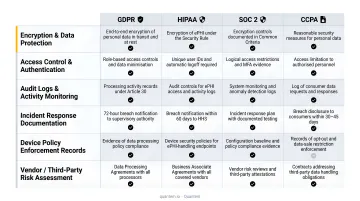
MDM tools don't get certified to regulatory frameworks - compliance depends on how the tool is configured and operated. What auditors actually want is evidence: the right audit logs, access records, and policy enforcement history that each framework requires.
Here's how the major frameworks map to MDM evidence:
| Framework | What It Requires from Devices | MDM Evidence It Needs |
|---|---|---|
| GDPR | Article 32 requires encryption, access controls, regular security testing, and resilience | Encryption status logs, access control records, policy enforcement history |
| HIPAA | Administrative, physical, and technical safeguards for ePHI including access controls and audit controls | Access logs, device inventory, remote action audit trails |
| SOC-2 | AICPA Trust Services Criteria covering Security, Availability, and Confidentiality | Change management logs, system operations records, security event trails |
| CCPA | Reasonable security practices for personal data; breach liability for unencrypted data | Data inventory tied to managed devices, access control documentation |
Vendor certification matters here too, not just your own configuration. Quantem holds SOC-2, GDPR, and CCPA certifications, so for organizations subject to those frameworks, the platform's own security practices satisfy a portion of your auditor's evidence requests directly - rather than leaving gaps you need to fill separately.
Best Practices for MDM Compliance Reporting
Best Practice 1: Define Your Compliance Baseline Before Configuring Reports
Reports are only as useful as the policies behind them. Before touching your reporting configuration, document the minimum security requirements for every device type:
- Encryption enabled (full-disk for laptops, storage encryption for mobile)
- Minimum OS version requirements
- Passcode complexity and lockout policies
- Approved app lists and prohibited app categories
- Network access requirements
Configure your MDM to enforce these baselines automatically. This way, compliance reports capture real-time deviations rather than discovering problems retroactively.
Best Practice 2: Automate Compliance Checks and Schedule Report Exports
Manual spot-checks create gaps in your audit trail. A device could fall out of compliance on a Tuesday and be remediated by Friday - and you'd have no record that the gap existed. Automated, continuous compliance checks close this window.
Schedule report exports based on your regulatory rhythm:
- Daily for high-risk environments (healthcare, financial services)
- Weekly or monthly for standard compliance tracking
- On-demand for audit preparation or incident response
Quantem's Enterprise plan supports up to 50 scheduled custom reports, giving compliance-heavy organizations the granularity to cover different device groups, regulatory frameworks, and reporting cadences without manual IT intervention.
Best Practice 3: Segment Compliance Reporting by Device Type, Role, and Location
A single aggregate report obscures the information auditors actually need. Create separate compliance views for:
- BYOD vs. corporate-owned devices - different ownership models carry different risk profiles and policy requirements
- High-risk user roles - employees accessing financial data, patient records, or proprietary IP need tighter compliance tracking
- Geographic regions - GDPR applies to EU-resident data regardless of where your company is headquartered; CCPA applies to California residents
That granularity also speeds up remediation. When you know which device group is generating the most policy violations, you can address root causes directly rather than chasing individual alerts.
Best Practice 4: Establish a Documented Remediation Workflow for Non-Compliant Devices
Flagging a violation is only half the job. Document the remediation workflow before you need it:
- Detection - automated compliance check flags a non-compliant device
- Response - defined action triggers (automated quarantine, IT alert, or user notification)
- Remediation - required steps with a defined time window for resolution
- Logging - record every action taken as part of the compliance log
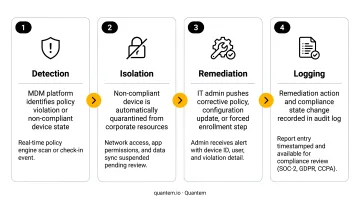
The remediation log carries as much weight as the initial violation record. Auditors need to see that you detected the problem, fixed it, and can document both.
Best Practice 5: Conduct Quarterly Policy Reviews and Update Compliance Baselines
Compliance baselines have a shelf life. OS updates shift the vulnerability landscape, new device types join your fleet, and regulatory requirements get revised - often without much fanfare. A quarterly review keeps your baselines current before auditors find the gaps first.
Schedule quarterly reviews to:
- Verify that OS version minimums reflect current security guidance (CIS publishes benchmarks for iOS, Android, and Windows)
- Update approved app lists to reflect software changes
- Test that updated reports accurately reflect revised baselines
- Review whether any regulatory changes affect your documentation requirements
Key Features to Look for in an MDM Compliance Reporting Solution
Not all MDM platforms approach compliance reporting with the same depth. When evaluating options, prioritize these capabilities:
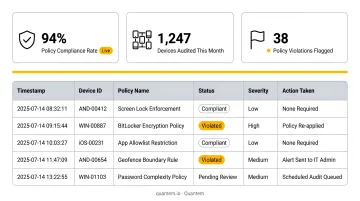
- Real-time compliance dashboards with drill-down into individual devices, policy violations, or user groups - not just fleet-wide summaries
- Scheduled report generation that exports automatically to PDF, CSV, or Excel without manual IT intervention, keeping audit deadlines manageable
- Granular audit logs capturing every policy change, device enrollment, remote action (lock, wipe, profile push), and access event with timestamps and user attribution - the evidence trail SOC-2, GDPR, and HIPAA auditors require
- Pre-built and custom report templates aligned to common regulatory frameworks, with a toggle-based builder (like Quantem's) so IT admins configure reports without writing code
- Multi-platform and BYOD coverage across Android, iOS, and Windows - Quantem's work profile separation keeps personal data outside the compliance perimeter while scoping reporting exclusively to the managed work environment
How to Implement MDM Compliance Reporting in Your Organization
Laying the Groundwork
Start with a device and data inventory. Before configuring any compliance policies, catalog every device type, operating system, user role, and the data each role accesses. This inventory determines which regulatory frameworks apply to which device groups and becomes the foundation for your compliance baselines.
Next, map regulatory obligations to specific MDM controls. For each framework your organization must comply with, identify the MDM settings and report types that generate the required evidence. GDPR's Article 32 encryption requirements map to device encryption status reports; SOC 2's audit log requirements map to activity trail exports. Work through this mapping before building a single report.
Rollout and Ongoing Management
With your baselines mapped, roll out in stages rather than all at once:
- Start with high-risk devices. Deploy compliance policies on corporate-owned devices that access sensitive data first. Validate that policies and reports are working correctly before expanding to BYOD and lower-risk endpoints - this catches misconfigurations before they affect your entire fleet.
- Assign ownership. Designate who reviews compliance reports (IT admin, compliance officer, or both) and define who handles non-compliant devices when issues surface.
- Set a review cadence. Schedule quarterly policy reviews and block time before annual audits for report preparation. Compliance reporting only works as an ongoing practice - not a one-time setup.
Frequently Asked Questions
What is an MDM solution?
MDM (Mobile Device Management) software enables IT teams to remotely enroll, configure, secure, and monitor devices from a central console. Platforms like Quantem cover smartphones, tablets, Windows desktops, and Android enterprise devices - including BYOD fleets where corporate and personal use overlap.
What is compliance in MDM?
MDM compliance means ensuring all managed devices consistently meet defined security policies - encryption, OS version minimums, passcodes - alongside external regulatory standards like GDPR, HIPAA, and SOC-2. Compliance reporting provides the documented proof that auditors and regulators require.
What types of reports should an MDM solution generate for compliance?
Key report types include: device health and inventory reports, policy violation logs, app compliance reports, user access and activity audit trails, and enrollment/unenrollment history - all with timestamps suitable for regulatory audits.
How does MDM compliance reporting support GDPR and SOC-2 requirements?
MDM supports GDPR by documenting encryption status, access controls, and data handling across managed devices. For SOC-2, it generates the audit logs, change management records, and security incident trails auditors need to verify Security, Availability, and Confidentiality trust criteria.
How often should compliance reports be reviewed?
Real-time dashboards handle day-to-day monitoring, while weekly or monthly exports support ongoing tracking. Schedule a formal quarterly review to update policies and prep audit documentation - high-risk environments should also run daily automated reports.
What happens when a device fails an MDM compliance check?
A non-compliant device can trigger automated access quarantine, IT alerts, or a remediation prompt to the user - depending on how policies are configured. Every action from detection through resolution should be logged to maintain a complete compliance record.