Introduction
Picture this: a customer at your self-checkout terminal taps an unexpected button, sidesteps the payment app, and suddenly has access to the device's OS settings. In 30 seconds, they've exposed stored payment tokens, browser history from the previous customer, and a clear path to install whatever software they want. Your kiosk just became a liability.
This isn't a hypothetical edge case. CVE-2023-51772 is a documented kiosk-escape vulnerability tracked by the National Vulnerability Database, and security researchers have demonstrated full Windows kiosk breakouts that escalate from a simple PIN bypass to NT AUTHORITY/SYSTEM-level access.
Retail kiosks face a distinct threat profile compared to standard enterprise endpoints. They're public-facing, physically accessible to anyone, and often processing payment data under PCI DSS scope. Generic device security doesn't address that.
This guide covers what kiosk lockdown actually is, the specific threats it mitigates, which MDM features matter for retail deployments, and how to roll out and manage a kiosk fleet at scale.
Key Takeaways
- Kiosk lockdown restricts devices to approved apps only, blocking OS access, system settings, and unauthorized hardware
- Three primary modes exist: single-app, multi-app, and web-only - each suited to different retail scenarios
- PCI DSS v4.0.1, CCPA, and GDPR all create compliance obligations that kiosk lockdown directly supports
- Zero-touch enrollment deploys entire fleets without manual per-device setup
- Remote monitoring and OTA updates handle most issues without an on-site technician
What Is Retail Kiosk Lockdown (and What Types Are Available)?
Kiosk lockdown is a configuration state enforced by MDM software that restricts a device to its intended purpose - and nothing else. A self-checkout terminal runs the checkout app. Everything outside that scope is blocked at the policy level.
This is distinct from simply launching an app in full-screen mode. A true MDM-enforced lockdown controls hardware buttons, removes navigation elements, prevents OS shortcuts, and survives a user who's actively trying to break out.
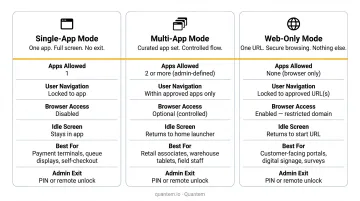
Single-App Kiosk Mode
Single-app mode pins the device to one application. The app loads at boot, occupies the entire screen, and cannot be minimized, switched away from, or closed by the user.
Enforced controls typically include:
- Hardware key blocking (home, back, power buttons)
- Navigation bar removal
- Status bar and notification panel suppression
- Factory reset protection
- Boot-time app loading with home screen lock
This mode is the right choice for POS terminals, self-checkout stations, customer feedback kiosks, and any scenario where one app is the entire purpose of the device. Quantem's single-app kiosk mode includes all of these controls natively, with no scripting required.
Multi-App Kiosk Mode
Multi-app mode grants access to a pre-approved set of applications while locking out everything else. A retail deployment might allow a POS app, an inventory scanner, and a store map - with nothing else reachable from the device.
This mode suits staff-shared devices and interactive in-store experiences where customers or associates legitimately need more than one tool. The key distinction from single-app is flexibility in scope, not a relaxation of security - unauthorized apps remain completely inaccessible.
Web-Only Kiosk Mode
Web-only mode restricts the device to a specific browser or URL. This works well for endless-aisle kiosks, loyalty program sign-ups, or any workflow that lives entirely in a web interface.
One critical requirement for web-only deployments is automatic session clearing between users. Each new customer must start with a clean slate:
- Cached form data wiped on session end
- Browser history cleared automatically
- Authentication tokens invalidated before the next user begins
The Security Threats That Make Retail Kiosk Lockdown Non-Negotiable
Kiosk Escape and OS-Level Access
The most common attack vector is finding a way out of the approved app and into the underlying operating system. Once there, the attack surface expands fast: data exfiltration, malware installation, credential harvesting, or straight-up operational disruption.
Security researchers at AFINE documented a Windows kiosk breakout against KioWare that moved from a PIN bypass to NT AUTHORITY/SYSTEM - full administrative control. Kiosk mode, in other words, needs active hardening at the OS level - not just an app-layer configuration.
Physical Tampering and Hardware Attacks
Public kiosks face physical attack surfaces that enterprise laptops don't:
- Plugging in unauthorized USB devices to trigger OS shortcuts or exfiltrate data
- Connecting a keyboard to access accessibility features or run shell commands
- Attempting factory resets to bypass enrollment and kiosk policies
- Card skimming devices hidden within payment terminals
PCI SSC guidance specifically notes that skimming hardware can be invisible to both staff and cardholders. Effective lockdown policies pair MDM-level controls (disabled USB ports, blocked factory resets, power button restrictions) with physical terminal inspection procedures.
Data Residue Between Sessions
If a customer completes a loyalty lookup or enters personal information and the next user can access that data, you have a privacy incident - even if no malicious intent was involved. Automatic session clearing after every interaction is not optional for kiosks handling personal data.
That data residue risk isn't just a UX problem - it triggers formal compliance obligations.
Compliance Exposure
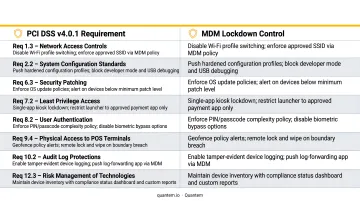
Retail kiosks processing payment card data fall under PCI DSS v4.0.1, which maps directly to kiosk management requirements:
- Requirement 7: Restrict access to system components and cardholder data by business need
- Requirement 8.2.8: Reauthentication required after 15 minutes of session inactivity
- Requirement 9.5.1.2: Periodic physical inspection of POI devices for tampering or substitution
Kiosks collecting customer personal data also trigger CCPA and GDPR obligations around notice at collection, data minimization, and session data retention. An MDM platform that holds SOC-2, GDPR, and CCPA certifications - Quantem carries all three - can supply audit-ready documentation for these requirements rather than adding another compliance gap to close.
Essential Lockdown and Security Features Every Retail Kiosk MDM Needs
Not all MDM platforms are built for the demands of public-facing retail hardware. These are the features that separate a capable solution from one that leaves gaps.
Granular Lockdown Policies Without Scripting
The MDM should allow admins to configure lockdown controls through a management console - not shell scripts or manual per-device setup. Controls should include:
- App allowlisting (single or multi-app)
- Status bar and notification suppression
- Hardware button blocking (home, back, power)
- Screenshot and screen recording prevention
- Peripheral access management (USB, Bluetooth, camera)
- Factory reset protection
Quantem exposes these controls through toggle-based policy management, eliminating scripting requirements and the inconsistencies they introduce across large fleets.
Remote Monitoring and Automated Alerts
Kiosk downtime has a direct customer-facing impact - 77% of shoppers choose self-checkout because it's faster, according to an NCR Voyix survey of 1,044 U.S. consumers. When a kiosk goes down, those customers go elsewhere or queue for staffed lanes.
The MDM dashboard should surface in real time:
- Battery level and charge status
- RAM and storage utilization
- Device connectivity and offline status
- Policy compliance state
Quantem's alerting system sends automated notifications to IT administrators when device health thresholds are breached - and can trigger automated remediation actions like remote lock, app restart, or device wipe.
That reactive coverage handles failures. The other side of fleet health is proactive: keeping every device current without rolling a truck.
Over-the-Air Content and App Updates
Price changes, updated apps, seasonal content, and security patches need to reach every kiosk simultaneously - without anyone physically touching a device.
Quantem pushes updates to a single device or an entire fleet in one action from the admin console, with scheduled deployment windows to avoid disrupting store hours.
Role-Based Access Control
Different stakeholders need different permissions. A store manager may need to reboot a frozen kiosk; only corporate IT should be able to modify security policies or change enrollment configurations.
Quantem enforces this through IAM-based role controls with two key guardrails:
- Segregation of duties - each role is scoped to only the actions it requires
- End-to-end audit trails - every policy change, enrollment action, and reboot is logged with a timestamp and user identity
How to Deploy and Manage Retail Kiosks at Scale
Nearly 205,000 self-checkout terminals shipped globally in 2024, with installations projected to exceed 2.1 million by 2030. Managing that scale requires a deployment model built around automation, not manual configuration.
That's where a structured rollout process makes the difference. Here's how it works in practice.
Step 1 - Zero-Touch Enrollment
Devices ship directly to store locations. On first power-on, they automatically enroll into the MDM, receive their configuration, and activate kiosk mode - no IT presence required on-site.
Quantem's zero-touch enrollment handles this for Android kiosk fleets across all plans. Devices can be pre-assigned to a device group - "Retail Kiosk - Store 12," for example - so the correct apps, policies, and lockdown settings apply automatically at enrollment.
Step 2 - Apply the Kiosk Lockdown Policy
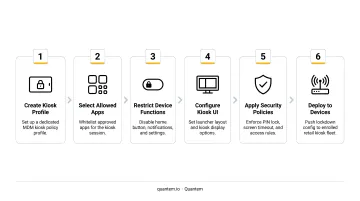
From the Quantem console, admins configure a lockdown profile:
- Select single-app or multi-app mode
- Specify permitted applications
- Disable hardware keys, navigation bar, and status bar
- Enable factory reset protection
- Configure screen timeout behavior
- Push the policy to all enrolled devices simultaneously
Step 3 - Configure Peripherals and Payment Integrations
Once lockdown policies are in place, connected hardware needs attention too. Barcode scanners, receipt printers, and card readers must stay functional while everything else stays restricted. Peripheral-level controls and app-level permissions handle this without exposing the rest of the device.
Step 4 - Remote Monitoring and Troubleshooting
Once deployed, IT monitors the entire fleet from one dashboard. When a device shows a connectivity issue, low battery, or policy violation, the alert fires before a customer notices. Remote reboot, silent app updates, and policy pushes resolve most issues without dispatching a technician.
Step 5 - Audit and Compliance Reporting
Pull device compliance reports regularly to confirm every kiosk is running approved software versions, has lockdown policies applied, and hasn't been tampered with. This documentation supports PCI DSS audit trails, CCPA data handling records, and GDPR data processing compliance - all from one platform.
Frequently Asked Questions
What are the benefits of kiosk mode?
Kiosk mode enhances security by restricting device access to only approved apps, keeps users focused on intended tasks, and reduces IT maintenance by preventing unauthorized changes to device settings or software. For retail, it also protects payment data and ensures consistent customer-facing experiences across a distributed fleet.
What is the difference between single-app and multi-app kiosk mode?
Single-app mode locks the device to one specific application - ideal for POS terminals, self-checkout, or feedback kiosks. Multi-app mode allows access to a curated set of approved apps, which suits staff devices or interactive stations where customers need more than one function.
How do I prevent customers from exiting the kiosk app on a retail device?
An MDM-enforced kiosk lockdown policy blocks hardware buttons (home, back, power), removes the navigation bar, and suppresses the status bar. The pinned app is also set as the device's default launcher, so it reloads automatically on restart - making exit structurally impossible under normal use.
Can I manage multiple retail kiosks remotely from a single location?
Yes. A platform like Quantem provides a central dashboard where IT can monitor device health, push updates, enforce policy changes, and trigger remote actions across an entire distributed fleet at once.
What security threats are specific to retail kiosks?
The primary risks include kiosk escape attacks (users accessing the underlying OS), physical USB-based intrusions, and card skimming on payment hardware. Data residue left between customer sessions and man-in-the-middle attacks on payment data over in-store Wi-Fi round out the main threat surface.
Does retail kiosk lockdown affect payment processing compliance (PCI DSS)?
Yes. Kiosk lockdown supports PCI DSS compliance by restricting payment hardware and cardholder data access to authorized functions only. Quantem's SOC-2, GDPR, and CCPA certifications also provide compliance documentation for audit requirements.