This guide walks IT admins and decision-makers through the complete MDM migration process - from initial audit through post-migration validation - with enough technical detail to plan confidently before touching a single device.
Key Takeaways
- MDM migration transfers device control from one platform to another - a factory reset is rarely required
- Common triggers: rising costs, poor automation, limited OS support, and compliance gaps
- Successful migration follows three phases: audit and prepare, execute, validate
- App configuration, OS version, and enrollment method are the top causes of migration failures
- Skipping pre-migration configuration causes devices to enroll but stay unmanaged
What Is MDM Migration?
MDM migration is the controlled process of unenrolling devices from one Mobile Device Management platform and re-enrolling them into a new one - while maintaining organizational policies, security settings, and device oversight throughout the transition.
The intended outcome: every device in the fleet is fully managed by the new MDM, with configuration profiles, managed apps, and restrictions reapplied. End users, ideally, notice nothing beyond a brief notification.
That simplicity on the user side masks real complexity on the IT side. Unlike a fresh deployment, migrating means working with devices that are already active, carry existing app data, and may have user-configured settings - factors that raise the risk profile compared to onboarding new devices from scratch.
Common Reasons Organizations Migrate MDM Services
Cost and Pricing Pressure
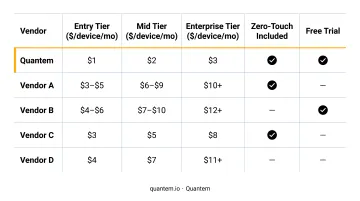
Per-device pricing adds up fast as fleets grow. Published pricing from major MDM vendors varies considerably:
- Microsoft Intune Plan 1: $8.00 per user/month
- Jamf (mobile devices): $5.75 per device/month (25-device minimum)
- Omnissa Workspace ONE UEM: $3.00–$10.00 per device/month
For organizations managing hundreds or thousands of devices, the difference between a $3 and a $10 per-device rate adds up to a significant annual difference. Quantem prices its tiers at $1–$3 per device/month (billed yearly), positioning against this range - and including free migration support in the Enterprise plan rather than charging for it separately.
Expanding Platform Support
An organization that started with an iOS-only fleet but now deploys Android tablets in warehouses, or Windows laptops for field staff, often discovers their current MDM was never built for multi-platform management. That gap forces a switch.
Compliance Requirements
Healthcare, finance, and retail environments face regulatory pressure that an aging MDM may not support. HIPAA's Security Rule requires administrative, physical, and technical safeguards for electronic protected health information - and MDM platforms that can't enforce encryption, access controls, or remote wipe fall short of those requirements. For organizations whose procurement process requires documented compliance credentials, this becomes a hard blocker. Quantem holds SOC-2, GDPR, and CCPA certifications, which addresses that requirement directly.
Operational Frustration with Legacy Tools
Legacy MDMs that require scripting for basic policy changes, lack automation, or deliver poor analytics create real IT overhead. According to IDC's April 2024 UEM MarketScape, more than 70% of enterprises with UEM tools run at least two products simultaneously, and over one-third run three or more - a sign that no single incumbent is satisfying every need.
Quantem replaces scripting with toggle-based controls across 250+ pre-built policy settings, removing the technical barrier that makes legacy tools expensive to operate.
How MDM Migration Works: Phase by Phase
Migration moves through three phases. Each has distinct tasks, and skipping steps in Phase 1 creates the most common failures in Phase 3.
Phase 1: Audit and Prepare
Before touching any device, document your current environment completely:
- Device inventory: Type, OS version, ownership model (corporate vs. BYOD), enrollment method
- Current configurations: Wi-Fi, VPN, email, certificates, compliance policies, deployed apps
- Eligibility assessment: Which devices qualify for streamlined migration vs. which need manual re-enrollment or replacement
In parallel, build out the new MDM environment:
- Configure push notification certificates
- Integrate with device enrollment programs (Android Enterprise zero-touch, Samsung Knox)
- Recreate all configuration profiles and compliance policies
- Validate the full setup on a test device before touching the live fleet
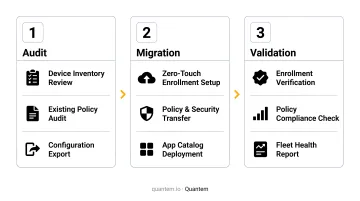
That final validation step matters more than it appears. Devices that enroll into an unconfigured MDM show as managed in the console but have no policies applied - a condition that passes a cursory audit while leaving the fleet exposed.
Quantem's Enterprise plan includes free migration support for this phase, covering environment setup and configuration review - useful if your team is running the new environment build alongside active IT operations.
Phase 2: Execute the Migration
On Apple platforms, Apple Business Manager (ABM) now supports a streamlined migration path for devices running iOS 26, iPadOS 26, or macOS 26 or later with Automated Device Enrollment (ADE). The process:
- Admin reassigns devices in ABM from the original MDM server to the new one
- The new MDM pushes enrollment profiles to eligible devices
- No factory reset is required for supported configurations
Android has no native cross-vendor migration path. Google's Android Management API does document a DPC-to-AMAPI transition process, but that only applies within the same EMM provider - it explicitly excludes migrations between different vendors. Cross-vendor Android migration typically requires re-enrollment, with the specific workflow depending on the target MDM vendor's capabilities.
End-user experience during migration:
- Users receive an enrollment notification on their device
- They complete a brief approval workflow
- If the new MDM was configured correctly to preserve managed apps before migration completes, apps and data remain intact
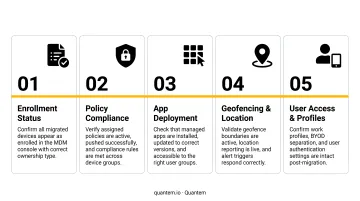
Phase 3: Validate and Close Out
Post-migration validation shouldn't be a spot-check. Run through this systematically:
- Confirm every device appears in the new MDM console
- Verify configuration profiles and compliance policies are applied - not just enrolled
- Check that managed apps are installed and functioning
- Audit for devices that failed to migrate, partially enrolled, or came through without policies applied
- Flag any devices still showing in the old MDM as a mixed-management risk
Key Factors That Affect a Successful MDM Migration
Device OS Version and Enrollment Method
Apple's no-wipe migration through ABM requires iOS 26, iPadOS 26, or macOS 26 as a minimum. Devices on older OS versions, or enrolled via manual profile-based methods rather than ADE, may not qualify and could require a wipe and fresh enrollment.
App Management Configuration
App data loss during migration is a real risk - and it's entirely preventable. Whether apps are preserved depends on how the destination MDM is configured before enrollment completes. Managed app preservation must be deliberately set up in the new platform prior to executing the migration; it doesn't happen automatically.
Policy and Configuration Parity
Not every MDM implements policies the same way. Before migration day, each of the following must be mapped from the source MDM to equivalent settings in the new platform:
- Wi-Fi profiles and network access configurations
- VPN settings and certificate deployments
- Compliance rules and conditional access policies
Gaps in this mapping leave devices enrolled but out of compliance from day one.
User Communication and Deadlines
In most migration scenarios, users must take an action - accepting an enrollment prompt, completing a short workflow. Completion rates improve significantly when you:
- Set a realistic deadline with adequate lead time
- Tell users exactly what to expect before the prompt appears
- Provide step-by-step instructions in plain language
Vague or last-minute communication is the primary reason migrations drag on past their target date.
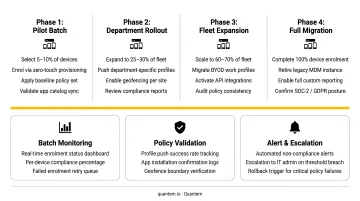
Scale and Fleet Size
A 50-device migration and a 5,000-device migration are operationally different problems. Large fleets require:
- Phased rollouts batched by device type, location, or department
- Thorough pilot testing before broad deployment
- Dedicated monitoring for failed or partial enrollments during each batch
Common Mistakes and Misconceptions About MDM Migration
Most migration failures aren't technical - they're the result of assumptions that haven't been tested since the last time someone touched an MDM rollout. These four mistakes show up repeatedly, across fleet sizes and industries.
Mistake 1: Assuming every migration requires a device wipe
Modern Apple platforms with ABM support no-wipe migration for eligible devices on iOS 26 / macOS 26. This is a documented, official Apple capability - not a vendor workaround. The misconception persists because older migration scenarios did require wipes, and many IT teams haven't revisited that assumption since.
Mistake 2: Executing reassignment before the new MDM is configured
This is the most consequential planning error. Many admins reassign devices in ABM before rebuilding configurations in the new MDM, assuming policies transfer automatically. They don't - devices enroll successfully but receive no policies, creating a fleet that looks managed in the console but is unprotected in practice.
Mistake 3: Overlooking devices that don't qualify for streamlined migration
Most fleets include a subset that won't meet eligibility requirements - older OS versions, manual enrollments, personally-owned devices. Teams identify the 80% that qualify, proceed, and discover post-migration that the remaining 20% either silently failed or landed in a mixed-management state. Those devices become compliance blind spots.
Mistake 4: Misunderstanding what MDM can and cannot see
A common employee concern during migration is privacy. Standard MDM manages device configuration and policy enforcement - not personal activity. Microsoft's documentation confirms that enrollment does not expose personal browsing history, email, text messages, or personal files.
One exception worth disclosing: if a web content filter is deployed through the MDM - such as Quantem's secure browsing feature - network-level activity through that filter may be logged. This should be covered explicitly in your acceptable use policy before migration begins.
Frequently Asked Questions
What is MDM migration?
MDM migration is the process of moving enrolled, managed devices from one Mobile Device Management platform to another. The goal is to transfer device oversight, policies, and security configurations to the new system without disrupting operations or exposing the fleet to a management gap.
Do devices need to be wiped when migrating to a new MDM?
Not always. Apple devices running iOS 26, iPadOS 26, or macOS 26 with Automated Device Enrollment can migrate through Apple Business Manager without a factory reset. Older OS versions, manually enrolled devices, or certain Android cross-vendor scenarios may still require re-enrollment after a wipe.
Will users lose their apps or data during MDM migration?
Only if the new MDM is misconfigured. App and data preservation during migration requires deliberate setup in the destination MDM before enrollment completes - it is not an automatic outcome. Skipping this configuration step is the leading cause of post-migration data loss complaints.
How long does MDM migration typically take?
Admin preparation (auditing the current environment and rebuilding configurations in the new MDM) takes the longest, ranging from days to several weeks depending on fleet complexity. The actual device re-enrollment typically takes minutes per device once migration is initiated.
Can MDM be removed permanently from a device?
On corporate-owned devices enrolled through Automated Device Enrollment (supervised devices), the MDM profile is locked and cannot be removed by the end user. On personally-owned or manually enrolled devices, users may be able to unenroll - which is why organizations use supervised enrollment for corporate fleets.
Can MDM see my browsing history?
Standard MDM enrollment does not capture personal browsing history - MDM manages device configuration, policies, and app deployment. If a web content filter is deployed through the MDM, the organization can monitor activity passing through that filter, which should be disclosed in acceptable use policies.