Introduction
Many IT teams reach a breaking point with their current MDM - devices take too long to enroll, platform coverage falls short, costs spiral past budget, or compliance audits reveal gaps that should have been caught months ago. The frustration builds slowly, until one incident makes the switch feel urgent.
Urgency is exactly the wrong mindset for an MDM migration. A reactive switch typically means managing all of the following at once:
- Re-enrollment planning across your entire device fleet
- Policy and configuration migration
- Compliance continuity during the transition window
- App license transfers and distribution setup
- End-user disruption and support load
Done without a plan, that combination creates security gaps, downtime, and data loss.
According to IDC, more than 70% of enterprises that have deployed UEM tools are running at least two endpoint management products concurrently. That's a clear indicator that most organizations are already patching gaps their primary MDM left open. This guide gives IT teams 10 concrete factors to evaluate before committing to a new provider, so the decision is grounded in requirements - not reaction.
Key Takeaways
- Switching MDMs demands structured evaluation of cost, compatibility, compliance, and migration support - not just feature demos.
- Platform coverage across Android, Windows, and iOS must be fully verified before committing.
- Total cost of ownership often diverges from advertised per-device pricing.
- Plan explicitly for data continuity, app migration, and end-user communication - these are where most MDM switches stall.
- Evaluate whether a provider offers free migration support and a no-credit-card trial before signing anything.
Why Organizations Switch MDM Providers
A Mobile Device Management (MDM) provider gives IT teams the tools to remotely enroll, configure, monitor, and secure a fleet of endpoints - smartphones, tablets, and computers - from a centralized console. Most modern platforms have evolved into Unified Endpoint Management (UEM) solutions, handling multiple device types and operating systems from one interface.
Despite this, not every provider keeps pace with what growing organizations actually need.
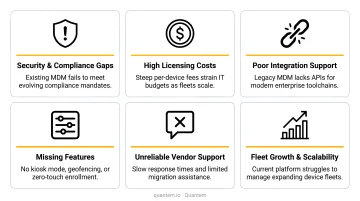
Organizations switch for various reasons, but the most common triggers include:
- Cost escalation as device counts grow and per-device fees compound
- Cross-platform gaps when an MDM handles iOS well but delivers only partial Android or Windows functionality
- Poor automation that forces IT teams into manual, repetitive configuration work
- Compliance exposure when the current provider lacks certifications relevant to the organization's industry
- Inadequate support during incidents that require fast, knowledgeable responses
- Tool consolidation pressure as IT leaders work to reduce the number of active endpoint management products
Many IT teams put off switching because the migration process looks daunting. In practice, a structured evaluation makes it far less risky - which is exactly what the 10 considerations below are designed to provide.
10 Things to Consider When Switching MDM Providers
1. Assess Why You're Switching - and Define Success Clearly
Before evaluating any vendor, document your specific dissatisfactions with the current MDM. Which features are absent? Which workflows are manual when they should be automated? Where are compliance obligations going unmet?
Then define measurable success criteria before you start vendor demos. Examples:
- Reduce device deployment time from 45 minutes to under 15
- Lower per-device cost below $2/device/month at scale
- Eliminate manual app assignment for new hires
- Achieve SOC-2 compliance continuity throughout migration
Clear criteria prevent scope creep during evaluation and give you a defensible case when presenting the switch to leadership.
2. Evaluate Feature Parity and Identify Capability Gaps
Migrating to a new MDM that lacks a feature your current tool provides - even one used infrequently - creates immediate operational or security gaps. A structured comparison checklist is the only reliable way to catch these gaps before signing a contract.
Features to compare side-by-side:
- Zero-touch/automated device enrollment
- Kiosk mode (single-app and multi-app)
- App management for both public and private/in-house apps
- BYOD work profile separation
- Geofencing and location tracking
- Policy automation and conditional enforcement
- Analytics dashboards and custom reporting
- API access depth and documentation quality
Don't rely on vendor feature pages alone - request a demo environment and test the specific workflows your team runs daily.
3. Verify Platform and Device Compatibility
MDM solutions differ significantly in how deeply they support each operating system. A provider that excels at iOS management may offer only surface-level Android management, missing enterprise features like fully managed device provisioning or work profile separation.
This matters most for organizations running mixed fleets - particularly in healthcare, logistics, and field services, where Android and Windows devices often outnumber iPhones. Confirm the new provider offers functional parity across every platform in your environment, including:
- Android Enterprise (fully managed, work profile, dedicated/kiosk modes)
- Windows MDM with policy and app management
- iOS Automated Device Enrollment via Apple Business Manager
- Shared and kiosk device enrollment for unattended scenarios
SOTI's 2024 transportation and logistics research found that mobile-device-related downtime costs workers an average of 13 hours per month - a figure that worsens when the MDM platform can't fully manage the devices in the fleet.
4. Calculate the True Total Cost of Ownership
Headline per-device pricing is rarely the full story. The real total cost of ownership (TCO) includes:
- Onboarding or professional services fees
- Premium support tiers not included in base pricing
- Add-on module costs for features listed as standard in demos
- Overage fees for exceeding device count tiers
- Cancellation penalties from your existing contract
Published market pricing ranges for reference (2024–2026):
| Provider | Entry-Level | Mid-Tier | Enterprise |
|---|---|---|---|
| Hexnode UEM | $2.20/device/mo | $3.20/device/mo | $4.70/device/mo |
| Miradore | $2.75/device/mo | $3.95/device/mo | - |
| Mosyle Business | $1.00/device/mo | $1.50/device/mo | $3.00/device/mo |
| ManageEngine MDM | $1.28/device/mo | $2.38/device/mo | - |
| Jamf Pro | $3.75/device/mo (iOS) | $7.89/device/mo (macOS) | Custom |
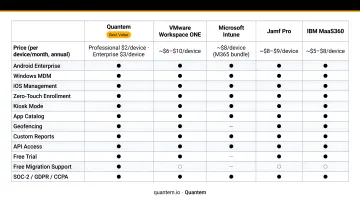
(Sources: TechTarget, vendor pricing pages)
At 500+ devices, a $2/device/month difference equals $12,000 or more annually. Run that full TCO model - including hidden fees and exit costs - before any vendor comparison on price.
5. Confirm Security and Compliance Continuity
MDM migrations introduce a temporary compliance gap: during re-enrollment, devices may briefly operate without enforced policies. For organizations in regulated industries, that gap carries real regulatory exposure.
Verify the following with the new provider before signing:
- SOC-2 Type II certification (covers security, availability, and monitoring controls)
- GDPR compliance and data processing agreement availability
- CCPA alignment for California-facing businesses
- HIPAA-relevant controls for healthcare organizations (remote wipe, encryption, audit logs, per HHS guidance)
- Data residency options if your organization has EU data location requirements
- Migration path that maintains policy enforcement without exposing unmanaged devices to the network
NIST SP 800-124r2 recommends that enterprise mobile security programs maintain inventory, configuration control, authentication, app management, and remote action capabilities - all of which need to remain intact throughout a migration.
6. Review Migration Support and Enrollment Options
What level of migration assistance does the new vendor actually provide? Some charge professional services fees. Others include migration support in their enterprise tier as a standard offering.
Enrollment method support is equally important:
- Zero-touch enrollment (Android Zero-Touch, Apple Automated Device Enrollment, Windows Autopilot) eliminates hands-on IT involvement per device - Carlsberg saved 30 minutes per device provisioned after adopting Windows Autopilot
- **QR code and NFC provisioning** works for Android devices that don't qualify for zero-touch programs
- Apple Business Manager supports migrating managed devices to a new MDM service, preserving apps and avoiding data loss during the transfer
Quantem includes zero-touch enrollment across all plans and provides free migration support in its Enterprise plan - reducing both cost and operational risk for teams transitioning from legacy providers.
7. Plan for Data and App Continuity
App and data migration is where MDM switches most often surprise IT teams. The specific risks:
- Managed apps may need to be reinstalled on each device after re-enrollment
- App licenses may need to be individually reassigned
- Locally stored app data does not transfer automatically and may be lost if a factory reset is required
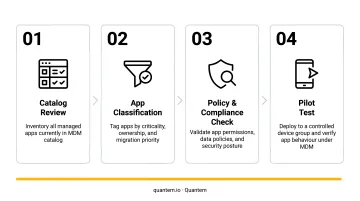
Before migrating, work through this audit:
- Catalog every app in your current MDM's managed app list
- Identify which apps sync data to cloud services versus storing it locally
- Confirm the new MDM supports both public App Store/Play Store apps and private/in-house apps with version control
- Test app restoration on a pilot device before fleet-wide rollout
Apple explicitly notes that preserving apps during migration avoids data loss and eliminates the need to re-download previously installed apps - but this only applies when the migration is handled through Apple Business Manager with the right ownership and enrollment conditions in place.
8. Assess Integration with Existing IT Infrastructure
A new MDM that can't connect to your identity provider creates immediate manual workarounds. Integration verification should cover:
- Identity providers: Azure AD/Entra ID, Okta, Google Workspace, or LDAP
- Ticketing systems: ServiceNow, Jira, Zendesk
- SIEM platforms: For security event logging and monitoring
- Internal APIs: Any custom tooling that calls MDM endpoints
Per NIST SP 800-124r2, EMM/UEM systems should integrate with enterprise directory services to support user-based and role-based policy enforcement - directory integration is a baseline requirement, not an optional add-on.
Ask vendors for API documentation before the demo phase, and confirm whether a sandbox or API playground environment is available for pre-migration testing. Quantem's Professional and Enterprise plans include native Okta and Google Workspace directory import, plus an API playground for pre-migration testing - useful if your team needs to validate integrations before committing to a full rollout.
9. Map Out the End-User Experience and Communication Strategy
End users are the most frequently overlooked stakeholder in MDM migrations. Without advance communication, re-enrollment prompts, app disruptions, and policy changes generate a surge in help desk tickets and user frustration that slows the rollout.
Build a migration communication plan that covers:
- What will change (and what won't)
- When the change happens and how long it takes
- What users need to do - step-by-step, in plain language
- Who to contact if something goes wrong
Organizations that communicate migration timelines to users in advance consistently report faster adoption and fewer support escalations. Schedule the rollout during low-activity windows (weekends, end of quarter) and ensure the help desk is briefed and ready before devices start re-enrolling.
10. Validate Scalability and Long-Term Strategic Fit
The MDM you select today needs to handle where your organization is going, not just where it is. Evaluate the vendor against anticipated growth across:
- Device count growth (doubling from 200 to 400 devices shouldn't require a new contract negotiation)
- New device types: BYOD personal devices, shared kiosk terminals, field devices
- New geographies and their associated compliance requirements
- New use cases like digital signage or dedicated device deployments
The BYOD and enterprise mobility market is projected to grow from USD 72.7B in 2024 to USD 133.9B by 2029 - the device management problem is expanding, not shrinking. That growth is driven partly by adoption outpacing policy: 84% of firms worldwide report employees using personal devices at work, while only 52% have formally approved the practice - meaning BYOD management pressure will likely increase regardless of whether organizations plan for it.
Contract flexibility matters as much as features. A pay-as-you-go model with no hidden fees and no cancellation penalties lets organizations scale or pivot without penalty. Lock-in contracts with volume minimums are worth scrutinizing carefully - fleet sizes change, and renegotiating mid-term is rarely straightforward.
How to Execute Your MDM Switch Successfully
A phased migration approach reduces risk that hard cutovers introduce. Rather than switching the entire fleet at once, run a pilot group of 10–20 devices first - spanning different device types and user roles - to validate policy behavior, enrollment flow, app deployment, and integrations before scaling.
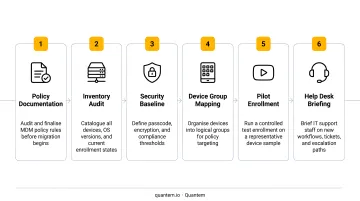
Pre-migration checklist:
- Document all current policies and configurations - don't rely on memory or screenshots
- Set up and test the new MDM environment in parallel before touching live devices
- Migrate app licenses and confirm managed app assignments carry over correctly
- Configure and test identity integrations before the first device enrolls
- Create a rollback procedure in case critical policies fail in the new environment
- Brief the help desk with enrollment troubleshooting steps
With your checklist in order, execution timing becomes the next variable to control. Schedule the migration during low-activity periods, communicate the timeline to end users at least a week in advance, and ensure IT staffing is in place during the rollout window. A single enrollment error that goes unaddressed can cascade across hundreds of devices within hours - so active coverage during the rollout window isn't optional.
Why Quantem Makes Switching MDM Providers Simpler
Quantem is a cloud-based MDM platform built to cut the cost, complexity, and risk that typically slow down provider switches.
For organizations switching MDMs, Quantem addresses the most common friction points directly:
- Pricing 50–70% below typical market rates - Essential at $1/device/month, Professional at $2/device/month, Enterprise at $3/device/month (billed annually), compared to the $3.75–$7.89/device/month range of some incumbents
- Zero-touch enrollment included across all plans - no add-on fee required
- Free migration support in the Enterprise plan - reducing both cost and operational risk during transition
- 21-day full-access free trial with no credit card required - so IT teams can validate the platform before committing
- No cancellation fees - the pay-as-you-go model scales with your organization without penalty
For regulated industries, Quantem holds SOC-2, GDPR, and CCPA certifications - directly relevant for healthcare, logistics, and retail organizations that cannot afford compliance gaps during migration.
Beyond compliance, the platform covers the operational depth most IT teams need across device types:
- Android Enterprise and Windows MDM support
- Kiosk mode (tiered across plans), geofencing, and location tracking
- BYOD work profile separation for personal device policies
- Private app management with version control
- API playground for integration testing before deployment
Conclusion
Switching MDM providers is a significant IT decision, but it pays off when approached with clear criteria, stakeholder alignment, and a vendor that supports the transition. The right choice isn't the most recognizable name - it's the provider that fits your actual fleet, team, compliance posture, and growth trajectory.
MDM needs evolve. Organizations adopt new device types, expand into new regulatory environments, and change how their teams work. Treat vendor selection as a living decision: revisit fit annually and be willing to switch again if the current provider stops serving your operational goals. Organizations that keep their options open - and evaluate vendors against real operational needs - are the ones that avoid being locked into a contract that no longer works.
The short version: choose for fit, not familiarity. Revisit that choice every year.
Frequently Asked Questions
What is an MDM provider?
An MDM (Mobile Device Management) provider is a software vendor that gives IT teams tools to remotely enroll, configure, monitor, and secure employee devices - including smartphones, tablets, and computers - from a central management console. Modern MDM platforms increasingly manage multiple operating systems and device types under a single interface.
How long does it take to switch MDM providers?
Timelines vary by fleet size and complexity - from a few days for smaller fleets to several weeks for large enterprise environments. Running a pilot before full deployment adds time but significantly reduces migration risk.
Do you need to wipe devices when switching MDM providers?
It depends on the platform. Apple devices using Apple Business Manager can often migrate without data loss through managed workflows, while Android fully managed devices typically require a factory reset to re-enroll under a new MDM provider.
What data is at risk when switching MDM solutions?
Locally stored app data, managed app configurations, and device policies are most vulnerable during migration. Cloud-synced data generally survives the transition, so auditing which apps rely on local storage before you begin is a critical first step.
What should I look for in a new MDM provider before switching?
Key factors to evaluate before switching:
- Platform compatibility across all device types in your fleet
- Pricing transparency, including total cost beyond per-device fees
- Migration support quality (is it included or billed separately?)
- Compliance certifications relevant to your industry
- Feature depth: zero-touch enrollment, kiosk mode, BYOD support
- Vendor support responsiveness after the sale
Are there hidden costs when switching MDM providers?
Yes. Common hidden costs include professional services fees for migration, add-on pricing for features shown as standard during demos, and overage charges as device counts grow. Check your existing contract for cancellation penalties too - and always request a full pricing breakdown, not just the per-device rate, before signing.