Introduction
A single faulty firmware update pushed simultaneously to 10,000 devices doesn't fail quietly - it fails everywhere at once. For IT managers, operations teams, and fleet administrators in healthcare, retail, logistics, and field services, that scenario isn't hypothetical. It's a mass outage with no remote fix and technicians dispatched to every site.
Rollout control and staged deployment address this: rather than pushing updates to an entire fleet at once, you release changes to a controlled subset first, observe what happens in the real world, and only expand if results meet your defined thresholds.
What follows is a practical breakdown of how staged deployments work - the parameters that govern them, how to monitor a rollout in progress, and when skipping stages is actually the right call.
Key Takeaways
- Staged deployment releases updates to a small device subset first, expanding only when success thresholds are met.
- Core parameters include batch size, time delays between phases, success thresholds, and rollback triggers.
- A faulty update without staged rollout hits your entire fleet at once, with no way to contain the damage.
- NIST SP 800-40r4 explicitly recommends phased patch deployments, and frameworks like SOC-2 and HIPAA support controlled change management.
- Automatic rollback and staged deployment are not the same thing: most platforms stop advancing phases but don't automatically revert devices.
What Is Rollout Control and Staged Deployment?
Rollout control is the set of policies and tools that govern how, when, and to which devices a change is pushed - covering update scheduling, device targeting, abort conditions, and rollback procedures.
Staged deployment, also called phased rollout, is the specific pattern within rollout control where a fleet is divided into sequential batches that receive updates progressively - unlike a "big bang" deployment, where all devices update at once.
Because these two concepts are often conflated, a couple of distinctions matter before going further:
- Staged deployment is not simply a delayed rollout. Time isn't the primary goal - risk containment is.
- It is not a rollback mechanism. Staged deployment operates before problems reach your full fleet. Rollback is what happens after something has already gone wrong.
Why Device Fleets Require Staged Deployments
The Blast Radius Problem
At scale, even a 1% failure rate in a fleet of 10,000 devices means 100 bricked or non-functional units. Multiply that across a hospital network, a warehouse chain, or a retail operation, and you're looking at manual intervention at every affected site - simultaneously.
The CrowdStrike incident in July 2024 illustrates this at the enterprise endpoint level: a single configuration update affected 8.5 million Windows devices, causing system crashes across airlines, banks, and healthcare organizations globally. While that wasn't an MDM deployment, the blast radius mechanics are identical.
For mobile device fleets specifically, the operational damage is well documented. SOTI's 2024 research found that transportation and logistics workers lose an average of 13 hours per month to mobile device-related downtime - and 35% of drivers work overtime just to stay on schedule.
Environment Variability
Lab testing doesn't replicate what happens in the field. Real-world conditions introduce variables no test lab can fully simulate:
- OS versions and hardware revisions across device generations
- Regional cellular carriers and network conditions
- Active workloads running at the time of update
- Warehouse, clinical, or field-specific environmental factors
Problems from these variables typically surface only after live deployment. Your first production batch is the actual canary - not your test environment.
Compliance and Audit Requirements
NIST SP 800-40r4 explicitly recommends phased deployments for routine patching, using a small subset of assets as canaries before broader rollout. For healthcare and finance environments, unplanned device downtime can trigger compliance events under HIPAA's availability requirements and SOC-2's change management controls.
Staged deployments create an auditable record of incremental, threshold-gated changes. That paper trail demonstrates controlled, intentional rollout decisions - and gives auditors the evidence they need without requiring manual documentation after the fact.
How Staged Deployment Works for Device Fleets
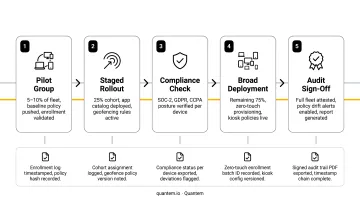
A fleet administrator defines a rollout policy covering device targeting rules, a batch sequence, success thresholds, and escalation conditions. The MDM platform executes that policy - advancing through batches when thresholds are met, halting or alerting when they aren't.
Fleet administrators typically tag devices with metadata labels - region, device type, OS version, deployment stage (for example, "testing" vs. "production") - that the rollout policy uses to select which devices enter each batch.
Step 1: Define Batches and Device Targets
Divide the fleet into logical groups using label selectors or device attribute filters. A typical three-batch sequence:
- Initial batch - 1–5% of devices (or a fixed count like 50 units) from a non-critical or internal group
- Intermediate batch - 15–20% drawn from broader production
- Final batch - remaining 80%+ of the fleet
Two parameters help enforce service continuity during an active rollout:
- maxUnavailable - the maximum number of devices allowed to be non-functional simultaneously
- minAvailable - the minimum number that must remain operational at all times
For example, a hospital with 500 ward tablets might set minAvailable to 450, ensuring clinical operations continue even mid-rollout.
Step 2: Execute the Rollout and Monitor
After each batch is pushed, the system monitors for signals that indicate whether the update is behaving as expected. What to watch actively:
- Update acknowledgment rates - are devices confirming receipt?
- Check-in frequency - are devices going offline unexpectedly?
- Application crash or error rates - are post-update failure rates elevated?
- Support ticket volume - unusual spikes often precede formal error reporting
These signals catch issues that pre-release testing rarely surfaces at scale. Quantem provides device online/offline status and event-based alerts - including configurable notifications for battery status, connectivity drops, and console activity - giving IT teams the visibility needed to make confident batch decisions.
Step 3: Advance, Pause, or Abort
After each batch evaluation, three outcomes are possible:
| Outcome | Trigger | What Happens |
|---|---|---|
| Advance | Success threshold met | Next batch begins automatically |
| Pause | Anomaly detected, manual review needed | Rollout holds; no new devices receive update |
| Abort | Failure rate exceeds acceptable limit | Rollout stops; unaffected devices stay on prior version |
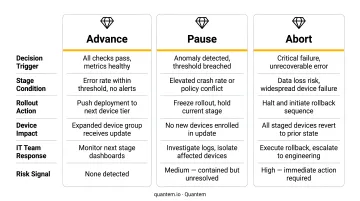
One critical distinction: aborting a staged rollout (preventing further spread) is not the same as executing a rollback (reverting already-updated devices). Most platforms stop advancement automatically but require a separate remediation deployment to revert devices that already received the update. Confirm your platform's behavior before starting any production rollout.
Key Factors That Affect a Staged Rollout
Batch Size and Sequencing
Batches that are too small provide little statistical signal. Batches that are too large defeat the purpose entirely.
Vendor-documented timing guidance:
- Microsoft Intune requires each offer group to have at least 100 devices, with a minimum 2-day delay before the first group receives updates
- Omnissa Workspace ONE documents device mapping taking up to 6 hours, with phase tracking continuing 30 days after the final phase starts
The right sequence depends on fleet size and update criticality. A conservative starting pattern is small → intermediate → full, with observation windows calibrated to the risk level of the change.
Success Threshold Definition
The threshold percentage of successfully updated devices required before advancing must be defined before the rollout starts - not adjusted mid-deployment.
Red Hat Edge Manager documents a configurable successThreshold parameter, with 95% given as a practical example: the rollout pauses if the success rate (successful rollouts divided by devices in the batch) falls below this value. This is a vendor-specific example rather than a one-size-fits-all standard, but it illustrates the right framing - thresholds should be deliberate, not defaulted.
- Too high (100%) - makes rollouts fragile; a single device connectivity issue halts everything
- Too low (50%) - provides minimal protection against a genuinely problematic update
Network and Connectivity Conditions
Devices on intermittent or low-bandwidth connections may report delayed or false update failures. Warehouse scanners, field service tablets, and remote clinical devices all behave differently from office-connected endpoints.
Staging policies should account for connectivity variability when interpreting batch success rates - a device that hasn't checked in isn't necessarily a failed device.
Device Heterogeneity
A fleet containing multiple hardware revisions, OS versions, or regional configurations requires more granular batch design. A batch drawn entirely from one device model won't predict behavior on a different hardware generation. Build batches that reflect the diversity of your actual fleet - not just the easiest devices to test.
Monitoring and Observability
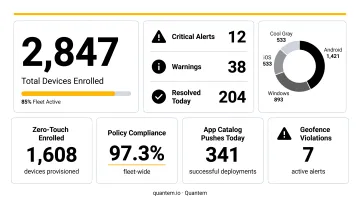
A staged rollout is only as effective as the data available to evaluate each batch. Real-time dashboards, error rate tracking, and device health signals are prerequisites for catching failures before they reach the full fleet.
Quantem's platform provides the observability layer to make that evaluation concrete:
- Tiered event feeds and activity logs with up to 30-day history on Enterprise plans
- Alert configurations for connectivity drops and console events
- 2-minute sync intervals for near-real-time device status visibility
Common Issues and Misconceptions
Misconception 1: Staged Deployment Is a Slow Rollout
The goal isn't to stretch deployment time - it's to limit device exposure to risk at any moment. A well-executed staged rollout across 10,000 devices can finish faster than a failed "big bang" update that requires manual remediation at every site.
Misconception 2: All Updates Need the Same Staging Depth
Applying a full four-phase rollout to a minor UI configuration change wastes time. Running a low-risk tweak through the same process as a critical OS update adds overhead without adding protection. Staging depth should match the risk level of the change.
Misconception 3: Platforms Automatically Roll Back Failures
Most platforms stop advancing the rollout when a batch fails - they do not automatically revert already-updated devices. Teams need a defined remediation deployment ready before the rollout starts, not as an afterthought once failure surfaces.
Misconception 4: Defining Thresholds Mid-Rollout Is Fine
It isn't. Success thresholds set after observing initial batch results introduce selection bias - you're effectively moving the goalposts based on what you've already seen. Define thresholds before pushing the first batch.
When Staged Deployment May Not Be the Right Approach
Staged deployment adds overhead. In some cases, that overhead isn't justified:
- Very small fleets (typically under 50 devices) - the entire fleet can serve as the pilot group
- Non-behavioral changes - updating a display name label or a static configuration field carries no meaningful risk of device instability
- No monitoring infrastructure - staged deployment without the ability to evaluate batch results offers no real risk reduction, only the appearance of it
When a Different Strategy Is Needed
Zero-day security vulnerabilities present a genuine tradeoff. When the risk of delayed patching on unprotected devices exceeds the risk of a broader deployment failure, speed takes priority over staged caution. NIST SP 800-40r4 addresses this directly: emergency canary testing may be compressed to a few minutes to a few hours, compared to the days or weeks appropriate for routine updates.
Availability constraints present a different kind of exception. Near-zero downtime tolerance environments - active surgical suite tablets, real-time payment kiosks at peak hours - require updates during guaranteed maintenance windows. Staged rollout logic doesn't help if the device cannot be taken offline at any point during operating hours.
Conclusion
Rollout control and staged deployment are the operational practice of treating fleet-wide updates as a controlled experiment. Start with a small, observable group. Evaluate real-world results against pre-defined thresholds. Expand only when those thresholds are met.
What makes this approach work is deliberate design, not technical complexity. Pre-defined batch sizes, clear success criteria, and real-time monitoring turn a high-risk fleet-wide change into an auditable, manageable process. The alternative is a "big bang" deployment where the first sign of a problem is hundreds of devices failing simultaneously - with no staged rollback path in sight.
For fleet administrators in healthcare, logistics, and retail - where device availability directly affects patient care, delivery schedules, and customer transactions - that's not a risk worth taking. For fleet administrators in healthcare, logistics, and retail - where device availability directly affects patient care, delivery schedules, and customer transactions - that's not a risk worth taking. An MDM platform like Quantem gives IT teams the controls to define batch sizes, set automated rollback triggers, and monitor deployment health in real time, so staged rollouts become a repeatable standard rather than a one-off effort.
Frequently Asked Questions
What is a deployment rollout?
A deployment rollout is the process of distributing a software, firmware, or configuration update to devices in a fleet. It describes a managed release - with monitoring and control mechanisms - not an all-at-once push to every device at once.
What are the stages of staged deployments for device fleets?
The typical sequence is an initial small batch (5–10% of devices), a monitoring and evaluation window, one or more intermediate batches (15–30%), and a final broad rollout to the remaining fleet. Each stage is gated by a success threshold before advancement.
Which is the best deployment strategy for device fleets?
For most enterprise fleets, staged deployment is the recommended approach - it limits blast radius and provides real-world validation before full exposure. Fleet size, update criticality, and available monitoring all factor in; small fleets or low-risk changes may not need full staging.
What is device fleet management?
Device fleet management is the centralized practice of enrolling, configuring, monitoring, updating, and securing a large group of managed devices from a single platform. It enables IT teams to apply policies and push changes across smartphones, tablets, kiosks, and IoT sensors without touching each device individually.
How do you monitor a staged deployment rollout?
Watch device check-in rates, update success and failure counts per batch, application crash rates, and connectivity health. A capable MDM platform should surface these signals in a real-time dashboard so teams can make advance, pause, or abort decisions without digging through raw logs.
What happens if a staged deployment fails mid-rollout?
When a batch fails its success threshold, the rollout should be paused or aborted immediately. Devices not yet updated stay on their current version, while already-updated devices may need a separate remediation deployment to revert, since automatic rollback is not guaranteed by all platforms.