Introduction
Switching to Hardware-as-a-Service solves the capital expenditure problem. Devices arrive without a six-figure purchase order, maintenance falls to the provider, and refresh cycles happen on schedule. But the moment that first shipment lands, a different problem surfaces: every device is unmanaged, unsecured, and invisible to IT until it's enrolled in an MDM platform.
According to the Verizon 2025 Data Breach Investigations Report, 46% of compromised systems with corporate logins in breach data were non-managed devices. That's the risk profile of an unenrolled HaaS fleet sitting in an office or warehouse.
Enrollment closes that gap. Here's what this guide covers:
- What device enrollment means in a HaaS context
- The four enrollment methods available to IT teams
- The end-to-end provisioning workflow
- Security and compliance requirements
- How to choose an MDM platform that scales with your program
Key Takeaways
- HaaS vendors supply the hardware; device enrollment into MDM is your responsibility unless the SLA explicitly states otherwise
- Zero-touch enrollment is the operational standard: devices self-configure on first boot, no IT hands required
- Corporate-owned and BYOD devices need separate enrollment profiles and data separation policies
- Your MDM platform choice - zero-touch support, compliance certifications, and per-device pricing - determines whether HaaS enrollment scales cleanly or creates ongoing friction
What HaaS Is and Where Device Enrollment Fits In
Hardware-as-a-Service is a subscription procurement model in which an MSP or OEM supplies laptops, mobile devices, servers, and networking gear on a monthly or annual basis. The provider owns the hardware, handles maintenance and repairs, and manages end-of-life disposal. IT gets the devices without the capital outlay.
What HaaS providers don't manage is the digital layer. Device enrollment is the process of registering each physical device with an MDM platform so IT can push policies, apps, security configurations, and compliance settings remotely. Without enrollment, a leased laptop is just a laptop - there's no policy, no visibility, no control.
Two terms HaaS contracts routinely conflate: device registration links a device's hardware identity (serial number, hardware hash) to a management service. Device enrollment is the active step that places the device under MDM policy control. Check SLA language carefully - they're not interchangeable.
What HaaS Providers Own vs. What IT Teams Own
The typical HaaS provider scope covers:
- Physical procurement and configuration
- Shipping and logistics
- In-warranty repair and replacement
- End-of-life decommissioning and disposal
MDM enrollment typically sits with the organization's IT team, or can be negotiated as a managed service add-on at additional cost. Before signing a HaaS agreement, verify the SLA covers:
- Who registers devices in the MDM tenant at fulfillment
- Whether zero-touch provisioning is supported by the vendor
- What happens to enrollment records when a device is replaced mid-contract
Device Enrollment Methods in a HaaS Model
Zero-Touch Enrollment (OEM/Vendor-Initiated)
When devices are ordered through a HaaS provider, the OEM can register each device's hardware identity with the organization's MDM tenant before shipment. On first power-on and network connection, the device auto-enrolls and downloads its assigned profile. No IT or user action needed.
The two dominant frameworks:
- Windows Autopilot - uses a hardware hash collected by the OEM or reseller and registered via Partner Center. Supports user-driven, self-deploying, and pre-provisioned modes
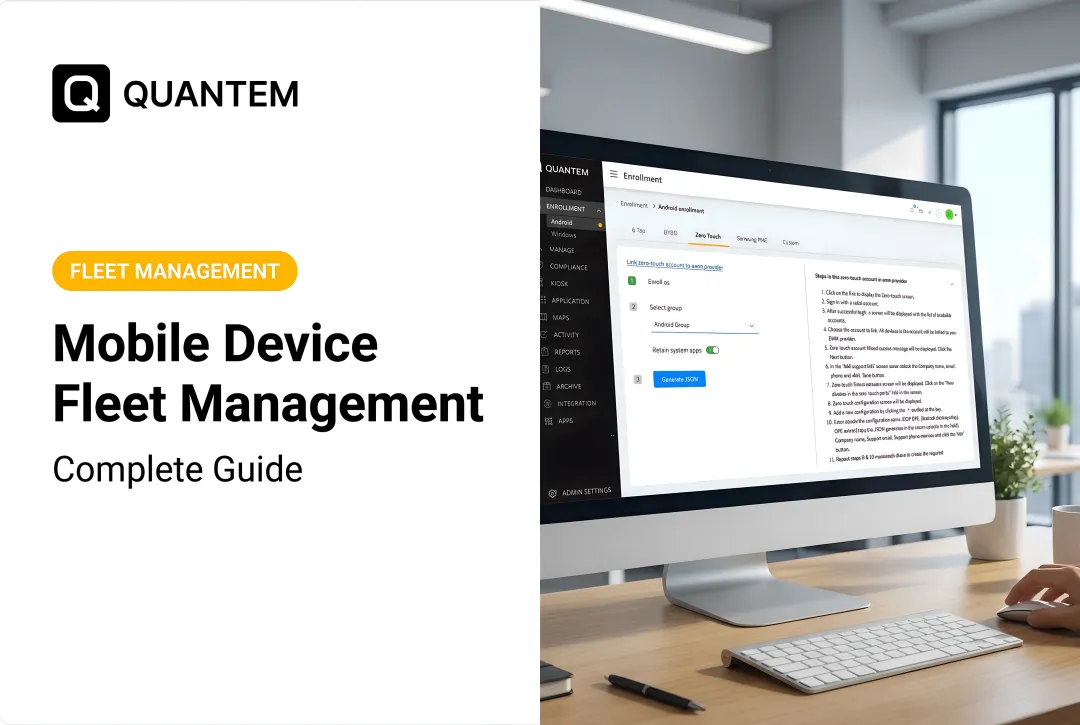
- Android Zero-touch - resellers assign devices through the zero-touch portal using serial number, IMEI, and model; on first setup, the device contacts Google's provisioning service and installs the device policy controller automatically
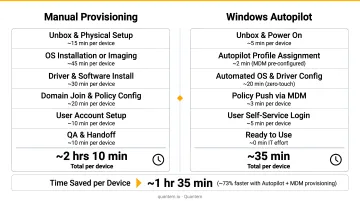
The time savings are real. Microsoft's benchmarking data shows Autopilot reduces median per-device handling time from 9.6 minutes to 55 seconds after initial setup - equivalent to 160 hours saved per 1,000 devices.
Apple Business Manager (ABM) / Automated Device Enrollment (ADE)
For Apple devices purchased through Apple-authorized HaaS channels, ADE is the equivalent mechanism. Devices are tied to Apple Business Manager at purchase, then assigned to an MDM server. When the user unboxes the device and powers it on, the MDM profile installs silently during Setup Assistant. The user can't skip it, and it can be configured so the profile cannot be removed.
Manual Enrollment
Used as a fallback for existing devices being re-enrolled mid-contract or legacy hardware that pre-dates zero-touch programs. Options include:
- Running an enrollment script distributed to users
- Installing a management agent manually
- Walking users through a browser-based enrollment workflow
Manual enrollment doesn't scale across distributed HaaS fleets. Reserve it for edge cases.
Smart / Conditional Enrollment
MDM platforms support rule-based enrollment that assigns different policy profiles based on user identity (via SSO), device type, IMEI, or serial number. A single HaaS fleet segments automatically - no manual sorting required. For example:
- Clinical tablets locked to kiosk mode
- Warehouse scanners restricted to specific apps
- Office laptops provisioned with a standard productivity profile
BYOD vs. Corporate-Owned Devices in HaaS Enrollment
Corporate-owned HaaS devices receive full MDM management from enrollment: IT controls the device profile, can remotely wipe, and enforces all policies without restriction.
BYOD devices use a different approach:
- Android Work Profile - creates a containerized work environment on Android 5+ devices; the organization manages work apps and data while personal apps, data, and usage remain completely private
- iOS User Enrollment - similar separation model for personally owned iPhones and iPads
For organizations supporting BYOD within a HaaS-adjacent program, the MDM platform needs to handle work profile separation natively. Quantem includes secure work profile separation across all plan tiers, with no scripting required to configure it.
The HaaS Device Enrollment Workflow, Step by Step
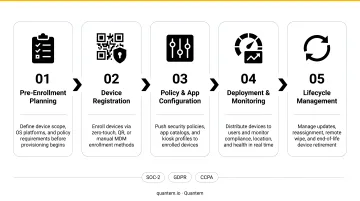
Step 1 - Pre-enrollment planning Before a single device ships, IT must define enrollment profiles (device groups, policy sets, app libraries), connect the MDM platform to the identity provider, and confirm the HaaS vendor's ability to register devices in the MDM tenant at the point of fulfillment. Missing any of these steps typically surfaces as enrollment failures or policy mismatches once devices start arriving.
Step 2 - Device registration and identity binding The HaaS vendor registers each device's hardware identity with the organization's MDM tenant:
- Windows Autopilot uses the hardware hash (or PKID/tuple via OEM/CSP)
- Android Zero-touch uses serial number, manufacturer, model, and IMEI
- Apple ABM uses serial number linked to the organization's ABM account
Step 3 - Automated provisioning on first boot The device powers on, connects to a network, contacts the MDM service, and receives its enrollment profile. Apps, security policies, Wi-Fi credentials, and compliance settings install without IT intervention. No one physically touches the device between the warehouse and the end user's desk.
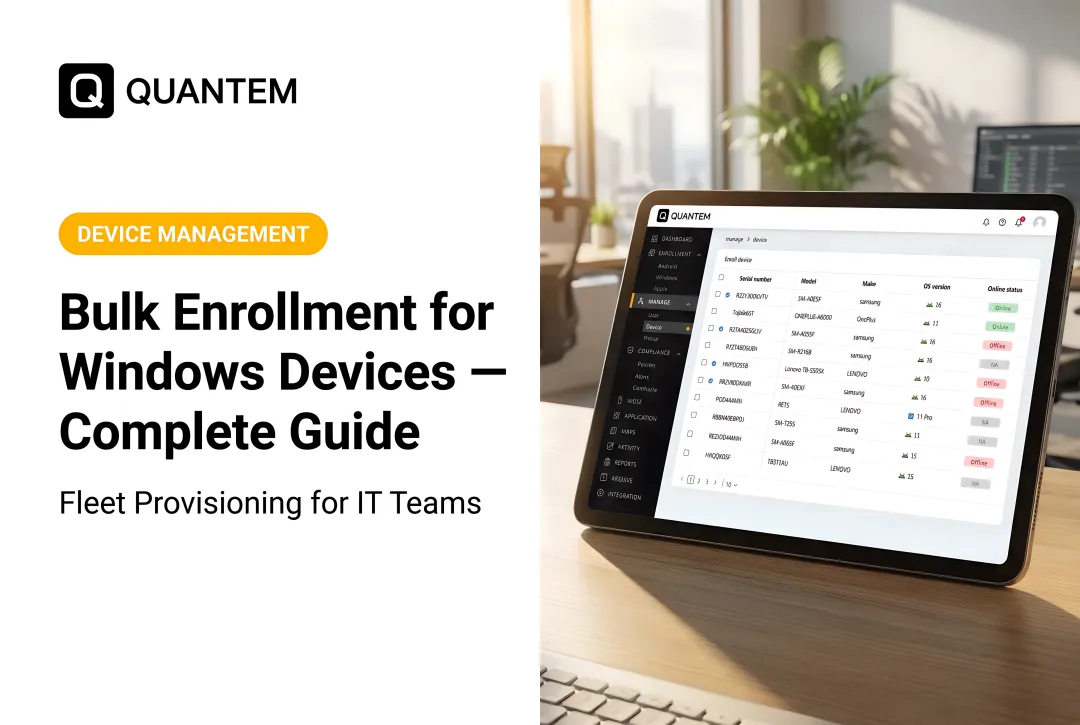
Step 4 - Policy assignment and verification Post-enrollment, IT verifies through the MDM dashboard that each device:
- Received the correct policy set
- Is reporting compliance status
- Completed all assigned app installations
When enrolling hundreds of devices in a single HaaS shipment, real-time fleet visibility lets IT confirm completion across the entire batch - not device by device.
Step 5 - Lifecycle event management IT must revisit enrollment at every HaaS lifecycle event:
- Device refresh - enroll incoming hardware, unenroll and wipe retired units before return
- Mid-contract swap - warranty or repair replacements arrive unenrolled; re-enroll before handing to the user
- Contract end - unenroll, wipe, and clear all corporate data before returning devices to the HaaS provider
Security and Compliance During HaaS Enrollment
Enrollment is a high-risk window. A device that reaches the network without disk encryption enforced, screen lock required, and certificate-based authentication active is a compliance liability the moment it connects.
HaaS deployments in regulated industries need to pay particular attention:
| Regulation | Key Enrollment Requirements |
|---|---|
| HIPAA | Access controls, audit logging, encryption, transmission security for ePHI |
| GDPR (Article 32) | Encryption, pseudonymization, integrity controls, resilience measures |
| CCPA | Reasonable security procedures to prevent unauthorized access to personal data |
| SOC-2 | Security, availability, processing integrity, confidentiality, and privacy controls |
The MDM platform should enforce these controls automatically at enrollment, not as a post-deployment manual task.
Two security practices that often get overlooked at this stage:
- Scope enrollment credentials tightly. Authenticate MDM enrollment automation using scoped service accounts or app registrations with minimal API permissions. Embedding broad-permission credentials in enrollment scripts that ship to devices is a significant exposure point.
- Vet your MDM platform's own compliance posture. The MDM platform processes device telemetry and employee identity data - its certifications are a legal consideration, not just a technical one. Quantem holds SOC-2, GDPR, and CCPA certifications, which directly address this requirement for regulated-industry HaaS programs.
Choosing the Right MDM Platform for Your HaaS Program
The MDM platform is the operational core of any HaaS enrollment program. The right platform makes enrollment invisible to end users - the wrong one creates friction at every lifecycle event, from provisioning to offboarding.
Critical evaluation criteria:
- Supports zero-touch enrollment natively across every platform in your fleet (Android, Windows, iOS)
- Configures enrollment profiles without scripting - policy management through toggle-based controls
- Provides enrollment status, compliance posture, and location tracking from a single dashboard
- Scales pricing up and down as HaaS contracts change, without penalizing fluctuation
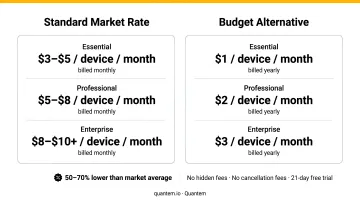
Pricing deserves a hard look. Typical MDM platforms run $3–$10+ per device per month - on a 500-device fleet, that's $18,000–$60,000 annually before any other software spend. Quantem prices at $1–$3 per device per month (Essential through Enterprise, billed annually), with zero-touch enrollment included on every plan and a 21-day free trial requiring no credit card. For HaaS programs where device counts shift as contracts cycle, that difference compounds fast.
Cost aside, pricing only matters if the platform actually handles your deployment pattern. Validate against your specific use case before committing:
- A healthcare network managing shared clinical tablets needs kiosk lockdown and shared device mode
- A logistics company managing rugged Android warehouse scanners needs Android Enterprise zero-touch and geofencing
- A professional services firm with a distributed remote workforce needs BYOD work profile separation and SSO integration
All three are common HaaS deployment patterns. The MDM platform should support each mode out of the box - not treat them as upsell add-ons.
Frequently Asked Questions
What is the difference between device enrollment and device registration in a HaaS model?
Registration links a device's hardware identity (serial number or hardware hash) to a management service - typically done at purchase by the OEM or reseller. Enrollment is the active process of placing the device under MDM policy control. Both steps must complete for a device to be fully managed in a HaaS program.
Does Hardware-as-a-Service include MDM enrollment?
It depends entirely on the HaaS contract. Some providers include MDM enrollment as part of a managed deployment service; others supply and ship hardware only, leaving enrollment to the customer's IT team. Always verify enrollment responsibilities in the SLA before signing.
What is zero-touch enrollment and how does it work in a HaaS program?
Zero-touch is an automated process where devices are pre-registered with the MDM tenant before shipping. On first power-on and network connection, the device self-configures and self-enrolls without any IT hands-on setup, making it the standard for large or geographically distributed HaaS deployments.
Can BYOD devices be enrolled in a HaaS model?
HaaS is primarily a corporate-owned device model, but organizations can extend it with BYOD enrollment using Android Work Profile or iOS User Enrollment to separate personal and corporate data. The MDM platform must support profile-based separation natively, without requiring manual scripting.
What happens to device enrollment when a HaaS contract ends?
Devices should be formally unenrolled from the MDM platform and fully wiped before being returned to the HaaS provider. No organizational data, certificates, or corporate app credentials should remain on returned hardware - define this offboarding step explicitly in the HaaS agreement.
How does HaaS enrollment support compliance with regulations like HIPAA or GDPR?
Compliant HaaS enrollment relies on an MDM platform that enforces encryption, access controls, and audit logging automatically at enrollment, not post-deployment. The platform itself should hold relevant certifications (SOC-2, GDPR, CCPA), since it processes the device telemetry and identity data regulators scrutinize.