Introduction
Most organizations running managed mobility services treat MDM and Help Desk as two separate systems. The result: IT teams manually cross-reference device alerts with support tickets, resolution times slow, and security gaps form between the two.
According to B2M Solutions' 2025 State of Enterprise Mobility report, 81% of frontline workers experience mobile issues monthly, and 85% of mobile issue resolutions take 30+ minutes. When MDM and Help Desk operate in isolation, that 30-minute average climbs - agents waste time hunting for device context that should appear automatically in the ticket.
For IT managers, operations leads, and administrators running corporate mobile fleets - company-owned or BYOD - the gaps are predictable:
- Agents receive tickets with no device context attached
- Compliance alerts surface in MDM but never reach the Help Desk queue
- Ticket backlogs fill with issues a single MDM policy push could have resolved in minutes
This guide walks through how to plan, execute, and validate MDM and Help Desk integration - so your MMS program stops creating work and starts resolving it.
Key Takeaways
- MDM controls devices; Help Desk manages users - integration is what connects them into an operational system
- Complete device enrollment and documented compliance policies are non-negotiable prerequisites
- Integration follows a six-step sequence, from mapping alert triggers and configuring the API to piloting, testing, and defining escalation rules
- Validate the integration end-to-end: confirm an MDM alert generates a ticket, an agent resolves it, and MDM reflects that resolution
- Watch for alert noise, stale device data, and broken API connections after platform updates - the most common points of failure
What MDM and Help Desk Integration Means Within Managed Mobility Services
Managed Mobility Services is the overarching framework covering the full device lifecycle - procurement, enrollment, security, support, and decommissioning. Within that framework, MDM and Help Desk are the two day-to-day workhorses. MDM manages what happens at the device level, while Help Desk manages what happens at the user level. Integration closes the gap between them.
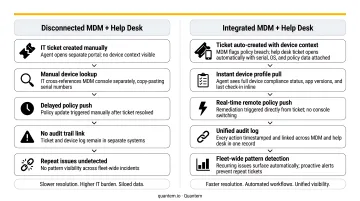
Disconnected vs. Integrated: What Changes
In a disconnected model, an agent receives a ticket, manually logs into the MDM console, searches for the device, notes its compliance status and OS version, then returns to the ticket to act. Every ticket wastes 5 to 15 minutes on this lookup.
In an integrated model, that device context - compliance status, OS version, last check-in timestamp, enrolled apps, assigned user - appears automatically when the ticket opens. MDM-confirmed resolutions can close tickets without manual intervention.
The practical difference:
- Disconnected: Agent switches between two systems per ticket, introducing errors and slowing resolution
- Integrated: Device data surfaces in the ticket interface, MDM actions trigger directly, and tickets close when remediation is confirmed
Why Scale Makes Integration Non-Negotiable
Manual cross-referencing holds up at 50 devices. At 200+, it breaks. Each new device adds another potential ticket, another compliance event to track, another lookup to perform. The administrative overhead compounds faster than headcount can absorb it.
MDM platforms like Quantem surface device status, online/offline history, and app inventory in ways that feed directly into ticketing workflows. That only happens when the integration is configured. Without it, that data sits in the MDM console while agents work blind.
Prerequisites and Readiness Checklist
Skipping prerequisites is the fastest way to build an integration that generates problems from day one - work through this checklist before touching any system configuration.
Device Inventory and Enrollment
Every device in the fleet must be enrolled in MDM and tagged with user identity, department, and device type before integration begins. Gaps in enrollment mean gaps in ticket context - agents will open tickets for devices the MDM has no record of.
A 2022 FleetDM survey of 205 security practitioners found only 23% had successfully enrolled all or nearly all devices in MDM. That's the starting point for most organizations - not the finish line.
API Availability and Compatibility
Confirm your MDM platform exposes APIs, webhooks, or native connectors to your ticketing system - ServiceNow, Jira Service Management, Freshdesk, or Zendesk. Not all MDM platforms make this straightforward.
Platforms with developer-friendly API access and built-in integration tooling reduce technical overhead compared to those that require third-party middleware for basic connectivity. Quantem's Enterprise plan includes custom API access, which removes that middleware dependency entirely.
Roles and Access Permissions
Define your permissions matrix before connecting systems:
- Tier 1 agents: View device compliance data, last check-in, OS version
- Tier 2 agents: Push basic MDM commands (remote lock, configuration profile updates)
- Device administrators: Policy-level changes, remote wipe, enrollment adjustments
Connecting systems without this matrix creates both security exposure and agent confusion. Agents shouldn't be making judgment calls about what they're permitted to do under pressure.
Clean MDM Policy Baseline
Document, test, and verify that all compliance rules, app configurations, and geofencing boundaries are producing expected results before integration begins. Misconfigured policies generate a flood of low-quality tickets the moment automation activates. Fix policy noise in the MDM first - then integrate.
Data Privacy and Compliance Requirements
Help Desk agents will gain visibility into device-level data. That triggers compliance obligations:
- GDPR/UK GDPR: ICO guidance requires organizations to hold only the minimum personal data necessary for the purpose
- CCPA: Data minimization is foundational - collect only what each specific purpose requires
- HIPAA: Applies where device data includes PHI; access must be limited to workforce members who need it by role
Choosing an MDM platform that already holds SOC-2, GDPR, and CCPA certifications - Quantem carries all three - closes this prerequisite before integration begins, rather than leaving compliance as a post-launch audit item.
How to Integrate MDM with Help Desk: Step-by-Step
MDM and Help Desk integration follows a defined sequence. Skipping steps, especially workflow mapping and pilot testing, is the most common reason integrations generate problems within the first 60 days.
Step 1 - Map Device Event Triggers to Support Workflows
Before touching any system, identify which MDM-generated events should create tickets:
- Enrollment failures
- Compliance violations
- Lost or stolen device reports
- Remote wipe requests
- App crash alerts (if applicable)
For each event, define ticket priority, queue assignment, and resolution owner in writing. This mapping document becomes your configuration specification and your troubleshooting reference.
Step 2 - Configure the MDM-to-Help Desk API Connection
Using your MDM platform's API or native connector, establish the authenticated link between systems:
- Set up webhooks to push MDM events as structured ticket payloads
- Store authentication tokens securely - not in plain text or shared documents
- Document endpoint URLs and authentication methods for future maintenance
- Test connectivity in a staging environment before any production configuration
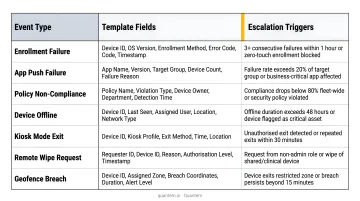
Step 3 - Build Standardized Ticket Templates
Create a dedicated template for each event type. Each template should pre-populate with device metadata and include a defined escalation path:
| Event Type | Required Fields | Escalation Trigger |
|---|---|---|
| Non-compliance alert | User, device ID, policy violated, last check-in | Unresolved after 4 hours |
| Remote wipe request | User, device model, location last known | Always escalate to administrator |
| Enrollment failure | Device type, enrollment method, error code | Retry failure → escalate |
| Lost/stolen report | User, device ID, last GPS location | Immediate administrator alert |
Step 4 - Configure Device Context Display in Tickets
When an agent opens any device-related ticket, they should see - without leaving the ticketing interface:
- Assigned user and department
- Device model and OS version
- Last MDM check-in timestamp
- Current compliance status
- Installed work apps
This single configuration change eliminates the most common source of unnecessary escalation: agents pushing tickets up the queue because they lack device context, not because the issue genuinely requires it.
Step 5 - Run a Controlled Pilot
Enroll 15 to 25 devices in the integrated environment. Simulate the most common scenarios:
- Trigger a compliance violation → verify ticket generates, routes correctly, displays accurate device context
- Submit a remote wipe request → verify template populates, escalation path activates
- Enroll a new device → verify metadata tags appear correctly in the ticket
Don't expand to the full fleet until every scenario in the pilot passes cleanly.
Step 6 - Define and Document Escalation Paths
Specify exactly when a tier-1 agent can resolve a ticket independently through a direct MDM action versus when it must escalate. Build this logic as a routing rule in the ticketing system. Agents shouldn't carry escalation thresholds in their heads - the system should enforce them. The routing rule should specify:
- Which MDM actions tier-1 can execute (remote lock, config profile push)
- Which actions require a device administrator (remote wipe, policy changes, enrollment resets)
- What the SLA window is at each tier before automatic escalation triggers
Post-Integration Validation
Go-live is not the finish line. Validation catches failures before they affect the broader fleet.
Test MDM-to-Ticket Trigger Reliability
Confirm that all mapped MDM events generate tickets within your organization's defined SLA window. The Service Desk Institute's Global Best Practice Standard specifies that service desks should set priority-based resolution targets and actively measure actual vs. target performance. Use that framework to define what "working correctly" means for your fleet, rather than applying generic benchmarks.
Audit Device Context Accuracy
Open tickets for two specific device types:
- A recently enrolled device - verify all metadata fields populate correctly
- A recently decommissioned device - verify it no longer appears in active ticket context or generates stale data
These are the two most common data quality failures post-integration. A targeted audit catches both in under an hour.
Simulate a Full End-to-End Resolution
Run this lifecycle test and confirm no step requires manual intervention:
- MDM compliance alert triggers → ticket created automatically
- Agent opens ticket → device context visible without switching tools
- Agent pushes MDM remediation → action executes from the ticket interface
- MDM confirms compliance restored → ticket closes automatically
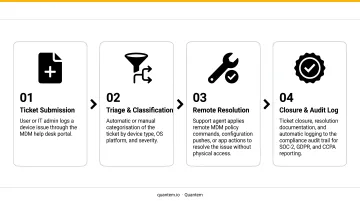
If any step in that chain fails or requires manual override, the integration is not ready for full deployment.
Once the round-trip test passes, shift focus to recognizing early failure patterns before they spread across the fleet.
Watch for Early Warning Signs
Document what a broken integration looks like so your team can recognize it:
- Duplicate tickets for the same MDM event
- Tickets remaining open after MDM confirms resolution
- Agents reporting missing or outdated device fields
Establish a 30-day post-launch monitoring period with a designated owner. If any of these patterns appear, treat them as integration failures - not user errors - and trace them back to the event mapping before they multiply.
Common Integration Problems and Fixes
Most MDM-to-help desk integration problems fall into three categories: alert volume, data freshness, and platform update breaks. Here's how to diagnose and fix each one.
Issue 1: MDM Alerts Generating Excessive Ticket Noise
Problem: The Help Desk queue floods with low-priority or repetitive tickets immediately after go-live, overwhelming agents and burying legitimate issues.
PagerDuty's 2024 State of Digital Operations study found 71% of IT professionals reported increased alert noise, with enterprises seeing a 16% year-over-year rise in customer-facing incidents - a pattern that worsens when MDM events flow into ticketing systems without filtering.
Likely cause: Compliance check intervals set too frequently, or non-critical events (brief network disconnections, low battery) mapped to ticket creation without priority filtering.
Fix: Reconfigure MDM compliance check cadence to a practical interval - hourly or daily depending on policy type - and introduce priority tiers in event-to-ticket mapping so only critical or unresolved events create active tickets.
Issue 2: Help Desk Agents Seeing Stale or Missing Device Data
Problem: Agents open tickets and find device fields blank or showing information that doesn't match the device's actual state.
Likely cause: The API sync interval between MDM and Help Desk is too infrequent, or devices aren't checking in with MDM regularly due to enrollment gaps or connectivity issues.
Fix: Shorten the MDM-to-Help Desk data sync frequency. Flag any device that hasn't checked in within a defined window as a data quality alert, rather than silently displaying its last-known state as current. Quantem's Enterprise plan tracks online/offline history for 30 days with sync intervals as short as 2 minutes, giving agents accurate device context when working tickets.
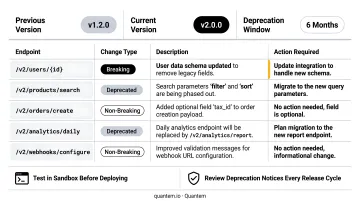
Issue 3: Integration Breaks After a Platform Update
Problem: Ticket automation stops working entirely following a version update to either the MDM or Help Desk platform.
Likely cause: API endpoint URLs, authentication tokens, or webhook payload structures changed in the update without advance notice - invalidating the previously configured connection.
Fix: Subscribe to both platform vendors' release notes and changelogs. Postman's 2025 State of the API Report found only 26% of organizations use semantic versioning, meaning breaking changes often arrive without clear version signals. Maintain documented records of all integration configuration settings and test the integration in a staging environment before applying major updates to production.
Pro Tips for Effective MDM–Help Desk Integration
These three practices separate integrations that hold up long-term from ones that quietly break under pressure.
Map the architecture on paper first. Document every event trigger, queue assignment, permission rule, and escalation path as a visual diagram before touching any system. Integrations built without upfront documentation are harder to troubleshoot and nearly impossible to hand off.
Start with the five highest-volume ticket types: enrollment failures, compliance violations, and remote wipe requests generate the most manual Help Desk work. Automate those, confirm they're stable, then expand in phases.
Run a quarterly integration health review. MDM policy changes, fleet growth, and platform updates all introduce drift. Assign a named owner to audit ticket routing rules, API connection health, and agent satisfaction with device context - before small problems compound.
Frequently Asked Questions
What are managed mobility services?
MMS is a comprehensive framework for managing corporate mobile devices across their full lifecycle: procurement, enrollment, ongoing security, support, and end-of-life decommissioning. It's typically delivered through a combination of MDM software, Help Desk services, and expense management tools - usually by a single managed services provider.
What is mobile device management (MDM) and what is it used for?
MDM is the software layer that lets IT administrators remotely enroll, configure, secure, monitor, and manage mobile devices at scale. It's used to enforce compliance policies, push app updates, restrict device functions, and remotely wipe lost or stolen devices - all from a centralized console.
What is the difference between MMS and MDM?
MDM is one technical component within the broader MMS framework. MMS covers the full operational and lifecycle picture, including Help Desk, procurement, and expense management, while MDM specifically handles device-level control, configuration, and security enforcement.
Why does Help Desk need to be integrated with MDM?
Without integration, agents manually investigate device status for every ticket, compliance alerts have no automatic owner, and resolution slows. Integration closes this gap by surfacing device data inside tickets and enabling MDM actions to be triggered directly from the Help Desk console.
Does MDM and Help Desk integration support BYOD devices?
Yes, provided the MDM enforces work profile separation. Android Enterprise Work Profile and Apple User Enrollment both keep work and personal data isolated on the same device. Help Desk agents see only work-related data - compliance status, enrolled apps, profile configuration - never personal content.
How long does a typical MDM and Help Desk integration take to complete?
Timeline varies based on MDM API availability, Help Desk platform complexity, and fleet size. A structured integration that includes workflow mapping, API configuration, and a controlled pilot can realistically be completed within 4 to 8 weeks for a mid-sized fleet.