Key Takeaways
- API access on Quantem requires the Enterprise plan ($3/device/month) - confirm your tier before writing any integration code
- Bearer Token authentication is standard for MDM APIs - never hard-code tokens in source code
- MDM commands are asynchronous - a 202 Accepted response does not mean the device has executed the command
- Always build pagination support into list endpoint calls, even for small fleets
- Rate limiting (429 errors) requires exponential backoff with jitter, not a static retry delay
Introduction
This guide is built for IT developers, DevOps engineers, and integration-focused sysadmins. You need familiarity with HTTP requests and JSON - but you're not building custom device agents or scripting from scratch. If you've worked with REST APIs before, you have everything required to follow along.
IT teams managing 50+ devices across healthcare networks, logistics fleets, retail kiosks, or field operations quickly hit the ceiling of manual MDM configuration. SOTI's 2024 research across 1,700 transportation and logistics employees found workers losing an average of 13 hours per month to mobile-device-related downtime - a direct consequence of slow, manual device operations.
API integration eliminates that overhead by automating enrollment, policy enforcement, app deployment, and compliance reporting at scale.
Two failure points trip up most integrations before they go live: authentication misconfigurations and asynchronous command handling. This guide covers both. By the end, you'll have a complete integration path covering:
- Prerequisites and environment setup
- Authentication and token management
- Core endpoints for device, policy, and app operations
- Workflow automation patterns
- Troubleshooting common failures
Prerequisites for MDM REST API Integration
Confirm Platform and Account Readiness
Before writing a single line of code, verify three things:
- Your MDM plan includes API access. On Quantem, API access is explicitly listed as an Enterprise plan feature ($3/device/month). If you're on the Essential or Professional tier, confirm your entitlements before proceeding.
- You have an admin or API-capable user account provisioned. A standard user account will not have the permissions to generate tokens or execute write operations.
- You know your authentication method. Determine whether your platform uses Bearer Token auth or OAuth 2.0 - the setup steps differ significantly.
Skipping any of these is the single most common reason integrations stall at step one.
Set Up Your Development Environment
You'll need an HTTP client - Postman or curl work well - and the ability to make outbound HTTPS requests. Most MDM REST APIs enforce TLS 1.2 as a minimum and will reject insecure connections.
If your MDM platform offers an API playground, use it. Quantem's built-in API playground is designed for this: developers can test requests against the full suite of API capabilities - including device management, geofencing, and policy operations - without touching live device configurations.
Address Compliance Prerequisites
If you're in healthcare and your MDM workflows touch electronic protected health information (ePHI), HHS guidance requires a Business Associate Agreement (BAA) with your MDM vendor before enabling any automated data flows. For organizations with EU users, confirm your vendor's GDPR controller/processor terms before API-enabling personal data exports.
Quantem is SOC-2, GDPR, and CCPA certified. If you're going through a vendor assessment process, contact the Quantem team at sales@quantem.io for compliance documentation.
Authenticating with the MDM REST API
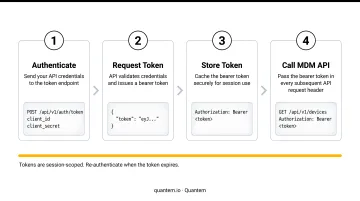
Bearer Token Authentication
Bearer Token is the most common MDM API authentication method. After generating a token from the admin console, every request must include it in the HTTP header:
Authorization: Bearer <your_token>
RFC 6750 defines bearer tokens as usable by any party in possession of the token - meaning a leaked token grants full API access to whoever has it. This is why TLS is mandatory, and why proper token security practices (covered below) are critical to any production integration.
Generating Your Token: Step by Step
- Log into your MDM console with an admin account
- Navigate to API Access (typically under Settings or Developer Tools)
- Create a token with the appropriate scope - read-only for reporting integrations, read-write for device management operations
- Copy and store the token immediately - most platforms will not display it again after generation
OAuth 2.0 for Cloud and Multi-Tenant Environments
For cloud-based or multi-tenant MDM platforms, OAuth 2.0 is the more appropriate auth flow. The process involves:
- Register a client application in the MDM console
- Generate an authorization grant
- Exchange the grant for access and refresh tokens
- Refresh the access token before it expires (typically every 30–60 minutes)
RFC 6749 defines this framework. Use OAuth 2.0 when your integration needs to act on behalf of multiple tenants or requires delegated access scopes.
Handling Rate Limiting (429 Errors)
MDM APIs throttle requests to protect platform performance. When you exceed the limit, you'll receive a 429 Too Many Requests response.
How to handle it correctly:
- Read the
Retry-Afterheader - it tells you exactly how many seconds to wait before retrying - Implement exponential backoff with jitter, not a static delay. AWS's exponential backoff research shows jitter prevents retry storms by spreading load across time
- For reference: Omnissa Workspace ONE UEM defaults to 5,000 calls per minute; Jamf recommends no more than 5 concurrent connections
Securing Your API Tokens
Rate limiting protects the platform - token hygiene protects your environment. Follow these practices for every integration you deploy:
- Never hard-code API tokens in source code or commit them to version control
- Use environment variables or a secrets manager to inject tokens at runtime
- Apply least-privilege - grant API users only the permissions their integration actually requires
- Establish a token rotation schedule and treat any exposed token as fully compromised
OWASP's Secrets Management Cheat Sheet is the go-to reference for secure storage, access control, rotation policy, and TLS transmission requirements.
Core MDM API Endpoints and Their Functions
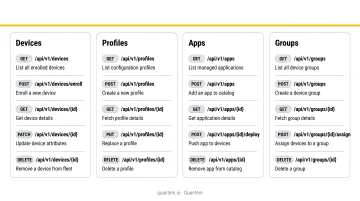
Device Management Endpoints
These are the foundation of any MDM integration:
| Endpoint | Method | Function |
|---|---|---|
/devices |
GET | Returns paginated list of enrolled devices |
/devices/{id} |
GET | Returns full detail for a single device |
/devices/{id}/actions |
POST | Sends commands: lock, wipe, sync |
Important: Commands sent via the actions endpoint are queued asynchronously. If a device is offline, the command will not execute until the device checks back in. A 202 Accepted response means the command was queued - not that it ran.
Filter the device list by status (online, offline, non-compliant) and platform (Android, Windows) to build targeted automation logic.
Profile and Policy Endpoints
These endpoints automate compliance enforcement at scale:
GET /profiles- lists available configuration profilesPOST /profiles/{id}/associate- pushes a profile to a device or group
Automating profile association ensures every newly enrolled device receives its compliance baseline within minutes. Without it, policy gaps compound fast: Microsoft's Intune documentation notes that removing a user from a group can take 7 hours or more before settings are removed from a device - a wide window for compliance drift.
App Management Endpoints
GET /apps- lists all managed applications in the MDM catalogPOST /apps/{id}/associate- deploys an app to a device or groupDELETE /apps/{id}/associate- removes or uninstalls an app
Combined with group-based targeting, these endpoints replace manual app distribution entirely. App deployment is asynchronous, so plan accordingly: Jamf documents that App Installer deployments can take up to 20 minutes to initiate on target devices.
Group, User, and Reporting Endpoints
Group and user endpoints:
GET /groups- returns current group structurePOST /groups- creates groups programmatically (useful for HR system or ITSM integrations)GET /users- returns managed user accounts
Exhilar demonstrates what this looks like in practice: they connected delivery route planning and an HRMS system directly to Quantem APIs, using group-level device targeting to drive the full automation workflow.
Reporting and compliance endpoints:
GET /devices/summary- fleet-wide health statisticsGET /devices/{id}/restrictions- active restrictions on a specific device- Audit log endpoints - time-stamped record of all administrative actions
Connect these endpoints to a dashboard or SIEM to eliminate manual data exports for compliance reporting. Quantem supports automated compliance report scheduling - ATHMA Hospitals uses this to manage hundreds of Android devices across a hospital environment without manual data collection before audits.
Building Your MDM API Integration: Step-by-Step
Planning Your Integration
Before making any API calls, map out exactly what you're automating. For each workflow, define the full sequence:
Trigger → API call → Response handling → Logging
Common automation candidates:
- Device enrollment (new hire provisioning)
- Policy assignment on enrollment
- App deployment during onboarding
- Weekly compliance report generation
Integrations built without this planning become brittle scripts that break on edge cases - a device that's offline during enrollment, a group that doesn't exist yet, a token that expired mid-run.
Making Your First API Call
A functional first request looks like this:
GET /devices?count=100&page=1
Authorization: Bearer <your_token>
Content-Type: application/json
Read the response's meta object to handle pagination. Key fields to check:
has_next_results- determines whether to loop to the next pagetotal_count- validates you've retrieved the full datasetpage- tracks your current position in the result set
Build this loop from the start. A 50-device fleet can easily scale to 500, and integrations without pagination return incomplete data silently.
A 401 Unauthorized response at this stage almost always means the token is malformed, has trailing whitespace, or lacks the required scope.
Automating Device Policy Enforcement
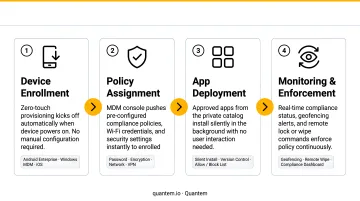
Here's a practical end-to-end enrollment automation:
- Detect new enrollment: Poll the devices endpoint for new entries, or use an enrollment webhook if your platform supports it
- Assign to group:
POST /groupsto place the device in the correct group based on platform or department - Apply the compliance profile via
POST /profiles/{id}/associateto enforce the baseline on that group - Deploy required apps via
POST /apps/{id}/associatefor each application in the onboarding set
Always check current device state before acting. This is the idempotency principle: call GET /devices/{id} before issuing a lock command or profile association. Sending a command to a device that's already in that state causes audit log noise and can trigger conflicts. Read first, then act.
With enrollment automation in place, the next critical layer is error handling - knowing what to do when a step in this sequence fails mid-run.
Common MDM API Integration Problems and How to Fix Them
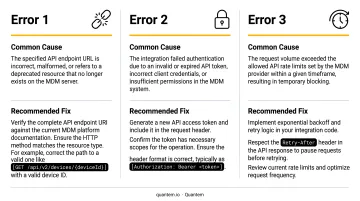
Most MDM API integration failures trace back to three predictable causes: bad authentication, ignored rate limits, or misread async behavior. Here's how to diagnose and fix each one.
Authentication Failures (401 Unauthorized)
API calls return 401 even though a token has been generated. The token is usually expired, copied with trailing whitespace or line breaks, or the API user lacks the role required for that endpoint - a read-only token attempting a POST, for example.
Fix:
- Regenerate the token from the MDM console
- Paste it into a plain-text editor first to check for invisible characters
- Confirm the header format is exactly
Bearer <token>with no extra spacing - Verify the API user has admin or maintainer role on the target resource
Rate Limiting Errors (429 Too Many Requests)
Bulk enrollment scripts or reporting loops trigger 429 responses that halt the integration. This happens when the integration ignores per-minute request limits and sends requests at full speed regardless of throttling signals.
Fix:
- Read the
Retry-Afterheader for the exact wait time - Implement exponential backoff with jitter - not a static sleep
- Where available, use batch endpoints instead of looping individual device calls
Asynchronous Command Delays (Device State Not Updating)
The API returns 202 Accepted for a command, but the device shows no change. The device is either offline or hasn't checked in to receive the queued command yet. Apple MDM uses push notifications followed by device polling, so commands don't execute until the device responds. Android Management API's issueCommand returns an async Operation with a default 10-minute execution window before it expires.
Fix:
- After issuing a command, poll the device status endpoint every 60 seconds for up to 10 attempts
- Check the device's last check-in timestamp and command execution status, not just whether the API accepted the request
- Build alerting for devices that fail to execute critical commands within your defined SLA window
Pro Tips for Effective MDM API Integration
These three practices consistently separate resilient MDM integrations from ones that break under real-world conditions.
Build pagination into every list call from day one. Device fleets grow fast - integrations that skip pagination silently return incomplete compliance data with no error to signal the gap.
Use Quantem's API playground before pushing to production. It lets developers explore and test API calls without risk to live device configurations - test each endpoint, confirm response structures match your parsing logic, and simulate failure scenarios like expired tokens or offline devices.
Log every API interaction. Include timestamp, endpoint called, request body (tokens redacted), and HTTP status code returned. This creates an automated audit trail that satisfies SOC-2 and GDPR evidence requirements, and it cuts debugging time dramatically when integrations fail in production.
Frequently Asked Questions
What is MDM API?
An MDM API is a set of endpoints that allow external systems and custom code to programmatically control a Mobile Device Management platform - enrolling devices, pushing policies, deploying apps, and pulling compliance reports without using the MDM's graphical interface. It's the mechanism that makes large-scale device automation possible.
What does MDM stand for?
MDM stands for Mobile Device Management, a technology category that enables IT teams to remotely enroll, configure, secure, and monitor mobile and endpoint devices - smartphones, tablets, laptops, and kiosks - from a central management console.
Is MDM an ETL tool?
No. MDM is a device security and management platform; ETL (Extract, Transform, Load) tools handle data pipeline workflows. That said, MDM REST APIs can feed data into ETL or reporting pipelines when needed.
What are the 4 types of REST API?
The four primary HTTP methods in REST APIs are GET (retrieve data), POST (create a resource), PUT/PATCH (update an existing resource), and DELETE (remove a resource). In MDM REST APIs, these map directly to reading device lists, enrolling devices, updating configurations, and removing profiles or apps.
How do I get started with Quantem's REST API?
API access is available on Quantem's Enterprise plan ($3/device/month). Register at app.quantem.io/new-registration to reach the API playground and full developer documentation. For integration questions, contact support@quantem.io - or start with the 21-day free trial before committing.