Introduction
At organizational scale, deploying an enterprise application means coordinating device compatibility, network infrastructure, security policies, user access controls, and compliance requirements — all at once, across hundreds or thousands of endpoints.
This work falls to IT administrators, endpoint management teams, and DevOps leads. In larger organizations, cross-functional coordination between IT, security, and operations is standard.
When deployment is mishandled, the consequences are concrete: app conflicts, configuration drift, failed rollouts causing downtime, and compliance violations with regulatory penalties attached.
According to ITIC, 97% of large enterprises report that a single hour of downtime costs more than $100,000.
This guide covers the complete enterprise application deployment lifecycle: from prerequisites and deployment model selection through step-by-step execution and post-deployment monitoring. It's built for IT teams managing real device fleets, not a theoretical walkthrough.
Key Takeaways
- Enterprise app deployment is a structured lifecycle, not a one-time install — it spans planning, execution, configuration, and ongoing management
- Compatibility checks, network readiness, and policy configuration must be resolved before any rollout begins
- Deployment model choice (on-premise, cloud, hybrid) directly determines tooling, scalability, and management overhead
- Post-deployment validation and compliance monitoring prevent silent failures from becoming operational problems
- Automation and centralized MDM tools reduce deployment time and error rates at scale
A Complete Guide to Enterprise Application Deployment
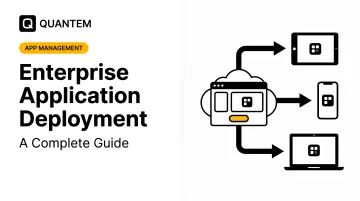
Enterprise application deployment spans a full lifecycle: requirements gathering and environment preparation, execution and configuration, then ongoing management and updates. Treat it as a process with defined stages, not a project with a single finish line.
Set realistic expectations on effort. A structured deployment to 50–500 devices typically spans days to weeks depending on complexity, team size, and whether automation tooling is in place. Organizations without MDM platforms or defined deployment frameworks consistently spend more time and encounter more failures than those with repeatable processes. Getting that foundation right starts with the planning phase.
Prerequisites and Planning
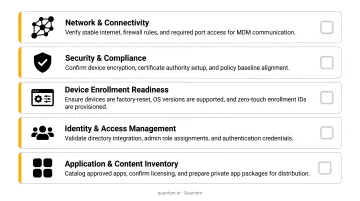
Run through this checklist before any deployment begins:
Device inventory: Document OS versions, hardware specs, and existing software across every target device. Incomplete inventory is one of the fastest routes to a failed rollout — deploying to devices you don't fully understand guarantees surprises.
Network readiness: Confirm bandwidth capacity, firewall rules, and VPN access for remote devices before the deployment window opens.
License procurement: The target application must be licensed for the number of devices in scope before deployment begins.
Compatibility validation:
- Confirm the application is tested against all OS versions in your fleet
- Check for dependency conflicts with existing software
- Validate that device storage and memory meet minimum requirements
Security and compliance requirements:
- Define deployment authorization — who can initiate and approve a rollout
- Confirm data governance policies, especially in healthcare or finance environments
- Ensure SOC 2, GDPR, or CCPA requirements are factored into how the app is distributed and what data it accesses
When not to proceed: If device fleet inventory is incomplete, security policy enforcement is not yet configured, or the application hasn't passed internal testing in a staging environment that mirrors production — stop. The cost of fixing a bad deployment exceeds the cost of delaying a good one.
Choosing Your Deployment Model
Three primary models exist, each suited to different organizational contexts:
| Model | Best For | Key Consideration |
|---|---|---|
| On-Premise | Regulated industries with strict data locality requirements | Full IT control; higher infrastructure overhead |
| Cloud-Based | Distributed workforces, scalable fleets | Low infrastructure overhead; preferred for remote teams |
| Hybrid | Organizations transitioning or with mixed use cases | Requires policy synchronization across both environments |
The model you choose determines your tooling. Cloud deployments typically use MDM/EMM platforms for push-based app distribution. On-premise deployments rely on local distribution servers or management consoles. Hybrid deployments require both, with synchronized policies.
The cloud-based MDM/EMM segment is growing fast: Grand View Research projects the EMM market to reach $69.12 billion by 2030, expanding at a 23.8% CAGR, reflecting the broad shift toward cloud-managed device fleets.
For mobile and tablet device fleets, MDM platforms with zero-touch provisioning eliminate the need for IT to physically handle each device. Apps and configurations push automatically at enrollment. Krones AG cut per-device admin work from 3–5 hours to 5 minutes using zero-touch capabilities — a result that's repeatable at scale.
Quantem includes zero-touch enrollment across all plans, so organizations managing Android device fleets can run the same hands-off provisioning model without paying for a premium tier to access it.
How to Deploy Enterprise Applications: Step-by-Step
Step 1 — Build and Prepare the Deployment Package
Package the application correctly before anything else:
- Use the appropriate installer format (MSI, EXE, APK, or equivalent)
- Include silent install parameters — the installation must complete without user interaction or dialog prompts
- Define uninstall commands for clean removal
- Configure precise detection rules so the management system can confirm whether installation actually succeeded on each target device
On detection rules specifically: use version-specific criteria — file version, registry key, specific checksum — not just "file exists." Generic detection rules cause false positives, where the system reports success on devices running outdated or partial installations.
Step 2 — Configure Target Device Groups
Segment devices into logical groups before pushing anything — by department, location, OS version, or role. Common segmentation criteria include:
- Department or team function
- Physical location or site
- OS version or device model
- User role and app entitlement
Deploying to a blanket "all devices" group is a frequent cause of wide-scale failures: wrong app versions on incompatible devices, or apps delivered to users who don't need them. Platforms like Quantem support group-level targeting through their management console, so IT teams apply policies and apps to defined segments rather than managing devices one by one.
Step 3 — Stage a Pilot Deployment
Deploy to a representative subset first — 5–15% of total target devices. Confirm installation success, test core app functionality, and collect user feedback before expanding.
Skipping this step turns a fixable pilot issue into an organization-wide incident. Remediation after a full rollout failure consistently costs more time, resources, and credibility than the pilot itself would have taken.
Step 4 — Execute the Full Rollout in Phases
Expand deployment in waves — by region, department, or site — rather than all at once. Phased rollout limits the impact scope if issues emerge and lets IT absorb support volume incrementally.
A practical wave structure for mid-size organizations:
- Wave 1: Pilot group (5–15% of devices) — already complete by this step
- Wave 2: One department or regional site (25–30%)
- Wave 3: Remaining devices after Wave 2 confirms stability
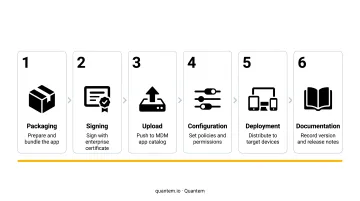
Step 5 — Apply Policies and Access Controls
Deployment is not complete when the app installs. Configure app-specific security policies:
- Access permissions and data sharing restrictions
- VPN enforcement where required
- Work profile separation for BYOD scenarios (verify this is active before marking devices as deployment-complete)
Quantem's Android Enterprise Work Profile support handles work/personal data separation at the platform level, keeping enterprise app policies enforced without touching personal device data.
Step 6 — Document and Communicate
Record the deployment configuration: version deployed, target group, install parameters, detection rules, and rollout timeline. Then notify end users with clear onboarding instructions.
Poor communication is one of the most consistently overlooked causes of low app adoption. A successful installation is not the same as a successful deployment.
Post-Deployment Validation and Monitoring
Confirming Deployment Success
Check installation status reports in your management console immediately after rollout. Verify the percentage of targeted devices showing "installed" versus "failed" versus "pending." Do not declare success until installation is confirmed on the vast majority of targets, with failure cases individually investigated.
From there, validate functionally: test the deployed application on a sample of devices across different OS versions and hardware configurations. Confirm that authentication, data access, and core features behave correctly in the production environment — not just in staging.
Ongoing Monitoring Requirements
Continuous monitoring after deployment covers:
- Version compliance: Which devices are running which application version
- Crash rates and application health: Ongoing performance tracking
- Policy adherence: Are the configurations applied at deployment still in place
- Offline device status: Which devices have gone offline and for how long
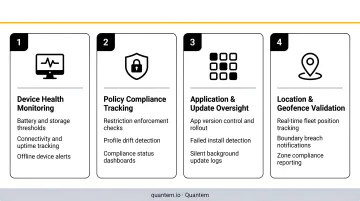
Quantem's Enterprise plan includes a 30-day device online/offline history and event-based alerts, so IT teams maintain fleet visibility without manual audits. IT teams can configure up to 50 scheduled custom reports in the Enterprise tier to surface compliance gaps on an ongoing basis.
Update and Patch Management
Verizon's 2024 DBIR found that organizations take an average of 55 days to remediate 50% of critical vulnerabilities after patches are available. Enterprises that treat initial deployment as "done" and neglect version management end up with fragmented fleets and avoidable security exposure.
Before the first deployment completes, establish a defined policy for how application updates are tested and distributed. Version management is part of the deployment lifecycle, not an afterthought.
Key actions to build into your process:
- Define a staging-to-production promotion path for application updates
- Set alert thresholds for devices running outdated versions
- Assign ownership for patch review and release scheduling
Common Enterprise App Deployment Challenges and Fixes
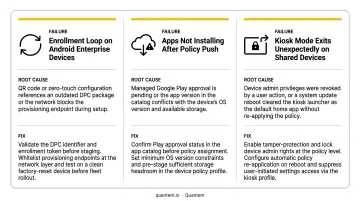
Even well-planned deployments hit predictable snags. The three patterns below cover the most common failure points — and what to do about each one before a contained issue spreads fleet-wide.
Installation Failures on a Subset of Devices
Problem: The application installs on most devices but shows "failed" on a consistent subset, often a specific model or OS version.
Likely cause: Dependency mismatch (missing runtime or redistributable), incompatible OS version, or insufficient local storage.
Fix: Review installation logs on failed devices to isolate the specific error code. Address the root cause — update the runtime, add the prerequisite package, or free storage — then re-target the failed group. Do not redeploy broadly until the cause is confirmed.
Configuration Drift After Deployment
Problem: App settings or policies correctly applied at deployment begin to deviate over time — especially on devices that were offline during initial rollout or added to the fleet later.
Likely cause: No continuous policy enforcement mechanism; policies are applied once at enrollment and never re-evaluated.
Fix: Enable automated compliance checks in your MDM or deployment tool so configurations are continuously evaluated, not just at enrollment. Devices falling out of compliance should trigger automatic remediation or an IT alert — not caught weeks later in a manual audit.
Apps Installed But Not Adopted
Problem: Deployment reports show high installation success, but actual usage is low. Productiv data shows that average SaaS portfolios have only 45% engaged users across all apps — a widespread problem, not an edge case.
Likely cause: End users were not informed of the deployment, lack onboarding guidance, or the app replaced a familiar workflow without adequate change management.
Fix: Build user communication and onboarding directly into the deployment plan. Send deployment notifications, provide quick-start documentation, and identify departmental champions who can support peer adoption in the first few weeks.
Pro Tips for Deploying Enterprise Applications Successfully
Most deployment failures trace back to decisions made — or skipped — before a single package reaches a device. These four practices separate teams that deploy confidently from those that scramble after rollout.
Mirror production in staging. Test on the same OS versions, device models, and network conditions your fleet actually uses. Staging environments that differ too much from production create false confidence.
Use version-specific detection rules. Set detection criteria to the exact application version being deployed — file version, registry key, specific checksum — not just "file exists." Generic rules cause the management system to falsely report success on outdated or partial installations.
Define rollback before you deploy. Determine in advance which version will be restored, how devices are re-targeted, and at what failure threshold rollback is triggered. Deploying without this plan means accepting unnecessary risk upfront.
Involve security before deployment, not after. App deployments that change data access patterns, introduce new network traffic, or modify device configurations can have security implications that IT alone may not anticipate. A joint review before deployment — especially in regulated environments — prevents violations that are far more expensive to fix retroactively.
Conclusion
The quality of an enterprise application deployment directly determines whether the application delivers its intended value. Rushed or underprepared deployments create IT debt: failed installs, inconsistent configurations, compliance gaps, and user resistance that each require remediation time and resources.
The approach outlined here — defined prerequisites, staged execution, policy enforcement at the point of deployment, and continuous post-deployment monitoring — pays for itself quickly. Organizations that build repeatable deployment frameworks reduce rollout time on subsequent deployments, shrink incident escalations, and maintain measurable compliance across expanding device fleets.
If your organization is deploying across an Android or Windows device fleet, Quantem's MDM platform supports this lifecycle from zero-touch provisioning through ongoing compliance monitoring — starting at $1 per device per month. A 21-day free trial is available with no credit card required — full platform access from day one.
Frequently Asked Questions
What does enterprise deployment mean?
Enterprise deployment is the structured process of distributing and configuring software across an organization's devices, servers, or cloud infrastructure. It is built for large-scale, mission-critical use, with centralized management, security policy enforcement, and high availability requirements that consumer or small-team deployments do not face.
What are the 4 major types of enterprise applications?
The four commonly cited types are ERP (Enterprise Resource Planning), CRM (Customer Relationship Management), SCM (Supply Chain Management), and HRM (Human Resource Management). Each serves a distinct organizational function but all require coordinated deployment and ongoing management across the enterprise.
What is the difference between enterprise app deployment and regular app deployment?
Regular app deployment typically involves a single device or small environment. Enterprise deployment operates at scale — managing hundreds or thousands of devices, enforcing security and compliance policies centrally, and using management platforms to maintain consistency across an entire fleet rather than device by device.
How do you deploy applications to enterprise mobile devices at scale?
Enterprise mobile app deployment is handled through an MDM platform, which allows IT to push applications remotely to enrolled devices, apply security policies, and monitor installation status in real time. Zero-touch provisioning automates configuration at enrollment, eliminating the need for physical device access.
What are the most common enterprise application deployment mistakes?
The most common mistakes are skipping the pilot deployment phase, failing to define post-deployment monitoring, poor end-user communication, and deploying without a defined rollback plan.
How long does enterprise application deployment typically take?
A well-prepared deployment to 100–500 devices using an MDM platform can be completed in days. Large-scale or complex deployments spanning thousands of devices or multiple regions may take several weeks, covering the pilot phase, phased rollout, and post-deployment validation.