Introduction
Banks still struggle to match digital-channel speed inside the branch. Long waits, limited teller capacity, and pressure to cut operating costs leave many institutions stuck between customer expectations and branch economics.
Research from Raddon finds that 51% of major-bank customers already use self-service kiosks regularly. For those institutions, kiosks are no longer a pilot channel. They are part of everyday service delivery.
Digital kiosk banking software goes well beyond ATM cash withdrawal. Instead of routing simple transactions through limited switching networks, it connects directly to core banking systems.
That link supports account opening, loan applications, document intake, video teller sessions, and other full self-service workflows, with security and compliance controls built into the stack.
This guide covers software architecture, deployment models, security requirements, vendor selection criteria, and implementation strategies for banks evaluating kiosk solutions in 2024.
Key Takeaways
- Core-system integration lets kiosks handle self-service banking well beyond cash withdrawals and deposits
- Platforms can support account opening, loan applications, video assistance, and biometric authentication
- Treat security, compliance, remote management, and standards-based peripheral control as must-have selection criteria
- Deployments work best when they weigh customer convenience against efficiency and regulatory requirements
What Is Digital Kiosk Banking Software?
Digital kiosk banking software is the operating system, middleware, and applications that power self-service banking terminals. It differs from traditional ATM software in both architecture and capability.
Core Architecture Differences:
- ATM software: Routes narrow transaction sets (withdrawals, balance inquiries) through ATM switching networks with limited core-system visibility
- Kiosk software: Connects directly to core banking platforms, enabling real-time account updates, complex workflows, and broader service delivery
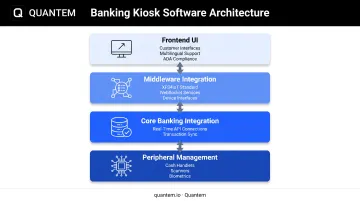
Modern banking kiosk software comprises four layers:
- Frontend UI layer: Customer-facing interfaces with multilingual support, intuitive navigation, and accessibility features. These interfaces must meet ADA requirements, including speech output, tactile controls, visible contrast, and Braille instructions.
- Middleware integration: XFS4IoT (eXtensions for Financial Services) is the current standard: an OS-agnostic framework that exposes vendor-independent device interfaces through WebSocket services. It replaces Windows-only client-server constraints and supports local or cloud control of financial peripherals.
- Core banking integration: Direct API connections synchronize transactions in real time with core platforms. Fiserv's banking kiosk software, for example, integrates with Fiserv core systems to process cash, checks, credit applications, and loans—capabilities standard ATM rails cannot support alone.
- Peripheral management: Controls cash handlers, check scanners, card readers, receipt printers, biometric devices, and document scanners through standardized protocols.
Deployment Models
- On-premises: Software and control systems run in the institution's data center. You get maximum control, but you also own the infrastructure burden.
- Cloud-based: Configuration, monitoring, and updates run from the cloud. On-site tech needs drop, and teams can manage the full kiosk fleet remotely.
Modern kiosk software supports omnichannel banking strategies by sharing customer context across channels. Diebold's ITM software shows the model in practice: web-based interfaces link kiosks to core systems and contact centers. Customers can start a transaction at one touchpoint and finish it at another.
Types of Banking Kiosk Software Solutions
Banks pick different software stacks based on which self-service jobs the kiosk needs to own. Most deployments combine more than one of the categories below.
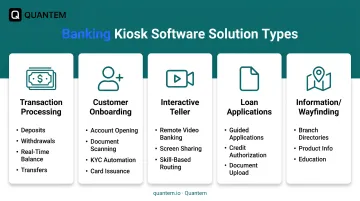
Transaction Processing Software
These systems handle deposits, withdrawals, transfers, and balance inquiries through direct core integration. Unlike ATM switching, they process transactions in real time against the authoritative customer record.
Key capabilities:
- Cash and check acceptance with immediate validation
- Multi-currency support and denomination management
- Real-time balance updates
- Transfer processing across accounts
- Bill payment functionality
Integration requirements include API connectivity to core banking platforms, fraud-detection systems, and card services.
Customer Onboarding Software
Onboarding software automates account opening and identity verification at the kiosk. Emirates NBD's EasyHub implementation shows what that looks like in practice.
Customers open accounts, receive instant debit cards, update personal details, and apply for personal loans at the kiosk, with video-banker guidance when needed.
Core features:
- Document scanning and image capture
- Identity validation and verification
- Digital signature capture
- KYC workflow automation (requires separate compliance validation)
- Instant card issuance integration
- Service request submission
Interactive Teller Software
Interactive teller software connects customers to remote banking specialists through video interfaces. NCR's Interactive Teller software provides:
- Full-screen video with skill-based routing to specialized staff
- Screen sharing for assisted transactions
- Transaction co-browsing capabilities
- Cash and check processing with remote oversight
- Cardless authentication options
- Customer-detail update workflows
- Scalable web-based back-office consoles
This software category extends branch hours and expertise by centralizing specialists who serve multiple locations.
Loan Application and Processing Software
Loan kiosk software supports self-service applications, document submission, and pre-qualification. It integrates with loan origination systems to validate eligibility, calculate terms, and route applications for underwriting.
Typical workflows:
- Guided application completion
- Income and employment verification
- Credit authorization and soft pull
- Document upload and signature
- Pre-approval determination
- Rate and term presentation
Information and Wayfinding Software
Though less transaction-focused, this category supports branch directories, product information, and customer education. Banks use content management systems to push updates across distributed kiosk networks.
Common uses include:
- Branch and ATM location directories
- Product and rate information displays
- Scheduled promotional content
- Service updates and educational materials
Essential Features of Banking Kiosk Software
User Interface and Experience Design
Interfaces must accommodate diverse customer demographics while meeting regulatory accessibility standards.
Critical requirements:
- Intuitive navigation requiring minimal instruction
- ADA Section 707 compliance for ATM-classified terminals (speech output, tactile controls, contrast, and Braille)
- Multilingual support matching customer demographics
- Large, readable fonts and high-contrast displays
- Touch-optimized controls with adequate target sizes
- Clear error messaging and recovery paths
Note: ADA Section 707 directly covers ATMs, but broader kiosk classifications may fall under evolving rulemaking. Obtain an accessibility review for your specific deployment.
Core Banking System Integration
Direct integration distinguishes modern kiosk software from legacy ATM systems.
Integration requirements:
- RESTful APIs or proprietary connectors to core platforms
- Real-time transaction synchronization
- Two-way customer data exchange
- Account balance verification
- Transaction authorization and posting
- Customer authentication validation
Middleware options include vendor-provided integration layers, custom API development, or standards-based protocols. The XFS4IoT standard provides OS-agnostic WebSocket services that separate application logic from peripheral control, enabling flexible deployment architectures.
Peripheral Device Management
Software must control and monitor financial hardware through standardized interfaces.
Managed peripherals:
- Cash handlers: Bill validators, recyclers, and dispensers with denomination tracking
- Check scanners: Image capture, MICR reading, and deposit validation
- Card readers: Magnetic stripe, chip, and contactless payment acceptance
- Receipt printers: Transaction confirmation and documentation
- Biometric devices: Fingerprint, palm vein, or facial recognition hardware
- Document scanners: ID capture and signature pads
Standards like XFS4IoT enable multi-vendor peripheral support without binding applications to specific manufacturers. KAL's banking terminal-management software exemplifies vendor-independent peripheral control across distributed ATM and kiosk networks.
Remote Management and Monitoring Capabilities
Centralized management is essential for distributed kiosk fleets.
Key capabilities:
- Real-time device status monitoring
- Centralized software updates and patch deployment
- Content scheduling and distribution
- Configuration management across device groups
- Diagnostic tools and remote troubleshooting
- Performance analytics and uptime tracking
- Automated alerting for offline devices, low cash, or hardware failures
For fleets spread across branches, an MDM platform such as Quantem adds zero-touch provisioning, centralized policy enforcement, and remote configuration. That combination keeps multi-location kiosk rollouts consistent without on-site IT visits.
Security and Lockdown Features
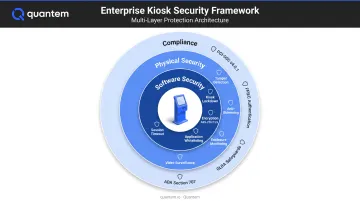
Banking kiosks require multiple security layers to protect customer data and prevent unauthorized access.
Application and OS security:
- Kiosk mode lockdown: Prevents access to underlying operating systems, restricting devices to approved banking applications
- Application whitelisting: NCR's Secure Whitelisting blocks unauthorized code execution
- Secure browser functionality: Restricts web access to approved banking domains
- Session timeout: Automatic logout after inactivity periods
- Screen privacy features: Anti-shoulder-surfing filters and auto-dimming
- Data encryption: AES-256 for data at rest, TLS 1.2+ for data in transit
- Disk encryption: Centralized key management for endpoint clients
MDM platforms extend lockdown with single-app kiosk mode, a secure browser limited to approved domains, and hardware controls over camera access, USB transfer, Wi-Fi settings, and factory reset.
Analytics and Reporting
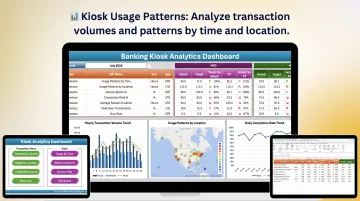
Analytics help you optimize kiosk placement, functionality, and performance.
Essential metrics:
- Transaction volume and type distribution
- Usage patterns by time, location, and customer segment
- Average session duration and completion rates
- Abandonment points in customer workflows
- Device uptime and availability
- Queue length and wait-time tracking
- Error rates and failure modes
These analytics inform decisions about staffing, kiosk placement, feature prioritization, and capacity planning.
Security and Compliance Considerations
Banking kiosks combine payments, customer data, and public access in one endpoint. That mix pulls your software and vendors into PCI scope, federal banking rules, and accessibility requirements.
PCI-DSS Requirements
PCI-DSS applies to entities that store, process, or transmit cardholder or sensitive authentication data. Kiosks enter scope through data flows and security impact.
Key requirements:
- Physical security: Payment terminals must be protected from tampering and substitution, with inspection logs maintained
- Network segmentation: Cardholder data environments require isolation and access controls
- Encryption: Protect data at rest and in transit
- Access controls: Limit system access to authorized personnel only
- Monitoring: Log and review all access to cardholder data
PCI DSS v4.0.1 became the only PCI SSC-supported version after December 31, 2024. Confirm vendors stay on the current standard and can produce up-to-date attestations (such as SOC 2) when they touch customer or cardholder data.
Banking Regulations and Standards
FFIEC Guidance:
The FFIEC's 2021 authentication guidance calls for risk-based authentication, layered security, and multi-factor authentication or equivalent controls. Apply this to kiosk customers, remote tellers, administrators, service providers, and core/API access.
GLBA Safeguards Rule:
The FTC GLBA Safeguards Rule requires covered institutions to keep a written information security program. Kiosk apps and management platforms that handle customer information belong in that program.
Cover at least:
- Access controls and encryption
- Multi-factor authentication
- Application security review and testing
- Staff training and provider oversight
- Patching cadence and incident response
ADA Accessibility:
Section 707 of the ADA Standards establishes specific requirements for ATM interfaces—speech output, tactile controls, contrast, and Braille instructions. However, non-ATM interactive transaction machines may be subject to evolving rulemaking, so obtain a classification review for your specific kiosk deployment.
Physical Security Integration
Software must integrate with physical tamper-detection mechanisms:
- Anti-skimming device monitoring
- Enclosure breach detection
- Unauthorized access alerts
- Video surveillance integration
- Environmental monitoring (temperature, humidity)
Centralized management platforms enable real-time alerting when physical security events occur, allowing rapid response before fraud or data compromise.
Implementation and Vendor Selection Guide
Choosing banking kiosk software is as much about the vendor relationship as the feature list. Use the framework below to compare platforms, model full costs, and roll out without disrupting branch operations.
Evaluation Framework
Assess vendors systematically across these dimensions:
Core Banking Compatibility:
- Documented integration with your core platform (APIs, connectors, or middleware)
- Real-time versus batch processing capabilities
- Data synchronization methods and latency
- Transaction rollback and error-handling procedures
Security claims need the same scrutiny as core connectivity:
Security Certifications:
- PCI-DSS compliance (current v4.0.1 validation)
- SOC 2 Type II attestation
- Relevant banking security standards
- Encryption and data-protection mechanisms
Plan for growth before you sign:
Scalability:
- Support for your current and projected device count
- Performance under peak transaction loads
- Geographic distribution capabilities
- Cloud versus on-premises deployment flexibility
Confirm the partner can support you after go-live:
Vendor Support:
- Technical support availability (24/7 for mission-critical systems)
- Software update and patch delivery processes
- Training resources and documentation quality
- Professional services for implementation and customization
Total Cost of Ownership
Evaluate costs beyond initial software licensing:
Software Licensing:
- Per-device versus enterprise pricing models
- Subscription versus perpetual licenses
- Feature tier differentiation
- Minimum commitment periods
Hardware Requirements:
- Peripheral device compatibility and costs
- Network infrastructure needs
- Server or cloud hosting expenses
Ongoing Support:
- Annual maintenance fees
- Technical support contracts
- Security patch and update costs
- Training and consultation services
Upgrade Paths:
- Version upgrade policies and fees
- Migration support when switching platforms
- Feature roadmap alignment with your strategy
Implementation Phases
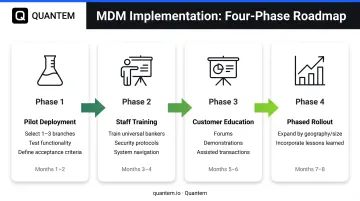
A systematic rollout reduces risk and enables learning.
Pilot Deployment:
Select 1-3 representative branch locations to test functionality, customer acceptance, and operational workflows.
One institution's documented ITM project ran about eight months from vendor selection through go-live. That window covered contracting, purchase, site preparation, installation, contact-center training, and testing.
Define acceptance tests for:
- Core banking transactions (deposits, withdrawals, transfers)
- Peripheral functionality (cash handling, check scanning, card reading)
- Accessibility features and multilingual interfaces
- Security controls (session timeout, lockdown, authentication)
- Failover scenarios and error recovery
- Assisted escalation to video tellers
- Remote monitoring and diagnostics
Staff Training:
Train at least three video universal bankers before launch, according to the same project plan. Staff must understand:
- Kiosk operation and customer assistance
- Remote teller procedures and system navigation
- Troubleshooting common customer issues
- Security protocols and fraud detection
- Escalation paths for complex transactions
Customer Education:
Plan customer forums, in-branch demonstrations, and assisted first transactions. The pilot phase should include on-site staff at go-live to guide customers through new interfaces.
Phased Rollout:
Expand to additional branches in waves, incorporating lessons learned. Group deployments by geography, branch size, or customer demographics to identify optimal configurations before full deployment.
Change Management
Kiosk deployments transform branch operations and staff roles.
Staff Transition:
Traditional teller roles evolve toward universal banker positions focused on complex transactions, relationship building, and customer assistance with self-service channels. One institution reduced teller staffing by more than half while redeploying staff to service roles, according to Raddon research.
Customer Adoption:
Customers vary in self-service preference. The same Raddon study found 68% of millennials used kiosks versus 19% of baby boomers. Maintain hybrid service models during transition periods, and provide staff-assisted kiosk transactions to build customer confidence.
Benefits and ROI of Banking Kiosk Software
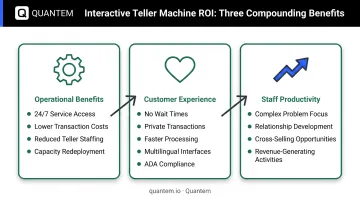
Operational Benefits
Kiosk software strengthens branch economics through longer service hours, cheaper routine transactions, and better use of people.
- Customers get 24/7 access without a matching increase in staff hours
- Self-service removes tellers from routine operations, lowering per-transaction cost—confirm the delta with your own pilot KPIs, not generic industry averages
- Freed capacity moves into lending and relationship work instead of clearing the queue
Returns show up when redeployment is intentional. One regional bank with $250M in assets and six branches reduced teller staffing by more than half while doubling loan growth.
Customer Experience Improvements
- Self-service on the customer’s schedule, without waiting for a teller
- Private handling of sensitive transactions without face-to-face interaction
- Faster completion of routine deposits, withdrawals, and inquiries
- Standardized workflows that reduce processing errors
- Multilingual interfaces and ADA-compliant features for diverse populations
Staff Productivity Gains
When kiosks absorb routine transactions, tellers spend more time on work that needs judgment:
- Complex problem resolution
- Relationship development and needs assessment
- Cross-selling and product education
- Exception handling that requires expertise
That split is where ROI compounds: lower cost to serve on simple work, more capacity for lending and advisory conversations that generate revenue.
Future of Banking Kiosk Technology
Emerging Technologies
Biometric Authentication:
Core-integrated branch kiosks already support biometric authentication for passwordless verification via fingerprint, palm vein, or facial recognition. That lowers fraud risk and speeds up check-in for customers.
Cloud-Manageable Services:
The XFS4IoT standard supports cloud control and monitoring through vendor-independent WebSocket services. Banks can manage kiosk fleets centrally without standing up on-premises infrastructure.
AI-Powered Assistance:
While production implementations remain limited, roadmap opportunities include natural language processing for voice-guided transactions, predictive suggestions based on customer history, and intelligent routing to appropriate service channels.
Omnichannel Integration
Next-generation kiosks will connect with mobile banking apps to support:
- Transaction handoff from mobile to kiosk
- Shared authentication across channels
- Unified customer context and history
- Consistent branding and experience
- Cross-channel journey tracking
In that model, kiosks sit inside a continuous customer journey instead of operating as standalone terminals.
Intelligent Kiosks
Vendor roadmaps increasingly point to:
- Predictive personalization based on customer data and behavior
- Proactive service offerings triggered by life events or account activity
- Dynamic interface adaptation to customer preferences
- Contextual product recommendations during transactions
- Advanced fraud detection through behavioral biometrics
Institutions should evaluate vendors' roadmaps for these capabilities when making long-term platform decisions.
Frequently Asked Questions
What is the difference between banking kiosk software and ATM software?
ATM software handles a narrow set of transactions—withdrawals, deposits, balance inquiries—through ATM switching networks. Banking kiosk software connects to core banking systems for broader services such as account opening, loan applications, document submission, video tellers, and full transaction processing beyond cash.
What security certifications should banking kiosk software have?
Look for PCI-DSS compliance (current v4.0.1), SOC 2 Type II attestation, and adherence to FFIEC authentication guidance and GLBA safeguards requirements. These certifications demonstrate vendor commitment to data security, audit controls, and regulatory compliance.
How does banking kiosk software integrate with existing core banking systems?
Integration usually runs through RESTful APIs, vendor middleware, or direct core connectors, with standards like XFS4IoT for peripheral control. Real-time sync posts transactions immediately; batch jobs often cover reporting and reconciliation. Choose vendors with documented compatibility for your core platform.
What is the typical cost range for banking kiosk software implementation?
Pricing depends on licensing (per-device vs. enterprise), scale, customization, hardware, and support. Budget total cost of ownership—licenses, hardware, install, training, network, maintenance, and support—not software alone. Ask vendors for itemized proposals so you can compare true multi-year cost.
How long does it take to deploy banking kiosk software across multiple branches?
One documented rollout took about eight months from vendor selection through install, training, and testing. Duration hinges on branch count, infrastructure readiness, and integration complexity. Pilot at 1–3 sites first, then phase the remaining branches using what you learn.
What ongoing maintenance and support is required for banking kiosk software?
Plan for software updates, security patches, content updates, peripheral upkeep, performance monitoring, and compliance audits. Prefer vendors with 24/7 support, automated update delivery, and centralized remote management to limit on-site work.