Kiosk Solutions
Configure single-app kiosks for focused tasks, multi-app kiosks for approved resources, or digital signage for campus updates. Manage device experiences remotely while limiting access to only the tools each audience needs.

Give students, faculty, and visitors reliable access to the digital tools they need with secure, centrally managed education kiosks. Quantem helps schools and campuses configure single-app, multi-app, and digital signage experiences while keeping devices focused, protected, and easy for IT teams to support. Deploy policies remotely, update content quickly, and maintain consistent access across shared devices.
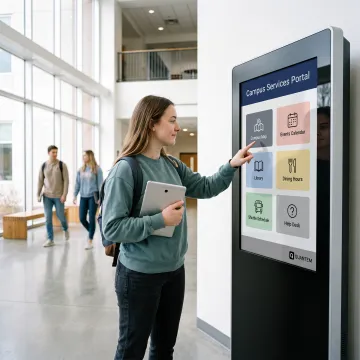
Flexible kiosk management tools that secure shared devices, streamline deployment, and support engaging campus experiences.
Configure single-app kiosks for focused tasks, multi-app kiosks for approved resources, or digital signage for campus updates. Manage device experiences remotely while limiting access to only the tools each audience needs.
Manage shared Android and Windows devices from one console with granular controls. Set device-level or group policies, restrict unwanted changes, and keep campus fleets consistent without time-consuming manual configuration.
Provision new devices with QR code, Samsung Knox, or Android zero-touch enrollment options. Apply profiles and policies during setup so devices are ready for students, staff, or visitors with less IT effort.
Push approved apps, block unauthorized software, and manage private app versions from a central dashboard. Give each kiosk the right educational resources while maintaining a controlled, dependable user experience.
Apply group policies and device-specific controls simultaneously across your fleet. Update kiosk settings, restrictions, and access rules in minutes rather than configuring each campus device one at a time.
Use standard or custom web filters to help keep browsing appropriate on managed devices. Device-focused filtering supports safer access to online learning, research, and approved campus resources.
Quantem gives educational IT teams a practical way to turn Android devices, displays, and tablets into dependable campus tools. Create focused kiosk experiences for check-in, library access, student services, wayfinding, testing, or communications, then manage settings from one place. With zero-touch enrollment, app controls, secure browsing, and remote policy updates, teams can reduce setup work while delivering consistent access across every shared device.
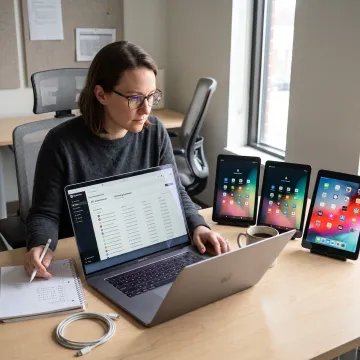
See how organizations use Quantem to simplify secure, scalable device management.
"The software scales perfectly with our business needs, delivers strong performance, and provides reliable support whenever our team needs help."

"Setup was quick and required no technical background. Our team saw immediate improvements in productivity within the first few weeks."

"Simple to use, powerful under the hood. We saw immediate improvements in productivity and data visibility after switching."

"This platform completely transformed how our team worksthe automation and analytics saved us hours every week andhelped us make smarter decisions faster."

"The software scales perfectly with our business needs, delivers strong performance, and provides reliable support whenever our team needs help."
"Setup was quick and required no technical background. Our team saw immediate improvements in productivity within the first few weeks."
"Simple to use, powerful under the hood. We saw immediate improvements in productivity and data visibility after switching."
"This platform completely transformed how our team worksthe automation and analytics saved us hours every week andhelped us make smarter decisions faster."
"The software scales perfectly with our business needs, delivers strong performance, and provides reliable support whenever our team needs help."
"Setup was quick and required no technical background. Our team saw immediate improvements in productivity within the first few weeks."
"Simple to use, powerful under the hood. We saw immediate improvements in productivity and data visibility after switching."
"This platform completely transformed how our team worksthe automation and analytics saved us hours every week andhelped us make smarter decisions faster."
A straightforward platform for secure, scalable management of education kiosks.
Kiosk capabilities are included across plans, helping schools control shared devices without premium-feature barriers.
Zero-touch and QR enrollment reduce manual setup when preparing devices for classrooms, libraries, and campus services.
SOC-2, GDPR, and CCPA compliance supports responsible management of devices and educational data.
Remote policies, app controls, reporting, and multi-platform support keep growing campus fleets easier to oversee.
People dedicated to making modern device management simpler.
Quantem is built by people who are focused on finding better ways to manage everyday technology. The team continuously improves the platform to make device administration more intuitive, useful, and worthwhile for the people who rely on it. For schools and campuses, that means less time spent on repetitive setup and troubleshooting, and more confidence that shared devices are ready for learning, services, and communication. Quantem combines enterprise-grade mobile device management with clear, toggle-based controls that help IT teams act quickly without unnecessary complexity. From a small group of tablets to a broader fleet of Android and Windows devices, the platform is designed to help organizations automate workflows, gain useful insights, and scale device operations with control and clarity.
Education kiosks can provide controlled access to specific resources and tasks, such as student check-in, wayfinding, library catalogs, digital forms, testing tools, campus announcements, and visitor information. A kiosk setup limits the device to approved apps or web content, helping schools create a consistent experience on shared tablets, displays, and Android devices while reducing the risk of unauthorized use.
Talk with Quantem about the right controls for your devices.

Security controls for trusted platform operations.
Privacy safeguards for personal data handling.
Privacy practices supporting consumer data rights.
Share your kiosk goals and device environment. Our team can help you explore the right Quantem configuration and plan.
You can also send us a quick email at sales@quantem.io.
You can also send us a quick email at sales@quantem.io.